0

Toca Mini

image

On sale for $.99 – Toca Mini, another creative app from Toca Boca. With this app kids can create silly monsters, imaginary animals, or playful friends. Toca Minis can become whatever you want them to be. To start, kids add colors to the mini’s body, arms, & legs. Then they add details using a wide variety of stamps – bows, hats, buttons, polka dots, etc. Next, kids add facial features which brings their minis to life – they, ooh, ah, sneeze, smile, blink, and more.  Kids can also add hair, eyebrows, beards, mustaches, etc. With 60 different colors and 78 different stamps, there are thousands of possible combinations. When kids finish creating their own unique mini, they can take a snapshot and save it to the camera roll. Then they can print it, share it, pull it into a story writing app, and more. Creating a mini could be a great springboard for creative writing – descriptive paragraphs, a story about their created character/creature. Toca Boca has created another open-ended, creative app!

Download link: https://itunes.apple.com/us/app/toca-mini/id718082838?mt=8&uo=4

0

Slice Fractions

slice fractions

On sale for only $.99  – Slice Fractions was recently listed as one of Apple’s Best of 2014:Apps. Kids learn about fractions as they slice through ice and lava to clear a path for a cute mammoth. Along the way they collect silly hats for the mammoth to wear. As they solve the app’s 90+ physics puzzles, they are exposed to key concepts of fractions – partitioning, equivalent fraction, numerator/denominator notation, ordering, subtracting from a whole, etc. Kids will enjoy learning about fractions in this wordless environment that seems more like a game than math lessons. I love that the app encourages kids to be problem solvers. Its replay button permits them to try each puzzle again and again until they figure it out. Hints are only given when support is needed. The end result is that kids are learning through discovery!  It’s no wonder that this app has received so many accolades: Apple Editor’s Choice, Editor’s Choice for Excellence in Design: Children’s Technology Review, Winner of a Parents’ Choice Gold Award 2014, Gold Medal Winner 2014: International Serious Play Awards, and Best Family Friendly Game 2014: Indie Prize Showcase Awards.

Common Core State Standards met:

  • 2.G.2. Partition a rectangle into rows and columns of same-size squares and count to find the total number of them.
  • 2.G.3. Partition circles and rectangles into two, three, or four equal shares, describe the shares using the words halves, thirds, half of, a third of, etc., and describe the whole as two halves, three thirds, four fourths. Recognize that equal shares of identical wholes need not have the same shape.
  • 3.NF.1. Understand a fraction 1/b as the quantity formed by 1 part when a whole is partitioned into b equal parts; understand a fraction a/b as the quantity formed by a parts of size 1/b.
  • 3.NF.3 – Explain equivalence of fractions and compare fractions by reasoning about their size. Understand two fractions as equivalent (equal) if they are the same size. Recognize and generate simple equivalent fractions, e.g., 1/2 = 2/4, 4/6 = 2/3).
  • 4.NF.2. Compare two fractions with different numerators and different denominators, e.g., by creating common denominators or numerators, or by comparing to a benchmark fraction such as 1/2.
  • 4.NF.3b. Decompose a fraction into a sum of fractions with the same denominator in more than one way, recording each decomposition by an equation.

Download link: https://itunes.apple.com/us/app/slice-fractions/id794730213?mt=8&uo=4

0

Everyday Math® APPS: Addition Top – It, Beat the Computer, Squeeze Monster, Equivalent Fractions, Divisibility Dash

FREE again!!!

5 educational apps from McGraw Hill’s Everyday Math® – If your school system uses this program to teach math, you may want to take advantage of these offers. 🙂

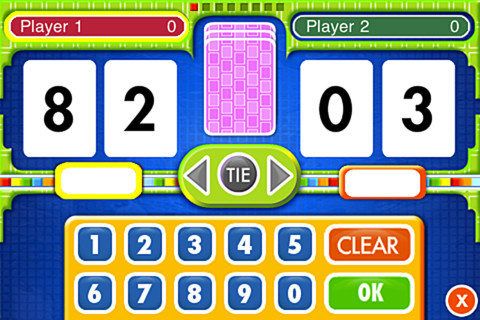
Everyday Math’s Addition Top-It app for iPhone/iPad is a two player game. It is fun easy way for kids to practice basic addition facts from 1 – 10 and greater than/less than.

Common Core Standards met:

  • 1.OA.6 – Add and subtract within 20, demonstrating fluency for addition and subtraction within 10.
  • 2.OA.2 – Fluently add and subtract within 20 using mental strategies. By end of Grade 2, know from memory all sums of two one-digit numbers.

Everyday Mathematics® Addition Top It - McGraw-Hill School Education Group

Everyday Math’s Beat the Computer app for iPhone/iPad is fun easy way for kids to practice basic multiplication facts. They race against the computer to score as many points as they can.

Common Core Standards met:

  • 3.OA.7 –  By the end of Grade 3, know from memory all products of two one-digit numbers.

Everyday Mathematics® Beat the Computer™ Multiplication - McGraw-Hill School Education Group

Everyday Math’s Squeeze Monster app for iPhone/iPad is a two player game. Designed for younger students, it reinforces number line concepts and number comparisons.

Everyday Mathematics® Monster Squeeze™ - McGraw-Hill School Education Group
Everyday Math’s Equivalent Fractions app for iPhone/iPad is fun easy way to reinforce fraction concepts. Note: the app uses a digital version of the fraction cards from the Everyday Math third grade book.

Common Core Standards met:

  • 3.NF.3 – Explain equivalence of fractions and compare fractions by reasoning about their size. Understand two fractions as equivalent (equal) if they are the same size, or the same point on a number line. Recognize and generate simple equivalent fractions, e.g., 1/2 = 2/4, 4/6 = 2/3). Explain why the fractions are equivalent, e.g., by using a visual fraction model.
Everyday Mathematics® Equivalent Fractions™ - McGraw-Hill School Education Group
Everyday Math’s Divisibility Dash app for iPhone/iPad is fun easy way to practice recognizing multiples of a number and applying divisibility tests.

Common Core Standards met:

  •  4.OA.4 – Find all factor pairs for a whole number in the range 1–100. Recognize that a whole number is a multiple of each of its factors. Determine whether a given whole number in the range 1–100 is a multiple of a given one-digit number. Determine whether a given whole number in the range 1–100 is prime or composite.

Everyday Mathematics® Divisibility Dash™ - McGraw-Hill School Education Group

0

Halftone 2 Comic Book Creator

halftone 2

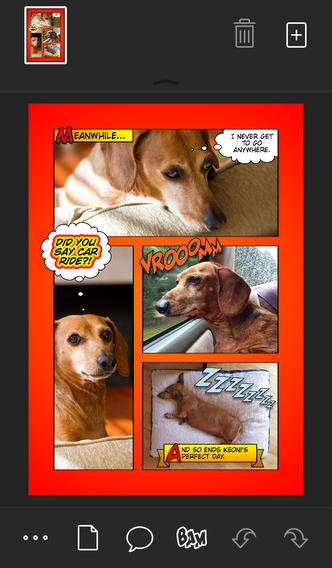
Halftone 2 – Comic Book Creator is FREE for a limited time. This app was named by Apple as one of the Best of 2013 and an Editors’ Choice. Halftone 2 – Comic Book Creator is a categorized as a photography app but it has many educational uses. This app makes it easy to turn your photos into comic book pages that your friends and family will love! The app includes a large assortment of paper styles, captions, speech bubbles, graphic stamps, and fonts for your projects. And… it’s so simple to use. First choose a page layout, then apply photo filters. Next add text by using captions and/or speech & thought bubbles. Then finish your project with some fun graphics like WHAM, BAM, or POW. You can even add a few sound effects. Your creation can be shared as an image, a multi-page document, or high-definition video. Because it is so easy to use, this app would be great for creating visuals to go with classroom projects such as stories, book reports, newsletters, etc. And… it would be really fun to use this app to create comics of your family vacation. Get started today – there are SO many creative & educational uses for this app!

Download link: https://itunes.apple.com/us/app/halftone-2-comic-book-creator/id603139024?mt=8&uo=4

0

Toca Town

toca town

FREE for a limited time – Toca Town, a digital town where kids rule. Toca Town features twenty-one playful characters and seven locations to explore – park, pond, store, police station, restaurant, house, and apartment. As kids move around the town, they choose their own adventures. They can grocery shop, cook thirty different dishes at the restaurant, visit the police station, or just hang out with friends. With a tap of the sun, kids can change day into night – perfect for camping in the dark! The app is full of interactive surprises for kids to discover – presents to wrap, lights that turn on and off, etc. Toca Town is great for vocabulary development and oral story telling. Don’t miss this great app from Toca Boca.

Direct Link: https://itunes.apple.com/us/app/toca-life-town/id871694174?mt=8&uo=6

0

Smart Whiteboard HD

super white boardFREE – Smart Whiteboard HD, an educational app that is super simple to use! One finger writes, 2 fingers erase, 3 fingers clears all. Press the save button or shake your device to save an image. Writing can be done in black, blue, or red with 3 Width choices. The app also includes a simple voice recorder. Just press record, talk, stop & name your file, and it is saved to a list. You can then email your recording if you wish to share it. Teachers can get rid of their classroom whiteboards, markers, and erasers! Have kids show their work, explain their thoughts, etc. with this simple educational app!

Smart White Board HD - Pad read

0

Nighty Night Circus

nighty night circus

FREE today – Nighty Night Circus, the sequel to the popular bedtime app “Nighty Night!“ This time kids find themselves in a circus setting with eight circus animals. They put the animals to bed by switching off the lights or blowing out candles. Each circus animal wants to show his tricks off before going to sleep – super cute! The app has all of the same great features as the original – cute animals, sleepy lullaby music, great narration, and fabulous artwork done by Heidi Wittlinger. It’s no wonder that Nighty Night Circus is on Apple’s Best of 2014 list!

Direct Link: https://itunes.apple.com/us/app/nighty-night-circus-bedtime/id931936670?mt=8&uo=6

0

Shadow Puppet

Shadow Puppet

Use the power of this app to create a unique Father’s Day tribute or greeting!!

Fabulous and FREE – Shadow Puppet is a photography app which has been featured by Apple as a Best New Apps. Using this app, it’s easy to create “puppets” – recorded explanations of your photos. First you choose your photos and put them in the order. Then you talk about your pictures. Everything is recorded. Finished “puppets” can be shared via email, SMS, Facebook and/or Twitter. There are so many ways for everyone to use Shadow Puppet: to teach something new, to share adventures with friends, to record children talking about their experiences, to tell the story behind old family photos, etc.

Recent updates have added many new features. Now you can include video clips, add music, search the web for images, overlay text/stickers, and more! The FREE version of the app permits you to include up to 10 photos/video clips. For $1.99 you can get Puppet Essentials which allows you to add up to 100 items to each video and have access to more drawing & decorating tools. The update made this great app even better!

The classroom uses for this app are only limited by your imagination: Take pictures of a child’s work and have him/her explain it to parents. Send pictures and voice recordings of the class field trip. Have kids give a step-by-step explanation of what happened in a science experiment. Draw & sequence pictures to retell a story. Make a “talking timeline” by sequencing photos of historical events. Have kids use it to present mini reports on any subject. Have virtual “pet day” – kids bring in pictures/recordings of their pets. Because you can use anything saved to your photo library, you can explain photos from the web, artwork created in other apps, and so much more. The possibilities for using this educational app are endless. For more suggestions go to http://get-puppet.com/education. What a fabulous resource!!

Download link: https://itunes.apple.com/us/app/shadow-puppet/id700902833?mt=8&uo=4

0

Chili Fish

chili fishFREE for a limited time – Chili Fish, a fun art app for children. Kids use their imaginations to create fish for their very own underwater kingdom. First they use a variety of colors to paint and/or stamp their fish. Then they choose from different eyes, tails, fins, mouths, etc. The result is a completely new fish every time. Each fish has its own personality, speed, and taste in food. They can also lay eggs to create new fishy friends. Kids can snap pictures of their fish and save them to the camera roll. Then they can print, share, or write about them. Check out this open-ended and interactive app. Kids will enjoy exploring and interacting with the aquatic world that they help to create!

Direct Link https://itunes.apple.com/us/app/chili-fish/id907053583?mt=8&uo=6

0

Pepi Bath 2

pepi 2FREE for a limited time – Pepi Bath 2. This educational app is the second installment of a role-playing game that teaches kids (ages 2 – 6) about personal hygiene. Kids start by choosing one of four characters: a boy, a girl, a cat or a dog. Then they choose one of six situations: brushing teeth, taking a bath, washing clothes, using the toilet, ironing or choosing an outfit.  In each scene kids learn to take care of themselves and they have fun along the way – adding bubbles to the bath, popping bubbles, etc. There are also some good lessons built into the app. For example – when the scissors are chosen, the character shakes his/her head no. Also, the characters are VERY polite – always saying thank you! Check it out for some good clean fun!

Direct Link: https://itunes.apple.com/us/app/pepi-bath-2/id957345067?mt=8&uo=6