0

3 FREE Poetry Apps from the International Reading Association

Planning a poetry unit? The International Reading Association has some apps that may help.

Here are three.
They are FREE. 🙂

acrosticAcrostic Poem helps kids learn about and write acrostic poetry. An acrostic poem uses a word as its subject. The word is written vertically so that each letter begins a line of the poem. All lines of the poem describe or relate to the subject word. The poem does not have to rhyme. Acrostic poems are easy to write and great for having kids introduce themselves, Mother’s Day, Father’s Day, etc.

The app is perfect for a classroom where devices are shared because each student creates his/her own profile. The app explains an acrostic poem and gives an example. Then the student enters his/her topic word. The app advances to a brainstorming page where the student can enter ideas to help write the poem. Then the app advances to a “write your poem” page. The brainstormed words are displayed to help. Work can be saved in progress – reinforcing the elements of the writing process. Finished poems can be saved to the device’s camera roll or emailed. This app mirrors ReadWriteThink’s popular acrostic poem web-based interactive: http://www.readwritethink.org/classroom-resources/student-interactives/acrostic-poems-30045.html. Students can send their editable poems to an email address and then open them in the online tool!

Download link: https://itunes.apple.com/us/app/acrostic-poem/id724841119?mt=8&uo=4

diamanteDiamante Poem helps kids learn about and write diamante poetry. Diamante poems can be written about one central topic or two opposing topics such as day/night. A diamante poem has seven lines and is written in the shape of a diamond. The first and last lines are just one word – nouns. The second and sixth line are two words – adjectives. The third and fifth lines are three words – “ing” words. And the middle line has four+ words – nouns or prepositional phrases. Diamante poems are great for teaching parts of speech and synonyms/antonyms.

The app is perfect for a classroom where devices are shared because each student creates his/her own profile. The app explains a diamante poem and gives two examples – a synonym poem and an antonym poem. Then the student enters his/her beginning and ending topic words. The app advances to a “write your poem” page where the student enters his/her words. The app reminds students which kids of words should be used on each line. Work can be saved in progress – reinforcing the elements of the writing process. Finished poems can be saved to the device’s camera roll or emailed. This app mirrors ReadWriteThink’s popular diamante poem web-based interactive: http://www.readwritethink.org/classroom-resources/student-interactives/diamante-poems-30053.html. Students can send their editable poems to an email address and then open them in the online tool!

Download link: https://itunes.apple.com/us/app/diamante-poem/id724953313?mt=8&uo=4
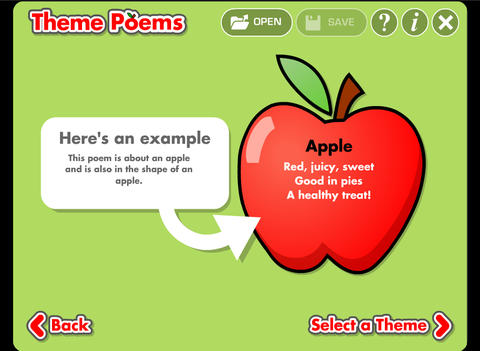
theme poemTheme Poem helps kids learn about and write theme poetry. A theme poem is sometimes called a shape poem. It is written in the shape of what the poem is about. For example, the apple poem is written in the shape of an apple.

Again, this app is perfect for a classroom where devices are shared because each student creates his/her own profile. The app gives an example of a theme poem. Then the student selects one of 5 themed files – nature, school, sports, celebrations, shapes. Each themed file has 5 – 8 shapes for students to choose. Once a shape is chosen, the app advances to a “think of words” page for the student to brainstorm his/her ideas. Then the app advances to a “write your poem” page. The brainstormed words are displayed to help. Work can be saved in progress – reinforcing the elements of the writing process. Finished poems can be saved to the device’s camera roll or emailed. This app mirrors ReadWriteThink’s popular theme poem web-based interactive: http://www.readwritethink.org/files/resources/interactives/theme_poems/. Students can send their editable poems to an email address and then open them in the online tool!

Download link: https://itunes.apple.com/us/app/theme-poem/id724978211?mt=8&uo=4

0

Cursive Writing Wizard – Trace Letters & Words

handwriting

FREE today – Cursive Writing Wizard – Trace Letters & Words, a fabulous app for teaching kids how to write in cursive. Start by choosing one of the 4 available fonts: Zaner Bloser, D’Nealian, French Cursive, or French Cursive 2. Then kids are ready to start tracing using animated stickers with fun sound effects. They can trace shapes, upper case letters, lower case letters, numerals, or words. The app has two modes: free or 5 stars. In free mode, kids trace the letters with all of the parameters selected. By selecting the “gear” button, the app’s parameters can be  customized to fit each child’s needs – letter size, difficulty, style (stickers or pen), show/hide model, allow to stop between key points, tracing speed, etc. In the 5 star mode, kids trace each letter 5 times – each step is more challenging. Detailed reports are provided showing what kids have completed. Teachers/parents can replay and export tracings to view a chid’s progress – wow! And, the app permits unlimited users – perfect for the classroom.

After teaching cursive writing for 30 years, I know that the biggest challenge is teaching kids to properly connect the letters. This app does a fabulous job!! There is a list of 3-letter words and often confused letters for kids to practice. But the best part of this app is the ability to add new lists. Kids’ names can be added. Lists of words with difficult connections can be added. Weekly spelling lists can be added. There are so many possibilities for meaningful practice of cursive writing. Don’t miss out on this one – it’s the best cursive writing app that I have seen to date!

Download link: https://itunes.apple.com/us/app/cursive-writing-wizard-trace/id757843896?mt=8&uo=4

0

Labo Drawing Lessons

labo

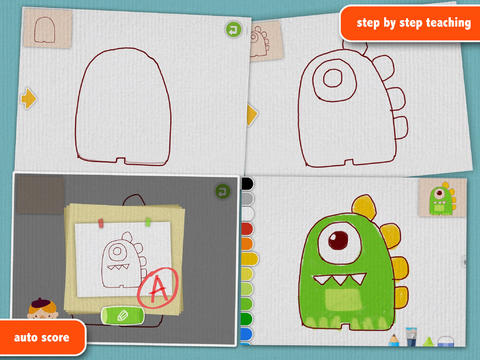
FREE for a limited time – Labo Drawing Lessons. This educational app has 3 different modes: drawing lessons, free drawing, and PK. In the lesson mode, your child will learn to draw 40 different things from 5 categories: animals, plants, vehicles, monsters, people. The app utilizes a step-by-step teaching method then scores (from A+ to D-) the drawing after it has been completed. In the free drawing mode, kids work on a blank canvas and draw their own creations. They are not scored in this mode. They can choose from 3 tools (pencil, crayon, brush) and 18 different colors. They can also pull in photos from the camera roll to use as a background. In both modes, kids can take pictures of their drawings, redo them, or trash them. If they take a picture, the creation is stored in the photo gallery and saved to the device’s camera roll. Once a drawing is on the camera roll, it can be shared, printed, or pulled into other apps. Finally, there is a PK mode which permits a child to compete with their parents or friends to see who can draw faster. Check out this YouTube video to see how this app works: http://www.youtube.com/watch?

Download link: https://itunes.apple.com/us/app/labo-drawing-lessons-3y+/id879834557?mt=8&uo=4

0

My Story – Book Maker for Kids

story maker

One of my favorite writing apps – FREE today.

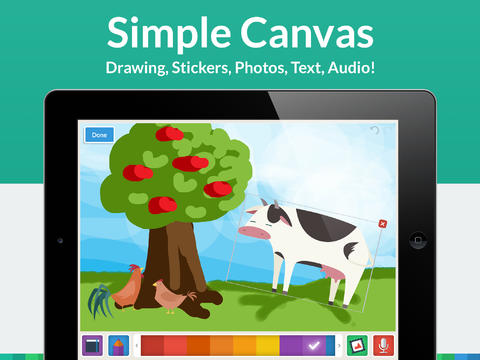
My Story – Book Maker for Kids is a great writing app for the iPad. The cost is normally $3.99 but it Is currently FREE. Kids can easily create then read an unlimited number of their own e-books using this app. Upgraded in March, the design has been simplified to make it easier for writers of all ages. Kids create their books one page at a time by typing in their text and adding their artwork. They can use a variety of mediums for their art –  stickers, drawings (with pencils, paints or markers), camera photos, or pictures saved in the photo library. They can also record themselves reading their books. Finalized stories can read directly from the app, be published to iBooks, and/or shared via email with anyone who owns an iPhone or iPad.

Watch the video and learn more about this app here: My Story – Book Maker for Kids.

What a great medium for your child to share his/her life experiences with grandparents and other loved ones – take photos of your day (at the zoo, in the park, etc.) and let your child narrate the experience! The voice recordings remain intact when the book is shared. The words can be typed in after your child has provided the narration so that kids learn that the words in books are really just “talk written down.”

My Story is perfect for the classroom because teachers can add multiple authors and sync it across multiple iPads! Kids can share their stories with friends through iBooks, write and present digital reports, keep ongoing vocabulary books and/or journals etc. What a fantastic tool to encourage writing! Don’t miss this one!!

My Story - Book Maker for Kids - HiDef Web Solutions

0

Number Line, by the Math Learning Center

number lineNumber Line, by the Math Learning Center is a fantastic FREE app that will help kids visualize number patterns and understand number operations. The app is well-designed with several useful features. The number line can be set by ones, twos, fives, tens, twenty-fives, and hundreds. It can also be customized to show multiples of any whole number from 1 to 100. This feature is perfect for skip counting and/or for visualizing multiplication. The app permits kids to add and manipulate forward & backward jumps – a great feature for teaching addition & subtraction. This feature also helps kids visualize multiplication as repeated addition of the same number and division as repeated subtraction of the same number. Teachers are able to hide or reveal numbers on the number line. This feature can be used to challenge kids to apply what they know in order to figure out the missing number/numbers. Teachers can also use this feature to teach kids how to solve more difficult patterns that are missing several numbers; such as 4, __, __, 16.  Kids can use the drawing tools to show what they know. They can write equations and expressions with the text tool. They can screen shot their work and use it as an exit slip after a lesson. Add this one to your virtual toolkit today – “seeing math” helps kids understand it. 🙂

Download Link: https://itunes.apple.com/us/app/number-line-by-math-learning/id751816884?mt=8&uo=4

1

Teach Me Kindergarten & Teach Me First Grade

teach me kindergarten

FREE for a limited time – Teach Me Kindergarten, an educational app for young kids. It teaches addition and subtraction to 10, spelling (choose the missing letter), preK & K Dolch sight words, letter writing (upper & lower case), and number writing. The app includes parental controls which permit parents/teachers to choose which subjects they want and/or the level of difficulty. They can even choose specific questions. Up to 40 players can be entered and the topics for each player can be individualized – great for the classroom. Parents/teachers can review performance history for each subject to check how their children are doing.

Kids are rewarded for correct answers with stickers or coins. Sticker scenes include the beach, reef, pirate cove, city, farm, and playground. Parents/teachers can set the number of correct responses needed for getting a sticker from 1 – 9. Completed scenes can be exported to share. 🙂

Download link: https://itunes.apple.com/us/app/teachme-kindergarten/id336689375?mt=8&uo=4

Also on sale for $.99 – Teach Me First Grade, another educational app from the same team. This app works the same way but teaches the following skills: first grade Dolch sight words, addition up to 20, subtraction down from 20, spelling of over 170 first grade words. 

Download link: https://itunes.apple.com/us/app/teachme-1st-grade/id355940964?mt=8&uo=4

0

Spelling Star

spelling star

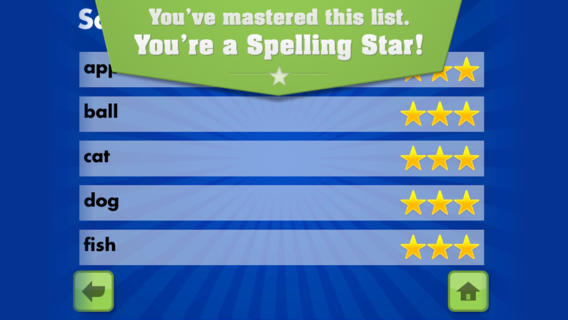
FREE for  limited time – Spelling Star, an educational app for practicing spelling lists. The app is simple to use – just type in and record the words. You may also include sentences to clarify the words’ meanings. Kids must spell each word correctly three times to become a Spelling Star.  Words are presented in random order. As kids practice, they can get a hint – a quick look at the word spelled correctly. When they spell a word without a hint, they earn a star. Spelling Star provides feedback after each word is spelled with the option to “try again” when an error is made. This educational app is great for home and/or school. Parents can use it to input spelling lists for multiple kids. Kids may enjoy inputting their own lists at the beginning of the week which would be GREAT practice! Teachers can create lists on one device and share those lists with anyone who has the Spelling Star app. Simple to use, effective, and tracks progress – what more do you need? 🙂

Download link: https://itunes.apple.com/us/app/spelling-star/id557070660?mt=8&uo=4

0

Sago Mini Bug Builder

bug buider

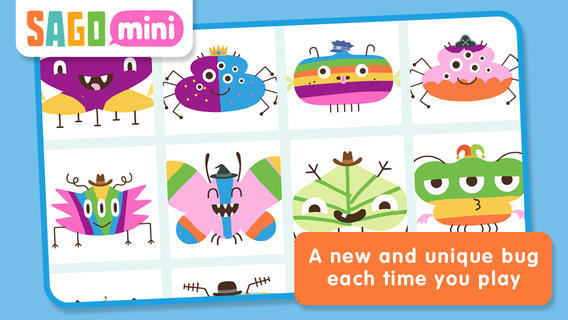
Only $.99, for a limited time – Sago Mini Bug Builder, an educational app for toddlers/preschoolers. Kids create, hatch, and play with cute little critters. They can transform 1 of 8 shapes into a colorful bug, add some color, then bring it to life. They can also add a funny hat, feed it a snack, clean up its mess, and take its picture. Kids can make unlimited number of unique bugs using this app which is very cute & creative! Older kids could create bugs to use for creative writing – a descriptive paragraph, a story, a dialog. Or, they could create 2 bugs to compare and contrast. Check out this colorful & creative app while it’s on sale!

Download link: https://itunes.apple.com/us/app/sago-mini-bug-builder/id657821775?mt=8&uo=4

0

Educational Apps from Nickelodeon – only $.99!!

Select educational apps from Nickelodeon are on sale for only $.99. These apps normally sell for $4.99 – $6.99 each. Here are the links. Enjoy!!  🙂

dora

Dora ABCs Vol 1: Letters & Letter Sounds   https://itunes.apple.com/us/app/dora-abcs-vol-1-letters-letter/id405566203?mt=8&uo=4

Dora ABCs Vol 2: Rhyming Words HD   https://itunes.apple.com/us/app/dora-abcs-vol-2-rhyming-words/id422608884?mt=8&uo=4

Dora ABCs Vol 3: Ready to Read! HD   https://itunes.apple.com/us/app/dora-abcs-vol-3-ready-to-read!/id466817553?mt=8&uo=4

Dora’s Great Big World HD   https://itunes.apple.com/us/app/doras-great-big-world-hd/id641652516?mt=8&uo=4

Dora Dress-Up Adventures! HD   https://itunes.apple.com/us/app/dora-dress-up-adventures!-hd/id444740616?mt=8&uo=4

bubble

Bubble Guppies: Animal School Day HD   https://itunes.apple.com/us/app/bubble-guppies-animal-school/id567244903?mt=8&uo=4

team umizoomi

Team Umizoomi Math: Zoom into Numbers HD  https://itunes.apple.com/us/app/team-umizoomi-math-zoom-into/id477561655?mt=8&uo=4

nick jr

Nick Jr Draw & Play HD   https://itunes.apple.com/us/app/nick-jr-draw-play-hd/id513414742?mt=8&uo=4

0

Animal Pre-K Learning Games for Kids with Skills on the Farm

farmFREE for a limited time – Animal Pre-K Learning Games for Kids with Skills on the Farm, a cute educational app for preschoolers. Lily the farmer leads kids through a series of games that teach preschool/K skills: colors, shapes, counting 1 – 10, groups & categories, sequencing & patterns, addition & subtraction. I like that the app teaches shapes in two ways – a circle and a donut, an oval and a watermelon, a rectangle and a bus, etc. And, I was particularly impressed that it names a kite shape as a rhombus. As kids play, they help the cute farm animals (Pinkie the pig, Oliver the horse, Bessie the cow, Cordelia the chicken, Gordon the goat, Sherman the sheep, Webster the duck, Pete the frog) find their way back home. The app is bright, colorful and full of positive encouragement. Nicely done, this app is sure to appeal to little ones.

Download link: https://itunes.apple.com/us/app/animal-pre-k-learning-games/id882334452?mt=8&uo=4