0

Bubbling Math

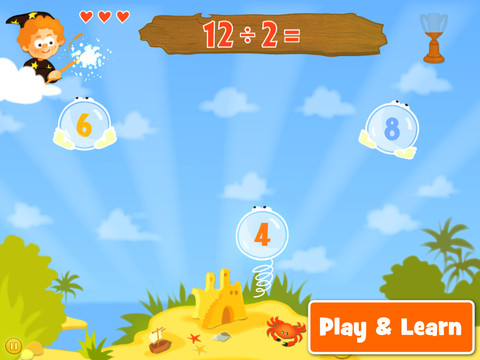
Bubbling Math for the iPad helps students in grades 1 – 4 become proficient in basic math skills – addition, subtraction, multiplication, division. In the Task Configuration section of the app, parents/teachers choose the operations & the levels of difficulty (easy, medium, hard, expert). Descriptions tell specifically what kinds of problems are included in each level. The ability to customize what a child needs to practice makes this app very powerful. Another plus is that the levels can be set differently for each operation. The other powerful section of this app is the “parents section” where a child’s progress is reported by the date, the operations and levels practiced, the number right & wrong, the specific problems missed, and percent correct.

As for the actual game – there are 9 levels that unlock as the child makes progress. There are trophies awarded for doing well. The graphics and music are nicely done. The speed of the game can be adjusted  – slow, normal, fast. But…what makes this app stand out is the ability to truly personalize it. Unfortunately, I don’t think the app tracks more than one child’s data. The data can be reset but the results for the first child would be lost. Regardless, this app is great!

Common Core Standards met:

  • 1.OA.6 – Add and subtract within 20, demonstrating fluency for addition and subtraction within 10.
  • 2.OA.2 – Fluently add and subtract within 20 using mental strategies. By end of Grade 2, know from memory all sums of two one-digit numbers.
  • 3.OA.7 – Fluently multiply and divide within 100, using strategies such as the relationship between multiplication and division or properties of operations. By the end of Grade 3, know from memory all products of two one-digit numbers.

This app was FREE last week but is currently selling for $.99. Keep watching my blog to find out when apps are offered for free.

Highly Recommended!

Bubbling Math - TappyTaps s.r.o.

0

i Learn With Boing: Savannah Adventures

For a limited time, all i Learn With Boing apps are being offered for $.99 and i Learn With Boing: Savannah Adventures is FREE.  These apps are geared towards 3 – 6 year olds. All i Learn With apps have the option for children to register so that they can earn rewards to play with on Planet Boing (a FREE central app that goes with the i Learn With series). Parents can also track their child’s progress if the child registers.

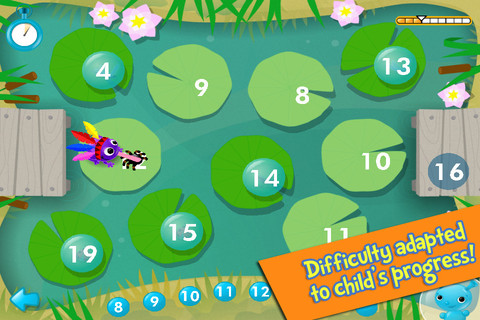
i Learn With Boing: Savannah Adventures has three math games: counting, ordering, and calculating. In the counting game, kids are asked to help the meerkat make soup by matching the pictured amount of ingredients with the written numeral (1 – 20). If kids touch any of the items, the total is named. Instead, I wish app counted the items (for kids who still need that) with the option to disable. In the ordering game, kids guide a frog across the pond by choosing the next number (1 – 20). The ordering doesn’t always start at 1 and there is variety in this game. Numbers may be ascending, descending or in a simple pattern (by 2’s or 10’s). In the calculating game, kids add the correct number of ostriches to a truck to reach a total. This game can be played alone or with a friend. Overall, this app is cute and nicely done. It would be fun for young kids who already know their numbers and are ready for some beginning math skills. The i Learn With program is brought to you by the developers of PBS KIDS PLAY and CBC Wonderworld online learning programs.

Common Core Standards met:

  • K.OA.2  – Add and subtract within 10, e.g., by using objects or drawings to represent the problem.
  • 1.OA.6 – Add and subtract within 20, demonstrating fluency for addition and subtraction within 10.

Recommended.

i Learn With Boing: Savannah Adventures! - Tribal Nova

0

The Opposites

The Opposites is currently FREE for the iPhone/iPad. Designed for kids 7+, this app requires the matching of increasingly difficult pairs of opposite words. There are two sections of the app: dictionary and play. In the dictionary section, words are listed next to their opposites. To learn the meaning, students just tap on the word and a definition appears. There are 10 levels with 100+ words per level. In the play section, words are pronounced by a boy or a girl as they appear in bubbles and float towards the top of the screen  Kids are to tap pairs of opposites as they appear – which makes the words turn a color then pop. The goal is to match 12 sets of opposites  – which completes the level. A bonus round then appears in which the student has 20 seconds to match up an entire  board full of opposites. This app starts off simply but becomes quite challenging in the later levels. It could be used for differentiating a lesson and/or for helping students grow their understanding of antonyms.

Common Core Standards met:

  • 4.L.5 – Demonstrate understanding of figurative language, word relationships, and nuances in word meanings. c.Demonstrate understanding of words by relating them to their opposites (antonyms) and to words with similar but not identical meanings (synonyms).
  • 5.L.5 – Demonstrate understanding of figurative language, word relationships, and nuances in word meanings. c. Use the relationship between particular words (e.g., synonyms, antonyms, homographs) to better understand each of the words.

Recommended!

The Opposites - Mindshapes Limited

0

Fetch! Lunch Rush

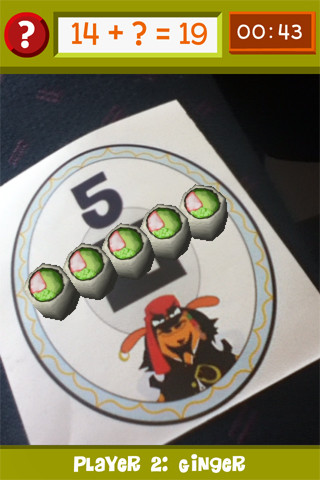
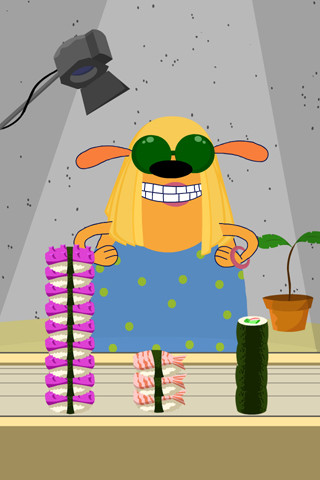
From our friends at PBS comes this very unique FREE math game app for iPhone/iPad.  In this multi-player game, it is the students’ task to keep up with the lunch orders from Ruff Ruffman’s movie crew. The challenge is to keep track of how many pieces of sushi everyone wants by adding and subtracting. Before the game begins, game pieces have to be printed from the PBS website and distributed around the room. As the sushi orders come in, students have to find the game piece with the correct answer to the problem. Using the camera lens on their device, they focus in on then tap the sushi. The sushi pieces magically move to the table in front of their character (as seen above). Students have to think fast and keep moving to fill all of the sushi orders before their friends do. What fun !!

Common Core Standards met:

  • 1.OA.6 – Add and subtract within 20, demonstrating fluency for addition and subtraction within 10.
  • 2.OA.2 – Fluently add and subtract within 20 using mental strategies. By end of Grade 2, know from memory all sums of two one-digit numbers.

Highly recommended!

FETCH! LUNCH RUSH - PBS KIDS

0

Math Magician

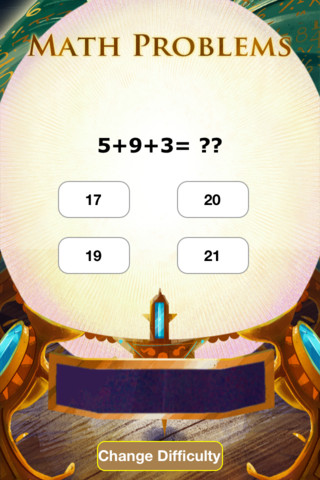
This app for the iPhone/iPad was just launched on August 7, 2012 and it has already been offered for FREE twice. There are 3 levels with several math concepts covered within each level. The easy level covers counting 1-120, skip counting by 2 & 5, addition 1-20, subtraction 1-20, and greater/less than 0-20. The medium level covers: skip counting (10 and 100), addition 0-100, subtraction 0-100, add/subtract by 10, greater/less than 0-100, multiplication 1-10, and division 1-10. The hard level covers: addition 100-500, subtraction 50-200, multiplication facts 0-12 and division facts, 0-12.

Kids earn treasure from the magician as they solve problems in the magic crystal ball. As kids answer correctly, the magic meter bar fills so they can keep track of their progress. Correct solutions are shown in the meter bar after the question is answered. Kids have to answer about 30 questions correctly in order to earn a treasure – which seems a little high to me. The other concern I have is that the answers do not reflect common mechanical mistakes. Kids can arrive at the correct answer by just adding or subtracting one’s place. Example:  386 + 199 = ?? and the 4 answers are 586, 585, 587, 589. If a student knows that 6 = 9 is 15, he/she will pick the answer with the 5 in one’s place. The more common error that kids make is forgetting to move the 10 over. So… 4 better answer choices might be 485, 585, 575, 475. That being said… there is a lot of good practice in this app.

Common Core Standards met:

  • 1.OA.6 – Add and subtract within 20, demonstrating fluency for addition and subtraction within 10.
  • 2.OA.2 – Fluently add and subtract within 20 using mental strategies. By end of Grade 2, know from memory all sums of two one-digit numbers.
  • 3.OA.7 – Fluently multiply and divide within 100, using strategies such as the relationship between multiplication and division or properties of operations. By the end of Grade 3, know from memory all products of two one-digit numbers.

Keep reading my blog to find out when apps are offered for FREE.

Math Magician - abcteach

0

Counting Numbers 123

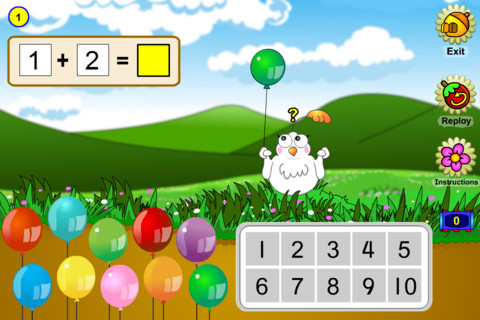
This cute little app for the iPhone/iPad sells for $.99 is sometimes offered for FREE. Geared towards preschoolers/kindergartners, it has 5 activities which teach counting to 10, symbols and words for the numbers 1 – 10, the concept of one more, and the concepts of  adding & subtracting. Kids help Molly, a friendly little bird, by dragging and popping her balloons to arrive at a number between 1 and 10. Also included is in the app is a catchy sing-along called The Numba Rumba which features dancing polar bears and penguins – very cute and fun!

Common Core Standards met:

  • K.OA.2 – Add and subtract within 10, e.g., by using objects or drawings to represent the problem.
Keep reading my blog to find out when apps are offered for FREE.
Counting 123 - Learn to count challenge for kids - TabTale LTD
0

Freefall Time

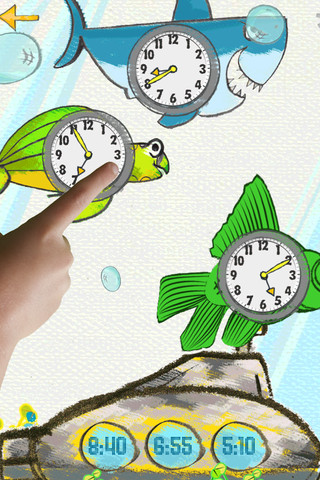
This iPhone/iPad app sells for $.99 but  I downloaded it on a FREE day. Kids practice matching the analog clocks with correct times, choose the correct time for a clock, or practice setting a clock – all while earning items to add to their interactive fish tank. The settings can be adjusted in different increments: 30 minutes, 15 minutes, 10 minutes, 5 minutes, and 1 minute. 24-hour format is also available. Simply done – it provides kids with practice they need reading and setting clocks.

Common Core Standards met:

  • 1.MD.3 – Tell and write time in hours and half-hours using analog and digital clocks.
  • 2.MD.7 – Tell and write time from analog and digital clocks to the nearest five minutes, using a.m. and p.m.
  • 3.MD.1 – Tell and write time to the nearest minute (first portion of the standard).

Keep reading my blog to find out when apps are offered for FREE!

Freefall Time - Merge Mobile

0

My Editing Buddy

This iPad app is a FREE simple to use word processor designed for use in elementary classrooms. But…there is so much more to this app. Kids can share their work with classmates and learn to edit using this app. To create an account, you need to provide an email address. The app can be used without an account but it will not save documents. After the account is created, just log in and create your document. Then it’s time to share your work with someone who will edit it. You can choose: “pass & edit” or “add to sharing network.” If you choose “pass & edit” you literally hand your work to someone for editing. Symbols and sticky notes are along the bottom of the screen when the app is in the editing mode. The “editor”  just drags the appropriate symbol in place to edit the document. A glossary of symbols is available by tapping the question mark. Sticky notes are available for more detailed feedback. When finished, your “editor” saves then returns your work. You can now swipe from your word processing version to the edited version and make revisions. If you choose “add to sharing network” your work will posted to your class for anyone to edit. Teachers need to set up a class for their students and provide students with the class password. Be aware that anyone who has an account can set up “a class” so teachers may have to monitor this option. What an awesome way to get kids involved in and excited about peer editing!!

Common Core Standards met:

  • K.W.5 /1.W.5/2.W.5/ – With guidance and support from adults, respond to questions and suggestions from peers and add details to strengthen writing as needed.
  • 3.W.5/4.W.5/5.W.5 – With guidance and support from peers and 5. adults, develop and strengthen writing as needed by planning, revising, and editing.

Highly Recommended!

My Editing Buddy - Interactive Elementary

0

Math Racer®

FREE for a few days – this iPhone/iPad app normally sells for $4.99. Math Racer times how fast kids can answer 10, 20, 50 or 100 problems in 7 different games: addition, subtraction, multiplication, division, add/subtract, multiply/divide, or all operations. I like kids being able to practice related operations together – it makes them pay attention to operational signs & see connections. The app keeps high scores for all areas. It shows which problems were missed and how long it took to answer each question (to the hundredth of a second). Teachers and parents can use this tracking system to document kids’ progress. To compliment the tracking, I wish the app could then be programmed for kids to work specifically on the facts that are giving them trouble.

This app provides a simple but fun way for kids to practice their facts. I can’t imagine that they won’t love racing the clock to improve their scores. If it is loaded on an iPhone, kids could easily practice their facts in the car on their way to after school lessons. 🙂

Common Core Standards met:

  • 1.OA.6 – Add and subtract within 20, demonstrating fluency for addition and subtraction within 10.
  • 2.OA.2 – Fluently add and subtract within 20 using mental strategies. By end of Grade 2, know from memory all sums of two one-digit numbers.
  • 3.OA.7 – Fluently multiply and divide within 100, using strategies such as the relationship between multiplication and division or properties of operations. By the end of Grade 3, know from memory all products of two one-digit numbers.

Recommended!

Math ® - i4software

0

Spellosaur

This app is FREE for the iPhone/iPad so that you can see how it works before purchasing the premium version for $3.99. What makes this app different from others is that you are able to input your own words to study. In the FREE version you can input 5 words and have 1 user. In the premium version, you can input many words and have multiple users (with their own lists). After the words are added, there are 4 activities for kids to do with their list: listen & choose the correct word, complete the word by adding the missing letters, rearrange the scrambled word, spell the word. Then kids can take a test over their words. There are 2 voices to choose from – US English & English or kids/parents can record their own words. If the words are homonyms kids can also add a meaning to differentiate one word from another. In the premium version, lists can be saved so that kids can go back and review previously studied/learned words. The ability to add your own words adds a lot of flexibility to this app. It could be used for word study: word families, letter sounds, making plurals, prefixes and suffixes, etc.  Nicely done!!

Common Core Standards met:

  • K.RF.3/1.RF.3/2.RF.3/3.RF.3/4.RF.3/5.RF.3 – Know and apply grade-level phonics and word analysis skills in decoding words.

Recommended!

Spellosaur - Simulant