Let’s face it – getting kids to learn their math facts can be a challenge. But once they know them, they know them forever. The process of “doing math” becomes more efficient and less frustrating when kids know their facts. Luckily there are plenty of fun apps that can help kids become “math fact” proficient. All of these apps are FREE or were “FREE for a limited time” when I reviewed them. Check them out – they’re all great!
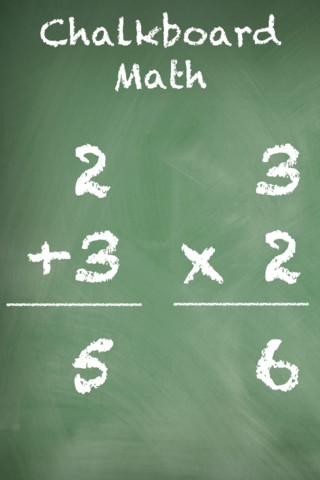
This app was FREE, now $.99. It helps kids practice their basic facts for addition, subtraction, multiplication, and division. First kids choose numbers (1-12) to work with, then the math operation/operations. The app generates practice in 2 modes: answer mode (enter the answers & get feedback) or flashcards mode (answer verbally then check). The game has no built-in sounds but there is positive reinforcement written at the top of the page. If a child misses a problem, it shows the correct answer. What I really like about this app is the ability to choose specific numbers to work on. Facts can be practiced in the order they are taught. I also like the ability to choose more than one operation to practice – it makes kids pay attention to the signs of operation and see the relationships between operations. This app is simple but effective – if you loaded this app on your iPhone, kids could easily practice flashcards on their way to after school activities. 🙂

Ahoy there!! Sail through Math from McGraw Hill is currently $1.99 but it “goes FREE” periodically. This educational app provides a fun way for students to practice their math facts/skills. There are 3 levels of play for addition, subtraction, multiplication, and division facts. Other areas covered are addition equations. subtraction equations, multiplication equations, two-step equations, names for numbers, patterns/factors/multiples, and compare numbers. This app provides of great practice built around a pirate theme – complete with music and firing cannonballs! At the end of each game, the child can see what problems he/she missed as well as a percentage score. What a fun way to learn basic facts – in the classroom, at home, in the car on a way to an evening activity. I used to tell my students to practice during commercials – 10 to 15 minutes a day works wonders. This app provides a fun way to accomplish that goal 🙂
Common Core Standards met:
- 1.OA.6 – Add and subtract within 20, demonstrating fluency for addition and subtraction within 10.
- 2.OA.2 – Fluently add and subtract within 20 using mental strategies. By end of Grade 2, know from memory all sums of two one-digit numbers.
- 3.OA.7 – Fluently multiply and divide within 100, using strategies such as the relationship between multiplication and division or properties of operations. By the end of Grade 3, know from memory all products of two one-digit numbers.

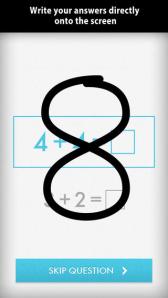
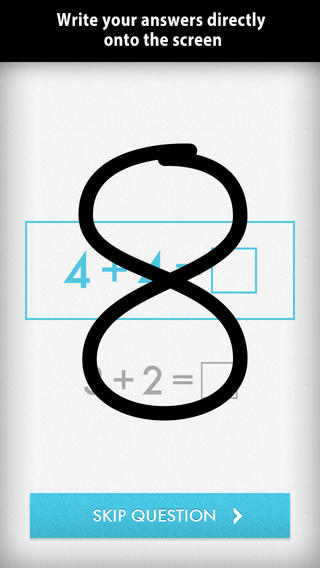
Was FREE for a limited time, currently $1.99 – Quick Math – Arithmetic & Times Tables, an educational app that encourages math fluency in addition, subtraction, multiplication, division, & mixed operations. Kids race against the clock to improve their scores. Handwriting recognition allows the players to write the answers directly on the screen – a very slick feature. There are 4 game levels: beginner, intermediate, advance, and extreme. This app features LOTS of great practice for multiple levels of math students. It can be shared among students and it tracks each student’s progress – perfect for the classroom. The math gets progressively harder as students improve their skills. I love how the app encourages self-improvement and legible writing! Teachers could assign 10 minutes of practice each day for their students. I am sure the results would be significant. What a fabulous tool for the classroom – perfect for a daily warm-up, at a math center, or for fluency practice after completing an assignment.
Common Core Standards met:
- 1.OA.6 – Add and subtract within 20, demonstrating fluency for addition and subtraction within 10.
- 2.OA.2 – Fluently add and subtract within 20 using mental strategies. By end of Grade 2, know from memory all sums of two one-digit numbers.
- 3.OA.7 – Fluently multiply and divide within 100, using strategies such as the relationship between multiplication and division or properties of operations. By the end of Grade 3, know from memory all products of two one-digit numbers.
Download link: https://itunes.apple.com/us/app/quick-math-arithmetic-times/id537802071?mt=8&uo=4
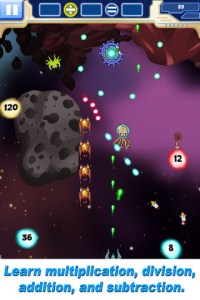
Was FREE for limited time, currently $1.99 – Math Evolve, an app that combines math practice (addition, subtraction, multiplication, division) with an arcade-style game that kids will enjoy playing. Math Evolve has 12 levels, 19 different enemies, and 6 challenging bosses that can be played on 3 difficulty settings. The app has 2 modes: practice mode and story mode. In practice mode, a parent or teacher can choose which math facts to practice and monitor a child’s progress. In the story mode, kids embark on math adventure across three environments: microscopic, ocean, and space. The difficulty of the math and the difficulty of the game can be set independently which makes the game fun for all ages. The app supports up to 5 players. Statistics are kept in the player history section so parent/teachers can evaluate how kids are progressing. This app would be great for independent practice in a classroom. It has customizable practice built into a fun game AND it collects statistical data – awesome!
For more information go to http://mathevolve.com.
Common Core Standards met:
- 1.OA.6 – Add and subtract within 20, demonstrating fluency for addition and subtraction within 10.
- 2.OA.2 – Fluently add and subtract within 20 using mental strategies. By end of Grade 2, know from memory all sums of two one-digit numbers.
- 3.OA.7 – Fluently multiply and divide within 100, using strategies such as the relationship between multiplication and division or properties of operations. By the end of Grade 3, know from memory all products of two one-digit numbers.
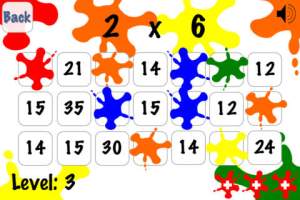
Was FREE for limited time, currently $.99 – Math Splat, a really fun mental math game. Kids are challenged to answer 21 math questions as fast as they can. A colorful paint splat covers each correct answer. Each game is timed and limited to 3 incorrect answers. Each incorrect answer adds a 3 second penalty to the final time. Kids will love trying to beat their best time! The student can choose between easy, medium, and hard questions which makes this game great for differentiating instruction. Have kids graph their scores so that they can see themselves improve and in the process they will also learn to collect data. This educational app is perfect for getting kids to practice their facts in a fun way!
Common Core Standards met:
- 1.OA.6 – Add and subtract within 20, demonstrating fluency for addition and subtraction within 10.
- 2.OA.2 – Fluently add and subtract within 20 using mental strategies. By end of Grade 2, know from memory all sums of two one-digit numbers.
- 3.OA.7 – Fluently multiply and divide within 100, using strategies such as the relationship between multiplication and division or properties of operations. By the end of Grade 3, know from memory all products of two one-digit numbers.
Download link: https://itunes.apple.com/us/app/math-splat/id495477324?mt=8&uo=4

Was FREE for a limited time, currently $2.99 – Operation Math, a great educational app from Spinlight Studio. Kids will have fun practicing basic addition, subtraction, multiplication, & division tables in this interactive “spy” game. The object of the game is to stop Dr. Odd’s quest to eliminate the world’s even numbers. In order to do so, kids must complete 105 missions by solving equations. Missions can be selected based on a child’s skill level and/or the operation (+, -, +/-, x, ÷, x/÷ or +/-/x/÷). Of course, time is of the essence so kids have to answer problems in 60 seconds or less. By doing so, they lock doors along their escape routes. And as they complete missions, they earn the gear of a seasoned spy. What a great game – I love how the app integrates math practice into a really cool game for kids. I especially like the modes which permit kids to practice multiple operations at a time. It makes kids pay attention to operation signs and quickly switch their thinking. What a fun way for kids to practice facts and meet CCSS! No wonderOperation Math was given a 2012 Parents’ Choice Award. Get it today – kids will LOVE it!
Common Core State Standards met:
- 1.OA.6 – Add and subtract within 20, demonstrating fluency for addition and subtraction within 10.
- 2.OA.2 – Fluently add and subtract within 20 using mental strategies. By end of Grade 2, know from memory all sums of two one-digit numbers.
- 3.OA.7 – Fluently multiply and divide within 100, using strategies such as the relationship between multiplication and division or properties of operations. By the end of Grade 3, know from memory all products of two one-digit numbers.
Download link: https://itunes.apple.com/us/app/operation-math/id487387270?mt=8&uo=4

Was FREE for a limited time, currently $2.99 – YodelOh™ Math Mountain. Kids will have fun learning basic addition, subtraction, multiplication, and division math tables with this game. The object of the game is to score enough points to keep Hans from falling off the cliff. In order to do so, kids have to answer problems quickly and avoid the crazy charging sheep. And as kids score points, the questions get harder. The app also includes high-score charts that track the best 15 games for all 5 modes. I especially like the mode which permits kids to practice all 4 operations at a time. It makes kids pay attention to operation signs and quickly switch their thinking. What a fun way for kids to practice facts and it meets CCSS! Get it today. 🙂
Common Core State Standards met:
- 1.OA.6 – Add and subtract within 20, demonstrating fluency for addition and subtraction within 10.
- 2.OA.2 – Fluently add and subtract within 20 using mental strategies. By end of Grade 2, know from memory all sums of two one-digit numbers.
- 3.OA.7 – Fluently multiply and divide within 100, using strategies such as the relationship between multiplication and division or properties of operations. By the end of Grade 3, know from memory all products of two one-digit numbers.
Download math: https://itunes.apple.com/us/app/yodeloh-math-mountain/id634946225?mt=8&uo=4
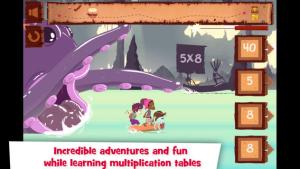
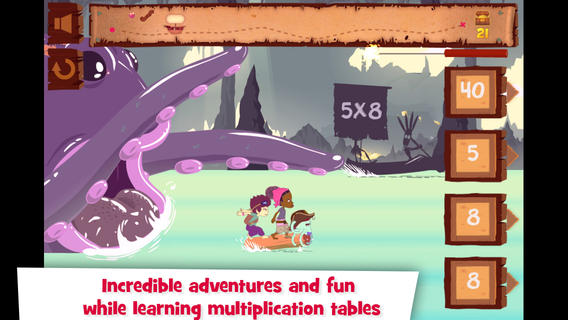
Was FREE for a limited time, currently $2.99 – Multiplications with Math Matthews, a great new app for studying multiplication facts. Kids join Math Mathews and his crew on a high seas adventure to find treasure and break the curse that turned him into an octopus. There are so many great things about this app that make it perfect for the classroom. The app includes a diary (ship’s log) that gives the back story to this adventure that kids are about to join. I envision teachers using this narrative as a group activity to get kids excited about joining the crew. Then the app is divided into 3 mini-games with each game using a different method of practice. Kids earn badges and collect gold as they practice facts. The app allows you to set which facts it will review. This feature makes this game particularly valuable in the classroom. Teachers can start with ones & twos, add fives, then three & fours – adapting their students’ practice to their teaching. And…the app can be used with 7 different players – perfect for small group practice, centers, etc. It keeps track of the progress for each individual – another plus for teachers. If I was still teaching, I would definitely use this educational app in my third grade classroom – it meet a CCSS for third grade multiplication. What a fabulous & fun learning tool for kids!!
Common Core State Standards met:
- 3.OA.7 – By the end of Grade 3, know from memory all products of two one-digit numbers.
Download link: https://itunes.apple.com/us/app/multiplications-math-mathews/id611130011?mt=8&uo=4

Was FREE for a limited time, currently $4.99 – Math Racer, an educational app that times how fast kids can answer 10, 20, 50 or 100 problems in 7 different games: addition, subtraction, multiplication, division, add/subtract, multiply/divide, or all operations. I like kids being able to practice related operations together – it makes them pay attention to operational signs & see connections. The app keeps high scores for all areas. It shows which problems were missed and how long it took to answer each question (to the hundredth of a second). Teachers and parents can use this tracking system to document kids’ progress.
This app provides a simple but fun way for kids to practice their facts. I can’t imagine that they won’t love racing the clock to improve their scores. If it is loaded on an iPhone, kids could easily practice their facts in the car on their way to after-school lessons. 🙂
Common Core Standards met:
- 1.OA.6 – Add and subtract within 20, demonstrating fluency for addition and subtraction within 10.
- 2.OA.2 – Fluently add and subtract within 20 using mental strategies. By end of Grade 2, know from memory all sums of two one-digit numbers.
- 3.OA.7 – Fluently multiply and divide within 100, using strategies such as the relationship between multiplication and division or properties of operations. By the end of Grade 3, know from memory all products of two one-digit numbers.

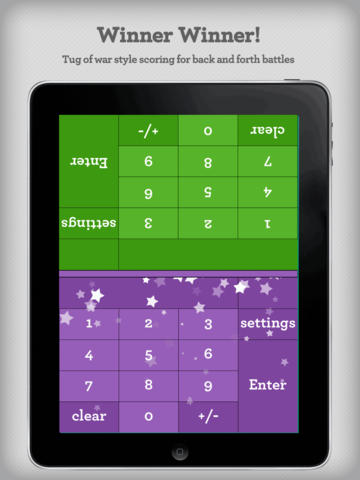
Was FREE for a limited time, currently $2.99 – Math Duel-2 Player Mathematical Game.This educational app pits two players against each other on the same device which makes it perfect for sharing iPads in the classroom. The app has a split screen interface – students sit facing each other on either end of the iPad. As kids answer math equations, the app keeps separate scores for each student. The best thing about this app is that it is fully customizable (on both sides) which makes it a fabulous tool for individualizing instruction for a wide range of students. Equations can be set with 1 – 5 terms. Largest numbers possible can be from 1 – 100. Negative numbers can be turned on/off. Kids can practice addition, subtraction, multiplication, division or any combination of these operations. Fabulous and fun for daily classroom math practice in multiple grades!
Common Core Standards met:
- 1.OA.6 – Add and subtract within 20, demonstrating fluency for addition and subtraction within 10.
- 2.OA.2 – Fluently add and subtract within 20 using mental strategies. By end of Grade 2, know from memory all sums of two one-digit numbers.
- 3.OA.7 – Fluently multiply and divide within 100, using strategies such as the relationship between multiplication and division or properties of operations. By the end of Grade 3, know from memory all products of two one-digit numbers.
Download link: https://itunes.apple.com/us/app/math-duel-2-player-mathematical/id495077699?mt=8&uo=4

Was FREE for a limited time, currently $1.99 – Bubbling Math, an educational app for the iPad helps students in grades 1 – 4 become proficient in basic math skills – addition, subtraction, multiplication, division. In the Task Configuration section of the app, parents/teachers choose the operations & the levels of difficulty (easy, medium, hard, expert). Descriptions tell specifically what kinds of problems are included in each level. The ability to customize what a child needs to practice makes this app very powerful. Another plus is that the levels can be set differently for each operation. The other powerful section of this app is the “parents section” where a child’s progress is reported by the date, the operations and levels practiced, the number right & wrong, the specific problems missed, and percent correct.
As for the actual game – there are 9 levels that unlock as the child makes progress. There are trophies awarded for doing well. The graphics and music are nicely done. The speed of the game can be adjusted – slow, normal, fast. But…what makes this app stand out is the ability to truly personalize it. Unfortunately, I don’t think the app tracks more than one child’s data. The data can be reset but the results for the first child would be lost. Regardless, this app is great!
Common Core Standards met:
- 1.OA.6 – Add and subtract within 20, demonstrating fluency for addition and subtraction within 10.
- 2.OA.2 – Fluently add and subtract within 20 using mental strategies. By end of Grade 2, know from memory all sums of two one-digit numbers.
- 3.OA.7 – Fluently multiply and divide within 100, using strategies such as the relationship between multiplication and division or properties of operations. By the end of Grade 3, know from memory all products of two one-digit numbers.













 appydazeblog