0

Labo Drawing Lessons

labo

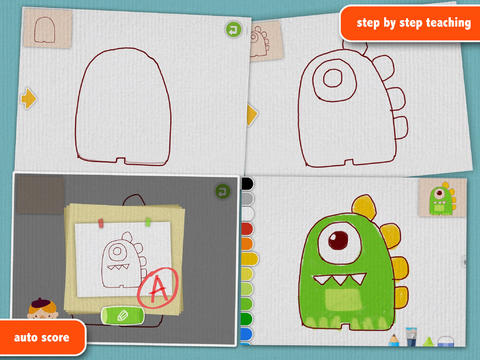
FREE for a limited time – Labo Drawing Lessons. This educational app has 3 different modes: drawing lessons, free drawing, and PK. In the lesson mode, your child will learn to draw 40 different things from 5 categories: animals, plants, vehicles, monsters, people. The app utilizes a step-by-step teaching method then scores (from A+ to D-) the drawing after it has been completed. In the free drawing mode, kids work on a blank canvas and draw their own creations. They are not scored in this mode. They can choose from 3 tools (pencil, crayon, brush) and 18 different colors. They can also pull in photos from the camera roll to use as a background. In both modes, kids can take pictures of their drawings, redo them, or trash them. If they take a picture, the creation is stored in the photo gallery and saved to the device’s camera roll. Once a drawing is on the camera roll, it can be shared, printed, or pulled into other apps. Finally, there is a PK mode which permits a child to compete with their parents or friends to see who can draw faster. Check out this YouTube video to see how this app works: http://www.youtube.com/watch?

Download link: https://itunes.apple.com/us/app/labo-drawing-lessons-3y+/id879834557?mt=8&uo=4
0

Toca Mini

toca mini

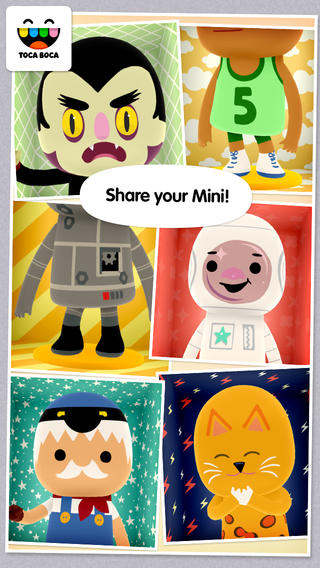
FREE for a limited time – Toca Mini, another creative app from Toca Boca. With this app kids can create silly monsters, imaginary animals, or playful friends. Toca Minis can become whatever you want them to be. To start, kids add colors to the mini’s body, arms, & legs. Then they add details using a wide variety of stamps – bows, hats, buttons, polka dots, etc. Next, kids add facial features which brings their minis to life – they, ooh, ah, sneeze, smile, blink, and more.  Kids can also add hair, eyebrows, beards, mustaches, etc. With 60 different colors and 78 different stamps, there are thousands of possible combinations. When kids finish creating their own unique mini, they can take a snapshot and save it to the camera roll. Then they can print it, share it, pull it into a story writing app, and more. Creating a mini could be a great springboard for creative writing – descriptive paragraphs, a story about their created character/creature. Toca Boca has created another open-ended, creative app!

Download link: https://itunes.apple.com/us/app/toca-mini/id718082838?mt=8&uo=4

Toca Mini is available for Android on Google Play for $2.99.

0

Monki Animal Builder

animal builder

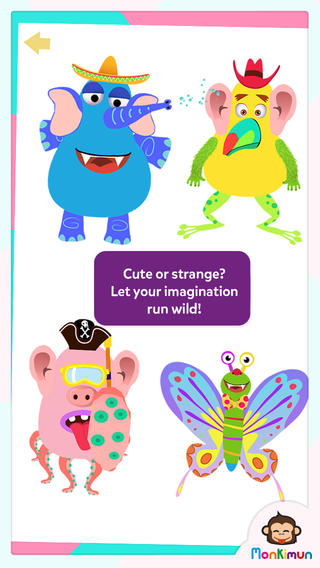
FREE today – Monki Animal Builder, a creative & fun app for kids. Kids use their imaginations to build unique animals. They start cracking open one of 6 eggs. Inside each egg is a different character – each having its own personality. There’s Hairy Ball who is grumpy, Pear who loves to be ticked, Slug who is dreamy, and 3 other interesting animals. Then kids add body parts (over 30 to choose from) and accessories (15 in all) such as a pirate hat, sunglasses, a sombrero. Animations bring everything to life. Kids can save their animals to play with later or share them with kids around the world. They can also save a picture to their device. Saved pictures can be printed and use for creative writing – descriptions, stories, compare/contrast, etc. Whether kids use this app to create, play, save, share, and/or write, it’s sure to bring smiles!

Download link: https://itunes.apple.com/us/app/monki-animal-builder/id836529548?mt=8&uo=4

0

Monki Animal Builder

animal builder

FREE today – Monki Animal Builder, a creative & fun app for kids. Kids use their imaginations to build unique animals. They start cracking open one of 6 eggs. Inside each egg is a different character – each having its own personality. There’s Hairy Ball who is grumpy, Pear who loves to be ticked, Slug who is dreamy, and 3 other interesting animals. Then kids add body parts (over 30 to choose from) and accessories (15 in all) such as a pirate hat, sunglasses, a sombrero. Animations bring everything to life. Kids can save their animals to play with later or share them with kids around the world. They can also save a picture to their device. Saved pictures can be printed and use for creative writing – descriptions, stories, compare/contrast, etc. Whether kids use this app to create, play, save, share, and/or write, it’s sure to bring smiles!

Download link: https://itunes.apple.com/us/app/monki-animal-builder/id836529548?mt=8&uo=4

0

Imagination Box

FREE for a limited time – Imagination Box, a creative art app for kids. What child doesn’t love creating with play dough? Hours of creative play awaits your child and there is no mess to clean up! It’s perfect for a trip to the doctor, a ride in the car, etc. The app includes 62 pieces of play dough (in 9 colors) including uppercase letters, numbers, and shapes. There are 12 backgrounds available for your child’s creations. Or, you can use your own photos as a background. Make a hat for the family dog or a play dough mustache for grandpa – how fun! There are also 10 markers available in the app adding even more possibilities for creativity. The app could also be used as a take-along “design center” for play dough. Kids could design their creations on the iPad, then actually recreate it with the real stuff. So many possibilities… get it today! 🙂

Download link: https://itunes.apple.com/us/app/imagination-box-colors-shapes/id698092635?mt=8&uo=4

0

TED – TED conferences

Parents/Teachers – here is an app for you (and the kids)!

TED started in 1984 as a conference bringing together people from three worlds: Technology, Entertainment, and Design. It is now a nonprofit devoted to ideas worth spreading. Here is information on 2 apps that will bring the world of TED to the device of your choice!

TED - original

tedRiveting talks by remarkable people and FREE to the world. Connect with the official TED app for iPhone/iPad. Access more than 1,400 TEDTalk videos with more added every week! When you open the app, you will see a wide variety of featured talks – Where is Google going  next? by Larry Page, A new way to grow bone by Molly Steven, Teach teachers how to create magic by Christopher Emdin, and so on. There are about 60 talks to choose from. Click on a title that interests you to get additional information about that talk: the length of the talk, a short synopsis, related talks, and related tags. Then you can watch the talk, save it, bookmark it, or share it. The app permits you to browse the entire library at any time – even when you are offline. You can browse by tag or by language. TEDTalks are subtitled in over 100 languages!  You can create your own playlist or the app can create one for you based on your mood and how much time you have to listen. A fabulous resource for lifelong learners!!

TED - TED Conferences

And now, Ted has a new initiative for teachers and students called TED-Ed. Teachers can create lessons around any TED-Ed original, TED Talk, or YouTube video and/or start a TED-Ed Club in their school.

From their site: “TED-Ed aims to amplify the voices and ideas of teachers and students around the world. TED-Ed’s commitment to creating lessons worth sharing is an extension of TED’s mission of spreading great ideas. With this philosophy in mind, and with the intention of supporting teachers and sparking the curiosity of learners around the world, TED-Ed is the newest of TED’s initiatives.”

Connect to TED-Ed here: Lessons Worth Sharing | TED-Ed

0

Puppet Workshop

Puppet Workshop

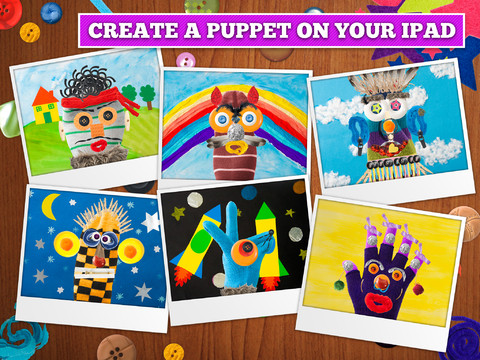
FREE again for a limited time (normally $2.99) –  Puppet Workshop. Kids use their creativity to turn a sock or a glove into a virtual puppet using this educational app. They first choose their sock or glove. Then they create the puppet’s eyes, nose, mouth, & hair from an assortment of buttons, ribbons, strings, etc. The puppet can be placed on a background from the app or a background from your camera roll. Or… your child can also create his/her own background! You can also save a picture of your child’s puppet to your camera roll or it ca be stored in the application. The app includes 20 different socks & gloves, 150+ enhancements, and 18 different backgrounds – enough “stuff” for a whole lot of creating!! Very fun. 🙂

Puppet Workshop - Creativity App for Kids - Sebastian Bachorzewski

0

Drawnimal

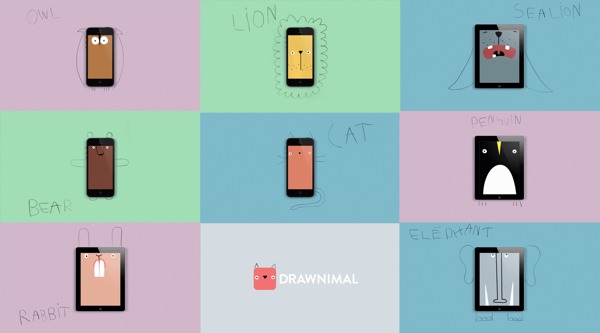
Just named Apple’s App of the Week and FREE for a limited time – Drawnimal, an ABC app for kids that has them thinking (and drawing) outside the box. Kids begin by placing the device on a piece of paper or other drawing surface. Then they draw around the device (as shown above) to complete the drawing of an animal. When they press play, the app identifies the animal. Finally, they tap the animal for a delightful surprise! Kids will love the animal animations that they helped to create. It’s the perfect combination of an alphabet app and a drawing app for little ones. And, it’s in 5 languages – English, Spanish, Dutch, Italian, and French. It’s super cute and super fun!

Download link: https://itunes.apple.com/us/app/drawnimal/id586239095?mt=8&uo=4

0

Monster Coloring Book

Monster Coloring Book

FREE for a limited time – Monster Coloring Book. Kids can paint 175 different monsters with no clean-up necessary! As they paint, they listen to classical music by Rachmaninov, Bach, Beethoven, and Brahms. Kids can paint with their fingers or use the “touch and fill” option. Enhancements include: stickers to accessorize the monsters and patterns to make the monsters unique. Once kids have designed their monster images, they can save them to their gallery. There they can turn their monster into a puzzle for use with Monster Puzzles – available in the App Store for $1.99. Creations can also be shared via email or they can be printed. This educational coloring app is well-designed!

Teachers – use this app to inspire creative writing! Kids could create their own monsters for a variety of language arts activities – a lesson on adjectives followed by descriptive paragraphs, conversation between two monsters, compare & contrast two monsters using Venn diagrams, creative stories, etc.

Download link: https://itunes.apple.com/us/app/monster-coloring-book/id435676573?mt=8&uo=4

0

Ed Emberley’s Shake & Make

ed

FREE for a limited time – Ed Emberley’s Shake & Make, a puzzle app for kids. Ed Emberley, an American illustrator, is best known for his work in children’s books. His  instructional drawing books use numbers, letters, and shapes to teach elementary kids how to draw. I have been a fan of his work since the 70s when I bought his Great Thumbprint Drawing Book to use in my classroom. It’s one of those books that I keep, in spite of its age & condition. Kids love his books!

This fun app brings the artwork of Ed Emberley to life as kids race against the clock to put his drawings back together. First kids study the drawing. Then they shake their device so that the pieces fall to the bottom. The object of the game is to put the drawing back together in 60 seconds or less. There is a “hint” button that gives kids another peek if needed but they lose 5 seconds if they use it. More difficult sets of puzzles unlock as kids correctly solve the puzzles. The app helps to build visual memory and it encourages kids to create their own art  – LOVE it!!

Download link: https://itunes.apple.com/us/app/ed-emberleys-shake-make/id433890924?mt=8&uo=4