0

Sandbox Web Browser & RabbleBrowser from Float Mobile Learning

FREE for a limited time – 2 great web browsing/sharing tools from Float Mobile Learning. Check them out while they are FREE. 🙂

sandbox

Sandbox Web Browser allows teachers/administrators to customize the appearance of the user interface on students’ devices. By using Sandbox, teachers can restrict students to a predetermined list of websites (called a whitelist) – perfect for classroom research. Bookmarks for approved sites can also be added. A passcode is set to prevent students from changing the settings. Sandbox also returns to a preset home page when the device goes idle. This app can be used to configure an individual device or it can be used to configure multiple devices by using a property list file. The app includes extensive instructions for configuring Sandbox to meet the specific your needs. It also includes instructions for restricting access to Safari, the App Store, You Tube, and other built-in apps through your device.

Download link: https://itunes.apple.com/us/app/sandbox-web-browser/id562054411?mt=8&uo=4
rabble

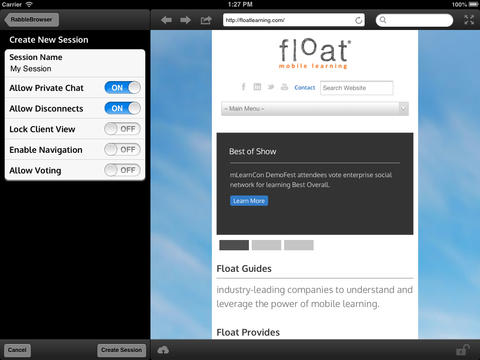
RabbleBrowser is a collaborative web browsing and file sharing tool. A teacher or student leader can facilitate a shared web-browsing/file-sharing experience with an unlimited number of locally connected others in their group. Other features of this app include: integrating chats, saving bookmarks, sharing of personal files, social sharing via email/Facebook/Twitter, and printing. This app looks fantastic for teacher collaboration – meetings, professional development days, college classes, etc.

Download link: https://itunes.apple.com/us/app/rabblebrowser/id432616026?mt=8&uo=4
0

Scanner Pro

scanner

Get digitally organized in the new year!

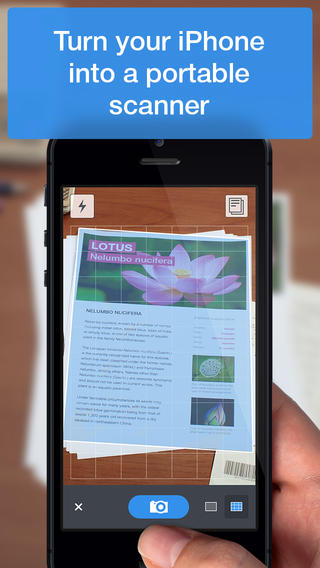
Apple’s App of the Week and FREE for a limited time – Scanner Pro by Readdle. This easy-to-use app turns your iPhone/iPad into a portable scanner. You can scan documents, sketches, whiteboards, receipts, etc. The app uses edge detection and image processing to scan items quickly and save them as PDF files. Once your digital file has been created, it can be uploaded to Dropbox, Evernote, or Google Drive. You can also save, print, or email your scanned documents. There are so many uses for this app especially when you use it with other apps/software. Get it while it is FREE because it is normally listed at $6.99.

Teachers could use this app to digitize student files then upload the files into Evernote to create digital student portfolios. Whoohoo – how organized is that!?

Download link: https://itunes.apple.com/us/app/scanner-pro-by-readdle/id333710667?mt=8&uo=4

0

ClassDojo

ClassDojo is a FREE & fabulous tool that helps improve classroom behaviors. Rewarding good behavior in real-time is easy – all it takes is a click. To use ClassDojo, you only need one device (computer, smartphone, a laptop, or a tablet) and an internet connection. It is very easy to set up. Each student on your class list is assigned a cute, monster-like avatar. Kids earn points for positive behaviors and lose points for negative behaviors. ClassDojo is also fully customizable so you can delete behaviors from the original list and/or add your own behaviors. As you use it, it automatically logs any data that you input. This data can be used to generate behavior reports to share with parents and administrators. How awesome is that? You can go into a meeting/conference with reports in hand! And now, parents can check online to see what kind of day their child is having.

If I were still in the classroom, I would enter my class list twice – once for data on work/study habits and the other for data on behaviors. I would make my habits/behaviors match exactly what was on my report cards. Then as I used the app, I would also be gathering data for my report cards. At the end of the grading period, I would just print out the date and enter it on the report cards – how easy!  I would also have the data (in a printed report) to be able to back up any grade on the card.  “As you can see Mrs. Doe, Jane only turned in her homework 56% of the time.”  Instant data would also be available for the RTI process, IEPs or any other team meeting on a child. What a powerful tool for teachers! An educational app that has the ability to positively impact the learning environment – LOVE it!!

Check out the website for more information: www.classdojo.com

Highly recommended !!

ClassDojo - Class Twist Inc

0

Teacher Clicker – Socrative / Student Clicker – Socrative

Still FREE and now even better – Socrative, an app that turns any device with a web browser into a student response clicker.

Socrative has added two additional quiz features: # 1 – Teachers can now add images to their questions. #2 – The system can now grade short answer questions. Teachers just input the acceptable answers and the system does the rest. 🙂

This website and app are unbelievably cool – they turn any device with a web browser (iPhone, iPad, laptops) into a student response clicker. If a teacher has access to any kind of wireless lab, he/she can engage the entire class in a game or quiz and watch the results in real-time. Teachers begin by using their teacher app or logging into t.socrative.com with their email and password. Once logged in, teachers are assigned a room number to share with their students. Students log in using their student app or at m.socrative.com and enter the “virtual room number” provided by the teacher. Teachers initiate an activity and students respond on their devices. Multiple choice and short answer quizzes are easy to create – types of questions can be mixed. Teachers can also choose to run the quiz as a Space Race game. The students’ responses are visible to the teacher in real-time. Teachers can see what each child answered individually as well as what the group answered collectively. And the best part is… the app grades, graphs the results, and generates a report as an Excel spreadsheet or an email.

What a powerful tool for teachers – a short quiz at the end of a lesson can pinpoint what students understand and what needs to be reviewed. Hours of grading and analyzing test results are done immediately. Every student is involved – wow!

Highly recommended!

Teacher app Teacher Clicker - Socrative - Socrative           Student app Student Clicker - Socrative - Socrative

0

iReward Chart: Reward Tracker Behavior Chore Chart for Parents

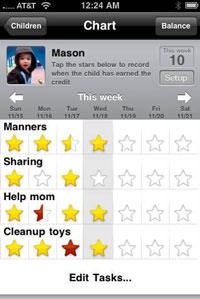
FREE today – iReward Chart, an app that tracks your child’s behaviors & responsibilities. This app was featured on the Today Show, CNN-Money, the CNET Top 5, and AOL ParentDish Top 10. It is very simple to set up. Just type in your child’s name and check the behaviors/tasks you would like on the chart. Or, you can customize the chart by adding your own behaviors, tasks, healthy habits, responsibilities, etc. Then just tap a star for each day to reward that behavior. As the week progresses, the app keeps track of cumulative points. If you press balance, there is an option to payout the points. The app suggests rewards or you can create your own custom rewards. It also has sync services so that parents can share their charts across devices. The developers seem to have thought of everything. 🙂

What do I love about this app? I love that kids get double points for manners. I love that parents can customize the behaviors/responsibilities that they want to reinforce. I love that the rewards and the points to earn those rewards can be customized. Your child can work towards earning something he/she really wants. If you are looking for a method to keep track of your child’s behaviors, look no further. Try this basic version today.

The basic version of the app supports one child with 4 behaviors/tasks per week. There is a premium version available for $3.99 ( in-app purchase) that allows unlimited children and tasks.

Download link: https://itunes.apple.com/us/app/irewardchart-reward-tracker/id580042542?mt=8&uo=4

0

Path On – Swipe to Type

Path On

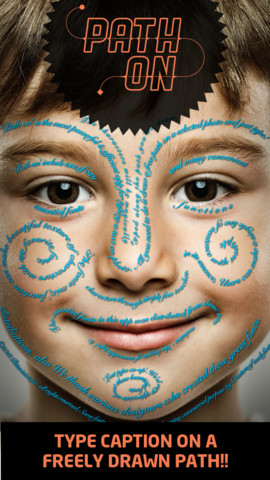
FREE today – Path On, a must-have app with many creative uses!! What does Path On do? It permits you to put text in a path across photos from your albums or taken with your device’s camera. It’s extremely simple to use. Text can be typed in a free path, square, circle, paragraph or spiral. You can also change font styles, colors, and effects. Path On is classified as a photo & video app but there are so many possibilities for using this app in education. Kids could type descriptions of themselves on their pictures, write poetry to go with an image, take photos then point out geometric shapes found in their environment, write a thank you note on a picture of them with the gift, create a timeline by using a series of pictures, create a travel log of the family vacation, and on and on and on. Creations can be saved and shared via Facebook, Instagram, Flickr, Twitter & email. WOW – what a fabulous tool!!

Path on - Peta Vision

0

Smart White Board HD

super white board

FREE – Smart White Board HD, an educational app that is super simple to use! One finger writes, 2 fingers erase, 3 fingers clears all. Press the save button or shake your device to save an image. Writing can be done in black, blue, or red with 3 Width choices. The app also includes a simple voice recorder. Just press record, talk, stop & name your file, and it is saved to a list. You can then email your recording if you wish to share it. Teachers can get rid of their classroom whiteboards, markers, and erasers! Have kids show their work, explain their thoughts, etc. with this simple educational app!

Smart White Board HD - Pad read

0

Trading Cards

trading cards

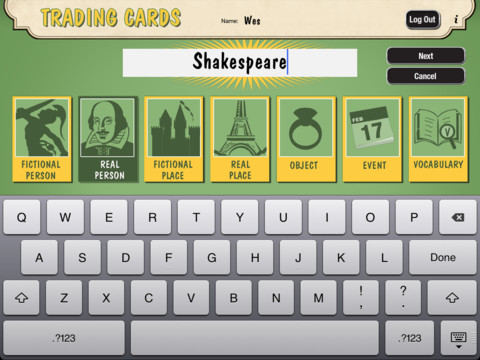
Fabulous educational app!!! ReadWriteThink’s Trading Cards is powerful FREE app developed by the International Reading Association. This educational app provides a unique way for kids to share their understanding of topics, generate their own study aids, create a fictional world to use in their writing, make their own trading cards, and more. There are 7 categories of cards available within the app: fictional person, real person, fictional place, real place, object, event, and vocabulary. Kids start by choosing a category and typing in the title of the card. Each category has specific questions which help kids create information-rich trading cards. Images can be added by using the device’s camera or by accessing pictures in the photo library. Kids can also sort their cards into collections such as characters from a book, heroes or villains, landmarks, the 50 states, vocabulary by subject, etc. The possibilities are endless! Cards can be shared via email, saved to the photo library, or printed on a wireless printer. And… the kid appeal is tremendous. Kids will LOVE trading their cards with their classmates 🙂

Highly recommended!!

Trading Cards - International Reading Association

0

gFlash+ Flashcards & Tests

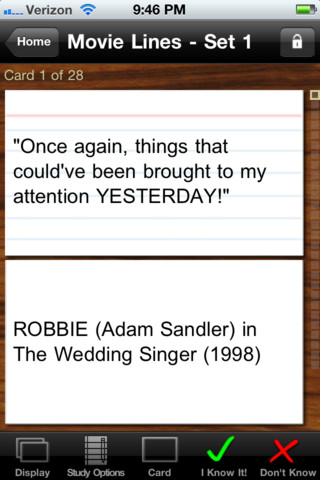
GFlash+ Flashcards & Tests is currently FREE. This educational app allows you to create, download, and manipulate flashcards for everything that you can imagine. You can create your cards in a Google docs spreadsheet and download it into the app or you can create your cards within the app. There is no limit on how many card sets you can have. Card sets created by leading educational publishers (Kaplan, Barron’s, McGraw-Hill, Wiley Publishing, etc.) are available as in-app purchases. You can also download and share sets from the gWhiz catalog. You must have an active wireless connection to download card sets or to use card sets with videos.

Once you have your cards ready, studying becomes simple. First choose box configuration or classic configuration. Both configurations keep track of the cards that are known & unknown. The box configuration has an unknown box, a known box, and a mastered box. As you go through the cards, the app keeps track of how many cards are in each box. In the classic mode, there is line of small cards on the right side of the screen. If you know a card, the little card turns green and if you do not know it, it turns read. It’s a nice visual for younger kids. A study score (percentage) is also given. Teachers of younger students could create the cards in Google docs for kids to download and study. This app is such a valuable tool for students of all ages to use in so many ways. I wish it would have been available when my kids were studying for the SAT and GRE. 🙂

Highly recommended!

gFlash+ Flashcards & Tests - gWhiz, LLC

0

Doodle Buddy – Paint, Draw, Scribble, Sketch – It’s Addictive

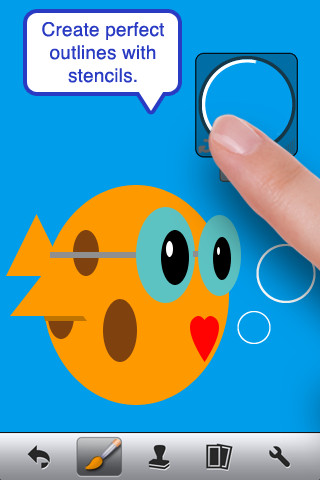
FREE – Doodle Buddy (for the iPhone/iPad), a great educational app for drawing and creating pictures. It comes with five kinds of tools. The drawing tool has several options – a brush, chalk, glitter, smudge, an eraser, and a color picker with thousands of colors. The stamper tool includes 80+ stamps with the option of making them small or large. Each stamper makes a funny sound when used. The stencil tool comes 6 stencils (basic shapes) with the option to buy other sets as an in-app purchase. Sets available to purchase are theme-based such as fashion, beach, cars, princess, dinosaurs, Christmas, and more. The text tool has 4 fonts with the ability to resize them. Text can be written in any color you choose. The background tool has about 30 backgrounds to choose from or you have the ability to pull in your own photos. Armed with such great tools, you can only imagine the fun you or your child will have creating a works of art! And…. the finished masterpieces can be saved to your photo album and/or shared via email. Fun!!!

There are so many fun ways to use this app. Kids can use it to illustrate their stories because saved illustrations can easily be pulled into a story writing app such as My Story – see my review from June 27. Have kids draw pictures of their vacation then save into photos and use as additional pictures or backgrounds for a photo vacation booklet created on Snapfish, etc. Make a book for Father’s Day, Mother’s Day, a grandparent, etc. – incorporating your child’s drawings and family photos. If creating a family cookbook, have kids do the illustrations. The list goes on……

Highly recommended!

Doodle Buddy for iPad – Paint, Draw, Scribble, Sketch – It’s Addictive! - Pinger, Inc.