0

Tellagami

Telegami

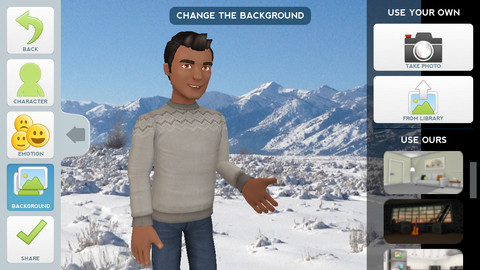
Currently FREE, Tellagami (rhymes with origami) is a unique storytelling app. Short stories called gamis are easy to create. First you select and customize a character by choosing his/her skin tone, eye color, hair color, and clothing. Then you choose an emotion – happy, sad, surprised, angry, scared, silly. Next you choose a background from the app, from your photo library, or create one by using your camera. You are now ready to create your gami. You can record your gami in you own voice or choose the text button to type in what your character will say  – the limit is 450 characters. Gamis can be shared via email, messaging, Facebook, or Twitter.

This educational app is fabulous!! Its uses are only limited by your imagination!! Kids can use gamis to introduce themselves at the beginning of the year. They can customize gamis to look like themselves and be reporters, scientists, teachers, etc. They can create the character (and setting) from a book they are reading. They can message or email a parent to explain what they are learning in class. Teachers could use gamis as interactive exit slips. The list is endless. Kids will LOVE creating gamis!

Tellagami ™ - Tellagami Inc.

0

Teacher Clicker – Socrative / Student Clicker – Socrative

Still FREE and now even better!! Socrative has added two additional quiz features: # 1 – Teachers can now add images to their questions. #2 – The system can now grade short answer questions. Teachers just input the acceptable answers and the system does the rest.  🙂

This website and app are unbelievably cool – they turn any device with a web browser (iPhone, iPad, laptops) into a student response clicker. If a teacher has access to any kind of wireless lab, he/she can engage the entire class in a game or quiz and watch the results in real-time. Teachers begin by using their teacher app or logging into t.socrative.com with their email and password. Once logged in, teachers are assigned a room number to share with their students. Students log in using their student app or at m.socrative.com and enter the “virtual room number” provided by the teacher. Teachers initiate an activity and students respond on their devices. Multiple choice and short answer quizzes are easy to create – types of questions can be mixed. Teachers can also choose to run the quiz as a Space Race game. The students’ responses are visible to the teacher in real-time. Teachers can see what each child answered individually as well as what the group answered collectively. And the best part is… the app grades, graphs the results, and generates a report as an Excel spreadsheet or an email.

What a powerful tool for teachers – a short quiz at the end of a lesson can pinpoint what students understand and what needs to be reviewed. Hours of grading and analyzing test results are done immediately. Every student is involved – wow!

Highly recommended!

Teacher app Teacher Clicker - Socrative - Socrative           Student app Student Clicker - Socrative - Socrative

0

MyCQs (Multiple Choice Questions)

test maker

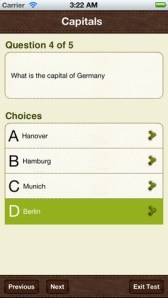
Create multiple choice quizzes/tests with this FREE educational app  – My CQs (Multiple Choice Questions). Teachers/parents can create multiple choice tests (with pictures, explanations, and unlimited questions) to help kids learn or review any subject. Since the app includes 6 lessons on how to write good multiple choice questions, older students can learn to create their own quizzes to help them study. Once a quiz/test has been created, kids can take and retake it and the app tracks their growth over time. Tests can also be shared with other members of the MyCQs community. LOTS of possibilities for using this app with every age-group of students!

My CQs (Multiple Choice Questions) was featured in The Guardian’s ‘Best iOS Apps This Week’, and listed in: Top 10 Free Education Apps – US, Top 10 Free Education Apps – Canada, Top 5 Free Education Apps – India, Top 30 Free Education Apps – UK.

MyCQs (Test Maker) - James Gupta

0

Move & Match

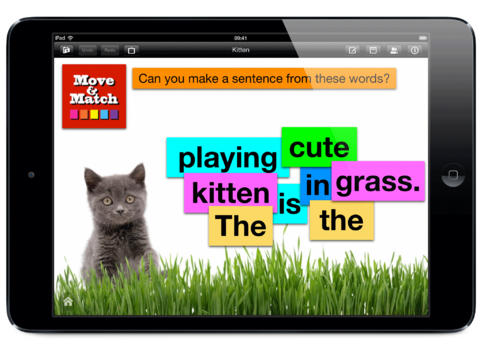
move & matchFREE for a limited time – Move & Match, an educational app that can be used by teachers, parents, or students to create simple activity cards for others to complete. The app is very easy to use. Teachers can create activity cards and send them to other iPads that have Move & Match installed. There is a wide variety of uses for this app – match beginning letters to pictures, reorder the words of a sentence, Cloze activities, reorder timelines, etc. Once projects have been created, you can save them in the Move and Match folder for future use. Projects can also be shared via email. This app would be especially nice for small group instructors or speech pathologists who could use it to create personalized activities for their students. The app permits you to use your own photos which would be fun. Kids love working on activities that are about them. 🙂 Lots of possibilities for this one!

Download link: https://itunes.apple.com/us/app/move-and-match/id564592203?mt=8&uo=4

0

ClassDojo

ClassDojo is a FREE & fabulous tool that helps improve classroom behaviors. Teachers are using it in different ways: to give feedback in real-time, to track behavior, and to generate reports. Reward good behavior in real-time – all it takes is a click. You need one device (computer, smartphone, a laptop, or a tablet) and an internet connection. It is very easy to set up with your class list. Each student is assigned a cute, monster-like avatar. Kids earn points for positive behaviors and lose points for negative behaviors. ClassDojo is also fully customizable so you can delete behaviors from the original list and/or add your own behaviors. As you use it, it automatically logs any data that you input. This data can be used to generate behavior reports to share with parents and administrators. How awesome is that? You can go into a meeting/conference with reports in hand!

If I were still in the classroom, I would enter my class list twice – once for data on work/study habits and the other for data on behaviors. I would make my habits/behaviors match exactly what was on my report cards. Then as I used the app, I would also be gathering data for my report cards. At the end of the grading period, I would just print out the date and enter it on the report cards – how easy!  I would also have the data (in a printed report) to be able to back up any grade on the card.  “As you can see Mrs. Doe, Jane only turned in her homework 56% of the time.”  Instant data would also be available for the RTI process, IEPs or any other team meeting on a child. Wow – a fabulous educational app!!

Check out the website for more information: www.classdojo.com

Highly recommended !!

ClassDojo - Class Twist Inc

0

Sandbox Web Browser & RabbleBrowser from Float Mobile Learning

FREE for a limited time – 2 web browsing tools from Float Mobile Learning. Check them out while they are FREE. 🙂

sandbox

Sandbox Web Browser allows teachers/administrators to customize the appearance of the user interface on students’ devices. By using Sandbox, teachers can restrict students to a predetermined list of websites (called a whitelist) – perfect for classroom research. Bookmarks for approved sites can also be added. A passcode is set to prevent students from changing the settings. Sandbox also returns to a preset home page when the device goes idle. This app can be used to configure an individual device or it can be used to configure multiple devices by using a property list file. The app includes extensive instructions for configuring Sandbox to meet the specific your needs. It also includes instructions for restricting access to Safari, the App Store, You Tube, and other built-in apps through your device.

Download link: https://itunes.apple.com/us/app/sandbox-web-browser/id562054411?mt=8&uo=4

rabble

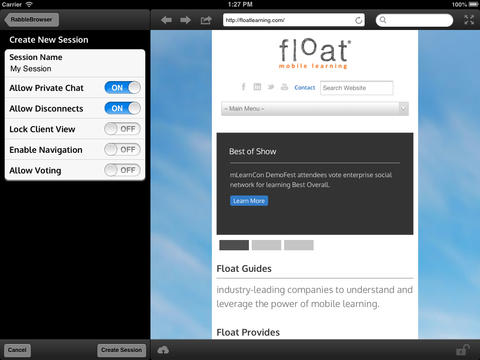
RabbleBrowser is a collaborative web browsing and file sharing tool. A teacher or student leader can facilitate a shared web-browsing/file-sharing experience with an unlimited number of locally-connected others in their group. Other features of this app include: integrating chats, saving bookmarks, sharing of personal files, social sharing via email/Facebook/Twitter, and printing. This app looks fantastic for teacher collaboration – meetings, professional development days, college classes, etc.

Download link: https://itunes.apple.com/us/app/rabblebrowser/id432616026?mt=8&uo=4

0

Team Shake

Team Shake

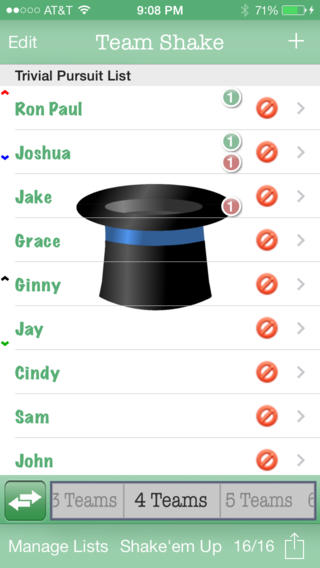
FREE for a limited time – Team Shake, a tool that helps select teams for games, sporting events, tournaments, school projects, etc. If you have to put people in groups, this is the app for you. 🙂 You can easily create 1 –  64 teams. First, enter the names of the participants by using the keyboard or by importing a file. Then set each student’s gender and level of strength. Temporarily disable the names of people who are absent then literally shake the your device (or press the shake button.) The app generates color-coded balanced teams. There are all sorts of additional features that let you customize this app to fit your needs. You can set groups of people to always be on the same team, set groups of people to always be on different teams, create teams where all players have the same strength, and more. I would enter my class multiple times by subject so that I could set the levels strength for each area. Very cool educational tool for teachers, coaches, and anyone else who works with groups!

Download link: https://itunes.apple.com/us/app/team-shake/id390812953?mt=8&uo=4

0

Smart White Board HD

super white board

FREE – Smart White Board HD, is super simple to use! One finger writes, 2 fingers erase, 3 fingers clears all. Press the save button or shake your device to save an image. You can write in black, blue, or red and in 3 thicknesses. The app also includes a simple voice recorder. Just press record, talk, stop & name your file, and it is saved to a list. You can then email your recording if you wish to share it. Teachers can get rid of their classroom whiteboards, markers, and erasers! Have kids show their work, explain their thoughts, etc. with this simple educational app!

Smart White Board HD - Pad read

0

Comic Book

Comic Book

On sale for only $.99 – Comic Book. This app was named Best Photo App of 2011 and was the App of the Week in 12 different countries! Using the app’s selection of image filters, comic fonts, customizable captions, classic comic graphics and page layouts, you can easily change your photos into comics. So many creative uses for the classroom!! Download now, brainstorm uses for this educational app later!!

ComicBook! - 3DTOPO Inc.

0

Cool Writer

Cool Writer

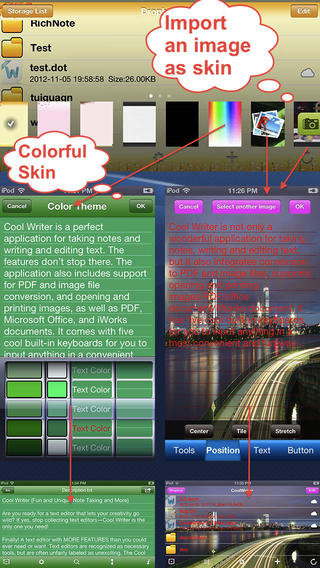
Free today – Cool Writer – Awesome Writing & Note Taking App and that it is! This educational app comes with 5 built-in keyboards to make writing and note taking fun. They are: Special Characters Keyboard with 2000 special characters, Emoji Keyboard with 471 emoticons, Article Keyboard with 400 popular characters/emoji article pictures, Crazy Text Keyboard with fun features like ‘upside-down’ letters, and Shortcut Keyboard that you can personalize. The app has 12 themes or you can create your own theme using images from your photo album. With it you can create, rename, delete, copy, and move your notes. You can also sort them by name, size, type, or time. There is even as search option. This app also converts text files to PDF or image format.

I visualize using this app as a digital version of the 5-subject notebook – kids could keep track of their class notes for all subjects in their device. It syncs with Dropbox so they can also access class notes at home. Teachers could share notes with students and vice versa. This app could be used to write exit slips at the end of a lesson and emailed to the teacher. Or, a teacher could assign reading/note taking for homework then have kids email the completed notes. Lots of possibilities here and slick enough that kids would probably enjoy using it – VERY cool!

Download link: https://itunes.apple.com/us/app/cool-writer-awesome-writing/id477698296?mt=8&uo=4