0

Teacher Clicker – Socrative / Student Clicker – Socrative

Still FREE and now even better!! Socrative has just added two additional quiz features: # 1 – Teachers can now add images to their questions. #2 – The system can now grade short answer questions. Teachers just input the acceptable answers and the system does the rest.  🙂

This website and app are unbelievably cool – they turn any device with a web browser (iPhone, iPad, laptops) into a student response clicker. If a teacher has access to any kind of wireless lab, he/she can engage the entire class in a game or quiz and watch the results in real-time. Teachers begin by using their teacher app or logging into t.socrative.com with their email and password. Once logged in, teachers are assigned a room number to share with their students. Students log in using their student app or at m.socrative.com and enter the “virtual room number” provided by the teacher. Teachers initiate an activity and students respond on their devices. Multiple choice and short answer quizzes are easy to create – types of questions can be mixed. Teachers can also choose to run the quiz as a Space Race game. The students’ responses are visible to the teacher in real-time. Teachers can see what each child answered individually as well as what the group answered collectively. And the best part is… the app grades, graphs the results, and generates a report as an Excel spreadsheet or an email.

What a powerful tool for teachers – a short quiz at the end of a lesson can pinpoint what students understand and what needs to be retaught. Hours of grading and analyzing test results are done immediately. Every student is involved – wow!

Highly recommended!

Teacher app Teacher Clicker - Socrative - Socrative           Student app Student Clicker - Socrative - Socrative

0

Tellagami

Telegami

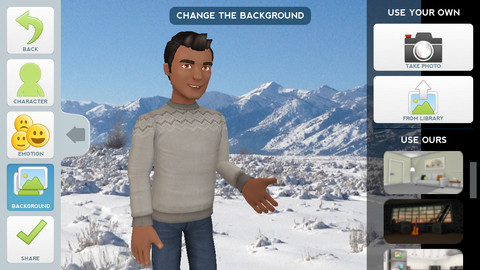
Currently FREE, Tellagami (rhymes with origami) is a unique storytelling app. Short stories called gamis are easy to create. First you select and customize a character by choosing his/her skin tone, eye color, hair color, and clothing. Then you choose an emotion – happy, sad, surprised, angry, scared, silly. Next you choose a background from the app, from your photo library, or create one by using your camera. You are now ready to create your gami. You can record your gami in you own voice or choose the text button to type in what your character will say  – the limit is 450 characters. Gamis can be shared via email, messaging, Facebook, or Twitter.

This educational app is fabulous!! Its uses are only limited by your imagination!! Kids can use gamis to introduce themselves at the beginning of the year. They can customize gamis to look like themselves and be reporters, scientists, teachers, etc. They can create the character (and setting) from a book they are reading. They can message or email a parent to explain what they are learning in class. Teachers could use gamis as interactive exit slips. The list is endless. Kids will LOVE creating gamis!

Tellagami ™ - Tellagami Inc.

0

Speech Journal

Speech Journal

FREE again for a limited time – Speech Journal. Parents, teachers, and speech pathologists will love this customizable voice recorder that allows recorded messages to be paired with imported images. This educational app is very easy to use. First the child creates a profile to store and save recordings. Then he/she chooses an image – by using the device’s camera or from the photo library. Next the voice recording is added. When completed, the child may listen to the recording, erase and rerecord it, or save the recording. Additional recordings can be added to create a slideshow. Recordings can be shared with other teachers, parents, grandparents, etc. via email. Suggested uses for Speech Journal include: customized picture sequences, expressive language exercises, articulation drills, multi-step directions, picture schedules, family picture albums, and more! A fabulous resource with so many uses. 🙂

Speech Journal - Mobile Education Store LLC

0

Popboardz

Popboardz

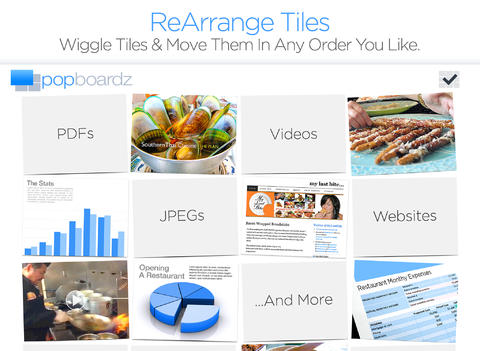
Recently updated and FREE for a limited time – Popboardz, a productivity tool that normally sells for $4.99.  Popboardz makes it easy to organize, store, and present information. Each board is a grid with 16 spaces for content so that all of your PDFs, images, videos, websites, can be arranged on one screen. Unlike other presentation tools, Popboardz makes it easy to customize your presentation to meet the needs of your group. Just click on the grid space that contains the example, information, or link that you would like present next! It’s easy to skip around. This app would be fabulous to use in the classroom. A teacher could organize all his/her digital resources for a unit on one board. That board can be saved so it is always ready to present! It is also easy to edit and/or rearrange boards so that lessons can be tweaked as new resources become available. Students could also use Popboardz – to organize information, to present projects, to give reports, and more. What a great educational app!

Download link: https://itunes.apple.com/us/app/popboardz/id563989511?mt=8&uo=4

0

ClassDojo

Start out your school year with ClassDojo, a FREE & fabulous tool that helps improve classroom behaviors. Teachers are using it in different ways: to give feedback in real-time, to track behavior, and to generate reports. Reward good behavior in real-time – all it takes is a click. You need one device (computer, smartphone, a laptop, or a tablet) and an internet connection. It is very easy to set up with your class list. Each student is assigned a cute, monster-like avatar. Kids earn points for positive behaviors and lose points for negative behaviors. ClassDojo is also fully customizable so you can delete behaviors from the original list and/or add your own behaviors. As you use it, it automatically logs any data that you input. This data can be used to generate behavior reports to share with parents and administrators. How awesome is that? You can go into a meeting/conference with reports in hand!

If I were still in the classroom, I would enter my class list twice – once for data on work/study habits and the other for data on behaviors. I would make my habits/behaviors match exactly what was on my report cards. Then as I used the app, I would also be gathering data for my report cards. At the end of the grading period, I would just print out the date and enter it on the report cards – how easy!  I would also have the data (in a printed report) to be able to back up any grade on the card.  “As you can see Mrs. Doe, Jane only turned in her homework 56% of the time.”  Instant data would also be available for the RTI process, IEPs or any other team meeting on a child. Wow – a fabulous educational app!!

Check out the website for more information: www.classdojo.com

Highly recommended !!

ClassDojo - Class Twist Inc

0

Pic Collage

Pic Collage

FREE with in-app purchases – Pic Collage, a fabulous app for creating collages! With PicCollage you easily create creative collages with your pictures and/or pictures from the internet. You can change photos into backgrounds, clip them into cutouts, apply filters, add borders, and more! You can also add stickers and text.  So many fun uses of this app for education – have students make a Pic Collage to introduce themselves at the start of the year, send students on a scavenger hunt of geometric shapes then have them make a Pic Collage of what they found, add a PIc Collage to a science report, Make a Pic Collage representing the main character of a book, etc. The list is only limited by your imagination! I LOVE educational apps like this – open-ended with great potential for creativity! WOW!!

Download link: https://itunes.apple.com/us/app/pic-collage/id448639966?mt=8&uo=4

0

Artkive

Now that it is summer, you may want to create a digital book of your child’s latest year in school. You can use Artkive, a productivity app, to do so. You may have heard of  this app because it has been featured on THE TODAY SHOW and in Real Simple magazine.

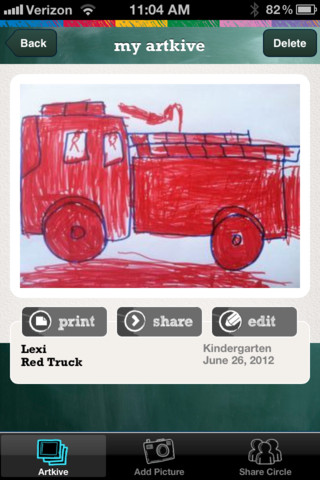
Artkive makes it easy to digitally store, share, and print your children’s artwork/schoolwork. Originally released on August 11, 2012  – this app for the iPhone/iPad is FREE again. It is very easy to use…. First you create an account. Then enter the first names of your children. Take photos of their artwork/schoolwork or upload existing photos from your camera roll. Tag the photo with a child’s name, age or grade, the date, and a title. So simple! You can then share their art with family & friends. You will also be able to have Artkive create digital books & other products using your child’s artwork/schoolwork. You can even order a few holiday presents while you’re at it. 🙂 Artkive makes it easy to collect, store, and share your children’s artwork.

What a great idea! As a parent, you can use it to create books for your children, of any age. I plan to make gift books for my adult children of the art/work that I have saved for years – yay, no more clutter!! As a teacher, you could use it to create digital portfolios of children’s work. Lots of possibilities with this one…. try it yourself while it is free!

To learn more @ http://www.artkiveapp.com/

Recommended!

Artkive - The Kive Company

0

ClassDojo

Recently updated, ClassDojo is a FREE & fabulous tool that helps improve classroom behaviors. Teachers are using it in different ways: to give feedback in real-time, to track behavior, and to generate reports. Reward good behavior in real-time – all it takes is a click. You need one device (computer, smartphone, a laptop, or a tablet) and an internet connection. It is very easy to set up with your class list. Each student is assigned a cute, monster-like avatar. Kids earn points for positive behaviors and lose points for negative behaviors. ClassDojo is also fully customizable so you can delete behaviors from the original list and/or add your own behaviors. As you use it, it automatically logs any data that you input. This data can be used to generate behavior reports to share with parents and administrators. How awesome is that? You can go into a meeting/conference with reports in hand!

If I were still in the classroom, I would enter my class list twice – once for data on work/study habits and the other for data on behaviors. I would make my habits/behaviors match exactly what was on my report cards. Then as I used the app, I would also be gathering data for my report cards. At the end of the grading period, I would just print out the date and enter it on the report cards – how easy!  I would also have the data (in a printed report) to be able to back up any grade on the card.  “As you can see Mrs. Doe, Jane only turned in her homework 56% of the time.”  Instant data would also be available for the RTI process, IEPs or any other team meeting on a child. Wow – a fabulous educational app!!!!

Check out the website for more information: www.classdojo.com

Highly recommended !!

ClassDojo - Class Twist Inc

0

Art Mail

Artmail

FREE again for a limited time! Add a personal touch to your emails with Artmail, an app for writing and sending handwritten notes. This app is not billed as an educational app but it could/should be. 🙂 The app features several choices of stationery plus the option of using your camera to create a unique background. The writing is a brush style (similar to a fountain pen) with several color options. But the best part of this app is the scaling feature – which makes this app great for kids. Users can fill up the entire screen and the app automatically shrinks the word/words to fit in a letter format. Subsequent words are shrunk to match the size of the other words. A red cursor can be moved around to change the location of the words. Little hands will be able to write thank you notes to grandparents or to add a note of explanation to a photo. In the classroom, teachers could use it is SO many ways – for good copies of their writing, to communicate with parents, as an exit slip after a lesson, etc. I LOVE that this app preserves the child’s writing!! Very cool app – perhaps an upgrade will include the ability to pull in pictures from the photo library which would make it even better!!

ArtMail - Wen Yun Rong

0

Tellagami

Telegami

Currently FREE, Tellagami (rhymes with origami) is a unique storytelling app. Short stories called gamis are easy to create. First you select and customize a character by choosing his/her skin tone, eye color, hair color, and clothing. Then you choose an emotion – happy, sad, surprised, angry, scared, silly. Next you choose a background from the app, from your photo library, or create one by using your camera. You are now ready to create your gami. You can record your gami in you own voice or choose the text button to type in what your character will say  – the limit is 450 characters. Gamis can be shared via email, messaging, Facebook, or Twitter.

The educational app is fabulous!! Its uses are only limited by your imagination!! Kids can use gamis to introduce themselves at the beginning of the year. They can customize gamis to look like themselves and be reporters, scientists, teachers, etc. They can create the character (and setting) from a book they are reading. They can message or email a parent to explain what they are learning in class. Teachers could use gamis as interactive exit slips. The list is endless. Kids will LOVE creating gamis!

Tellagami ™ - Tellagami Inc.