0

Paper Camera

Paper Camera

FREE today only – Paper Camera, an app that permits you to add special effects to your photos in real-time. Just open the app, choose camera or video, then choose one of the 12 special effects – comic boom, sketch up, acquarello, old printer, con tours, neon cola, bleaching, gotham noir, half ton, granny’s paper, pastel perfect or andy pop. The effects are applied to your photo as you make the shot! You can point you camera at a scene and toggle between effects to decide which one to use. The app also permits you to “paper-ize” existing photos from your photo library/camera roll. Very slick!!

SO many educational ideas for this app… Video your kids playing using the cartoon mode. Add special effects to digital artwork. Create party invitation using the andy mode. The list could go on and on – so creative!!


Paper Camera - JFDP Labs Limited

0

Halftone

Half Tone

Halftone was FREE over the weekend but is now back to $.99. Named by Apple as a favorite photo app of 2011, Halftone makes it easy to turn your photos into vintage-looking comics that your friends and family will love!  It’s simple to add paper styles, captions, speech balloons, graphic stamps, and fonts to your photos. Because it is so easy to use, this app would be great for creating the art to go with classroom projects – for stories, book reports, newsletters, etc. Lots of creative uses for this educational app!

Keep reading my blog to find out when this app goes FREE again!

Halftone - Juicy Bits

1

ToonCamera

ToonCamera

FREE for a limited time – ToonCamera, a very cool photography app that turns photos and videos into cartoons. Using this app you can apply real-time cartoon effects to record videos, snap photos, or convert existing videos/photos. Your artistic creations can be saved or shared through email, Facebook, Twitter, Flickr, Tumblr, Instagram, and YouTube. There are multiple effects that you can apply to your photos – cartoon, pencil, stipple, & ink. Easy to use, this app would be great for creating the art to go with classroom projects – for stories, book reports, newsletters, etc. VERY COOL!!

ToonCamera - Code Organa

0

Homework+

Homework+

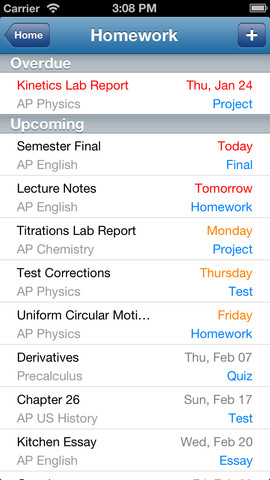
FREE again, for a limited time – Homework+, a simple to use homework/test planner. This educational app is geared towards older students who are taking multiple classes. It could also be used with younger kids as an electronic assignment book. It’s never too early to teach kids how to be organized. 🙂

To set up the app, first edit the subject list & category lists to reflect what you are studying. After that, it is very easy to add assignments to the calendar – just give the assignment a title, choose the subject & category, put in the due date, choose a level of priority, and save. As you finish an assignment, mark it as complete and the app moves it to the finished list. App badges show you how many assignments you have and how many you have finished. Notifications can be set (1 or 2 days before) to remind you of an upcoming assignment. The app also keeps track of overdue assignments. Very slick and intuitive – great for teaching kids to be organized!!

Homework+ - Chijang Huang

0

Bitsboard Pro – Education, Games, and Flashcards for Learning Reading, Spelling, and more

Bitsboard

Just yesterday, I reviewed Bitsboard and today Bitsboard Pro is FREE for a limited time. Both versions are ideal for teaching languages, vocabulary, sight words, spelling, and more. However, Bitsboard Pro has many more options than the FREE version. It has 10 games – the 3 in the FREE version: Flashcards (10,000+ free flash cards with fully customizable settings), Explore (reviews all flashcards), and Photo Touch (spot the correct item game) PLUS… the 7 games that are in-app purchases in the FREE version. Both educational apps are easy to use and fully customizable so that you can use them to create games for whatever you are teaching. And, you can see that people have done just that because within the app you have access to the Bitsboard catalog. It includes thousands of flashcards with lessons covering a variety of topics. If all of that hasn’t convinced you that you need this app, this feature certainly will – Bitsboard Pro supports multiple users and keeps track of their progress!!

Recommended – a great app with loads of potential!!

Bitsboard PRO - The Best Educational Games and Flash Cards in 1 App - GrasshopperApps.com

0

Bitsboard – Education, Games, and Flashcards for Learning Reading, Spelling, and more

Bitsboard

Bitsboard is a FREE app for education with so many uses – it’s ideal for teaching languages, vocabulary, sight words, spelling, and more.The app comes with three games: Flashcards (10,000+ free flash cards with fully customizable settings), Explore (reviews all flashcards), and Photo Touch (spot the correct item game). There are 7 additional games available as in-app purchases. Bitsboard is easy to use and fully customizable so you can use it to create games for whatever you are teaching. And, you can see that people have done just that because the app includes FREE access to the Bitsboard catalog which includes thousands of flashcards with lessons covering a variety of topics. If all of that hasn’t convinced you that you need this educational app, this feature certainly will –  Bitsboard supports multiple users and keeps track of their progress!!

Recommended – a great app with loads of potential!!

Bitsboard - Education, Games, and Flashcards for Learning Reading, Spelling, and more - GrasshopperApps.com

0

Artkive

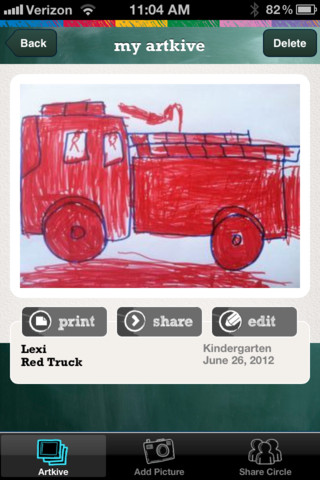
Now that it is almost summer, you may want to create a digital book of your child’s latest year in school. You can use Artkive, a productivity app, to do so. You may have heard of  this app because it has been featured on THE TODAY SHOW and in Real Simple magazine.

Artkive makes it easy to digitally store, share, and print your children’s artwork/schoolwork. Originally released on August 11, 2012  – this app for the iPhone/iPad is FREE again. It is very easy to use…. First you create an account. Then enter the first names of your children. Take photos of their artwork/schoolwork or upload existing photos from your camera roll. Tag the photo with a child’s name, age or grade, the date, and a title. So simple! You can then share their art with family & friends. You will also be able to have Artkive create digital books & other products using your child’s artwork/schoolwork. You can even order a few holiday presents while you’re at it. 🙂 Artkive makes it easy to collect, store, and share your children’s artwork.

What a great idea! As a parent, you can use it to create books for your children, of any age. I plan to make gift books for my adult children of the art/work that I have saved for years – yay, no more clutter!! As a teacher, you could use it to create digital portfolios of children’s work. Lots of possibilities with this one…. try it yourself while it is free!

To learn more @ http://www.artkiveapp.com/

Recommended!

Artkive - The Kive Company

0

Homework+

Homework+

FREE for a limited time – Homework+, a simple to use homework/test planner. This app is geared towards older students who are taking multiple classes. It could also be used with younger kids as an electronic assignment book. It’s never too early to teach kids how to be organized. 🙂

To set up the app, first edit the subject list & category lists to reflect what you are studying. After that, it is very easy to add assignments to the calendar – just give the assignment a title, choose the subject & category, put in the due date, choose a level of priority, and save. As you finish an assignment, mark it as complete and the app moves it to the finished list. App badges show you how many assignments you have and how many you have finished. Notifications can be set (1 or 2 days before) to remind you of an upcoming assignment. The app also keeps track of overdue assignments. Very slick and intuitive – great for teaching kids to be organized!!

Homework+ - Chijang Huang

0

Speech Journal

Speech Journal

FREE again for a limited time – Speech Journal. Parents, teachers, and speech pathologists will love this customizable voice recorder that allows recorded messages to be paired with imported images. The app is very easy to use. First the child creates a profile to store and save recordings. Then he/she chooses an image – by using the device’s camera or from the photo library. Next the voice recording is added. When completed, the child may listen to the recording, erase and rerecord it, or save the recording. Additional recordings can be added to create a slideshow. Recordings can be shared with other teachers, parents, grandparents, etc. via email. Suggested uses for Speech Journal include: customized picture sequences, expressive language exercises, articulation drills, multi-step directions, picture schedules, family picture albums, and more! A fabulous resource with so many uses 🙂

Speech Journal - Mobile Education Store LLC

0

MyScript Calculator

myscript

Just named by Apple as 1 of  10 Apps That WOW and FREE  – MyScript Calculator is an amazing app. It performs mathematical operations literally by hand! You write the problem … it solves the problem! The app is very simple to use. Just write the mathematical equation on the screen. MyScript technology converts the symbols and numbers to digital text and delivers the answers. It supports the following operations: basic operations (+, -, x, ÷, +/‒, 1/x), additional operations ( %, √, x!, |x|), powers/exponentials (ℯx, xy , x2), trigonometry, and more. Very cool!! MyScript Calculator also won the Mobile App Showdown at CES 2013!!

MyScript Calculator - Vision Objects