0

ScreenChomp

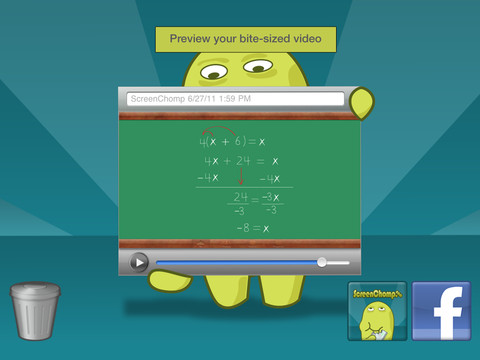
ScreenChomp is a powerful tool that can be used in so many ways and it’s FREE!! It is basically turns your iPad into a recordable whiteboard. You can use it to sketch out and record ideas for yourself or to share with others. Teachers can send tutorial videos home with kids. Kids can create videos to help each other. The possibilities for this app are only limited by one’s imagination.

Here is a link to a You Tube video that explains how it works: What is ScreenChomp? The iPad app to Record. Sketch. Share! – YouTube.

Highly recommended!

ScreenChomp - TechSmith Corporation

0

Smart White Board HD

super white board

FREE whiteboard app, Smart White Board HD, is super simple to use! One finger writes, 2 fingers erase, 3 fingers clears all. Press the save button or shake your device to save an image. You can write in black, blue, or red and in 3 thicknesses. The app also includes a simple voice recorder. Just press record, talk, stop & name your file, and it is saved to a list. You can then email your recording if you wish to share it. Teachers can get rid of their classroom whiteboards, markers, and erasers! Have kids show their work, explain their thoughts, etc. with this simple app!

Smart White Board HD - Pad read

0

Teacher Clicker – Socrative / Student Clicker – Socrative

Still FREE and now even better!! Socrative has just added two additional quiz features: # 1 – Teachers can now add images to their questions. #2 – The system can now grade short answer questions. Teachers just input the acceptable answers and the system does the rest.  🙂

This website and app are unbelievably cool – they turn any device with a web browser (iPhone, iPad, laptops) into a student response clicker. If a teacher has access to any kind of wireless lab, he/she can engage the entire class in a game or quiz and watch the results in real-time. Teachers begin by using their teacher app or logging into t.socrative.com with their email and password. Once logged in, teachers are assigned a room number to share with their students. Students log in using their student app or at m.socrative.com and enter the “virtual room number” provided by the teacher. Teachers initiate an activity and students respond on their devices. Multiple choice and short answer quizzes are easy to create – types of questions can be mixed. Teachers can also choose to run the quiz as a Space Race game. The students’ responses are visible to the teacher in real-time. Teachers can see what each child answered individually as well as what the group answered collectively. And the best part is… the app grades, graphs the results, and generates a report as an Excel spreadsheet or an email.

What a powerful tool for teachers – a short quiz at the end of a lesson can pinpoint what students understand and what needs to be retaught. Hours of grading and analyzing test results are done immediately. Every student is involved – wow!

Highly recommended!

Teacher app Teacher Clicker - Socrative - Socrative           Student app Student Clicker - Socrative - Socrative

0

Record of Reading

Record of Reading

Record of Reading by Clemson University is a FREE app that was just updated on April 2, 2013. The app provides an electronic form for taking running records (an assessment of oral reading developed by Marie M. Clay). The teacher still needs to do the coding and the analysis of the child’s reading. But… the app has formulas for accuracy and self-corrections embedded in it so that there is no need for a calculator!! The app also records the student’s voice as the teacher is taking the record. After the running record is completed, it can be saved and/or emailed! If you are an elementary school teacher who regularly uses running records, you are going to want to check this app out. 🙂

A fabulous tool for elementary teachers – thank you Clemson!!

Record of Reading - Clemson University

0

Speech Journal

Speech Journal

FREE again for a limited time – Speech Journal. Parents, teachers, and speech pathologists will love this customizable voice recorder that allows recorded messages to be paired with imported images. The app is very easy to use. First the child creates a profile to store and save recordings. Then he/she chooses an image – by using the device’s camera or from the photo library. Next the voice recording is added. When completed, the child may listen to the recording, erase and rerecord it, or save the recording. Additional recordings can be added to create a slideshow. Recordings can be shared with other teachers, parents, grandparents, etc. via email. Suggested uses for Speech Journal include: customized picture sequences, expressive language exercises, articulation drills, multi-step directions, picture schedules, family picture albums, and more! A fabulous resource with so many uses 🙂

Speech Journal - Mobile Education Store LLC

0

Use Your Handwriting GOLD

Use yourUse Your Handwriting

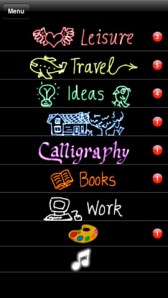
FREE today (normally $9.99) a “business” app called Use Your Handwriting GOLD. This app has LOTS of potential for classroom/kid use! It permits you to use your finger to write notes, messages, lists, etc. on your device (iPhone/iPad) screen. You can choose 5 different styles of writing in 22 different colors – there is even a rainbow option! Notes, lists, etc. are saved into categories – which you set. This app is great for kids because writing is not confined to a limited space – the app will move the writing to the left so a line can be completed. After “done” is tapped, the app shrinks the writing and adds it to the area above!

There are SO many uses for this app. Kids could use this app to take notes in class – choosing different color for each subject. They could write poetry in color! Teachers could have their students use this app to create exit slips. Or, students could use the app to take notes, respond to what they’ve read, etc. Younger students could practice their cursive writing with this app. Anything created in the app can be emailed/messaged to the teacher. At home, your kids can use the app to write thank you notes to grandparents which can be delivered via email or MMS. And the BEST part of this app is that it preserves the child’s drawings & handwriting! VERY cool!!

Use Your Handwriting GOLD - Gee Whiz Stuff

1

Phoster

Phoster

Phoster 2

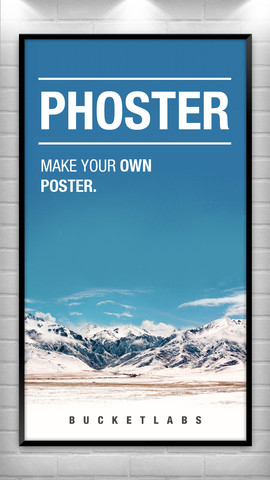
JUST named App of the Week and FREE for a limited time – Phoster is an app to create your own posters and invitations. The app includes 197 templates with a variety of designs. You can also use photos from your photo libraries or take new photos with your device’s camera. Background colors, fonts, font colors, brightness, saturation, size, position, etc. are all changeable. There are also many options for sharing your creation – Facebook, Twitter, Tumblr, and email. Kids could use this app to make posters advertising a book that they just read, a place they just studied, geometric shapes they just learned about, an animal they are reporting on, etc. – lots of creative uses for learning!!

Phoster - Bucket Labs

0

ClassDojo for Teachers

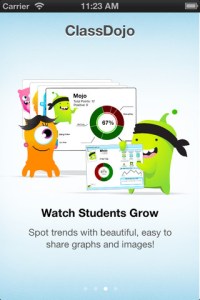
Recently updated, ClassDojo for Teachers is a FREE & fabulous tool that helps improve classroom behaviors. Teachers are using it in different ways: to give feedback in real-time, to track behavior, and to generate reports. Reward good behavior in real-time – all it takes is a click. You need one device (computer, smartphone, a laptop, or a tablet) and an internet connection. It is very easy to set up with your class list. Each student is assigned a cute, monster-like avatar. Kids earn points for positive behaviors and lose points for negative behaviors. ClassDojo is also fully customizable so you can delete behaviors from the original list and/or add your own behaviors. As you use it, it automatically logs any data that you input. This data can be used to generate behavior reports to share with parents and administrators. How awesome is that? You can go into a meeting/conference with reports in hand!

If I were still in the classroom, I would enter my class list twice – once for data on work/study habits and the other for data on behaviors. I would make my habits/behaviors match exactly what was on my report cards. Then as I used the app, I would also be gathering data for my report cards. At the end of the grading period, I would just print out the date and enter it on the report cards – how easy!  I would also have the data (in a printed report) to be able to back up any grade on the card.  “As you can see Mrs. Doe, Jane only turned in her homework 56% of the time.”  Instant data would also be available for the RTI process, IEPs or any other team meeting on a child. Wow !!!!

Check out the website for more information: www.classdojo.com

Highly recommended !!

ClassDojo - Class Twist Inc

0

Path On

Path On

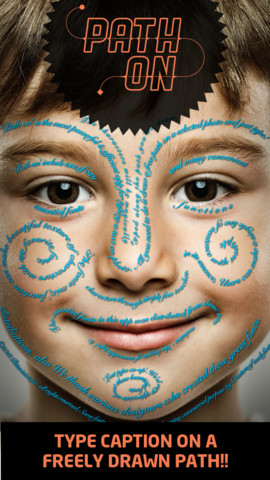
FREE today – a must-have app with many creative uses!! What does Path On do? It permits you to put text in a freely drawn path across photos from your albums or taken with your device’s camera. It’s extremely simple to use. Text can be typed in a free path, square, circle, paragraph or spiral. You can also change font styles, colors, and effects. Path On is classified as a photo & video app but there are so many possibilities for using this app in education. Kids could type descriptions of themselves on their pictures, write poetry to go with an image, photograph then explain geometric shapes found in their environment, write a thank you note on a picture of them with the gift, create a timeline by using a series of pictures, create a travel log of the family vacation, and on and on and on. Creations can be saved and shared via Facebook, Instagram, Flickr, Twitter & email. WOW – what a fabulous tool!!

Path on - Peta Vision

0

Speech Journal

Speech Journal

FREE for a limited time – Speech Journal. Parents, teachers, and speech pathologists will love this customizable voice recorder that allows recorded messages to be paired with imported images. The app is very easy to use. First the child creates a profile to store and save recordings. Then he/she chooses an image – by using the device’s camera or from the photo library. Next the voice recording is added. When completed, the child may listen to the recording, erase and rerecord it, or save the recording. Additional recordings can be added to create a slideshow. Recordings can be shared with other teachers, parents, grandparents, etc. via email. Suggested uses for Speech Journal include: customized picture sequences, expressive language exercises, articulation drills, multi-step directions, picture schedules, family picture albums, and more! A fabulous resource with so many uses 🙂

Speech Journal - Mobile Education Store LLC