0

Madagascar: My ABCs

Madagascar- My ABCs

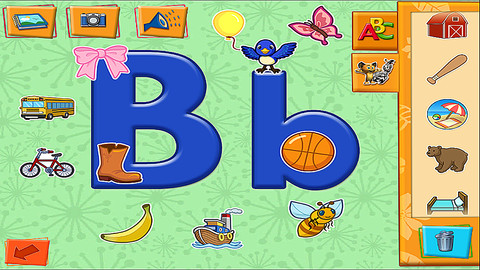
FREE for a limited time – Madagascar: My ABCs. If your preschooler is a fan of Madagascar, you may want to check out this educational app. It teaches letters (upper & lower case), letter sounds, and letter formation. There are also songs to sing and poems for each letter! Kids can create their own alphabet books with the help of 400+ stickers that reinforce beginning sounds. Kids can also travel on a field trips with Alex, Marty, Melman, and Gloria to tropical beaches, New York City, savannahs, and jungles in a fun game called Sticker Safari. Kids use their trusty binoculars to find hidden letter stickers. If you have more than one child, no problem – the app allows more than one child to play and save their work & progress. Fun for little ones. 🙂

Madagascar: My ABCs - Knowledge Adventure

0

Space Cakes

Space CakeSpace Cakes (an educational app) was released on April 25 and it is FREE – thanks to the support of Eli’s Cheesecake in Chicago. Kids use number sense and early math skills to complete intergalactic baking missions. They find themselves in a bakery filled with alien ingredients. They must follow a recipe to add the correct amount of each ingredient. Then they choose a 3D shape for their levitating batter and bake it. Next a topper, frosting, and sprinkles are added to finish their creations. Time for delivery – they steer the cake delivery spaceship back to Earth. Finally they celebrate their safe arrival with starburst, fireworks, and colorful confetti!  Kids can snap a photo of their creations to share them via email, save them in a gallery, or use them to inspire creative writing – descriptive paragraphs using math terms, a story about an intergalactic cake baking contest, etc. There is a section for parents/teachers which explains the educational value of the app and how it meets the CCSS. This app provides a fun way to work with math concepts AND a wonderful springboard for creative writing.

Space Cakes - Kids Bakery Game with Math and Numbers - Mrs. Judd's Games, LLC

0

Fraction Walls

Fraction Wall

FREE for a limited time – Fraction Wall, an app designed for small group or independent learning. This educational app has 4 sections: Teacher Tool, Complete the Wall, 2 Player Game, and Addition. The Teacher Tool can be used to show/discover equivalent fractions or it can be used to answer equivalent fraction problems. Complete the Wall has kids moving bricks on top of equivalent fractions. There are 4 levels: level 1 – halves and quarter; level 2 – halves, thirds, quarters and sixths; level 3 – halves, thirds; quarters fifths, sixths, tenths; level 4 – halves up to tenth. 2 Player Game has kids competing against each other to be the first to fill their wall of equivalent fractions. Addition has kids adding fractions to answer multiple choice questions. There is a clickable wall to help them visualize the answer if needed. This section also has 4 levels. The app can be customized to exclude more difficult fractions from the wall. This app would work well in the classroom – great for practicing and/or for using as a tool to visualize answers. Much more fun than a worksheet for practicing fractions!

Common Core Standards met:

3.NF.3 – Explain equivalence of fractions and compare fractions by reasoning about their size. Understand two fractions as equivalent (equal) if they are the same size. Recognize and generate simple equivalent fractions, e.g., 1/2 = 2/4, 4/6 = 2/3).

Fraction Wall - Aleesha Kondys

0

Bitsboard Pro – Education, Games, and Flashcards for Learning Reading, Spelling, and more

Bitsboard

Just yesterday, I reviewed Bitsboard and today Bitsboard Pro is FREE for a limited time. Both versions are ideal for teaching languages, vocabulary, sight words, spelling, and more. However, Bitsboard Pro has many more options than the FREE version. It has 10 games – the 3 in the FREE version: Flashcards (10,000+ free flash cards with fully customizable settings), Explore (reviews all flashcards), and Photo Touch (spot the correct item game) PLUS… the 7 games that are in-app purchases in the FREE version. Both educational apps are easy to use and fully customizable so that you can use them to create games for whatever you are teaching. And, you can see that people have done just that because within the app you have access to the Bitsboard catalog. It includes thousands of flashcards with lessons covering a variety of topics. If all of that hasn’t convinced you that you need this app, this feature certainly will – Bitsboard Pro supports multiple users and keeps track of their progress!!

Recommended – a great app with loads of potential!!

Bitsboard PRO - The Best Educational Games and Flash Cards in 1 App - GrasshopperApps.com

0

BrainPOP and BrainPOP Jr.

BrainPOP has been around for more than a decade as a website.  The content is geared for grades 4+ but I used a lot of the movies in my third grade classroom. It was truly one of my favorite websites. There are over 750 lessons covering science, social studies, math, art & music, etc.

Now you can download the BrainPOP Featured Movie app for FREE and your child can learn something new every day.  After watching each movie there is a short interactive quiz. If your child can’t get enough of this engaging app, there are two subscription options: $1.99 per month will get you four movies and quizzes each day and full access is $6.99 per month.

Highly Recommended!

BrainPOP Featured Movie - BrainPOP®

Also available for FREE is BrainPOP Jr. Movie of the Week. Every week Annie and Moby (two lovable characters) help 5 to 9 year olds learn about a different subject. There is also a quiz and activities to accompany each animated movie.  BrainPOP Jr. has been on the web since 2006 delivering content for younger students in science, social studies, reading, writing, math, and more.

Highly recommended!

BrainPOP Jr. Movie of the Week - BrainPOP®

0

ABC Music

ABC Music

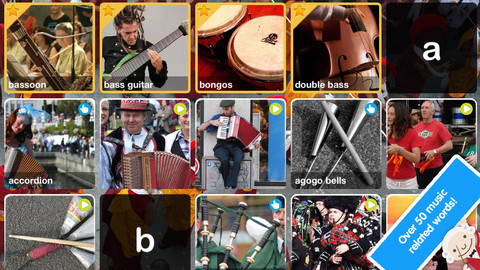
FREE for a limited time – ABC Music, an educational app that teaches kids about 50 musical instruments in an engaging way. The words are arranged on a ABC grid. If you tap on a word, the app brings the word up on a full screen. The full screen includes fun facts, interactive scenes, and links to a featured You Tube videos about the instrument. Of course, internet access is required to watch the videos. Even though children cannot link from the featured videos to the You Tube website, there is an option to disable the videos in the settings. I did not watch every video in the app but the developer claims that they were all tested for appropriateness. The app can be used in English, Spanish, or dual language mode. All in all, a great app for introducing kids to musical instruments!

ABC Music - Peapod Labs LLC

0

Bitsboard – Education, Games, and Flashcards for Learning Reading, Spelling, and more

Bitsboard

Bitsboard is a FREE app for education with so many uses – it’s ideal for teaching languages, vocabulary, sight words, spelling, and more.The app comes with three games: Flashcards (10,000+ free flash cards with fully customizable settings), Explore (reviews all flashcards), and Photo Touch (spot the correct item game). There are 7 additional games available as in-app purchases. Bitsboard is easy to use and fully customizable so you can use it to create games for whatever you are teaching. And, you can see that people have done just that because the app includes FREE access to the Bitsboard catalog which includes thousands of flashcards with lessons covering a variety of topics. If all of that hasn’t convinced you that you need this educational app, this feature certainly will –  Bitsboard supports multiple users and keeps track of their progress!!

Recommended – a great app with loads of potential!!

Bitsboard - Education, Games, and Flashcards for Learning Reading, Spelling, and more - GrasshopperApps.com

0

Go There Square: A Stella and Sam Adventure

stella & sam

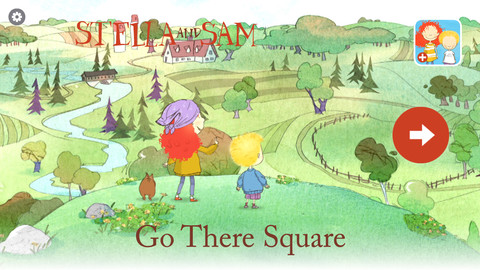
Recently updated, Go There Square: A Stella and Sam Adventure is FREE today! Stella and Sam apps are based on the television show and the bestselling picture book series by Marie-Louise Gay. The books have been translated into fifteen languages & have sold over one million copies. Stella and Sam find magical places with the help of their go-there-square. Kids go along to pop musical bubbles, collect dandelions and build a bridge out of flowers. Beautifully done and fun for preschoolers!

Here is a link to my earlier review of another Stella and Sam app – Draw Along with Stella & Sam (currently available for $1.99) – Draw Along with Stella and Sam for iPad « appydazeblog. Very creative – loved it!!

Other Stella and Sam Adventures that are available on iTunes for $2.99 each include:  Into the Snow We Go, Rainy Days and Rainbows, Backyard at Twilight, Cocoons and Caterpillars. All Stella and Sam apps are also supported in French. With the current update of Go There Square you can easily change from English to French/French to English in the app’s settings. Great educational apps for kids!

Go There Square: A Stella and Sam Adventure - zinc Roe

0

How to Draw

There are several apps with this name. This review refers to the one by Mind the Kids Ltd.

This app gives kids step-by-step visual and verbal instructions for 12 drawing episodes. Episodes teach how to draw things such as a dog, a princess, and the space shuttle. In the “I am watching” mode, kids can use paper and pencil. In the “I am drawing” mode, the program verbally explains as it draws in red lines for the child to draw over on the iPad or iPhone.  Then the red lines disappear leaving only the child-drawn image behind. There is an option to color and add additional details or background to your drawing. Drawings can be emailed or saved in your photos.

A couple of issues – I think it would be difficult to use this program on anything smaller than an iPad. I also wish there was the option of a blank sheet so that kids could create their own original drawing. It is possible to create your own drawing but… you have to go into an episode and basically ignore the instructions to do your own thing.

All in all, it is somewhat limited but it is also FREE and fun.

How to draw - Mind the Kids Ltd

0

Counting Dots

Counting Dots

FREE again today – Counting Dots, a counting app for young iPad users. Kids learn to recognize/count numbers by popping colorful dots in this simple but visually appealing game. The app has three settings – counting by one, fives, or tens. There are also settings for sound, hinting, and enabling vibrations (iPhone only). The app is advertised as helping kids count from one to a million. I counted by ones to 20 and by tens to 100  – didn’t quite make it to a million. 🙂 This app is by the same developer that did Rain Dots (see my March 1 review). Recommended!

Counting Dots - Helping kids count from one to one million! - Ellie's Games, LLC