0

The Opposites

FREE again – The Opposites for the iPhone/iPad. Designed for kids 7+, this educational app requires the matching of increasingly difficult pairs of opposite words. There are two sections of the app: dictionary and play. In the dictionary section, words are listed next to their opposites. To learn the meaning, students just tap on the word and a definition appears. There are 10 levels with 100+ words per level. In the play section, words are pronounced by a boy or a girl as they appear in bubbles and float towards the top of the screen  Kids are to tap pairs of opposites as they appear – which makes the words turn a color then pop. The goal is to match 12 sets of opposites  – which completes the level. A bonus round then appears in which the student has 20 seconds to match up an entire  board full of opposites. This app starts off simply but becomes quite challenging in the later levels. It could be used for differentiating a lesson and/or for helping students grow their understanding of antonyms.

Common Core Standards met:

  • 4.L.5 – Demonstrate understanding of figurative language, word relationships, and nuances in word meanings. c.Demonstrate understanding of words by relating them to their opposites (antonyms) and to words with similar but not identical meanings (synonyms).
  • 5.L.5 – Demonstrate understanding of figurative language, word relationships, and nuances in word meanings. c. Use the relationship between particular words (e.g., synonyms, antonyms, homographs) to better understand each of the words.

Recommended!

The Opposites - Mindshapes Limited

0

Counting Dots

Counting Dots

FREE again today – Counting Dots, an educational app for young iPad users. Kids learn to recognize/count numbers by popping colorful dots in this simple but visually appealing game. The app has three settings – counting by one, fives, or tens. There are also settings for sound, hinting, and enabling vibrations (iPhone only). The app is advertised as helping kids count from one to a million. I counted by ones to 20 and by tens to 100  – didn’t quite make it to a million. 🙂 This app is by the same developer that did Rain Dots (see my March 1 review). Recommended!

Counting Dots - Helping kids count from one to one million! - Ellie's Games, LLC

0

Bugs and Buttons 2

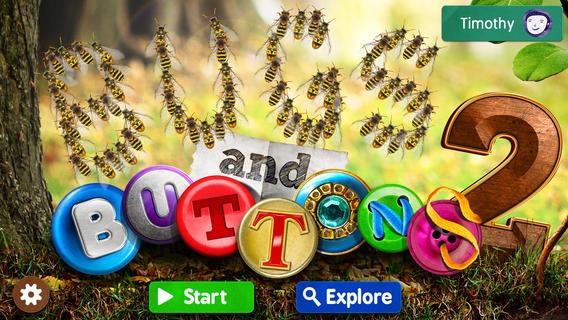
FREE and just named App of the Week on the iTunes Store – Buttons and Bugs 2, an educational app for preschoolers. Bugs and buttons are featured in 18 visually appealing activities. Kids count them, sort them, match them, etc. in a variety of ways. As they do so, they are learning about colors, shapes, letters, numbers, and more. The activities integrate learning into a collection of activities – a fun way to play with bugs!

Download link: https://itunes.apple.com/us/app/bugs-and-buttons-2/id686968315?mt=8&uo=4

0

Strawberry Shortcake Berry Best Friends

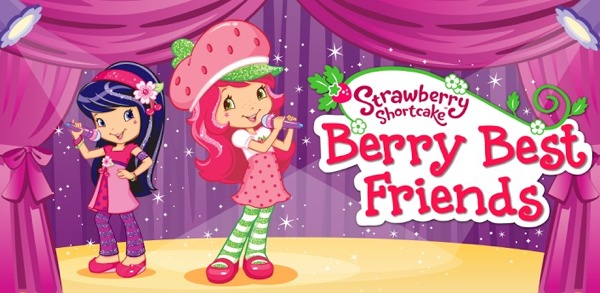
FREE for a limited time – Strawberry Shortcake Berry Best Friends from Cupcake Digital. Kids join Strawberry Shortcake & her friends as they practice for a talent show in this cute story about friendship and working together. There are 3 modes: Read & Play, Read to Me, and Just a Book. The story is filled with fun animations and it has 3 after-reading activities: Berry Sweet Nails, Berry Fun Hair Stylin’, and Berry Blitz. This educational app is a must-have for Strawberry Shortcake fans!!

https://itunes.apple.com/us/app/strawberry-shortcake-berry/id662089667?mt=8&uo=4

0

Bluster

Bluster is a FREE app for the iPad developed by McGraw-Hill. It was designed to teach vocabulary and word development to students in grades 2 – 4. Topics covered are rhyming, prefixes & suffixes, word roots, synonyms, homophones, and adjectives. There are 3 modes of play – single, team, and versus. Team mode permits collaboration with a friend. Versus mode allows head-to-head play with the ability to disrupt your opponent by causing weather related attacks. Kids start by choosing their mode of play, grade level, and word match type. They then swipe through the list to match 3 words with the same meaning, rhyme, prefix, suffix, or word root. There are 10 groups of 3 to match in each round of play. What a fun way to present over 800 vocabulary words!

Common Core Standards met:

  • 2.L.4 – Determine the meaning of the new word formed when a known prefix is added to a known word (e.g., happy/unhappy, tell/retell). Use a known root word as a clue to the meaning of an unknown word with the same root (e.g., addition, additional).
  • 3.L.4 – Determine the meaning of the new word formed when a known affix is added to a known word (e.g., agreeable/disagreeable, comfortable/uncomfortable, care/careless, heat/preheat). Use a known root word as a clue to the meaning of an unknown word with the same root (e.g., company, companion).
  • 4.L.4 –  Use common, grade-appropriate Greek and Latin affixes and roots as clues to the meaning of a word (e.g., telegraph, photograph, autograph).
  • 4.L.5. Demonstrate understanding of words by relating them to their opposites (antonyms) and to words with similar but not identical meanings (synonyms).

Recommended!

Bluster! - McGraw-Hill School Education Group

0

Tellagami

Telegami

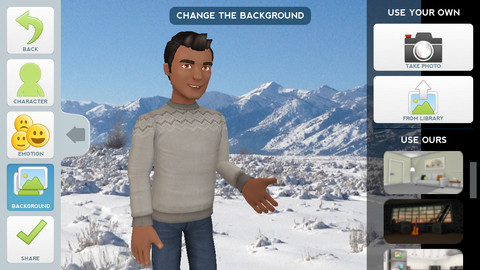
Currently FREE, Tellagami (rhymes with origami) is a unique storytelling app. Short stories called gamis are easy to create. First you select and customize a character by choosing his/her skin tone, eye color, hair color, and clothing. Then you choose an emotion – happy, sad, surprised, angry, scared, silly. Next you choose a background from the app, from your photo library, or create one by using your camera. You are now ready to create your gami. You can record your gami in you own voice or choose the text button to type in what your character will say  – the limit is 450 characters. Gamis can be shared via email, messaging, Facebook, or Twitter.

This educational app is fabulous!! Its uses are only limited by your imagination!! Kids can use gamis to introduce themselves at the beginning of the year. They can customize gamis to look like themselves and be reporters, scientists, teachers, etc. They can create the character (and setting) from a book they are reading. They can message or email a parent to explain what they are learning in class. Teachers could use gamis as interactive exit slips. The list is endless. Kids will LOVE creating gamis!

Tellagami ™ - Tellagami Inc.

0

Spelling City

Spelling City  – a FREE educational app for the iPhone/iPad! I LOVE Spelling City. It is a phenomenal website where teachers can input their weekly spelling lists so kids can go online to practice their spelling in so many fun ways – hang mouse, match it, which word, sentence unscramble, etc. I used Spelling City in my classroom for the last several years and the kids & parents loved it. The app has several preloaded lists and the best part…..kids can access the their teacher’s list (providing that he/she uses Spelling City, of course) by using their zip code, school name, and teacher’s name. Practice spelling in the car on a way to a soccer game or while waiting in the dentist’s office. AWESOME!!

Common Core Standards met:

  • K.RF.3  – Distinguish between similarly spelled words by identifying the sounds of the letters that differ.
  • 1.RF.3 – Recognize and read grade-appropriate irregularly spelled words.
  • 2.RF.3 – Identify words with inconsistent but common spelling-sound correspondences. AND Recognize and read grade-appropriate irregularly spelled words.
  • 3.RF.3 – Read grade-appropriate irregularly spelled words.
  • 4.RF.3 – Use combined knowledge of all letter-sound correspondences, syllabication patterns, and morphology (e.g., roots and affixes) to read accurately unfamiliar multisyllabic words in context and out of context.
  • 5.RF.3 – Use combined knowledge of all letter-sound correspondences, syllabication patterns, and morphology (e.g., roots and affixes) to read accurately unfamiliar multisyllabic words in context and out of context.

Highly recommended!

SpellingCity - SpellingCity

0

Teacher Clicker – Socrative / Student Clicker – Socrative

Still FREE and now even better!! Socrative has added two additional quiz features: # 1 – Teachers can now add images to their questions. #2 – The system can now grade short answer questions. Teachers just input the acceptable answers and the system does the rest.  🙂

This website and app are unbelievably cool – they turn any device with a web browser (iPhone, iPad, laptops) into a student response clicker. If a teacher has access to any kind of wireless lab, he/she can engage the entire class in a game or quiz and watch the results in real-time. Teachers begin by using their teacher app or logging into t.socrative.com with their email and password. Once logged in, teachers are assigned a room number to share with their students. Students log in using their student app or at m.socrative.com and enter the “virtual room number” provided by the teacher. Teachers initiate an activity and students respond on their devices. Multiple choice and short answer quizzes are easy to create – types of questions can be mixed. Teachers can also choose to run the quiz as a Space Race game. The students’ responses are visible to the teacher in real-time. Teachers can see what each child answered individually as well as what the group answered collectively. And the best part is… the app grades, graphs the results, and generates a report as an Excel spreadsheet or an email.

What a powerful tool for teachers – a short quiz at the end of a lesson can pinpoint what students understand and what needs to be reviewed. Hours of grading and analyzing test results are done immediately. Every student is involved – wow!

Highly recommended!

Teacher app Teacher Clicker - Socrative - Socrative           Student app Student Clicker - Socrative - Socrative

0

Happi and the Pirates

Pirates

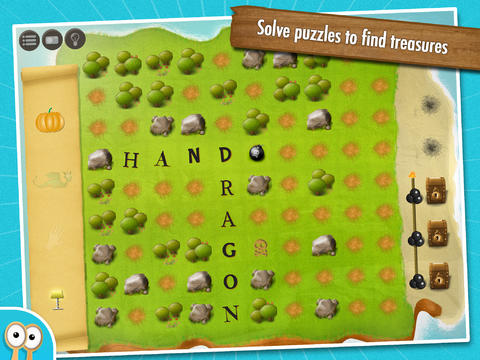
FREE for  limited time – Happi and the Pirates, an educational app from Happi Pappi. Kids use their spelling skills to solve word puzzles. They are presented with picture clues and a grid printed on a piece of treasure map. Kids have to use their knowledge of word structure & word building to spell the words and place them in the correctly on the grid. When they complete the puzzle, they earn keys to treasure chests. The more accurately and quickly they complete the puzzle, the more keys they earn. As they game progresses, they earn the tools and map pieces that lead them to the pirates’ treasure. While this app is primarily a word game, it also requires kids to use logic and deductive reasoning. I love the way this app is designed – it’s appealing to kids but it requires them to think. 🙂 The timer can be disabled for younger students to give them more “think time” and/or to allow teachers to use the app for a lesson on problem solving. This educational app has been featured by Apple in New & Noteworthy in USA, UK, Ireland. It was awarded the Editor’s Choice Award by the Children’s Technology Review in 2013.

Download link: https://itunes.apple.com/us/app/happi-pirates-spelling-math/id622075576?mt=8&uo=4

0

ABC Farm

ABC farm

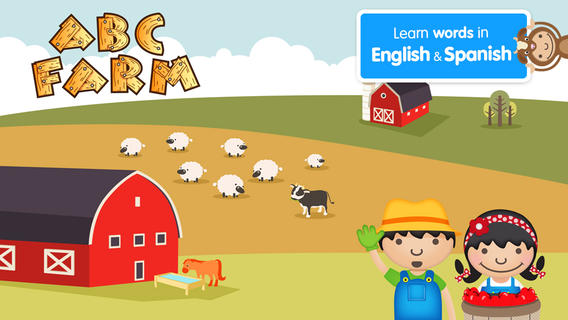
FREE for a limited time – ABC Farm. This educational app introduces your toddler (3 – 5) to over 50 farm words through sight, sound, and touch. The app opens to a grid arranged in ABC order. Kids can tap on a letter to find objects that begin with that letter or they can tap on a specific object to learn about it. As an object’s photo appears, a child’s voice says the initial letter then reads the name of the object (which appears in writing at the bottom of the screen). A little cartoon person drops down on the left hand side of the screen with a link to a video clip or an interactive scene. The child can scroll to the left for additional pictures and videos about each object. The app also contains “Read To Me” Fun Facts about each farm word featured. The app can be used in English only, Spanish only, or in dual language mode – great for ESL students. 

This app needs an internet connection to work because the 100+ videos are actually links from You Tube. They are chosen by Peapod Labs and checked to be interesting and safe for kids. Kids cannot link from this app into other You Tube content. This app is nicely done  – great for building vocabulary and beginning to read/spell words.

Also check out my reviews of ABC Wildlife, ABC House, ABC Music, and ABC Aquarium by the same developers. :)

Download link: https://itunes.apple.com/us/app/abc-farm/id615898597?mt=8&uo=4