0

ClassDojo

ClassDojo is a FREE & fabulous tool that helps improve classroom behaviors. Teachers are using it in different ways: to give feedback in real-time, to track behavior, and to generate reports. Reward good behavior in real-time – all it takes is a click. You need one device (computer, smartphone, a laptop, or a tablet) and an internet connection. It is very easy to set up with your class list. Each student is assigned a cute, monster-like avatar. Kids earn points for positive behaviors and lose points for negative behaviors. ClassDojo is also fully customizable so you can delete behaviors from the original list and/or add your own behaviors. As you use it, it automatically logs any data that you input. This data can be used to generate behavior reports to share with parents and administrators. How awesome is that? You can go into a meeting/conference with reports in hand!

If I were still in the classroom, I would enter my class list twice – once for data on work/study habits and the other for data on behaviors. I would make my habits/behaviors match exactly what was on my report cards. Then as I used the app, I would also be gathering data for my report cards. At the end of the grading period, I would just print out the date and enter it on the report cards – how easy!  I would also have the data (in a printed report) to be able to back up any grade on the card.  “As you can see Mrs. Doe, Jane only turned in her homework 56% of the time.”  Instant data would also be available for the RTI process, IEPs or any other team meeting on a child. Wow – a fabulous educational app!!

Check out the website for more information: www.classdojo.com

Highly recommended !!

ClassDojo - Class Twist Inc

0

Digital Math Tool Kit – 3 FREE apps

Three for FREE – great digital math tools for your classroom.

Geoboard by The Math Learning Center (a nonprofit organization dedicated to K – 12 education) is a FREE educational app that turns your iPhone/iPad into a virtual geoboard. Geoboards can be used as tools to teach mathematical concepts such as polygons, perimeter, area, line segments, angles, congruent shapes, symmetry, fractions, etc. Shapes are created by stretching bands on the geoboard’s pegs. There are 5 colors of bands in the iPhone version and 8 in the iPad version. There is also a tool to fill in shapes. On the iPad version, you can switch from the standard 25 peg board to a 150 peg board to create more complex shapes. This is a great app with the potential to be used in so many ways.
Highly recommended!

Geoboard, by The Math Learning Center - Clarity Innovations

FREE for the iPad, Virtual Manipulatives, an educational app that features math manipulatives for teaching fractions, decimals, and percents. Included are tiles/circles divided into halves, thirds, fourth, fifths, sixths, eighths, tenths, and 12ths AND their corresponding decimals and percentages! The manipulatives are color coded across the settings so that 1/2 is blue as is .50 and 50%. Kids drag tile pieces onto the work area to compare fractions/decimals/percentages. In the settings you can change from tiles to circles, make the pieces transparent, and hide the numbers on the pieces. Completed work can be easily saved to photos. Finding equivalent fractions has never been so slick – WOW!!

Common Core Standards

  • 3.NF.3 – Explain equivalence of fractions in special cases, and compare fractions by reasoning about their size. Understand two fractions as equivalent (equal) if they are the same size, or the same point on a number line.
  • 4.NF.1 – Explain why a fraction a/b is equivalent to a fraction (n × a)/(n × b) by using visual fraction models, with attention to how the number and size of the parts differ even though the two fractions themselves are the same size. Use this principle to recognize and generate equivalent fractions.

Highly Recommended!

Virtual Manipulatives! - ABCya.com

equivalent fractions

From the National Council of Teachers of Mathematics comes a FREE educational app called Equivalent Fractions. Kids create equivalent fractions by dividing and shading squares or circles. Circles can be divided into 24ths. Squares can be divided into 144ths. In the play mode, a fraction is shown and kids must create 2 additional fractions that are equivalent. All 3 fractions must have different denominators. The app also places the fractions on a number line – a great visual for comparing! There is also a “build your own” mode which would be fabulous to use for guided exploration & practice. Kids could also use this section as a virtual manipulative when working independently. This app is an excellent resource for the classroom !!

Common Core Standards met:

  • 3.NF.3 – Explain equivalence of fractions and compare fractions by reasoning about their size. Understand two fractions as equivalent (equal) if they are the same size, or the same point on a number line. Recognize and generate simple equivalent fractions, e.g., 1/2 = 2/4, 4/6 = 2/3). Explain why the fractions are equivalent, e.g., by using a visual fraction model.

Highly Recommended!

Equivalent Fractions - National Council of Teachers of Mathematics

0

Miku’s Picnic, Let’s Color, and Squiggles – apps by Lazoo

Miku's Picnic

FREE again for a limited time – Miku’s Picnic, an adorable interactive story designed to support creative thinking. Kids join Bobu, the monkey & Miku, the rabbit on a chase after some jumping beans. The two need help capturing the beans before they bounce away! Along the way kids learn about using their imaginations and creative problem solving as the Bobu & Moku use “Squiggles” to… make a car go faster, make springs to get to the top of a tree, make binoculars to look for the beans, make a rocket zoom to the moon, and more. This educational app has 2 reading modes – “Read to Me” and “Read it Myself” as well as an option to record your own voice as the narrator. The story ends with a link to the FREE Squiggles app for kids so kids can “take a turn” drawing. Super creative and super cute!

Download link for Miku’s Picnichttps://itunes.apple.com/us/app/lazoo-mikus-picnic/id652945863?mt=8&uo=4

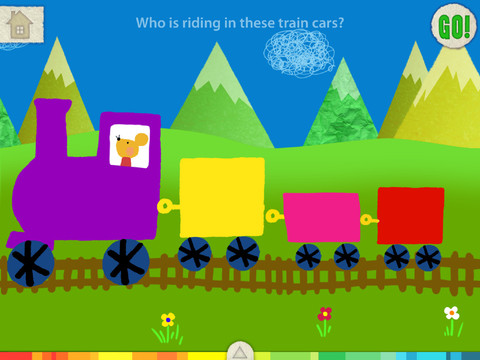
Also FREE again for a limited time – Let’s Color, an educational app that encourages creativity! The app includes an animated short in which the characters – Bobu, the monkey & Miku, the rabbit use their imaginations to turn triangles into a strawberry, a dog, a mountain, etc. Then kids are encouraged to color different things to complete a page: what is coming out of a hose, who is riding in the train, etc. Once the coloring is completed, they press GO and the drawings come alive. There are 17 coloring pages as well as a blank page for your child to create his/her own pictures. Additional coloring pages can be purchased within the app. Tools included are stickers, markers, paint, chalk, a ketchup bottle, as well as 10 colors & a mystery color wheel. Work can be saved into the gallery of the parents’ section by pressing the piggy bank. This app is super cute!! It encourages children to be imaginative & creative. :)

Highly recommended!

Let's Color! - Lazoo Worldwide, Inc

squiggles

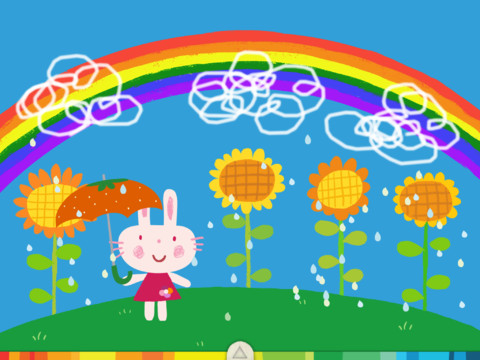
Squiggles – This FREE educational app for the iPad is adorable! Kids are encourages to draw squiggles to create: rain clouds (to water flowers), waves (to help fish swim), wool on sheep, cotton candy, etc. Once the squiggles are drawn, they press GO and the drawings come alive. The app includes an interactive storybook and an animated short which introduces the characters – Bobu, the monkey  & Miku, the rabbit. It also includes 14 drawing pages (just add the squiggles) as well as a blank page for your child to create his/her own pictures. Tools included are stickers, markers, paint, chalk, a ketchup bottle, as well as 10 colors & a mystery color wheel. Work can be saved into the gallery of the parents’ section by pressing the piggy bank. This app is super cute!! It encourages children to be imaginative & creative – one of my favorites. 🙂

Highly recommended!

Squiggles! - Lazoo Worldwide, Inc

0

A StoryBots Halloween

StoryBots

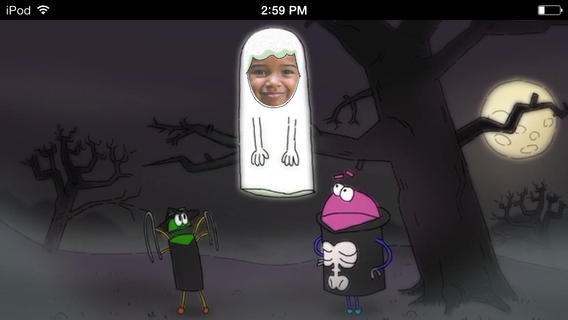
A StoryBots Halloween is currently FREE! Cast up to 5 members of your family in this cute & catchy animated Starring You® Video. It’s easy to cast your family members as a vampire, a ghost, a werewolf, a mummy, or Frankenstein’s monster. Just take or upload a photo, position the face, then name your character. In no time you and your kids will be dancing with the StoryBots like the “Boogie” Man! If you’d like, you may share your final creation via email, Facebook or Twitter. VERY cute and fun!

Download link: https://itunes.apple.com/us/app/storybots-halloween-starring/id701184040?mt=8&uo=4

0

SparkleFish

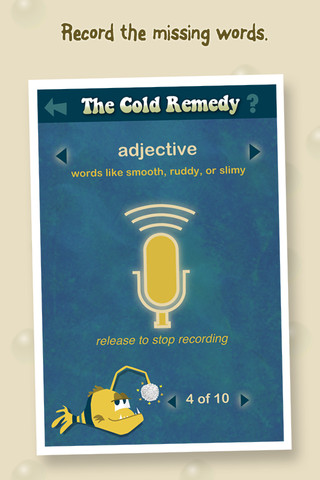
SparkleFish is a FREE educational app for iPhone/iPad that works like a digital version of Mad Libs. Five stories are included in the app with others available as in-app purchases. Kids are asked to provide words from a specific category (animal, body part, etc.) or a specific part of speech (adjectives, nouns, adverbs, past tense verbs, etc.). If the child cannot think of a good word, he/she can get suggestions from SparkleFish by touching the word. Instead of writing the words, kids record their choices in their own voice. Their words are played back in the reading of the story. Kids can save their recordings and listen to them later. This app allows kids to practice parts of speech in a fun way. Kids love Mad Libs because the results can be hilarious. I am sure they will feel the same way about SparkleFish. 🙂

Recommended!

SparkleFish - Whosagoodboy Partners

0

Find the Synonym

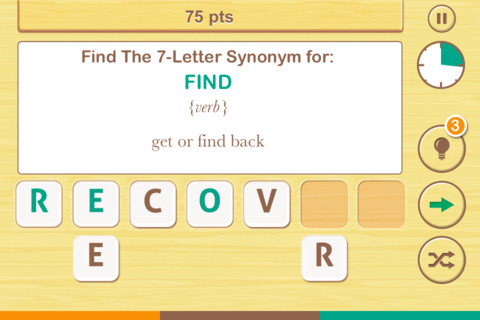
FREE  – Find the Synonym is an app designed for the iPhone/iPad. It is listed as a game app rather than an educational app but it would be great for kids in upper elementary school/junior high. A word is shown with its part of speech and definition. You are challenged to create a 4 – 7 letter synonym of that word using the letters provided. Points are awarded based on the length of the word, the time involved, whether clues are used, and/or if any mistakes are made. Badges are earned as the game is played. It’s simply designed  – not a lot of bell & whistles but it is heavy on content. There are a total of 1600 synonyms in the app. After you find 250 of them, the antonyms are unlocked. There are 700 antonyms in the app.

I realize that this app was not necessarily designed for kids but it is educational. More flexibility in the settings would make it more suitable for classroom use. I could not find a way to restart the game. The game picks up where it left off & points are cumulative, so only one person can play. Also, having access to both synonyms and antonyms would be a plus. Regardless, I am sure that teachers will come up with creative ways to use this resource. 🙂

Recommended!

Find The Synonym - FreshLogo

0

Zoola Baby Animals

zoola

What does the fox say?

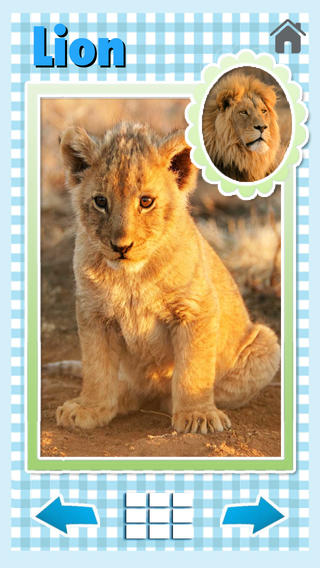
Find the answer to that question with Zoola Baby Animals, a FREE educational app for babies. Your child will learn to recognize 30 different adult animals and their babies. The app names the adult animal (only) but it gives the sounds for the adult & the baby (when their pictures are tapped.) It’s easy to use for little ones – they just tap the arrows to move back and forth. Or, they can tap the grid and see thumbnails of all the animals in the app. Adorable pictures that little ones are sure to enjoy!  The full version (400 photos/sounds of mommy, daddy, and baby) is ad-free and available for purchase.

Download link: https://itunes.apple.com/us/app/zoola-baby-animals/id471706389?mt=8&uo=4

0

Sushi Monster

Sushi Monster is a FREE educational app for the iPhone/iPad developed by Scholastic. It helps kids practice, reinforce, and extend their knowledge of math facts. There are 12 levels of play – 7 addition levels and 5 multiplication levels. A chef places numbered plates of sushi on the counter. Kids have to combine the numbers on the plates to reach the target number (worn by the sushi monster). If the combination is correct, the monster gobbles up the sushi. If it is wrong, the monster throw a tantrum. Each round has 14 target numbers. Successfully completing one level unlocks the next. As kids progress through the levels they are expected to extend their thinking beyond the basic facts. At each level a strategy is provided to help kids succeed. This educational app provides a lot of practice and kids will love the silly sushi chef!

Common Core Standards met:

  • 3.OA.7 – By the end of Grade 3, know from memory all products of two one-digit numbers.
  • 3.NTB.3 – Multiply one-digit whole numbers by multiples of 10 in the range 10–90 (e.g., 9 × 80, 5 × 60) using strategies based on place value and properties of operations.

Great for math fluency – highly recommended!

Sushi Monster - Scholastic

0

Smart White Board HD

super white board

FREE – Smart White Board HD, is super simple to use! One finger writes, 2 fingers erase, 3 fingers clears all. Press the save button or shake your device to save an image. You can write in black, blue, or red and in 3 thicknesses. The app also includes a simple voice recorder. Just press record, talk, stop & name your file, and it is saved to a list. You can then email your recording if you wish to share it. Teachers can get rid of their classroom whiteboards, markers, and erasers! Have kids show their work, explain their thoughts, etc. with this simple educational app!

Smart White Board HD - Pad read

0

Wonderopolis

Wonderopolis

FREE – Wonderopolis, the educational app. Now you can explore Wonderopolis (the website) from your mobile device.

Wonderopolis (Wonderopolis | Where the Wonders of Learning Never Cease) is a fantastic website that provides a daily Wonder of the Day®. An intriguing question is posed each day. There is a written explanation of the answer (which you can read on your own or listen to), vocabulary words (with a word challenge), a gallery of images & videos – all to inspire curiosity and learning about the day’s wonder. Other daily features include a “Try It Out” section which suggests activities based on the day’s question, a “Still Wondering” section which gives additional/related information. and a quiz. There is also a section for teachers/parents called the “Educator Sandbox” which has additional resources and opportunities to connect with the Wonderopolis community.

Using this app/website would be a fabulous addition to a daily classroom routine. Kids could read the daily Wonder of the Day® as part of their independent work time. They could journal about what they learned and/or are still wondering about. A class discussion could be scheduled for later. What a great way to encourage THINKING! Wonderopolis is a fabulous resource to ignite the natural curiosity and imagination of kids!

Download link: https://itunes.apple.com/us/app/wonderopolis/id505247028?mt=8&uo=4