0

4 FREE Poetry Apps from the International Reading Association

Planning a unit for poetry month? The International Reading Association has some great FREE apps. acrosticAcrostic Poem helps kids learn about and write acrostic poetry. An acrostic poem uses a word as its subject. The word is written vertically so that each letter begins a line of the poem. All lines of the poem describe or relate to the subject word. The poem does not have to rhyme. Acrostic poems are easy to write and great for having kids introduce themselves, Mother’s Day, Father’s Day, etc.

The app is perfect for a classroom where devices are shared because each student creates his/her own profile. The app explains an acrostic poem and gives an example. Then the student enters his/her topic word. The app advances to a brainstorming page where the student can enter ideas to help write the poem. Then the app advances to a “write your poem” page. The brainstormed words are displayed to help. Work can be saved in progress – reinforcing the elements of the writing process. Finished poems can be saved to the device’s camera roll or emailed. This app mirrors ReadWriteThink’s popular acrostic poem web-based interactive: http://www.readwritethink.org/classroom-resources/student-interactives/acrostic-poems-30045.html. Students can send their editable poems to an email address and then open them in the online tool!

Download link: https://itunes.apple.com/us/app/acrostic-poem/id724841119?mt=8&uo=4 diamanteDiamante Poem helps kids learn about and write diamante poetry. Diamante poems can be written about one central topic or two opposing topics such as day/night. A diamante poem has seven lines and is written in the shape of a diamond. The first and last lines are just one word – nouns. The second and sixth line are two words – adjectives. The third and fifth lines are three words – “ing” words. And the middle line has four+ words – nouns or prepositional phrases. Diamante poems are great for teaching parts of speech and synonyms/antonyms.

The app is perfect for a classroom where devices are shared because each student creates his/her own profile. The app explains a diamante poem and gives two examples – a synonym poem and an antonym poem. Then the student enters his/her beginning and ending topic words. The app advances to a “write your poem” page where the student enters his/her words. The app reminds students which kids of words should be used on each line. Work can be saved in progress – reinforcing the elements of the writing process. Finished poems can be saved to the device’s camera roll or emailed. This app mirrors ReadWriteThink’s popular diamante poem web-based interactive: http://www.readwritethink.org/classroom-resources/student-interactives/diamante-poems-30053.html. Students can send their editable poems to an email address and then open them in the online tool!

Download link: https://itunes.apple.com/us/app/diamante-poem/id724953313?mt=8&uo=4 theme poemTheme Poem helps kids learn about and write theme poetry. A theme poem is sometimes called a shape poem. It is written in the shape of what the poem is about. For example, the apple poem is written in the shape of an apple.
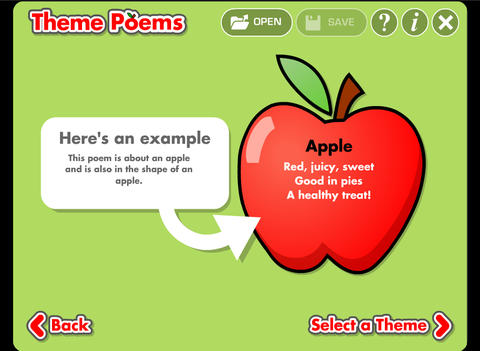
Again, this app is perfect for a classroom where devices are shared because each student creates his/her own profile. The app gives an example of a theme poem. Then the student selects one of 5 themed files – nature, school, sports, celebrations, shapes. Each themed file has 5 – 8 shapes for students to choose. Once a shape is chosen, the app advances to a “think of words” page for the student to brainstorm his/her ideas. Then the app advances to a “write your poem” page. The brainstormed words are displayed to help. Work can be saved in progress – reinforcing the elements of the writing process. Finished poems can be saved to the device’s camera roll or emailed. This app mirrors ReadWriteThink’s popular theme poem web-based interactive: http://www.readwritethink.org/files/resources/interactives/theme_poems/. Students can send their editable poems to an email address and then open them in the online tool!

Download link: https://itunes.apple.com/us/app/theme-poem/id724978211?mt=8&uo=4 haiku Haiku Poem helps kids learn about and write Haiku poetry. Haiku is a Japanese poem of three lines with a very specific syllable structure  – 5 syllables, 7 syllables, 5 syllables. Haikus are traditionally about nature but they can be about any subject as long as they follow the syllable structure.
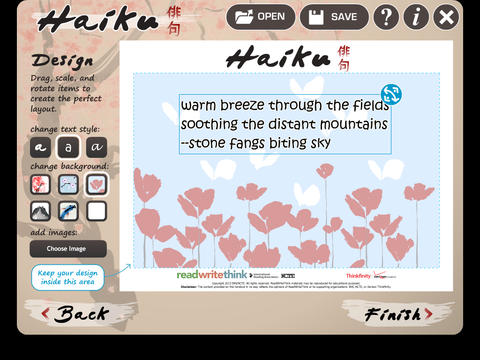
Again, this app is perfect for a classroom where devices are shared because each student creates his/her own profile. The app encourages students to go on a haiku walk for inspiration. Then, they brainstorm words for their poem. As they choose words to compose their poems, students are reminded to pay attention to the poem’s structure. The app also gives helpful tips about creating a shift in the poem’s imagery. Once a poems is complete, a student can customize its design by choosing a style of text and background. The finished poem can be saved to the device’s camera roll or emailed. This app mirrors ReadWriteThink’s popular theme poem web-based interactive:http://www.readwritethink.org/classroom-resources/student-interactives/haiku-poem-interactive-31074.html. Students can send their editable poems to an email address and then open them in the online tool!

Download link: https://itunes.apple.com/us/app/haiku-poem/id810338702?mt=8&uo=4

0

7 Math Manipulatives for your Digital Toolkit

Plan a lesson for Digital Learning Day (March 13) or Pi Day (March 14) with these seven FREE math apps. 
Geoboard by The Math Learning Center (a nonprofit organization dedicated to K – 12 education) is a FREE app that turns your iPhone/iPad into a virtual geoboard. Geoboards can be used as tools to teach mathematical concepts such as polygons, perimeter, area, line segments, angles, congruent shapes, symmetry, fractions, etc. Shapes are created by stretching bands on the geoboard’s pegs. There are 5 colors of bands in the iPhone version and 8 in the iPad version. There is also a tool to fill in shapes. On the iPad version, you can switch from the standard 25 peg board to a 150 peg board to create more complex shapes. This is a great app with the potential to be used in so many ways.

Geoboard, by The Math Learning Center - Clarity Innovations

FREE for the iPad, Virtual Manipulatives contains math manipulatives for teaching fractions, decimals, and percents. Included are tiles/circles divided into halves, thirds, fourth, fifths, sixths, eighths, tenths, and 12ths AND their corresponding decimals and percentages! The manipulatives are color coded across the settings so that 1/2 is blue as is .50 and 50%. Kids drag tile pieces onto the work area to compare fractions/decimals/percentages. In the settings you can change from tiles to circles, make the pieces transparent, and hide the numbers on the pieces. Completed work can be easily saved to photos. Finding equivalent fractions has never been so slick – WOW!!

Common Core Standards met:

  • 3.NF.3 – Explain equivalence of fractions in special cases, and compare fractions by reasoning about their size. Understand two fractions as equivalent (equal) if they are the same size, or the same point on a number line.
  • 4.NF.1 – Explain why a fraction a/b is equivalent to a fraction (n × a)/(n × b) by using visual fraction models, with attention to how the number and size of the parts differ even though the two fractions themselves are the same size. Use this principle to recognize and generate equivalent fractions.

Virtual Manipulatives! - ABCya.com

equivalent fractions

From the National Council of Teachers of Mathematics comes a FREE app called Equivalent Fractions. Kids create equivalent fractions by dividing and shading squares or circles. Circles can be divided into 24ths. Squares can be divided into 144ths. In the play mode, a fraction is shown and kids must create 2 additional fractions that are equivalent. All 3 fractions must have different denominators. The app also places the fractions on a number line – a great visual for comparing! There is also a “build your own” mode which would be fabulous to use for guided exploration & practice. Kids could also use this section as a virtual manipulative when working independently. This app is an excellent resource for the classroom !!

Common Core Standards met:

  • 3.NF.3 – Explain equivalence of fractions and compare fractions by reasoning about their size. Understand two fractions as equivalent (equal) if they are the same size, or the same point on a number line. Recognize and generate simple equivalent fractions, e.g., 1/2 = 2/4, 4/6 = 2/3). Explain why the fractions are equivalent, e.g., by using a visual fraction model.

Equivalent Fractions - National Council of Teachers of Mathematics

counting board

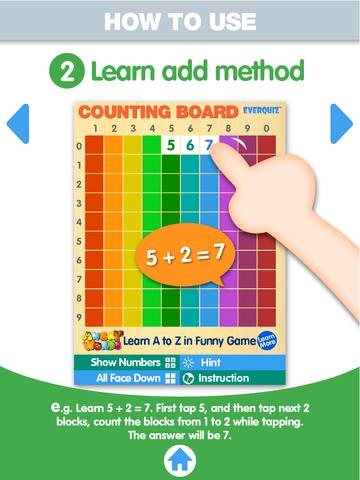
Another FREE app is Counting Board HD, a colorful number grid that can be used to help kids learn basic number concepts. The app is advertised as being suitable for 2 to 4 year olds but it can also used with older students. I frequently used number grids with third graders. Number grids help kids see patterns and visualize math concepts. With younger children, the app can be used for counting to 100 – by ones, fives, tens. Younger kids can also learn basic addition and subtraction by using the app to count up or count back. With older kids, number grids can be used to teach: greater than and less than, how to find missing addends, place value concepts, skip counting, and more! The app can be used with the numbers showing or hidden and the pronunciation can be on or off. The app simple to use, visually appealing, and useful for so many math lessons. I love this app! It’s so much easier than dragging out the laminated number grids and counters. 🙂

Common Core Standards met:

  • K.CC.1. Count to 100 by ones and by tens.
  • K.CC.2. Count forward beginning from a given number within the known sequence (instead of having to begin at 1).
  • 1.NBT.5. Given a two-digit number, mentally find 10 more or 10 less than the number, without having to count; explain the reasoning used.
  • 1.NBT.6. Subtract multiples of 10 in the range 10-90 from multiples of 10 in the range 10-90 (positive or zero differences), using concrete models or drawings and strategies based on place value, properties of operations, and/or the relationship between addition and subtraction; relate the strategy to a written method and explain the reasoning used.
  • 3.OA. 9. Identify arithmetic patterns (including patterns in the addition table or multiplication table), and explain them using properties of operations.

Download link: https://itunes.apple.com/us/app/counting-board/id450751745?mt=8&uo=4

number lineNumber Line, by the Math Learning Center is a fantastic FREE app that will help kids visualize number patterns and understand number operations. The app is well-designed with several useful features. The number line can be set by ones, twos, fives, tens, twenty-fives, and hundreds. It can also be customized to show multiples of any whole number from 1 to 100. This feature is perfect for skip counting and/or for visualizing multiplication. The app permits kids to add and manipulate forward & backward jumps – a great feature for teaching addition & subtraction. This feature also helps kids visualize multiplication as repeated addition of the same number and division as repeated subtraction of the same number. Teachers are able to hide or reveal numbers on the number line. This feature can be used to challenge kids to apply what they know in order to figure out the missing number/numbers. Teachers can also use this feature to teach kids how to solve more difficult patterns that are missing several numbers; such as 4, __, __, 16.  Kids can use the drawing tools to show what they know. They can write equations and expressions with the text tool. They can screen shot their work and use it as an exit slip after a lesson. Add this one to your virtual toolkit today – “seeing math” helps kids understand it. 🙂

Download Link: https://itunes.apple.com/us/app/number-line-by-math-learning/id751816884?mt=8&uo=4

protractor

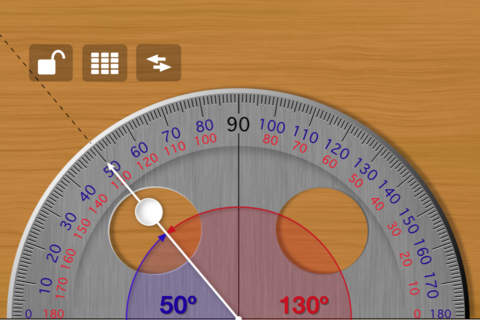
Free Protractor from Pongo Soft is another tool that you may want to add to your digital toolbox. The angle can be set in two ways: by touching the pointer or by entering the angle on a keypad. Once the angle has been set, it can be locked to avoid movement of the pointer when taking readings. Kids can also use this tool to see how many degrees are in a straight angle and a right angle or to discover the difference between an acute angle and an obtuse angle. They can easily see what combinations of angles are equal to a straight angle.  Since the app is free, there is some advertising across the top. Check out this FREE educational app for your geometry students.

Download link: https://itunes.apple.com/us/app/free-protractor/id555590467?mt=8&uo=4

number pieces

FREE educational app – Number Pieces from Math Learning Center. This educational app is the digital version of place value manipulatives, hands-on tools used to help students understand place value. Using the place value models within this app, kids can visualize the process of adding and subtracting ones, tens, and hundreds. The app has a function that permits kids to break apart pieces or join them together. This feature is fabulous for kids who need concrete examples. The app also includes expanding edge pieces which can be used to introduce arrays. Other features of the app include: three colors for identifying groups, drawing tools for labeling, a text tool for writing number sentences, zooming & scrolling for larger numbers. Thanks to the Math Learning Center, teachers & their students have another great app to add to their digital toolkits!

Common Core Standards:

  • 1.NBT.6. Subtract multiples of 10 in the range 10-90 from multiples of 10 in the range 10-90 (positive or zero differences), using concrete models or drawings and strategies based on place value, properties of operations, and/or the relationship between addition and subtraction; relate the strategy to a written method and explain the reasoning used.
  • 2.NBT.1 Understand that the three digits of a three-digit number represent amounts of hundreds, tens, and ones; e.g., 706 equals 7 hundreds, 0 tens, and 6 ones. Understand the following as special cases: a. 100 can be thought of as a bundle of ten tens — called a “hundred.” b. The numbers 100, 200, 300, 400, 500, 600, 700, 800, 900 refer to one, two, three, four, five, six, seven, eight, or nine hundreds (and 0 tens and 0 ones).

Download link: https://itunes.apple.com/us/app/number-pieces-by-math-learning/id605433778?mt=8&uo=4

0

Celebrate Pi Day with 3 FREE Apps (National Council of Teachers of Mathematics)

equivalent fractionsFrom the National Council of Teachers of Mathematics comes a FREE app called Equivalent Fractions. Kids create equivalent fractions by dividing and shading squares or circles. Circles can be divided into 24ths. Squares can be divided into 144ths. In the play mode, a fraction is shown and kids must create 2 additional fractions that are equivalent. All 3 fractions must have different denominators. The app also places the fractions on a number line – a great visual for comparing! There is also a “build your own” mode which would be fabulous to use for guided exploration & practice. Kids could also use this section as a virtual manipulative when working independently. This app is an excellent resource for the classroom!

Common Core Standards met:

  • 3.NF.3 – Explain equivalence of fractions and compare fractions by reasoning about their size. Understand two fractions as equivalent (equal) if they are the same size, or the same point on a number line. Recognize and generate simple equivalent fractions, e.g., 1/2 = 2/4, 4/6 = 2/3). Explain why the fractions are equivalent, e.g., by using a visual fraction model.

Equivalent Fractions - National Council of Teachers of Mathematics

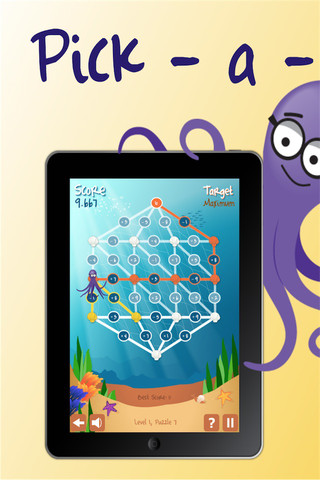
Pick a PathPick-a-Path is another FREE math game from the National Council of Teachers of Mathematics. Kids help Okta the octopus reach a target number by choosing the best path from the top maze to the bottom of a maze. There are 7 different levels with 7 puzzles in each level. The puzzles start with basic operations then move to fractions, negative numbers, decimals, and other more difficult skills. Kids have to plan out a strategy to reach the target which can be a specific value, a minimum value, or a maximum value. This app provides a lot of good skills practice. And… as an extra added bonus, kids have to think of a strategy!

Pick-a-Path - National Council of Teachers of Mathematics

Math concentration

Math Concentration was developed by the National Council of Teachers of Mathematics for students from preschool through fifth grade. It’s a classic matching game that can be played by one or two players. There are six levels of play – numbers 1- 6, numbers 1 – 10, shapes, multiplication, fractions, and percentages & fractions. In all levels, numbers are represented in different ways – written names, digits, pictures, etc. The game also has two modes – a transparent board (for younger students) or a fully covered board. The game is simple to play and kids earn socks for completing all of the matches on the board. 🙂

Download link: https://itunes.apple.com/us/app/math-concentration/id458437534?mt=8&uo=4

0

Trading Cards

trading cards

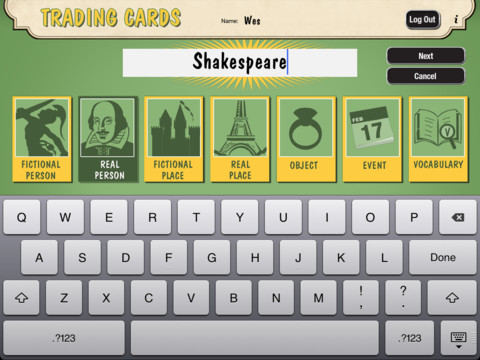
Fabulous educational app!!! ReadWriteThink’s Trading Cards is powerful FREE app developed by the International Reading Association. This educational app provides a unique way for kids to share their understanding of topics, generate their own study aids, create a fictional world to use in their writing, make their own trading cards, and more. There are 7 categories of cards available within the app: fictional person, real person, fictional place, real place, object, event, and vocabulary. Kids start by choosing a category and typing in the title of the card. Each category has specific questions which help kids create information-rich trading cards. Images can be added by using the device’s camera or by accessing pictures in the photo library. Kids can also sort their cards into collections such as characters from a book, heroes or villains, landmarks, the 50 states, vocabulary by subject, etc. The possibilities are endless! Cards can be shared via email, saved to the photo library, or printed on a wireless printer. And… the kid appeal is tremendous. Kids will LOVE trading their cards with their classmates. 🙂

Highly recommended!!

Trading Cards - International Reading Association

0

7 Math Manipulatives for your Digital Toolkit

Plan a lesson for Digital Learning Day on March 13 with these seven FREE math apps. 
Geoboard by The Math Learning Center (a nonprofit organization dedicated to K – 12 education) is a FREE app that turns your iPhone/iPad into a virtual geoboard. Geoboards can be used as tools to teach mathematical concepts such as polygons, perimeter, area, line segments, angles, congruent shapes, symmetry, fractions, etc. Shapes are created by stretching bands on the geoboard’s pegs. There are 5 colors of bands in the iPhone version and 8 in the iPad version. There is also a tool to fill in shapes. On the iPad version, you can switch from the standard 25 peg board to a 150 peg board to create more complex shapes. This is a great app with the potential to be used in so many ways.

Geoboard, by The Math Learning Center - Clarity Innovations

FREE for the iPad, Virtual Manipulatives contains math manipulatives for teaching fractions, decimals, and percents. Included are tiles/circles divided into halves, thirds, fourth, fifths, sixths, eighths, tenths, and 12ths AND their corresponding decimals and percentages! The manipulatives are color coded across the settings so that 1/2 is blue as is .50 and 50%. Kids drag tile pieces onto the work area to compare fractions/decimals/percentages. In the settings you can change from tiles to circles, make the pieces transparent, and hide the numbers on the pieces. Completed work can be easily saved to photos. Finding equivalent fractions has never been so slick – WOW!!

Common Core Standards met:

  • 3.NF.3 – Explain equivalence of fractions in special cases, and compare fractions by reasoning about their size. Understand two fractions as equivalent (equal) if they are the same size, or the same point on a number line.
  • 4.NF.1 – Explain why a fraction a/b is equivalent to a fraction (n × a)/(n × b) by using visual fraction models, with attention to how the number and size of the parts differ even though the two fractions themselves are the same size. Use this principle to recognize and generate equivalent fractions.

Virtual Manipulatives! - ABCya.com

equivalent fractions

From the National Council of Teachers of Mathematics comes a FREE app called Equivalent Fractions. Kids create equivalent fractions by dividing and shading squares or circles. Circles can be divided into 24ths. Squares can be divided into 144ths. In the play mode, a fraction is shown and kids must create 2 additional fractions that are equivalent. All 3 fractions must have different denominators. The app also places the fractions on a number line – a great visual for comparing! There is also a “build your own” mode which would be fabulous to use for guided exploration & practice. Kids could also use this section as a virtual manipulative when working independently. This app is an excellent resource for the classroom !!

Common Core Standards met:

  • 3.NF.3 – Explain equivalence of fractions and compare fractions by reasoning about their size. Understand two fractions as equivalent (equal) if they are the same size, or the same point on a number line. Recognize and generate simple equivalent fractions, e.g., 1/2 = 2/4, 4/6 = 2/3). Explain why the fractions are equivalent, e.g., by using a visual fraction model.

Equivalent Fractions - National Council of Teachers of Mathematics

counting board

Another FREE app is Counting Board HD, a colorful number grid that can be used to help kids learn basic number concepts. The app is advertised as being suitable for 2 to 4 year olds but it can also used with older students. I frequently used number grids with third graders. Number grids help kids see patterns and visualize math concepts. With younger children, the app can be used for counting to 100 – by ones, fives, tens. Younger kids can also learn basic addition and subtraction by using the app to count up or count back. With older kids, number grids can be used to teach: greater than and less than, how to find missing addends, place value concepts, skip counting, and more! The app can be used with the numbers showing or hidden and the pronunciation can be on or off. The app simple to use, visually appealing, and useful for so many math lessons. I love this app! It’s so much easier than dragging out the laminated number grids and counters. 🙂

Common Core Standards met:

  • K.CC.1. Count to 100 by ones and by tens.
  • K.CC.2. Count forward beginning from a given number within the known sequence (instead of having to begin at 1).
  • 1.NBT.5. Given a two-digit number, mentally find 10 more or 10 less than the number, without having to count; explain the reasoning used.
  • 1.NBT.6. Subtract multiples of 10 in the range 10-90 from multiples of 10 in the range 10-90 (positive or zero differences), using concrete models or drawings and strategies based on place value, properties of operations, and/or the relationship between addition and subtraction; relate the strategy to a written method and explain the reasoning used.
  • 3.OA. 9. Identify arithmetic patterns (including patterns in the addition table or multiplication table), and explain them using properties of operations.

Download link: https://itunes.apple.com/us/app/counting-board/id450751745?mt=8&uo=4

number lineNumber Line, by the Math Learning Center is a fantastic FREE app that will help kids visualize number patterns and understand number operations. The app is well-designed with several useful features. The number line can be set by ones, twos, fives, tens, twenty-fives, and hundreds. It can also be customized to show multiples of any whole number from 1 to 100. This feature is perfect for skip counting and/or for visualizing multiplication. The app permits kids to add and manipulate forward & backward jumps – a great feature for teaching addition & subtraction. This feature also helps kids visualize multiplication as repeated addition of the same number and division as repeated subtraction of the same number. Teachers are able to hide or reveal numbers on the number line. This feature can be used to challenge kids to apply what they know in order to figure out the missing number/numbers. Teachers can also use this feature to teach kids how to solve more difficult patterns that are missing several numbers; such as 4, __, __, 16.  Kids can use the drawing tools to show what they know. They can write equations and expressions with the text tool. They can screen shot their work and use it as an exit slip after a lesson. Add this one to your virtual toolkit today – “seeing math” helps kids understand it. 🙂

Download Link: https://itunes.apple.com/us/app/number-line-by-math-learning/id751816884?mt=8&uo=4

protractor

Free Protractor from Pongo Soft is another tool that you may want to add to your digital toolbox. The angle can be set in two ways: by touching the pointer or by entering the angle on a keypad. Once the angle has been set, it can be locked to avoid movement of the pointer when taking readings. Kids can also use this tool to see how many degrees are in a straight angle and a right angle or to discover the difference between an acute angle and an obtuse angle. They can easily see what combinations of angles are equal to a straight angle.  Since the app is free, there is some advertising across the top. Check out this FREE educational app for your geometry students.

Download link: https://itunes.apple.com/us/app/free-protractor/id555590467?mt=8&uo=4

number pieces

FREE educational app – Number Pieces from Math Learning Center. This educational app is the digital version of place value manipulatives, hands-on tools used to help students understand place value. Using the place value models within this app, kids can visualize the process of adding and subtracting ones, tens, and hundreds. The app has a function that permits kids to break apart pieces or join them together. This feature is fabulous for kids who need concrete examples. The app also includes expanding edge pieces which can be used to introduce arrays. Other features of the app include: three colors for identifying groups, drawing tools for labeling, a text tool for writing number sentences, zooming & scrolling for larger numbers. Thanks to the Math Learning Center, teachers & their students have another great app to add to their digital toolkits!

Common Core Standards:

  • 1.NBT.6. Subtract multiples of 10 in the range 10-90 from multiples of 10 in the range 10-90 (positive or zero differences), using concrete models or drawings and strategies based on place value, properties of operations, and/or the relationship between addition and subtraction; relate the strategy to a written method and explain the reasoning used.
  • 2.NBT.1 Understand that the three digits of a three-digit number represent amounts of hundreds, tens, and ones; e.g., 706 equals 7 hundreds, 0 tens, and 6 ones. Understand the following as special cases: a. 100 can be thought of as a bundle of ten tens — called a “hundred.” b. The numbers 100, 200, 300, 400, 500, 600, 700, 800, 900 refer to one, two, three, four, five, six, seven, eight, or nine hundreds (and 0 tens and 0 ones).

Download link: https://itunes.apple.com/us/app/number-pieces-by-math-learning/id605433778?mt=8&uo=4

0

SlateMath for Kids – Kindergarten and 1st Grade Games

slate math

SlateMath for Kids – Kindergarten and 1st Grade Games is a FREE educational app with 38 educational activities that prepare kids for kindergarten/first grade math. I found out about this app from one of my readers. What a great suggestion – it’s a hidden gem! All of the games are presented in a travel book so kids learn about the world as they complete the varied math activities. They travel to Scotland, Norway, Germany, Czech Republic, Switzerland, Italy, Greece, Russia, Spain, and Sweden – how fun! Skills presented include: counting, writing digits, ordering, addition, patterns, odd/even numbers, and problem solving. Kids are rewarded with fireworks when they answer questions correctly and helped when they miss questions. Written directions can be easily switched to 25 different languages. The app permits multiple users with each user’s progress tracked in his/her travel book. I love the travel theme and the variety of well-developed, age-appropriate activities that this app provides. Check it out! 🙂

Download link: https://itunes.apple.com/us/app/slatemath-for-kids-kindergarten/id589371294?mt=8&uo=4

0

Record of Reading

Record of Reading

Record of Reading is a FREE educational app from Clemson University. The app provides an electronic form for running records, an oral reading assessment developed by Marie M. Clay. Teachers need to code and the analyze the child’s reading as they would with a paper/pencil running record. However, there is no need for a calculator because the app has formulas for accuracy and self-corrections embedded within it. The app also records the student’s voice as the teacher is taking the record. When the running record is replayed, the oral reading and the written record are synced.  Running records can be saved and emailed – perfect for sharing with an intervention specialist or for adding to digital portfolios. The latest upgrade includes integration with Dropbox. If you are an elementary school teacher who uses running records, you are going to want to look at this educational app. 🙂

A fabulous tool for elementary teachers – thank you Clemson University!

Record of Reading - Clemson University

0

Khan Academy

khan (new)

A fabulous educational app just got better!!

Khan Academy is an amazing FREE educational app! Whoever said the best things in life are FREE was absolutely correct. With Khan Academy students can learn almost anything and the app is completely FREE! It has a library of over 5,000 videos which covers a wide range of subjects such as K – 12 math, biology, chemistry, the humanities, and more. And now, Khan Academy‘s iPad app includes over 150,000 interactive, Common Core aligned math exercises with instant feedback and step-by-step hints. Kids can review what they are learning in school or practice at their own pace.

With Khan Academy, anyone can review a subject that they have already studied or they can choose to learn something completely new! Videos can be watched online or downloaded to watch offline. All videos are subtitled so that students can read along, skip ahead, or go back. If students log in to their Khan Academy account, they can track their progress. The app gives credit for watching the videos and allows students to see their achievements. Badges and points are earned for learning. Teachers can access their students’ data – as a class or individually. Khan Academy is an incredible resource for all kinds of learners – students, teachers, principals, home-schoolers, adults returning to school, and lifelong learners. It is truly one of the best educational apps available – at any price!

Khan Academy - Khan Academy

0

3 FREE Apps from the National Council of Teachers of Mathematics

equivalent fractionsFrom the National Council of Teachers of Mathematics comes a FREE app called Equivalent Fractions. Kids create equivalent fractions by dividing and shading squares or circles. Circles can be divided into 24ths. Squares can be divided into 144ths. In the play mode, a fraction is shown and kids must create 2 additional fractions that are equivalent. All 3 fractions must have different denominators. The app also places the fractions on a number line – a great visual for comparing! There is also a “build your own” mode which would be fabulous to use for guided exploration & practice. Kids could also use this section as a virtual manipulative when working independently. This app is an excellent resource for the classroom!

Common Core Standards met:

  • 3.NF.3 – Explain equivalence of fractions and compare fractions by reasoning about their size. Understand two fractions as equivalent (equal) if they are the same size, or the same point on a number line. Recognize and generate simple equivalent fractions, e.g., 1/2 = 2/4, 4/6 = 2/3). Explain why the fractions are equivalent, e.g., by using a visual fraction model.

Equivalent Fractions - National Council of Teachers of Mathematics

Pick a PathPick-a-Path is another FREE math game from the National Council of Teachers of Mathematics. Kids help Okta the octopus reach a target number by choosing the best path from the top maze to the bottom of a maze. There are 7 different levels with 7 puzzles in each level. The puzzles start with basic operations then move to fractions, negative numbers, decimals, and other more difficult skills. Kids have to plan out a strategy to reach the target which can be a specific value, a minimum value, or a maximum value. This app provides a lot of good skills practice. And… as an extra added bonus, kids have to think of a strategy!

Pick-a-Path - National Council of Teachers of Mathematics

Math concentration

Math Concentration was developed by the National Council of Teachers of Mathematics for students from preschool through fifth grade. It’s a classic matching game that can be played by one or two players. There are six levels of play – numbers 1- 6, numbers 1 – 10, shapes, multiplication, fractions, and percentages & fractions. In all levels, numbers are represented in different ways – written names, digits, pictures, etc. The game also has two modes – a transparent board (for younger students) or a fully covered board. The game is simple to play and kids earn socks for completing all of the matches on the board. 🙂

Download link: https://itunes.apple.com/us/app/math-concentration/id458437534?mt=8&uo=4

0

6 FREE Apps to Encourage Lifelong Learning

Winter blahs? Try adding one or more of these apps to your daily classroom routine. Students will love learning something new each day!

This Day in HistoryOne of my favorite FREE resources… WORLD BOOK  – This Day in History for iPad is a great FREE resource for the classroom. Historical events for the day are displayed on a calendar page. You can click on links to related media such as articles, photos/illustrations, music, speeches and more! When I was teaching, I had students  do “morning work” (correct punctuation, capitalization, & spelling in two sentences) while I took attendance, did lunch count, etc. This educational app would have been perfect for that daily assignment because I always used information about something interesting that happened that day. After correcting the sentences, the kids and I would discuss the history of that day. I was always amazed at how well kids retained what we had discussed during the opening minutes of every day. Throughout the year they would often remark, “We learned about that in our morning work.” You may want to try making this educational app part of your classroom’s morning routine. 🙂

WORLD BOOK - This Day in History for iPad - Software MacKiev

WonderopolisFREE – Wonderopolis, a fabulous educational app. Explore Wonderopolis (the website) with your mobile device.

Wonderopolis (Wonderopolis | Where the Wonders of Learning Never Cease) is a fantastic website that provides a daily Wonder of the Day®.  A fun & intriguing question is featured every day. The website/app includes a written explanation of the answer, vocabulary words, and a gallery of images & videos – all to foster learning and inspire curiosity about the Wonder of the Day®. Other daily features include a “Try It Out” section which suggests activities based on the day’s question, a “Still Wondering” section which gives additional/related information, and a quiz. There is even a section for teachers/parents called the “Educator Sandbox” with additional resources and opportunities to connect with the Wonderopolis community. It’s such a fascinating and wonderful resource – I enjoy reading it myself!

Using this website/app would be a fabulous addition to a daily classroom routine. Kids could read (or listen to) the daily Wonder of the Day® as part of their independent work time. They could journal about what they learned and/or what they are still wondering about. A class discussion could be scheduled for later. What a great way to encourage THINKING! Wonderopolis is a fabulous resource to ignite the natural curiosity and imagination of kids!

Download link: https://itunes.apple.com/us/app/wonderopolis/id505247028?mt=8&uo=4

BrainPOP has been around for more than a decade as an educational website. The site features short animated movies – 750+ lessons covering science, social studies, math, art & music, etc. The content is geared for grades 4 and above but I found that many movies were also suitable for third graders. When I was in the classroom, it was one of my favorite online resources.

Now you can download the BrainPOP Featured Movie, the educational app for FREE! Your child can learn something new every day. After watching the daily movie there is a short interactive quiz. And… if your child can’t get enough of this app, there are two subscription options: $1.99 per month/ 4 movies & quizzes a day OR $6.99 per month/full access.

Teachers could add the BrainPOP movie of the day to their daily routine. Watch it at a transition time – right before lunch, after lunch, while waiting for buses to called, etc. Interesting and educational!!

BrainPOP Featured Movie - BrainPOP®

Also available for FREE is BrainPOP Jr. Movie of the Week, another educational app. Every week Annie and Moby (two lovable characters) help 5 to 9 year olds learn about a different subject. There is also a quiz and activities to accompany each animated movie. BrainPOP Jr. has been on the web since 2006 delivering content for younger students in science, social studies, reading, writing, math, and more.

Again, teachers could add the BrainPOP Jr. Movie of the Week to their routine. Start your Monday off with the “Movie of the Week” or use it on Friday. BrainPOP gives teachers another way spark kids interest in learning!

BrainPOP Jr. Movie of the Week - BrainPOP®

weirdDid you know that hippo’s lips are about two feet wide? Get ready to learn all sorts of wacky facts with this app. Just updated and FREE – Weird But True, an e-book from National Geographic Kids. Over 625 kid-friendly, wacky facts are presented in a fun & interactive way. Kids can swipe to move from fact to fact or shake their device to generate a random fact. Sound effects and surprises add to the fun! There is a fact finder which kids can use to locates facts by subject – animals, weather, space, etc. The app also includes a “Weird-O-Meter” which kids can use to rate the level of weirdness for each fact. Additional fact packs are available as in-app purchases –  $.99 each. This app won the Spring 2012 Parents’ Choice Award and was chosen as New & Noteworthy, What’s Hot, & Staff Favorites by Apple. Kids will LOVE this app. 🙂

Weird But True - National Geographic Society

newsCheck out a FREE trial of News-o-Matic, an educational newspaper app for kids 7 – 11 years old. A new edition is published every Monday through Friday. Each edition features 5 articles from the news – sports, science, world news, wacky events, etc. The articles are kid-friendly and age-appropriate. Kids can read on their own or have the articles read to them. Important vocabulary words are underlined and linked to their definitions. The articles also include fun facts, a map for locating where the news is happening, videos, and games. Once registered, kids can connect to the News Room to draw pictures, express opinions, or ask questions about the news. This app helps kids become informed citizens of the world!

The FREE trial lasts for 2 weeks. After that, you must subscribe: yearly – $19.99. monthly – $1.99, or weekly – $0.99. If you subscribe before the end of your free trial, you get a special rate. Teachers, there is also a News-o-Matic School Edition. It comes with a teacher’s guide which includes discussion prompts, comprehension questions, Lexile reading levels, and more. And, it’s a great resource for non-fiction reading!

Download link: https://itunes.apple.com/us/app/news-o-matic-daily-reading/id578023255?mt=8&uo=4