0

Counting Board HD

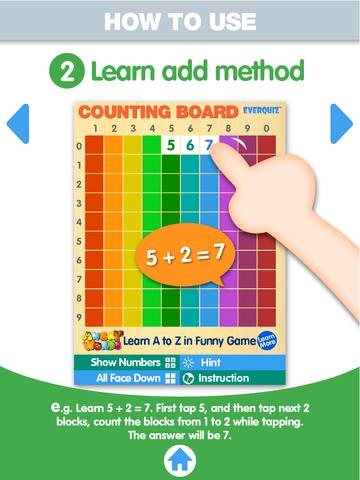
counting boardAnother FREE app is Counting Board HD, a colorful number grid that can be used to help kids learn basic number concepts. The app is advertised as being suitable for 2 to 4 year olds but it can also used with older students. I frequently used number grids with third graders. Number grids help kids see patterns and visualize math concepts. With younger children, the app can be used for counting to 100 – by ones, fives, tens. Younger kids can also learn basic addition and subtraction by using the app to count up or count back. With older kids, number grids can be used to teach: greater than and less than, how to find missing addends, place value concepts, skip counting, and more! The app can be used with the numbers showing or hidden and the pronunciation can be on or off. The app simple to use, visually appealing, and useful for so many math lessons. And… it’s so much easier than dragging out laminated number grids and counters. I love this app! 🙂

Common Core Standards met:

  • K.CC.1. Count to 100 by ones and by tens.
  • K.CC.2. Count forward beginning from a given number within the known sequence (instead of having to begin at 1).
  • 1.NBT.5. Given a two-digit number, mentally find 10 more or 10 less than the number, without having to count; explain the reasoning used.
  • 1.NBT.6. Subtract multiples of 10 in the range 10-90 from multiples of 10 in the range 10-90 (positive or zero differences), using concrete models or drawings and strategies based on place value, properties of operations, and/or the relationship between addition and subtraction; relate the strategy to a written method and explain the reasoning used.
  • 3.OA. 9. Identify arithmetic patterns (including patterns in the addition table or multiplication table), and explain them using properties of operations.

Download link: https://itunes.apple.com/us/app/counting-board/id450751745?mt=8&uo=4

0

4 FREE Virtual Math Manipulatives

Four fabulous apps for your virtual math toolkit. 
Geoboard by The Math Learning Center (a nonprofit organization dedicated to K – 12 education) is a FREE app that turns your iPhone/iPad into a virtual geoboard. Geoboards can be used as tools to teach mathematical concepts such as polygons, perimeter, area, line segments, angles, congruent shapes, symmetry, fractions, etc. Shapes are created by stretching bands on the geoboard’s pegs. There are 5 colors of bands in the iPhone version and 8 in the iPad version. There is also a tool to fill in shapes. On the iPad version, you can switch from the standard 25 peg board to a 150 peg board to create more complex shapes. This is a great app with the potential to be used in so many ways.

Geoboard, by The Math Learning Center - Clarity Innovations

FREE for the iPad, Virtual Manipulatives contains math manipulatives for teaching fractions, decimals, and percents. Included are tiles/circles divided into halves, thirds, fourth, fifths, sixths, eighths, tenths, and 12ths AND their corresponding decimals and percentages! The manipulatives are color coded across the settings so that 1/2 is blue as is .50 and 50%. Kids drag tile pieces onto the work area to compare fractions/decimals/percentages. In the settings you can change from tiles to circles, make the pieces transparent, and hide the numbers on the pieces. Completed work can be easily saved to photos. Finding equivalent fractions has never been so slick – WOW!!

Common Core Standards

  • 3.NF.3 – Explain equivalence of fractions in special cases, and compare fractions by reasoning about their size. Understand two fractions as equivalent (equal) if they are the same size, or the same point on a number line.
  • 4.NF.1 – Explain why a fraction a/b is equivalent to a fraction (n × a)/(n × b) by using visual fraction models, with attention to how the number and size of the parts differ even though the two fractions themselves are the same size. Use this principle to recognize and generate equivalent fractions.

Virtual Manipulatives! - ABCya.com

equivalent fractions

From the National Council of Teachers of Mathematics comes a FREE app called Equivalent Fractions. Kids create equivalent fractions by dividing and shading squares or circles. Circles can be divided into 24ths. Squares can be divided into 144ths. In the play mode, a fraction is shown and kids must create 2 additional fractions that are equivalent. All 3 fractions must have different denominators. The app also places the fractions on a number line – a great visual for comparing! There is also a “build your own” mode which would be fabulous to use for guided exploration & practice. Kids could also use this section as a virtual manipulative when working independently. This app is an excellent resource for the classroom !!

Common Core Standards met:

  • 3.NF.3 – Explain equivalence of fractions and compare fractions by reasoning about their size. Understand two fractions as equivalent (equal) if they are the same size, or the same point on a number line. Recognize and generate simple equivalent fractions, e.g., 1/2 = 2/4, 4/6 = 2/3). Explain why the fractions are equivalent, e.g., by using a visual fraction model.

Equivalent Fractions - National Council of Teachers of Mathematics

counting board

Another FREE app is Counting Board HD, a colorful number grid that can be used to help kids learn basic number concepts. The app is advertised as being suitable for 2 to 4 year olds but it can also used with older students. I frequently used number grids with third graders. Number grids help kids see patterns and visualize math concepts. With younger children, the app can be used for counting to 100 – by ones, fives, tens. Younger kids can also learn basic addition and subtraction by using the app to count up or count back. With older kids, number grids can be used to teach: greater than and less than, how to find missing addends, place value concepts, skip counting, and more! The app can be used with the numbers showing or hidden and the pronunciation can be on or off. The app simple to use, visually appealing, and useful for so many math lessons. I love this app! It’s so much easier than dragging out the laminated number grids and counters. 🙂

Common Core Standards met:

  • K.CC.1. Count to 100 by ones and by tens.
  • K.CC.2. Count forward beginning from a given number within the known sequence (instead of having to begin at 1).
  • 1.NBT.5. Given a two-digit number, mentally find 10 more or 10 less than the number, without having to count; explain the reasoning used.
  • 1.NBT.6. Subtract multiples of 10 in the range 10-90 from multiples of 10 in the range 10-90 (positive or zero differences), using concrete models or drawings and strategies based on place value, properties of operations, and/or the relationship between addition and subtraction; relate the strategy to a written method and explain the reasoning used.
  • 3.OA. 9. Identify arithmetic patterns (including patterns in the addition table or multiplication table), and explain them using properties of operations.

Download link: https://itunes.apple.com/us/app/counting-board/id450751745?mt=8&uo=4

0

6 FREE Apps to Encourage Lifelong Learning

Try adding one or more of these apps to your daily routine this year. Students will love learning something new each day!

This Day in HistoryOne of my favorite FREE resources… WORLD BOOK  – This Day in History for iPad is a great FREE resource for the classroom. Historical events for the day are displayed on a calendar page. You can click on links to related media such as articles, photos/illustrations, music, speeches and more! When I was teaching, I had students  do “morning work” (correct punctuation, capitalization, & spelling in two sentences) while I took attendance, did lunch count, etc. This educational app would have been perfect for that daily assignment because I always used information about something interesting that happened that day. After correcting the sentences, the kids and I would discuss the history of that day. I was always amazed at how well kids retained what we had discussed during the opening minutes of every day. Throughout the year they would often remark, “We learned about that in our morning work.” You may want to try making this educational app part of your classroom’s morning routine. 🙂

WORLD BOOK - This Day in History for iPad - Software MacKiev

WonderopolisFREE – Wonderopolis, a fabulous educational app. Explore Wonderopolis (the website) with your mobile device.

Wonderopolis (Wonderopolis | Where the Wonders of Learning Never Cease) is a fantastic website that provides a daily Wonder of the Day®.  A fun & intriguing question is featured every day. The website/app includes a written explanation of the answer, vocabulary words, and a gallery of images & videos – all to foster learning and inspire curiosity about the Wonder of the Day®. Other daily features include a “Try It Out” section which suggests activities based on the day’s question, a “Still Wondering” section which gives additional/related information, and a quiz. There is even a section for teachers/parents called the “Educator Sandbox” with additional resources and opportunities to connect with the Wonderopolis community. It’s such a fascinating and wonderful resource – I enjoy reading it myself!

Using this website/app would be a fabulous addition to a daily classroom routine. Kids could read (or listen to) the daily Wonder of the Day® as part of their independent work time. They could journal about what they learned and/or what they are still wondering about. A class discussion could be scheduled for later. What a great way to encourage THINKING! Wonderopolis is a fabulous resource to ignite the natural curiosity and imagination of kids!

Download link: https://itunes.apple.com/us/app/wonderopolis/id505247028?mt=8&uo=4

BrainPOP has been around for more than a decade as an educational website. The site features short animated movies – 750+ lessons covering science, social studies, math, art & music, etc. The content is geared for grades 4 and above but I found that many movies were also suitable for third graders. When I was in the classroom, it was one of my favorite online resources.

Now you can download the BrainPOP Featured Movie, the educational app for FREE! Your child can learn something new every day. After watching the daily movie there is a short interactive quiz. And… if your child can’t get enough of this app, there are two subscription options: $1.99 per month/ 4 movies & quizzes a day OR $6.99 per month/full access.

Teachers could add the BrainPOP movie of the day to their daily routine. Watch it at a transition time – right before lunch, after lunch, while waiting for buses to called, etc. Interesting and educational!!

BrainPOP Featured Movie - BrainPOP®

Also available for FREE is BrainPOP Jr. Movie of the Week, another educational app. Every week Annie and Moby (two lovable characters) help 5 to 9 year olds learn about a different subject. There is also a quiz and activities to accompany each animated movie. BrainPOP Jr. has been on the web since 2006 delivering content for younger students in science, social studies, reading, writing, math, and more.

Again, teachers could add the BrainPOP Jr. Movie of the Week to their routine. Start your Monday off with the “Movie of the Week” or use it on Friday. BrainPOP gives teachers another way spark kids interest in learning!

BrainPOP Jr. Movie of the Week - BrainPOP®

weirdDid you know that hippo’s lips are about two feet wide? Get ready to learn all sorts of wacky facts with this app. Just updated and FREE – Weird But True, an e-book from National Geographic Kids. Over 625 kid-friendly, wacky facts are presented in a fun & interactive way. Kids can swipe to move from fact to fact or shake their device to generate a random fact. Sound effects and surprises add to the fun! There is a fact finder which kids can use to locates facts by subject – animals, weather, space, etc. The app also includes a “Weird-O-Meter” which kids can use to rate the level of weirdness for each fact. Additional fact packs are available as in-app purchases –  $.99 each. This app won the Spring 2012 Parents’ Choice Award and was chosen as New & Noteworthy, What’s Hot, & Staff Favorites by Apple. Kids will LOVE this app. :

Weird But True - National Geographic Society

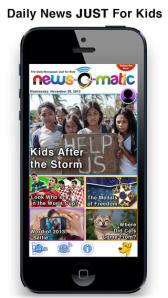
newsCheck out a FREE trial of News-o-Matic, an educational newspaper app for kids 7 – 11 years old. A new edition is published every Monday through Friday. Each edition features 5 articles from the news – sports, science, world news, wacky events, etc. The articles are kid-friendly and age-appropriate. Kids can read on their own or have the articles read to them. Important vocabulary words are underlined and linked to their definitions. The articles also include fun facts, a map for locating where the news is happening, videos, and games. Once registered, kids can connect to the News Room to draw pictures, express opinions, or ask questions about the news. This app helps kids become informed citizens of the world!

The FREE trial lasts for 2 weeks. After that, you must subscribe: yearly – $19.99. monthly – $1.99, or weekly – $0.99. If you subscribe before the end of your free trial, you get a special rate. Teachers, there is also a News-o-Matic School Edition. It comes with a teacher’s guide which includes discussion prompts, comprehension questions, Lexile reading levels, and more. And, it’s a great resource for non-fiction reading!

Download link: https://itunes.apple.com/us/app/news-o-matic-daily-reading/id578023255?mt=8&uo=4

0

Learn with Homer

Learn with Homer

Listed as “New & Noteworthy” in August 2013, Learn with Homer is an educational reading app for kids 3 – 6. Its FREE trial download includes multiple stories and lessons with additional content available through in-app purchases. The app was updated again on August 14, 2014. This update includes a some back-to-school surprises such as Homer singing the alphabet! 

Homer, a gray pigeon, resides in an interactive world designed to help kids learn to read. The fun starts in the Hat Shop where kids have photos taken in the “thinking caps” of their choice. Kids then proceed to a carousel which features every part of the app: Story Time, Learn to Read, Discover the World, Draw a Picture, Songs & Rhymes, Record Your Voice, and U.S. Presidents. There kids choose where to begin their reading adventure. The Learn to Read lessons teach phonemes (sounds) in sequence, then words, then sentences in a sequential, step-by-step reading program. The Story Time section is divided into categories – Homer stories, poetry, folktales, first readers. It includes some free stories with many more offered as in-app purchases. Discover the World is a series of adventures in science, history, art, etc. designed to increase kids’ basic knowledge and vocabularies. The drawing & recording tools help kids develop their expressive skills. There is also a parent website to track children’s progress and/or download printables & book recommendations. This educational app seems to have it all – a well-designed, comprehensive approach to learning to read with real kid appeal!

For more information go to Homer: Parent Resources.

Download link: https://itunes.apple.com/us/app/learn-with-homer/id601437586?mt=8&uo=4

0

Trading Cards

trading cards

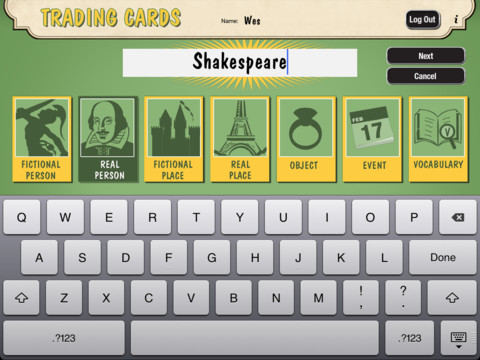
Fabulous educational app!!! ReadWriteThink’s Trading Cards is powerful FREE app developed by the International Reading Association. This educational app provides a unique way for kids to share their understanding of topics, generate their own study aids, create a fictional world to use in their writing, make their own trading cards, and more. There are 7 categories of cards available within the app: fictional person, real person, fictional place, real place, object, event, and vocabulary. Kids start by choosing a category and typing in the title of the card. Each category has specific questions which help kids create information-rich trading cards. Images can be added by using the device’s camera or by accessing pictures in the photo library. Kids can also sort their cards into collections such as characters from a book, heroes or villains, landmarks, the 50 states, vocabulary by subject, etc. The possibilities are endless! Cards can be shared via email, saved to the photo library, or printed on a wireless printer. And… the kid appeal is tremendous. Kids will LOVE trading their cards with their classmates. 🙂

Highly recommended!!

Trading Cards - International Reading Association

0

Shadow Puppet Edu and Shadow Puppet

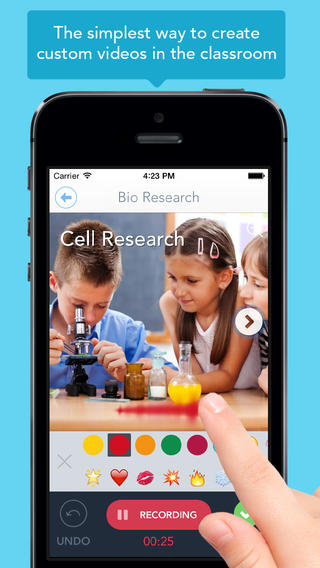
show puppet eduJust released in June – Shadow Puppet Edu, a FREE educational version of Shadow Puppet. Even kindergarten/first graders can create videos with this app which is very intuitive and easy to use. This educational version has a built-in, safe search that allows kids to search the Library of Congress, NASA Flickr Creative Commons, Yahoo Images, and Animated GIFs for images to add to their projects. And… it automatically adds the image credits to the end of the video. How cool as that? Kids can also add any photos that have been saved to their camera rolls. The possibilities for using this app are absolutely endless. Students can use it to create videos to: tell digital stories, explain concepts, present a project, describe an experience, show what they know, and more!! Teachers can create mini-lessons, share examples, enhance their lessons with imagery, etc. What a fabulous classroom tool!

Download link: https://itunes.apple.com/us/app/shadow-puppet-edu/id888504640?mt=8&uo=4

Shadow Puppet

Recently updated and still FREE – Shadow Puppet, a photography app which has been featured by Apple as one of the “Best New Apps” for over 6 months! Using this app, it’s easy to create “puppets” – recorded explanations of your photos. First you choose your photos and put them in the order. Then you talk about your pictures. Everything is recorded. Finished “puppets” can be shared via email, SMS, Facebook and/or Twitter. There are so many ways for everyone to use Shadow Puppet: to teach something new, to share adventures with friends, to record children talking about their experiences, to tell the story behind old family photos, etc.

The update has many new features. Now you can include video clips, add music, search the web for images, overlay text/stickers, and more! The FREE version of the app permits you to include up to 10 photos/video clips. For $1.99 you can get Puppet Essentials which allows you to add up to 100 items to each video and have access to more drawing & decorating tools. The update made this great app even better!

The classroom uses for this app are only limited by your imagination: Take pictures of a child’s work and have him/her explain it to parents. Send pictures and voice recordings of the class field trip. Have kids give a step-by-step explanation of what happened in a science experiment. Draw & sequence pictures to retell a story. Make a “talking timeline” by sequencing photos of historical events. Have kids use it to present mini reports on any subject. Have virtual “pet day” – kids bring in pictures/recordings of their pets. Because you can use anything saved to your photo library, you can explain photos from the web, artwork created in other apps, and so much more. The possibilities for using this educational app are endless. For more suggestions go to http://get-puppet.com/education. What a fabulous resource!!

Download link: https://itunes.apple.com/us/app/shadow-puppet/id700902833?mt=8&uo=4

0

7 Non-Scary, Educational Apps About Sharks

Discovery Channel’s Shark Week starts today. It’s a week of TV programs dedicated to sharks that began in 1988 and is now broadcast in 72 countries.

Here’s some educational apps about these creatures who capture the interest of so many people – young and old!

Shark Goes to the Doctor

FREE – SeaWorld: Ruckus Reader presents – Shark Goes to the Doctor, an engaging story that follows a sand tiger shark as it is checked by vets. Kids learn interesting facts about sharks’ lives.

Download link for SeaWorld: Ruckus Readerhttps://itunes.apple.com/us/app/seaworld-ruckus-reader/id515220048?mt=8&uo=4

Shark tank

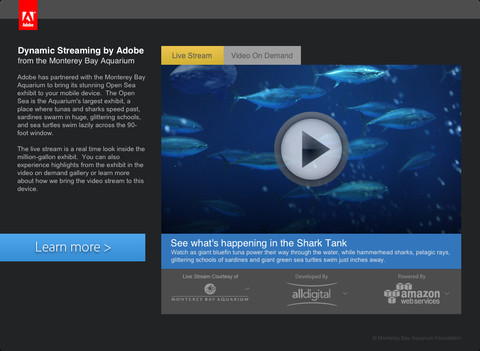
FREE – Sea TV is a collaborative effort between Adobe and Monterey Bay Aquarium (a highly ranked U.S. aquarium) to bring its Open Seas Exhibit to your mobile device! The Open Sea is a million gallon exhibit with a 90-foot window. You may see sharks speed past, sardines swimming in glittering schools, and/or sea turtles on the live video stream. You can also watch videos on demand.

Download link for Sea TVhttps://itunes.apple.com/us/app/sea-tv/id530529039?mt=8&uo=4

shark track 1

shark track 2

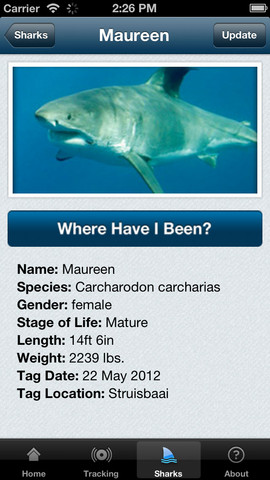
FREE – Global Shark Tracker lets you follow the navigational pattern of sharks that have been tagged with satellite tracking technology.  The purpose of this tracking is for shark conservation and the collection of data on the health of sharks. Very cool!

Download link for Global Shark Tracker:https://itunes.apple.com/us/app/global-shark-tracker/id570772231?mt=8&uo=4

sharky

Currently $.99 – Sparky the Shark, a fun interactive story for kids. Sparky is a friendly shark who does not understand why he frightens people. He and his penguin pal, Dax, try to fix the problem by getting Sparky a new look. They try different teeth and a variety of disguises. Eventually Sparky is accepted for who he is. The app has 2 modes – “read to me” and “read it myself.” There are 90+ interactive hidden hot spots in the story for kids to discover. There is also a “fun disguises page” where kids can dress Sparky in goofy teeth, hats, ties, & googly eyes. Then they can take his photo. What a great app – a fun interactive experience with an important message about wanting to be accepted and believing in one’s self. No wonder it was a finalist in the Australian Mobile Awards!

Download link: https://itunes.apple.com/us/app/sparky-shark-funny-animated/id478654371?mt=8&uo=4

Discovery Kids Sharks

Currently $4.99 – Discovery Kids Sharks for kids 6+. If your child loves sharks, this is a must-have educational app! Kids will learn: shark anatomy, types of sharks, how sharks hunt, where sharks live, and about shark families. The app includes 5 interactive games and 30 digital trading cards that can be shared via email. This app has a great mix of videos (from Discovery’s Shark Week files), fabulous photos of sharks in their natural environment, 150+ interesting shark facts, and a few games. Teachers could use the information in this app to teach a lesson on comparing and contrasting – using a Venn diagram or other graphic organizer. Kids will love learning about sharks using this fun, cool app!

Discovery  Kids Sharks - Parragon

On sale for $.99, Treasure Kai and the Lost Gold of Shark Island is an adventure story of a 10-year-old treasure hunter named Kai. Kai is always dreaming about treasure and looking for it in his parents’ store: The Treasure Shop. Kai’s dreams magically transport him to Shark Island where he finds a treasure chest. And so the adventure begins…. Kids help in the hunt for gold by choosing from 8 different treasure chests. Each chest reveals another clue – leading Kai through more adventures. Along the way there are animations to discover, great sound effects, and an original score. This digital story is similar to the “choose your own adventure” books with an “Indiana Jones” feel to it. It is different every time it is read with thousands of ways to find the treasure. This app would be great for kids who are a bit older and becoming independent readers. Very cool 🙂

Visit the website for a preview http://treasurekai.com/. After reading the story, your child can go back to the website for a variety of extras: watch fun fact videos, go behind the scenes, play a video game, work some puzzles, and more.

Treasure Kai and the Lost Gold of Shark Island - Interactive Book App for Kids - Treasure Bound Books

ocean

Currently $2.99 – Ocean – Animal Adventures for Kids, an educational app for preschoolers. Kids will become sea life experts as they explore 3 ocean scenes – a coral reef, a shark reef, and the deep-sea. The app has two modes – one for tapping/interacting with the creatures and the other for listening to/learning facts about them. Kids will learn fun facts about more than 30 animals and be delighted with the 60+ animations. The app is narrated in 12 languages – English, German, French, Spanish, Russian, Swedish, Japanese, Chinese, Portuguese (Brazilian), Turkish, Dutch and Italian. Check out this cute interactive book for your 1 – 5 year old today. 🙂

Download link: https://itunes.apple.com/us/app/ocean-animal-adventures-for/id819165012?mt=8&uo=4

0

SlateMath for Kids – Kindergarten and 1st Grade Games

slate math

SlateMath for Kids – Kindergarten and 1st Grade Games is a FREE educational app with 38 educational activities that prepare kids for kindergarten/first grade math. I found out about this app from one of my readers. What a great suggestion – it’s a hidden gem! All of the games are presented in a travel book so kids learn about the world as they complete the varied math activities. They travel to Scotland, Norway, Germany, Czech Republic, Switzerland, Italy, Greece, Russia, Spain, and Sweden – how fun! Skills presented include: counting, writing digits, ordering, addition, patterns, odd/even numbers, and problem solving. Kids are rewarded with fireworks when they answer questions correctly and helped when they miss questions. Written directions can be easily switched to 25 different languages. The app permits multiple users with each user’s progress tracked in his/her travel book. I love the travel theme and the variety of well-developed, age-appropriate activities that this app provides. Check it out! 🙂

Download link: https://itunes.apple.com/us/app/slatemath-for-kids-kindergarten/id589371294?mt=8&uo=4

1

This Day in History

This Day in History

One of my favorite FREE resources…

WORLD BOOK  – This Day in History for iPad is a great FREE resource for the classroom. Historical events for the day are displayed on a calendar page. You can click on links to related media such as articles, photos/illustrations, music, speeches and more! When I was teaching, I had students  do “morning work” (correct punctuation, capitalization, & spelling in two sentences) while I took attendance, did lunch count, etc. This educational app would have been perfect for that daily assignment because I always used information about something interesting that happened that day. After correcting the sentences, the kids and I would discuss the history of that day. I was always amazed at how well kids retained what we had discussed during the opening minutes of every day. Throughout the year they would often remark, “We learned about that in our morning work.” You may want to try making this educational app part of your classroom’s morning routine. 🙂

WORLD BOOK - This Day in History for iPad - Software MacKiev

0

7 Educational Apps About Sharks

Shark Week (starting on August 10) is Discovery Channel’s week of TV programs dedicated to sharks. The programming event began in 1988 and it’s now broadcast in 72 countries.

Here’s some educational apps for kids that I found about these creatures who capture the interest of so many people – young and old!

Shark Goes to the Doctor

FREE – SeaWorld: Ruckus Reader presents – Shark Goes to the Doctor, an engaging story that follows a sand tiger shark as it is checked by vets. Kids learn interesting facts about sharks’ lives.

Download link for SeaWorld: Ruckus Readerhttps://itunes.apple.com/us/app/seaworld-ruckus-reader/id515220048?mt=8&uo=4

Shark tank

FREE – Sea TV is a collaborative effort between Adobe and Monterey Bay Aquarium (a highly ranked U.S. aquarium) to bring its Open Seas Exhibit to your mobile device! The Open Sea is a million gallon exhibit with a 90-foot window. You may see sharks speed past, sardines swimming in glittering schools, and/or sea turtles on the live video stream. You can also watch videos on demand.

Download link for Sea TVhttps://itunes.apple.com/us/app/sea-tv/id530529039?mt=8&uo=4

shark track 1

shark track 2

FREE – Global Shark Tracker lets you follow the navigational pattern of sharks that have been tagged with satellite tracking technology.  The purpose of this tracking is for shark conservation and the collection of data on the health of sharks. Very cool!

Download link for Global Shark Tracker:https://itunes.apple.com/us/app/global-shark-tracker/id570772231?mt=8&uo=4

sharky

Currently $.99 – Sparky the Shark, a fun interactive story for kids. Sparky is a friendly shark who does not understand why he frightens people. He and his penguin pal, Dax, try to fix the problem by getting Sparky a new look. They try different teeth and a variety of disguises. Eventually Sparky is accepted for who he is. The app has 2 modes – “read to me” and “read it myself.” There are 90+ interactive hidden hot spots in the story for kids to discover. There is also a “fun disguises page” where kids can dress Sparky in goofy teeth, hats, ties, & googly eyes. Then they can take his photo. What a great app – a fun interactive experience with an important message about wanting to be accepted and believing in one’s self. No wonder it was a finalist in the Australian Mobile Awards!

Download link: https://itunes.apple.com/us/app/sparky-shark-funny-animated/id478654371?mt=8&uo=4

Discovery Kids Sharks

Currently $4.99 – Discovery Kids Sharks for kids 6+. If your child loves sharks, this is a must-have educational app! Kids will learn: shark anatomy, types of sharks, how sharks hunt, where sharks live, and about shark families. The app includes 5 interactive games and 30 digital trading cards that can be shared via email. This app has a great mix of videos (from Discovery’s Shark Week files), fabulous photos of sharks in their natural environment, 150+ interesting shark facts, and a few games. Teachers could use the information in this app to teach a lesson on comparing and contrasting – using a Venn diagram or other graphic organizer. Kids will love learning about sharks using this fun, cool app!

Discovery  Kids Sharks - Parragon

Currently $3.99, Treasure Kai and the Lost Gold of Shark Island is an adventure story of a 10-year-old treasure hunter named Kai. Kai is always dreaming about treasure and looking for it in his parents’ store: The Treasure Shop. Kai’s dreams magically transport him to Shark Island where he finds a treasure chest. And so the adventure begins…. Kids help in the hunt for gold by choosing from 8 different treasure chests. Each chest reveals another clue – leading Kai through more adventures. Along the way there are animations to discover, great sound effects, and an original score. This digital story is similar to the “choose your own adventure” books with an “Indiana Jones” feel to it. It is different every time it is read with thousands of ways to find the treasure. This app would be great for kids who are a bit older and becoming independent readers. Very cool 🙂

Visit the website for a preview http://treasurekai.com/. After reading the story, your child can go back to the website for a variety of extras: watch fun fact videos, go behind the scenes, play a video game, work some puzzles, and more.

Treasure Kai and the Lost Gold of Shark Island - Interactive Book App for Kids - Treasure Bound Books

ocean

Currently $2.99 – Ocean – Animal Adventures for Kids, an educational app for preschoolers. Kids will become sea life experts as they explore 3 ocean scenes – a coral reef, a shark reef, and the deep-sea. The app has two modes – one for tapping/interacting with the creatures and the other for listening to/learning facts about them. Kids will learn fun facts about more than 30 animals and be delighted with the 60+ animations. The app is narrated in 12 languages – English, German, French, Spanish, Russian, Swedish, Japanese, Chinese, Portuguese (Brazilian), Turkish, Dutch and Italian. Check out this cute interactive book for your 1 – 5 year old today. 🙂

Download link: https://itunes.apple.com/us/app/ocean-animal-adventures-for/id819165012?mt=8&uo=4