0

Preschool University – phonics/spelling apps

spelling-magic

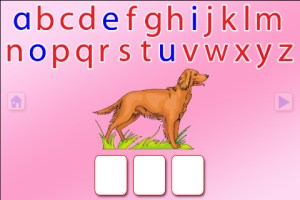
Moveable Alphabet option from ABC Spelling Magic

Wow!! Preschool University has 12 phonics/spelling apps available for FREE right now. There are links to all below. I have them grouped by the skills that they teach and from easiest to most difficult. The first group teaches letter sounds.

  • ABC Magic Phonics – initial letter sounds, 1 picture for each letter       ABC MAGIC PHONICS - PRESCHOOL UNIVERSITY
  • ABC Magic 2 –  initial letter sounds, 4 pictures for each letter       ABC MAGIC 2 - PRESCHOOL UNIVERSITY
  • ABC Magic 3 Line Match – Kids apply what they know about sounds by matching. There are 2 modes: matching 2 pictures with the same beginning sounds or matching letters to a picture that starts with that sound.       ABC MAGIC 3 Line Match - PRESCHOOL UNIVERSITY
  • ABC Magic 4  – Kids are given a letter and they must find pictures of 3,6,or 9 items that begin with that sound.       ABC MAGIC 4 - PRESCHOOL UNIVERSITY
  • ABC Magic 5 Letter Sound Matching – Kids match sounds in 2 modes: picture to letter or letter to picture. As kids become more advanced, you can increase their number of choices (4, 6, or 9) and increase the number of matches per round (5,10,15,20,or 25). ABC MAGIC 5 Letter Sound Matching - PRESCHOOL UNIVERSITY
  • ABC Magic 6 – is the same as Sound Beginnings (follows #8).
  • ABC Magic 7 Memory Match – A matching game with 2 options: match letter to letter or match picture to picture. Letter sounds and picture names are pronounced with the option of turning the sounds off. Grids of 12, 16, or 20 are available.       ABC MAGIC 7 Memory Match - PRESCHOOL UNIVERSITY
  • ABC Magic 8 Sound Matching – This app is an extension of ABC Magic 7. It’s another matching game with 2 options: letter to picture having that beginning sound or picture to another picture with the same beginning sound. Letter sounds and picture names are pronounced with the option of turning the sounds off. Grids of 12, 16, or 20 are available.       ABC MAGIC 8 Sound Matching - PRESCHOOL UNIVERSITY
  • Sound Beginnings – This app is the most advanced of the letter sound teaching apps. It is called sound beginnings but actually teaches beginning, middle, and ending sounds. There are two options: a picture to letter and letter to picture. As kids become more advanced, you can increase their number of choices (3,4, or 5) and increase the number of matches per round (5,10,15,20,or 25). Awesome practice for beginning readers!!       SOUND BEGINNINGS - PRESCHOOL UNIVERSITY

The second group of apps uses letter sounds to spell words that phonetically regular. There are 2 ways to use each of these apps. Word Jumble provides the  child with the letters of the word and the child puts them in order. Moveable Alphabet (the more difficult option) has the entire alphabet across the top of the page and the child must find the correct letters to spell the word. If a child touches a picture, the app reads the word. If a child touches a letter, the app gives the sound for that letter. Each vowel is taught in isolation but there is also a shuffle option which provides mixed practice. Vowels are printed in blue and consonants are in red so you can reinforce the CVC (consonant, vowel, consonant) pattern.

  • ABC Spelling Magic Short Vowels – teaches short vowels       ABC SPELLING MAGIC Short Vowel Words - PRESCHOOL UNIVERSITY
  • ABC Spelling Magic 2 Consonant Blends – teaches consonant blends and consonant clusters       ABC SPELLING MAGIC 2 Consonant Blends - PRESCHOOL UNIVERSITY
  • ABC Spelling Magic 3 Blends & Syllables – GREAT practice spelling multi-syllable words       ABC SPELLING MAGIC 3 Blends and Syllables - PRESCHOOL UNIVERSITY
  • Sentence Reading Magic – Kids built 2 or 3 words sentences using phonetically regular words.       SENTENCE READING MAGIC - PRESCHOOL UNIVERSITY

These apps provide a lot of good practice for preschoolers and early readers!!

Common Core Standards met:

  • K. RF.3 – Know and apply grade-level phonics and word analysis skills in decoding words. Demonstrate basic knowledge of one-to-one letter-sound correspondences by producing the primary sound or many of the most frequent sounds for each consonant. Associate the short sounds with common spellings (graphemes) for the five major vowels.
0

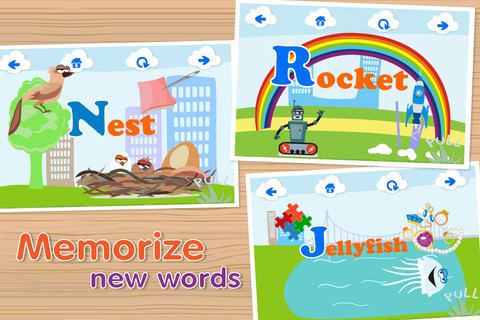
ABC Games – Montessori Phonics-enabled Alphabet

ABC Games – Montessori Phonics-enabled Alphabet for the iPhone/iPad is FREE for a limited time. It is designed to teach 2 – 5 year olds the letters of the alphabet and their sounds. Kids may explore the alphabet in any order that they wish. There are over 100 animations which correspond to the letters of the alphabet. The 3 words for each letter are pronounced and spelled. The illustrations are animated cartoons. Pages for each letter are uncluttered – simply presented but engaging. The app also has a parent section that shows how often your child has visited each letter. Nicely done!

Common Core Standards met:

  • K.RF.1 – Demonstrate understanding of the organization and basic features of print. Recognize and name all upper and lowercase letters of the alphabet.

Recommended!

Interactive ABC HD - Pre-reading for Kids - Kids Academy Company

0

Little Writer – The Tracing App for Kids

This FREE letter writing app for the iPhone/iPad is designed to teach 3 – 6 year olds how to write upper & lower case letters, numbers, shapes, and words. It starts by showing the shape of the letter and naming it. The child traces along lines to write the letter. Then the child is praised and told what letter, number, shape or word he/she has just written. When writing a word, the letters are presented one at a time with the full word shown in the upper right-hand corner. When the word is finished, a picture pops up with the child’s writing underneath it.

There are a lot of great things about this app. I like the size of the letters  – nice and big for little hands. I also like that there are subtle dotted lines on the page. But, the best part of this app is the ability to customize it. You can turn items on or off in order to introduce letters, numbers, etc. slowly. You can record your voice or your child’s voice pronouncing the names of the letters, numbers, etc. You can add in your own pictures & words so that your child can learn to write his/her own name and names of family members or whatever you wish! You can add additional letters for foreign words so that you can use it to teach simple words in another language. SO many possibilities……

Common Core Standards met:

  • K.RF.1 – Recognize and name all upper and lowercase letters of the alphabet.

Highly Recommended!

Little Writer - The Tracing App for Kids - Innovative Mobile Apps

0

Marbleminds Phonics

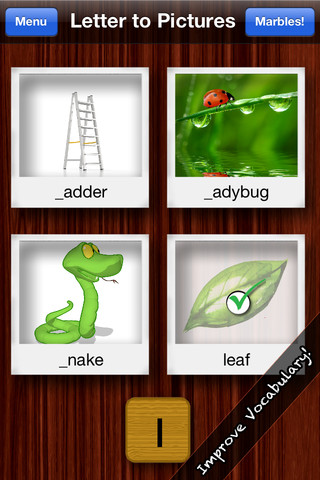
In this app for the iPhone/iPad (which normally costs $2.99) kids practice phonics in four different ways: picture to letter (choose the beginning letter for a picture), letter to picture (find the pictures that start with a letter), memory (match letters to pictures), and sounds like (choose the letter for the sound). In the game mode, all four methods are mixed and kids earn marbles as they play. This app provides some good practice for kids with letters/sounds for over 150 pictures.

Be aware of a few issues that will hopefully be addressed in the next update. The sounds of c and k can be the same. When c is followed by a,o, or u it makes a k sound. In the app when looking for words that start with the k sound, the correct answers were kettle, kangaroo and kettle but other choices included cat and candy cane – too confusing!  Also, vowels can be tricky. When looking for the short i sound, one of the correct answers was iron which is incorrect because it has a long i sound. When looking for the short o sound, two of the correct answers were orange and onion – neither make the short o sound. Even though this app has some mistakes, it is better than many of the other phonics apps that I have seen.

Common Core Standards met:

  • K.RF.3 –  Know and apply grade-level phonics and word analysis skills in decoding words.a.Demonstrate basic knowledge of one-to-one letter-sound correspondences by producing the primary sound or many of the most frequent sounds for each consonant.

Keep reading my blog to find out when apps go FREE. There is a lite version of this app that you can try.

Marbleminds Phonics - Iskandar, Inc.

0

ABC Mouse.co – Ham with Jam, Hen in the Pen, Big Pig & Little Pig, To Run is Fun

These apps for the iPhone/iPad are from the ABC Mouse word family beginning reader series. I chose to downloaded The Hen in the Pen to review the series. Each story emphasizes words from a particular word family. There are also easy sight words in the stories. There are several ways that the books can be read: Read to Me, Read with Pause, I Can Read It, and Hear the Words. I really like the Hear the Words option. It allows the child to read alone but tap any word that he/she gets stuck on. There are parent tips on the title page that explain word families and sight words for beginning readers. There are also parent tips throughout the books. The illustrations are colorful and support the text so that kids can use picture clues as they read. The story lines are very simple. But, that is not a negative thing because these apps are more about the process of reading than the actual story. When my son was an early reader, he loved books like these because he could read them “all by himself” and that alone makes them worth downloading 🙂 And…. they are currently FREE.

Common Core Standards met:

K.RF.3 – Know and apply grade-level phonics and word analysis skills in decoding words. c. Read common high-frequency words by sight (e.g., the, of, to, you, she, my, is, are, do, does). d. Distinguish between similarly spelled words by identifying the sounds of the letters that differ.

Recommended!

ABCmouse.com Ham and Jam - Age of Learning, Inc. Ham with Jam     ABCmouse.com The Hen in the Pen - Age of Learning, Inc. Hen in the Pen     ABCmouse.com Big Pig and Little Pig - Age of Learning, Inc. Big Pig & Little Pig     ABCmouse.com To Run is Fun - Age of Learning, Inc. To Run is Fun

0

The Opposites

The Opposites is currently FREE for the iPhone/iPad. Designed for kids 7+, this app requires the matching of increasingly difficult pairs of opposite words. There are two sections of the app: dictionary and play. In the dictionary section, words are listed next to their opposites. To learn the meaning, students just tap on the word and a definition appears. There are 10 levels with 100+ words per level. In the play section, words are pronounced by a boy or a girl as they appear in bubbles and float towards the top of the screen  Kids are to tap pairs of opposites as they appear – which makes the words turn a color then pop. The goal is to match 12 sets of opposites  – which completes the level. A bonus round then appears in which the student has 20 seconds to match up an entire  board full of opposites. This app starts off simply but becomes quite challenging in the later levels. It could be used for differentiating a lesson and/or for helping students grow their understanding of antonyms.

Common Core Standards met:

  • 4.L.5 – Demonstrate understanding of figurative language, word relationships, and nuances in word meanings. c.Demonstrate understanding of words by relating them to their opposites (antonyms) and to words with similar but not identical meanings (synonyms).
  • 5.L.5 – Demonstrate understanding of figurative language, word relationships, and nuances in word meanings. c. Use the relationship between particular words (e.g., synonyms, antonyms, homographs) to better understand each of the words.

Recommended!

The Opposites - Mindshapes Limited

0

My Editing Buddy

This iPad app is a FREE simple to use word processor designed for use in elementary classrooms. But…there is so much more to this app. Kids can share their work with classmates and learn to edit using this app. To create an account, you need to provide an email address. The app can be used without an account but it will not save documents. After the account is created, just log in and create your document. Then it’s time to share your work with someone who will edit it. You can choose: “pass & edit” or “add to sharing network.” If you choose “pass & edit” you literally hand your work to someone for editing. Symbols and sticky notes are along the bottom of the screen when the app is in the editing mode. The “editor”  just drags the appropriate symbol in place to edit the document. A glossary of symbols is available by tapping the question mark. Sticky notes are available for more detailed feedback. When finished, your “editor” saves then returns your work. You can now swipe from your word processing version to the edited version and make revisions. If you choose “add to sharing network” your work will posted to your class for anyone to edit. Teachers need to set up a class for their students and provide students with the class password. Be aware that anyone who has an account can set up “a class” so teachers may have to monitor this option. What an awesome way to get kids involved in and excited about peer editing!!

Common Core Standards met:

  • K.W.5 /1.W.5/2.W.5/ – With guidance and support from adults, respond to questions and suggestions from peers and add details to strengthen writing as needed.
  • 3.W.5/4.W.5/5.W.5 – With guidance and support from peers and 5. adults, develop and strengthen writing as needed by planning, revising, and editing.

Highly Recommended!

My Editing Buddy - Interactive Elementary

0

Spellosaur

This app is FREE for the iPhone/iPad so that you can see how it works before purchasing the premium version for $3.99. What makes this app different from others is that you are able to input your own words to study. In the FREE version you can input 5 words and have 1 user. In the premium version, you can input many words and have multiple users (with their own lists). After the words are added, there are 4 activities for kids to do with their list: listen & choose the correct word, complete the word by adding the missing letters, rearrange the scrambled word, spell the word. Then kids can take a test over their words. There are 2 voices to choose from – US English & English or kids/parents can record their own words. If the words are homonyms kids can also add a meaning to differentiate one word from another. In the premium version, lists can be saved so that kids can go back and review previously studied/learned words. The ability to add your own words adds a lot of flexibility to this app. It could be used for word study: word families, letter sounds, making plurals, prefixes and suffixes, etc.  Nicely done!!

Common Core Standards met:

  • K.RF.3/1.RF.3/2.RF.3/3.RF.3/4.RF.3/5.RF.3 – Know and apply grade-level phonics and word analysis skills in decoding words.

Recommended!

Spellosaur - Simulant