0

Wonderopolis

Wonderopolis

FREE – Wonderopolis, the educational app. Now you can explore Wonderopolis (the website) from your mobile device.

Wonderopolis (Wonderopolis | Where the Wonders of Learning Never Cease) is a fantastic website that provides a daily Wonder of the Day®. An intriguing question is posed each day. There is a written explanation of the answer (which you can read on your own or listen to), vocabulary words (with a word challenge), a gallery of images & videos – all to inspire curiosity and learning about the day’s wonder. Other daily features include a “Try It Out” section which suggests activities based on the day’s question, a “Still Wondering” section which gives additional/related information. and a quiz. There is also a section for teachers/parents called the “Educator Sandbox” which has additional resources and opportunities to connect with the Wonderopolis community.

Using this app/website would be a fabulous addition to a daily classroom routine. Kids could read the daily Wonder of the Day® as part of their independent work time. They could journal about what they learned and/or are still wondering about. A class discussion could be scheduled for later. What a great way to encourage THINKING!  Wonderopolis is a fabulous resource to ignite the natural curiosity and imagination of kids!

Download link: https://itunes.apple.com/us/app/wonderopolis/id505247028?mt=8&uo=4

0

The Opposites

FREE again – The Opposites for the iPhone/iPad. Designed for kids 7+, this educational app requires the matching of increasingly difficult pairs of opposite words. There are two sections of the app: dictionary and play. In the dictionary section, words are listed next to their opposites. To learn the meaning, students just tap on the word and a definition appears. There are 10 levels with 100+ words per level. In the play section, words are pronounced by a boy or a girl as they appear in bubbles and float towards the top of the screen  Kids are to tap pairs of opposites as they appear – which makes the words turn a color then pop. The goal is to match 12 sets of opposites  – which completes the level. A bonus round then appears in which the student has 20 seconds to match up an entire  board full of opposites. This app starts off simply but becomes quite challenging in the later levels. It could be used for differentiating a lesson and/or for helping students grow their understanding of antonyms.

Common Core Standards met:

  • 4.L.5 – Demonstrate understanding of figurative language, word relationships, and nuances in word meanings. c.Demonstrate understanding of words by relating them to their opposites (antonyms) and to words with similar but not identical meanings (synonyms).
  • 5.L.5 – Demonstrate understanding of figurative language, word relationships, and nuances in word meanings. c. Use the relationship between particular words (e.g., synonyms, antonyms, homographs) to better understand each of the words.

Recommended!

The Opposites - Mindshapes Limited

0

Teach Me Toddler

Teach Me Toddler

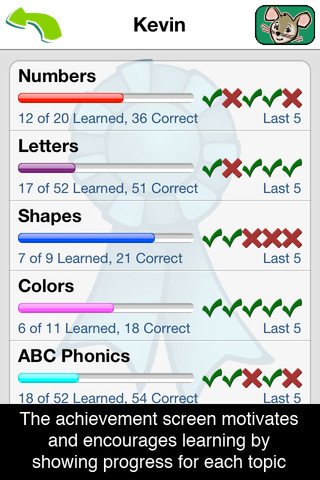
FREE again today – Teach Me Toddler, a fabulous educational app for teaching your little one letters, numbers, shapes, colors, phonics (letter sounds), and counting. The app includes parental controls so that parents/teachers can choose which areas they want their child/children to work on. Up to 40 players can be entered and the topics for each player can vary – it’s fully customizable by individual! And… the app keeps track of each child’s performance – perfect for a preschool or kindergarten classroom. Teachers could start by assigning general practice for all then reset the players and customize it to meet individual kids’ needs  – AWESOME!!

Kids are rewarded for correct answers with stickers or coins. Sticker scenes include the beach, reef, pirate cove, city, farm, and playground. Parents/teachers can set the number of correct responses needed for getting a sticker from 1 – 9. Completed scenes can be exported to share. 🙂

One of the BEST thing about this educational app is the appropriateness of the topics. It teaches numbers to 20, counting to 10, upper and lower case letters, 11 colors, 9 shapes, and letter sounds. I was so excited that it taught the hard and soft sound of c!! Download this one today – it is rarely FREE!

TeachMe: Toddler - 24x7digital LLC

0

Learn with Homer

Learn with Homer

Released on August 1 and already listed as “New & Noteworthy” – Learn with Homer is an educational reading app for kids 3 – 6. The FREE download includes 30 stories and lessons (18 Learn to Read lessons/stories, 12 Discover the World lessons) as well as access to Homer’s Clubhouse and parent tools. Additional content is available through in-app purchases.

Homer, a gray pigeon, resides in an interactive world designed to help kids learn to read. The fun starts in the Hat Shop where kids have photos taken in the “thinking caps” of their choice. From there, kids can proceed to Story Time, Learn to Read, Discover The World, or Homer’s Clubhouse. The Story Time section includes 9 free stories representing 4 genres (rhymes, poetry, folktales, folk songs) as well as Homer stories.  The Learn to Read section teaches the phonemes (sounds) in sequence. Lessons start with sounds & letters, then move to words, and then to sentences. Discover The World is a series of adventures in science, history, art, etc. designed to increase kids’ basic knowledge and vocabularies. Finally, kids can go to Homer’s Clubhouse to draw and record what they have learned. And if that wasn’t enough… there is also a parent website to track your child’s progress and/or download printables  & book recommendations. This educational app seems to have it all – a well designed, comprehensive approach to learning to read with real kid appeal!!

For more information go to Homer: Parent Resources.

Download link: https://itunes.apple.com/us/app/learn-with-homer/id601437586?mt=8&uo=4

0

Alien Buddies

Alien Buddies

Alien Buddies is FREE for a limited time. Formerly listed as one of Apple’s “New & Noteworthy” and geared towards kids ages 3 – 7, this educational app features 4 different activities (matching, puzzles, dot-to-dot, and stickers) with varying levels of difficulty. Matching can be played in 2 modes (visual or audio) to reinforce colors, shapes, numbers and letters. Puzzles can be set to contain 4, 6, or 8 pieces. In the sticker section, kids add out-of-this-world stickers to 8 different space scenes.  All activities are well done but I especially like the dot-to-dot activity which has a “please help” or an “I can do it myself” button. Kids need to visually recognize the order of the numbers to connect the dots and the app counts as the dots are connected – love it! The app is cute, colorful, and sure to appeal to kids!

Download link: https://itunes.apple.com/us/app/alien-buddies-preschool-learning/id469461540?mt=8&uo=4

0

Word Wonderland (Primary) and Word Wonderland (Elementary)

Word Wonderland

FREE for a limited time – Word Wonderland (Primary) and Word Wonderland (Elementary), games that have kids hoping, eating, and shaking their way to the end of a game board as they sort words. Children start by creating name badges – the app permits multiple children to play. In the primary (K – 2) version, kids help to guide a friendly frog through the pond as they sort words by sounds – short vowels. long vowels, r controlled vowels, blends, digraphs, and more. In the elementary (3 – 6) version, kids guide an astronaut crab through the space station as they sort more difficult words by sounds, inflectional endings, Greek/Latin roots, etc. These educational apps provide a fun way for kids to sort words but I am a bit apprehensive about encouraging kids to shake the iPad. Check it out for yourself while the full versions are FREE.

Download links: https://itunes.apple.com/us/app/word-wonderland-primary-full/id611436564?mt=8&uo=4 and https://itunes.apple.com/us/app/word-wonderland-elementary/id634947932?mt=8&uo=4

0

Wubbzy The Superhero

Wubby The Superhero

FREE today – Wubbzy The Superhero, a storybook app featuring Wonder Wubbzy and Flower Power Daizy. This app was developed by Cupcake Digital in partnership with the producers of the Emmy® Award-winning Nick Jr. TV series Wow! Wow! Wubbzy!®.

 Kids join Wubby and Daizy as they help Ms. Bookbinder the librarian, rescue a poodle from a tree, and find a lost key to the city. Along the way kids will discover animations & interactivity on every page! The app also has 4 educational games and sing-along music videos. The Grown Up’s Corner has 2 sets of questions about the story. The questions address literal understanding of the story (thin questions) as well as extended meaning (fat questions).  Also included in the Grown-Up Corner is information about the Common Core Standards addressed by this app which are predominately kindergarten standards. Print-outs and activities to supplement the story are available online at cupcakedigital.com. What is not to love about this educational app? – Cute story packed with interactivity, great message about helping others, educational games, sing-along videos, standards-based, and a guide for adults!

Download link: https://itunes.apple.com/us/app/wubbzy-the-superhero/id616726246?mt=8&uo=4

0

Grammar Wonderland (Primary) & Grammar Wonderland (Elementary)

grammar primary

grammar

FREE again – the full versions of Grammar Wonderland (Primary) & Grammar Wonderland (Elementary). In both games kids lead their characters through different adventures as they practice  nouns, verbs, adjectives, and more. The primary version is for younger children – the words are read and some levels include pictures. The app does not teach the parts of speech but it provides lots of practice for kids in a fun game-like environment. After teaching a lesson about parts of speech, teachers can have kids show what they know with this app. Practice is provided for the following: common nouns, proper, nouns, concrete nouns, abstract nouns, singular nouns, plural nouns, possessive nouns, pronouns, action verbs, present-tense verbs, past-tense verbs, future-tense verbs, linking verbs, adjectives, articles, comparative/superlative adjectives, and more! Many parts of speech are taught in both of theses educational apps – perfect for differentiating your instruction for a variety of reading levels. Both also apps permit multiple player – great for the classroom!

Recommended!!  – Download them today 🙂

Grammar Wonderland Primary       Grammar Wonderland (Primary) - McGraw-Hill School Education Group

Grammar Wonderland Elementary       Grammar Wonderland (Elementary) - McGraw-Hill School Education Group

0

SpellingCity

Spelling City  – a FREE educational app for the iPhone/iPad! I LOVE Spelling City. It is a phenomenal website where teachers can input their weekly spelling lists so kids can go online to practice their spelling in so many fun ways – hang mouse, match it, which word, sentence unscramble, etc. I used Spelling City in my classroom for the last several years and the kids & parents loved it. The app has several preloaded lists and the best part…..kids can access the their teacher’s list (providing that he/she uses Spelling City, of course) by using their zip code, school name, and teacher’s name. Practice spelling in the car on a way to a soccer game or while waiting in the dentist’s office. AWESOME!!

Common Core Standards met:

  • K.RF.3  – Distinguish between similarly spelled words by identifying the sounds of the letters that differ.
  • 1.RF.3 – Recognize and read grade-appropriate irregularly spelled words.
  • 2.RF.3 – Identify words with inconsistent but common spelling-sound correspondences. AND Recognize and read grade-appropriate irregularly spelled words.
  • 3.RF.3 – Read grade-appropriate irregularly spelled words.
  • 4.RF.3 – Use combined knowledge of all letter-sound correspondences, syllabication patterns, and morphology (e.g., roots and affixes) to read accurately unfamiliar multisyllabic words in context and out of context.
  • 5.RF.3 – Use combined knowledge of all letter-sound correspondences, syllabication patterns, and morphology (e.g., roots and affixes) to read accurately unfamiliar multisyllabic words in context and out of context.

Highly recommended!

SpellingCity - SpellingCity

0

Cookie Next Door – Rainy Days AND Rainy ‘Go Round (the sequel)

cookie

Rainy 'Go Round

WOW – here are TWO educational apps that you don’t want to miss!!

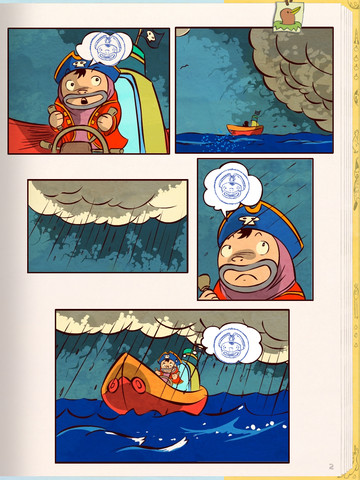
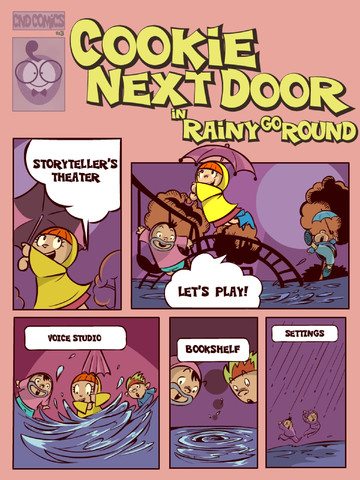
FREE again – Cookie Next Door-Rainy Days. This educational app was a choice in the “New & Noteworthy” section of the app store in early February. Kids become storytellers in this animated adventure. Their speech, songs, and rhymes bring Cookie and his friends alive. The app includes a Creative Comic Book, a Voice Over Studio, and an Animated Stage Projector. Creative Comic Book utilizes storyboards to guide kids through the storytelling experience. In the Voice Over Studio, kids can change the pitch of the characters’ voices. As kids tell the story their speech, singing, etc. is transformed into the voices of the characters. Once the story is complete, the Animated Stage turns it into a play with dancing props! This app is very creative, very fun and it’s great for developing oral language skills. I am looking forward to more adventures of Cookie and friends!!

Cookie Next Door – Rainy Go Round is here!! This educational app is also FREE for a limited time. The sequel to Rainy Days, Cookie’s first adventure, this app has the same features – the Creative Comic Book, Voice Over Studio, and Animated Sage projector. The tale continues…

Cookie Next Door ~ Rainy Days - Sabodu LLC Rainy Days          Cookie Next Door ~ Rainy 'Go Round - Sabodu LLC   Rainy ‘Go Round (the sequel)