0

Virtual Math Manipulatives

Geoboard by The Math Learning Center (a nonprofit organization dedicated to K – 12 education) is a FREE educational app that turns your iPhone/iPad into a virtual geoboard. Geoboards can be used as tools to teach mathematical concepts such as polygons, perimeter, area, line segments, angles, congruent shapes, symmetry, fractions, etc. Shapes are created by stretching bands on the geoboard’s pegs. There are 5 colors of bands in the iPhone version and 8 in the iPad version. There is also a tool to fill in shapes. On the iPad version, you can switch from the standard 25 peg board to a 150 peg board to create more complex shapes. This is a great app with the potential to be used in so many ways.

Highly recommended for your virtual math tool kit!

Geoboard, by The Math Learning Center - Clarity Innovations

FREE for the iPad, Virtual Manipulatives, an educational app that features math manipulatives for teaching fractions, decimals, and percents. Included are tiles/circles divided into halves, thirds, fourth, fifths, sixths, eighths, tenths, and 12ths AND their corresponding decimals and percentages! The manipulatives are color coded across the settings so that 1/2 is blue as is .50 and 50%. Kids drag tile pieces onto the work area to compare fractions/decimals/percentages. In the settings you can change from tiles to circles, make the pieces transparent, and hide the numbers on the pieces. Completed work can be easily saved to photos. Finding equivalent fractions has never been so slick – WOW!!

Common Core Standards

  • 3.NF.3 – Explain equivalence of fractions in special cases, and compare fractions by reasoning about their size. Understand two fractions as equivalent (equal) if they are the same size, or the same point on a number line.
  • 4.NF.1 – Explain why a fraction a/b is equivalent to a fraction (n × a)/(n × b) by using visual fraction models, with attention to how the number and size of the parts differ even though the two fractions themselves are the same size. Use this principle to recognize and generate equivalent fractions.

Highly Recommended!

Virtual Manipulatives! - ABCya.com

equivalent fractions

From the National Council of Teachers of Mathematics comes a FREE educational app called Equivalent Fractions. Kids create equivalent fractions by dividing and shading squares or circles. Circles can be divided into 24ths. Squares can be divided into 144ths. In the play mode, a fraction is shown and kids must create 2 additional fractions that are equivalent. All 3 fractions must have different denominators. The app also places the fractions on a number line – a great visual for comparing! There is also a “build your own” mode which would be fabulous to use for guided exploration & practice. Kids could also use this section as a virtual manipulative when working independently. This app is an excellent resource for the classroom !!

Common Core Standards met:

  • 3.NF.3 – Explain equivalence of fractions and compare fractions by reasoning about their size. Understand two fractions as equivalent (equal) if they are the same size, or the same point on a number line. Recognize and generate simple equivalent fractions, e.g., 1/2 = 2/4, 4/6 = 2/3). Explain why the fractions are equivalent, e.g., by using a visual fraction model.

Highly Recommended!
Equivalent Fractions - National Council of Teachers of Mathematics

0

BuzzMath Middle School

Buzz Math

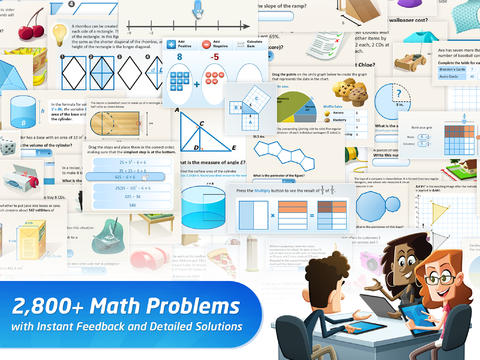
FREE with an option to upgrade to premium features – BuzzMath Middle School, a math practice app for 6 – 8th graders based on the Common Core State Standards. All you need to use this educational app is an iPad 2 or higher and an internet connection. The app has 2800+ problems arranged by topic – number sense & operations, fractions & decimals, geometry, measurement, data & probability, patterns, algebraic equations, and more. Parents/Homeschoolers can register their kids individually or teachers can register their classes. Teachers who register are given a class code to distribute to their students. Once students register with the teacher’s code, the teacher can make a class assignments. The teacher also has the ability to make assignments specific to individual needs. And, as the students work, their data is being tracked and reported! Wow, individualized practice across all of the math strands, all of the work graded and reported – what’s not to love? 🙂

0

Wubbzy The Superhero

Wubby The Superhero

FREE today – Wubbzy The Superhero, a storybook app featuring Wonder Wubbzy and Flower Power Daizy. This app was developed by Cupcake Digital in partnership with the producers of the Emmy® Award-winning Nick Jr. TV series Wow! Wow! Wubbzy!®.

 Kids join Wubby and Daizy as they help Ms. Bookbinder the librarian, rescue a poodle from a tree, and find a lost key to the city. Along the way kids will discover animations & interactivity on every page! The app also has 4 educational games and sing-along music videos. The Grown Up’s Corner has 2 sets of questions about the story. The questions address literal understanding of the story (thin questions) as well as extended meaning (fat questions).  Also included in the Grown-Up Corner is information about the Common Core Standards addressed by this app which are predominately kindergarten standards. Print-outs and activities to supplement the story are available online at cupcakedigital.com. What is not to love about this educational app? – Cute story packed with interactivity, great message about helping others, educational games, sing-along videos, standards-based, and a guide for adults!

Download link: https://itunes.apple.com/us/app/wubbzy-the-superhero/id616726246?mt=8&uo=4

0

Factor Samurai

Factor Samurai

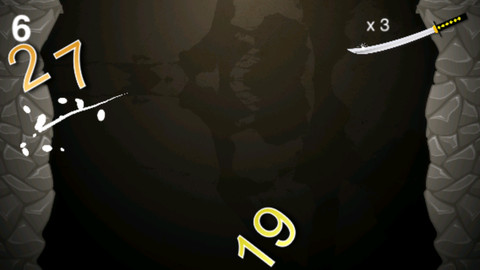
Another educational app, FREE for a limited time – Factor Samurai is a fun game to practice multiplication/division while looking for prime factors. The goal of the game is to cut falling numbers down to their prime numbers. So if the number 14 is on the screen, it would be cut once to become 2 and 7. If the number 18 is on the screen, it would be cut twice – first to 3 and 6 and then the 6 would be cut to 2 and 3. The game has three levels – grasshopper, apprentice, and master. The speed of the falling numbers increases in each level. Once a player has cut 3 numbers that are already prime, the game is over. The score (showing how many numbers were cut down to their prime) is displayed! There is an option to play the game through the Game Center.

One concern I have is that the number 1 is included in the falling numbers and one is NOT a prime number. So… I contacted customer support with my concern and was pleasantly surprised to get a response within 10 minutes! The developer is planning on taking #1 out of the falling numbers with the next update. They anticipate the update to be live by the end of the month (July). Great news 🙂 because this is a fun game that helps kids with an important math standard!

Common Core Standards met:

  • 4.OA.4 Find all factor pairs for a whole number in the range 1–100. Recognize that a whole number is a multiple of each of its factors. Determine whether a given whole number in the range 1–100 is a multiple of a given one-digit number. Determine whether a given whole number in the range 1–100 is prime or composite.

Factor Samurai - Third Rail, LLC

0

Fetch! Lunch Rush

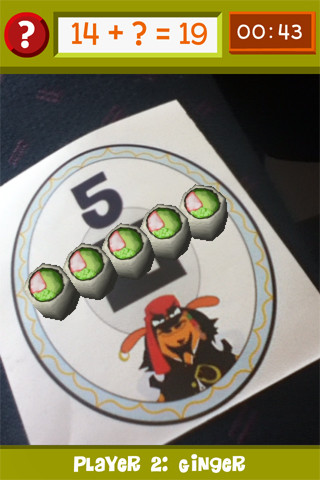
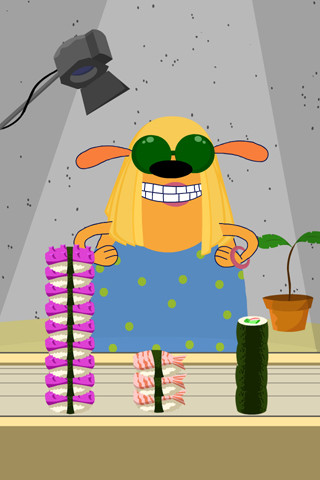
From our friends at PBS comes Fetch! Lunch Rush, a very unique FREE math game app for iPhone/iPad.  In this multi-player game, it is the students’ task to keep up with the lunch orders from Ruff Ruffman’s movie crew. The challenge is to keep track of how many pieces of sushi everyone wants by adding and subtracting. Before the game begins, game pieces have to be printed from the PBS website and distributed around the room. As the sushi orders come in, students have to find the game piece with the correct answer to the problem. Using the camera lens on their device, they focus in on then tap the sushi. The sushi pieces magically move to the table in front of their character (as seen above). Students have to think fast and keep moving to fill all of the sushi orders before their friends do. What a fun educational app!

Common Core Standards met:

  • 1.OA.6 – Add and subtract within 20, demonstrating fluency for addition and subtraction within 10.
  • 2.OA.2 – Fluently add and subtract within 20 using mental strategies. By end of Grade 2, know from memory all sums of two one-digit numbers.

Highly recommended!

FETCH! LUNCH RUSH - PBS KIDS

0

Multiplication: Math Fact Card Matching

Multiplication

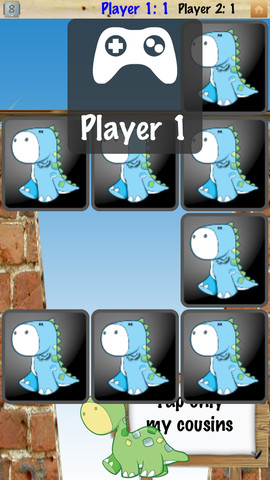
FREE for a limited time – Multiplication: Math Fact Card Matching, an educational app for kids who are learning their facts. This app combines fact practice with a memory game as kids flip cards to match an equation to its answer. The game has 3 modes – 1 player, 2 player, or play the computer. The app can be customized to have 6, 12, or 18 cards. The app can also be customized to be less or more difficult depending on the child’s level. The app also keep track of the attempts made and how many seconds it takes to match all the cards. Great for the classroom  – have kids practice facts with a friend instead of doing a worksheet!

Common Core Standards met:

  • 3.OA.7 – .By the end of Grade 3, know from memory all products of two one-digit numbers.

Multiplication: Math Facts Card Matching Game - @Reks

0

Space Cakes

Space CakeSpace Cakes (an educational app) was released on April 25 and it is FREE – thanks to the support of Eli’s Cheesecake in Chicago. Kids use number sense and early math skills to complete intergalactic baking missions. They find themselves in a bakery filled with alien ingredients. They must follow a recipe to add the correct amount of each ingredient. Then they choose a 3D shape for their levitating batter and bake it. Next a topper, frosting, and sprinkles are added to finish their creations. Time for delivery – they steer the cake delivery spaceship back to Earth. Finally they celebrate their safe arrival with starburst, fireworks, and colorful confetti!  Kids can snap a photo of their creations to share them via email, save them in a gallery, or use them to inspire creative writing – descriptive paragraphs using math terms, a story about an intergalactic cake baking contest, etc. There is a section for parents/teachers which explains the educational value of the app and how it meets the CCSS. This app provides a fun way to work with math concepts AND a wonderful springboard for creative writing.

Space Cakes - Kids Bakery Game with Math and Numbers - Mrs. Judd's Games, LLC

0

Fraction Walls

Fraction Wall

FREE for a limited time – Fraction Wall, an app designed for small group or independent learning. This educational app has 4 sections: Teacher Tool, Complete the Wall, 2 Player Game, and Addition. The Teacher Tool can be used to show/discover equivalent fractions or it can be used to answer equivalent fraction problems. Complete the Wall has kids moving bricks on top of equivalent fractions. There are 4 levels: level 1 – halves and quarter; level 2 – halves, thirds, quarters and sixths; level 3 – halves, thirds; quarters fifths, sixths, tenths; level 4 – halves up to tenth. 2 Player Game has kids competing against each other to be the first to fill their wall of equivalent fractions. Addition has kids adding fractions to answer multiple choice questions. There is a clickable wall to help them visualize the answer if needed. This section also has 4 levels. The app can be customized to exclude more difficult fractions from the wall. This app would work well in the classroom – great for practicing and/or for using as a tool to visualize answers. Much more fun than a worksheet for practicing fractions!

Common Core Standards met:

3.NF.3 – Explain equivalence of fractions and compare fractions by reasoning about their size. Understand two fractions as equivalent (equal) if they are the same size. Recognize and generate simple equivalent fractions, e.g., 1/2 = 2/4, 4/6 = 2/3).

Fraction Wall - Aleesha Kondys

0

Math Evolve

Math Evolve

FREE for  limited time – the full version of Math Evolve, an app that combines math practice (addition, subtraction, multiplication, division) with an arcade-style game that kids will enjoy playing. Math Evolve has 12 levels, 19 different enemies, and 6 challenging bosses that can be played on 3 difficulty settings. The app has 2 modes: practice mode and story mode. In practice mode, a parent or teacher can choose which math facts to practice and monitor a child’s progress. In the story mode, kids embark on math adventure across three environments: microscopic, ocean, and space. The difficulty of the math and the difficulty of the game can be set independently which makes the game fun for all ages. The app supports up to 5 players. Statistics are kept in the player history section so parent/teachers can evaluate how kids are progressing. This app would be great for independent practice in a classroom. It has customizable practice built into a fun game AND it collects statistical data – awesome!

For more information go to http://mathevolve.com.

Common Core Standards met:

  • 1.OA.6 – Add and subtract within 20, demonstrating fluency for addition and subtraction within 10.
  • 2.OA.2 – Fluently add and subtract within 20 using mental strategies. By end of Grade 2, know from memory all sums of two one-digit numbers.
  • 3.OA.7 – Fluently multiply and divide within 100, using strategies such as the relationship between multiplication and division or properties of operations. By the end of Grade 3, know from memory all products of two one-digit numbers.

Math Evolve: A Fun Math Game - Zephyr Games

0

Oh No Fractions!

on no fractrions

UPDATED and even better!! Oh No Fractions! is a great FREE iPhone/iPad app for comparing and exploring fractions. The app is simple to use – kids just swipe to the right or the left to indicate whether one fraction is “greater than” or “less than” or “equal to” (a new feature) a second fraction. Kids can use a manipulative to “peek” at an answer before they commit to it or they can use the manipulative to “prove” their answer later.  The “peek”/”prove it” feature of this app is fabulous because it allows the child to visualize his/her answer.

Kids can also practice finding the common denominator then use the app for addition, subtraction, multiplication and division of fractions. The app then generates the corresponding decimal and percentage for the answer. The developer made several improvements to this already great app after receiving feedback from teachers –  how wonderful to have a developer willing to listen to teachers’ needs!

Great tool for helping kids to understand fractions!! Recommended!

Common Core Standards met:

3.NF.3 – Explain equivalence of fractions and compare fractions by reasoning about their size. Understand two fractions as equivalent (equal) if they are the same size. Recognize and generate simple equivalent fractions, e.g., 1/2 = 2/4, 4/6 = 2/3).

Oh No Fractions! - Curious Hat Lab - Curious Hat