0

Math Racer®

Only $.99 for a limited time – Math Racer, an educational app that normally sells for $4.99. Math Racer times how fast kids can answer 10, 20, 50 or 100 problems in 7 different games: addition, subtraction, multiplication, division, add/subtract, multiply/divide, or all operations. I like that this app offers the option of practicing related operations (add/subtract, multiply/divide) together – it makes kids pay attention to operational signs & make connections. The app keeps high scores for all areas. It shows which problems were missed and how long it took to answer each question (to the hundredth of a second). Teachers and parents can use this tracking system to document kids’ scores & their progress over time.

This app provides a simple but fun way for kids to practice their facts. I can’t imagine that they won’t love racing the clock to improve their scores. If it is loaded on an iPhone, kids could easily practice their facts in the car on their way to after-school lessons. 🙂

Common Core Standards met:

  • 1.OA.6 – Add and subtract within 20, demonstrating fluency for addition and subtraction within 10.
  • 2.OA.2 – Fluently add and subtract within 20 using mental strategies. By end of Grade 2, know from memory all sums of two one-digit numbers.
  • 3.OA.7 – Fluently multiply and divide within 100, using strategies such as the relationship between multiplication and division or properties of operations. By the end of Grade 3, know from memory all products of two one-digit numbers.

Recommended!

Math ® - i4software

0

Wee Kids Math

wee kids math

FREE for a limited time – Wee Kids Math, an educational app that features a variety of activities for beginning math students. There are 20 activities in all – each activity presented in a new brightly colored scene. Kids can order numbers on a caterpillar, match number words/numerals/pictures on ocean liners, practice addition on a farm, practice subtraction in the ocean, etc. A definite strength of this app is its variety. Number skills (0 – 20) included are matching, counting, ordering, identifying equalities & inequalities, identifying > & <, adding, and subtracting. The app jumps right into each activity without any sort of instructions. Most of the activities are fairly intuitive. But if kids can’t figure what they are supposed to do, they can go back & press the help button. Then they will find visual instructions for each activity. This app would be a good one to use WITH your child. There is no progress tracking so you will want to see what your child understands. 🙂

Download link: https://itunes.apple.com/us/app/wee-kids-math/id638457112?mt=8&uo=4

0

Brainingcamps Apps: Area of Figures and Fractions

areaFREE for a limited time – Area of Figures, an excellent educational app for teaching area from Brainingcamp LLC.The app helps kids understand how to find the area of 4 different figures:  rectangles, parallelograms, triangles, and circles. For each figure there is a narrated lesson (with visual models), virtual manipulatives for kids to explore, practice questions to check understanding, and a challenging game for additional practice.

What a GREAT app! The lessons are wonderful – clearly explained and involve students along the way. The manipulatives are designed to promote understanding of the concepts presented. The practice questions give students and their teachers a check of their understanding. And, the challenging games helps kids further master the topic. It would be a fabulous for grades 3 and beyond!

Common Core Standards met:

  • 3.G.5. Recognize area as an attribute of plane figures and understand concepts of area measurement.
  • 3.G.6. Measure areas by counting unit squares (square cm, square m, square in, square ft, and improvised units).
  • 6.G.1. Find the area of right triangles, other triangles, special quadrilaterals, and polygons by composing into rectangles or decomposing into triangles and other shapes; apply these techniques in the context of solving real-world and mathematical problems.

Download link: https://itunes.apple.com/us/app/area-of-figures/id434220361?mt=8&uo=4

Also FABULOUS and currently FREE…

fractions

Fractions by Brainingcamp, an excellent educational app for teaching fractions. The app covers 7 topics: introduction to fractions, equivalent fractions, common denominators, comparing/ordering fractions, adding/subtracting fractions, multiplying fractions, and dividing fractions. Each topic includes: a narrated lesson (with visual models), virtual manipulatives for kids to explore, practice questions to check understanding, and a challenging game for additional practice. Kids earn badges as they work through the components of each topic.

WOW – I love everything about this app. The lessons are wonderful. The manipulatives are designed to promote understanding of the concepts presented. The practice questions give students and their teachers a check of their understanding. And, the challenging games helps kids further master the topic. It would be a fabulous for grades 3 and beyond!

Common Core State Standards met:

  • 3.NF.1. Understand a fraction 1/b as the quantity formed by 1 part when a whole is partitioned into b equal parts; understand a fraction a/b as the quantity formed by a parts of size 1/b.
  • 3.NF.3 – Explain equivalence of fractions and compare fractions by reasoning about their size. Understand two fractions as equivalent (equal) if they are the same size. Recognize and generate simple equivalent fractions, e.g., 1/2 = 2/4, 4/6 = 2/3).
  • 4.NF.3 – a. Understand addition and subtraction of fractions as joining and separating parts referring to the same whole.
  • 5.NF.3 – Interpret a fraction as division of the numerator by the denominator (a/b = a ÷ b).

Download link: https://itunes.apple.com/us/app/fractions-by-brainingcamp/id471353363?mt=8&uo=4

0

Fizzy’s Lunch Lab Fresh Pick

Fizzy's Lunch Lab Fresh Pick

Fizzy’s Lunch Lab Fresh Pick (an educational app based on the PBS KIDS web series) is FREE ! It was developed by PBS with funding from a Ready to Learn Grant from the U.S. Department of Education. Professor Fizzy is holding a competition for 6 – 8 year olds to see who qualifies to be the next Lunch Labber. The app includes 8 challenges that use math and problem solving skills – deductive reasoning, mapping, sorting and classifying. Kids must navigate their way through a grocery store, buy groceries, count out the correct change in a check-out line, successfully serve the correct food to hungry customers, use reasoning to find Freddy, and more. This educational app supports multiple users with self-leveling games that make the challenge specific to each child. FUN!!

Fizzy's Lunch Lab Fresh Pick - PBS KIDS

0

iTooch 5th Grade Math and iTooch 6th Grade Math

itoochFREE for a limited time iTooch 5th Grade Math and iTooch 6th Grade Math. Both apps normally sell for $4.99. Both offer math exercises for practicing/learning different math strands of their respective grade levels. The 5th grade app covers: numbers & operations, fractions, measurement & estimating, graphing & stats, and geometry. The 6th grade app covers: numbers & operations, algebraic structures, data analysis, graphs, and geometry. Both apps have over 1500 questions which are organized by chapter. First, kids choose an area to practice. The app is set on practice mode when the testing option is turned off. Once an answer is submitted, a solution button appears for most questions. When pressed, it explains why an answer is correct. There is also a lesson summary available for each chapter. If the testing mode is tuned on, kids are graded & timed on their answers. They earn points based on the number correct and their time. If they do not meet the criteria for that chapter (4 out of 6), they can choose to “go back to practice” or try the test again. Other useful features of this app include: speech synthesis for kids who may have difficulty reading the problems, the option to adjust the font size, and an embedded calculator. These apps can be used by multiple students and track their individual achievement – great for tutors and classroom teachers. Check them out while they are free. 🙂

Download links:

5th Grade Math https://itunes.apple.com/us/app/itooch-5th-grade-math-maths/id423778530?mt=8&uo=4

6th Grade Math https://itunes.apple.com/us/app/itooch-6th-grade-math-math/id521720767?mt=8&uo=4

0

Subtracting Sardines

FREE again – Subtracting Sardines, an educational app that helps young kids (preschoolers/kindergarten) understand the concept of subtraction. With the help of a cute little penguin, kids subtract (up to 9) using sardines. This app meets the Common Core Standards for kindergarten. First grade standards are a bit more rigorous and expect students to add & subtract up to 20. There are a lot of good things about this app. The sardines are displayed on a keyboard with domino like keys (number on the left/picture on the right). The child chooses a subtraction problem and the sardines appear at the top of the screen. Here’s how it works: If a child chooses 7 – 2: 7 sardines appear then 2 sardines are taken away. As the child counts the remaining fish, they are encased in ice. Only the bones left behind of the subtracted fish and they disintegrate if touched. The app even allows for subtraction problems with negative answers (red fish joins the left over bones). Children earn gold coins as they work. This nicely done app helps kids with the beginning concepts of subtraction.

Common Core Standards met:

  • K.OA.2  – Add and subtract within 10, e.g., by using objects or drawings to represent the problem.

Highly Recommended!

Subtracting Sardines HD - Operatio

0

Quick Math+

FREE for a limited time – Quick Math+, an educational app that encourages the development of mental math skills. Kids race against the clock to improve their scores. Handwriting recognition allows the players to write the answers directly on the screen – a very slick feature. There are 4 game modes: solve, memorize, compare, and swap. Each game has 4 levels: beginner, intermediate, advance, and extreme. At a beginning level, this app helps to develop math fluency. Once kids have mastered the basics, the app introduces order of operations & parenthesis, negatives numbers, and indices. LOTS of great practice for multiple levels of math students in this app. It can be shared among students and it tracks each student’s progress – perfect for the classroom. The math gets progressively harder as students improve their skills. I love how the app encourages self-improvement and legible writing! Teachers could assign 10 minutes of practice each day for their students. I am sure the results would be significant. What a fabulous tool for the classroom!

Download link: https://itunes.apple.com/us/app/quick-math+/id703287370?mt=8&uo=4

0

Marble Math

Marble Math

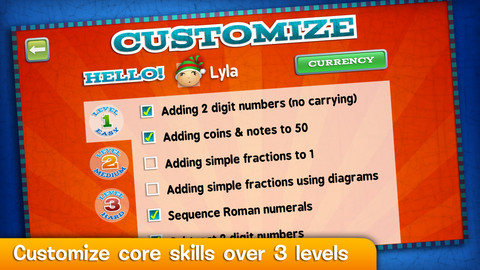
FREE today only – Marble Math. This educational app for 9 – 12 year olds was selected by Apple as New & Noteworthy. Kids solve a variety of math problems as they navigate their way through a series of marble mazes. Concepts included are addition/subtraction, multiplication/division, adding/sequencing fractions with different denominators, factoring, adding/subtracting negative integers and more! The game supports multiple players and it allows teachers to customize specific skills for each player – what a great option! Another great thing about this app – when a player answers incorrectly, he/she can choose one of 3 options: try again, show me, or next problem. Kids earn marbles as they answer correctly and high scores are recorded. This game blends fun with the practice of common core skills. Worth downloading!

Common Core Standards met:

  • 3.OA.7 Fluently multiply and divide within 100, using strategies such as the relationship between multiplication and division
  • 4.OA.4 Find all factor pairs for a whole number in the range 1–100.
  • 4.NF.3 Understand a fraction a/b with a > 1 as a sum of fractions 1/b. a. Understand addition and subtraction of fractions as joining and separating parts referring to the same whole.

Marble Math - Artgig Studio

0

Operation Math

operation math

FREE again for a limited time – Operation Math, a great educational app from Spinlight StudioKids will have fun practicing basic addition, subtraction, multiplication, & division tables in this interactive “spy” game. The object of the game is to stop Dr. Odd’s quest to eliminate the world’s even numbers. In order to do so, kids must complete 105 missions by solving equations. Missions can be selected based on a child’s skill level and/or the operation (+, -, +/-, x, ÷, x/÷  or +/-/x/÷).  Of course, time is of the essence so kids have to answer problems in 60 seconds or less. By doing so, they lock doors along their escape routes. And as they complete missions, they earn the gear of a seasoned spy. What a great game – I love how the app integrates math practice into a really cool game for kids. I especially like the modes which permit kids to practice multiple operations at a time. It makes kids pay attention to operation signs and quickly switch their thinking. What a fun way for kids to practice facts and meet CCSS! No wonder Operation Math was given a 2012 Parents’ Choice Award. Get it today – kids will LOVE it!

Common Core State Standards met:

  • 1.OA.6 – Add and subtract within 20, demonstrating fluency for addition and subtraction within 10.
  • 2.OA.2 – Fluently add and subtract within 20 using mental strategies. By end of Grade 2, know from memory all sums of two one-digit numbers.
  • 3.OA.7 – Fluently multiply and divide within 100, using strategies such as the relationship between multiplication and division or properties of operations. By the end of Grade 3, know from memory all products of two one-digit numbers.

Download link: https://itunes.apple.com/us/app/operation-math/id487387270?mt=8&uo=4

0

Arithmetic Invaders: Grade 3 Math Facts

Arithmetic Invaders

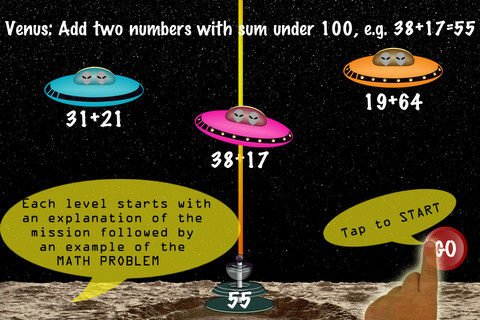
FREE for a limited time – Arithmetic Invaders: Grade 3 Math Facts. Kids defend the planets from invaders in this math game. The table of contents shows the titles of the missions, a short description of the math required, and the high score for that mission. There are 8 “missions” to complete – 2 addition, 2 subtraction, 2 multiplication, and 2 division. With completion of the last mission, your child earns the highest rank – DEFENDER OF THE SOLAR SYSTEM. In each mission, the child matches the value on the laser gun to an equation having the same value – written below 1 of 3 invader ships. The mission’s length can be 2, 3, or 5 minutes. Even though the title implies that the app only practices facts, the addition & subtraction missions include 2 digit numbers. All in all, this educational app provides another fun way for kids to practice math!

Arithmetic Invaders: Grade 3 Math Facts - @Reks