0

Space Cakes

Space CakeSpace Cakes (an educational app) was released on April 25 and it is FREE – thanks to the support of Eli’s Cheesecake in Chicago. Kids use number sense and early math skills to complete intergalactic baking missions. They find themselves in a bakery filled with alien ingredients. They must follow a recipe to add the correct amount of each ingredient. Then they choose a 3D shape for their levitating batter and bake it. Next a topper, frosting, and sprinkles are added to finish their creations. Time for delivery – they steer the cake delivery spaceship back to Earth. Finally they celebrate their safe arrival with starburst, fireworks, and colorful confetti!  Kids can snap a photo of their creations to share them via email, save them in a gallery, or use them to inspire creative writing – descriptive paragraphs using math terms, a story about an intergalactic cake baking contest, etc. There is a section for parents/teachers which explains the educational value of the app and how it meets the CCSS. This app provides a fun way to work with math concepts AND a wonderful springboard for creative writing.

Space Cakes - Kids Bakery Game with Math and Numbers - Mrs. Judd's Games, LLC

0

Fraction Walls

Fraction Wall

FREE for a limited time – Fraction Wall, an app designed for small group or independent learning. This educational app has 4 sections: Teacher Tool, Complete the Wall, 2 Player Game, and Addition. The Teacher Tool can be used to show/discover equivalent fractions or it can be used to answer equivalent fraction problems. Complete the Wall has kids moving bricks on top of equivalent fractions. There are 4 levels: level 1 – halves and quarter; level 2 – halves, thirds, quarters and sixths; level 3 – halves, thirds; quarters fifths, sixths, tenths; level 4 – halves up to tenth. 2 Player Game has kids competing against each other to be the first to fill their wall of equivalent fractions. Addition has kids adding fractions to answer multiple choice questions. There is a clickable wall to help them visualize the answer if needed. This section also has 4 levels. The app can be customized to exclude more difficult fractions from the wall. This app would work well in the classroom – great for practicing and/or for using as a tool to visualize answers. Much more fun than a worksheet for practicing fractions!

Common Core Standards met:

3.NF.3 – Explain equivalence of fractions and compare fractions by reasoning about their size. Understand two fractions as equivalent (equal) if they are the same size. Recognize and generate simple equivalent fractions, e.g., 1/2 = 2/4, 4/6 = 2/3).

Fraction Wall - Aleesha Kondys

0

Counting Dots

Counting Dots

FREE again today – Counting Dots, a counting app for young iPad users. Kids learn to recognize/count numbers by popping colorful dots in this simple but visually appealing game. The app has three settings – counting by one, fives, or tens. There are also settings for sound, hinting, and enabling vibrations (iPhone only). The app is advertised as helping kids count from one to a million. I counted by ones to 20 and by tens to 100  – didn’t quite make it to a million. 🙂 This app is by the same developer that did Rain Dots (see my March 1 review). Recommended!

Counting Dots - Helping kids count from one to one million! - Ellie's Games, LLC

0

Math Evolve

Math Evolve

FREE for  limited time – the full version of Math Evolve, an app that combines math practice (addition, subtraction, multiplication, division) with an arcade-style game that kids will enjoy playing. Math Evolve has 12 levels, 19 different enemies, and 6 challenging bosses that can be played on 3 difficulty settings. The app has 2 modes: practice mode and story mode. In practice mode, a parent or teacher can choose which math facts to practice and monitor a child’s progress. In the story mode, kids embark on math adventure across three environments: microscopic, ocean, and space. The difficulty of the math and the difficulty of the game can be set independently which makes the game fun for all ages. The app supports up to 5 players. Statistics are kept in the player history section so parent/teachers can evaluate how kids are progressing. This app would be great for independent practice in a classroom. It has customizable practice built into a fun game AND it collects statistical data – awesome!

For more information go to http://mathevolve.com.

Common Core Standards met:

  • 1.OA.6 – Add and subtract within 20, demonstrating fluency for addition and subtraction within 10.
  • 2.OA.2 – Fluently add and subtract within 20 using mental strategies. By end of Grade 2, know from memory all sums of two one-digit numbers.
  • 3.OA.7 – Fluently multiply and divide within 100, using strategies such as the relationship between multiplication and division or properties of operations. By the end of Grade 3, know from memory all products of two one-digit numbers.

Math Evolve: A Fun Math Game - Zephyr Games

0

Oh No Fractions!

on no fractrions

UPDATED and even better!! Oh No Fractions! is a great FREE iPhone/iPad app for comparing and exploring fractions. The app is simple to use – kids just swipe to the right or the left to indicate whether one fraction is “greater than” or “less than” or “equal to” (a new feature) a second fraction. Kids can use a manipulative to “peek” at an answer before they commit to it or they can use the manipulative to “prove” their answer later.  The “peek”/”prove it” feature of this app is fabulous because it allows the child to visualize his/her answer.

Kids can also practice finding the common denominator then use the app for addition, subtraction, multiplication and division of fractions. The app then generates the corresponding decimal and percentage for the answer. The developer made several improvements to this already great app after receiving feedback from teachers –  how wonderful to have a developer willing to listen to teachers’ needs!

Great tool for helping kids to understand fractions!! Recommended!

Common Core Standards met:

3.NF.3 – Explain equivalence of fractions and compare fractions by reasoning about their size. Understand two fractions as equivalent (equal) if they are the same size. Recognize and generate simple equivalent fractions, e.g., 1/2 = 2/4, 4/6 = 2/3).

Oh No Fractions! - Curious Hat Lab - Curious Hat

0

Khan Academy

Khan 2

Khan Academy

For my 500th post, I wanted to write about an amazing app and this one certainly meets that criteria. Whoever said the best things in life are FREE was absolutely correct. With Khan Academy you can learn almost anything and the app is completely FREE! It has a library of over 4,100 videos which covers a wide range of subjects such as K – 12 math, biology, chemistry, the humanities, and more. You can use the app to review a subject that you have already studied or to learn something completely new! You can watch the videos online or you can download  them to watch offline at your own pace. The videos are subtitled so that you can read along, skip ahead, or go back. If you log in with your Khan Academy account, you can track your progress. The app gives you credit for watching the videos and allows you to see your achievements. Badges and points are earned for learning. Teachers can access their students’ data – as a class or individually. Khan Academy is an incredible resource for all kinds of learners – students, teachers, principals, home-schoolers, adults returning to school, and anyone committed to be a lifelong learner. It is truly one of the best apps available – at any price!

Khan Academy - Khan Academy

0

Montessori Numbers – Math Activities for Kids

Montessori Numbers

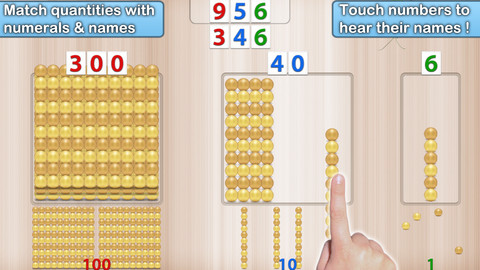
FREE for a limited time – Montessori Numbers – Math Activities for Kids. Designed for children 3 – 6, this app helps to build a mathematical foundation by helping kids: learn the numerals & their names, associate quantities with numerals/numbers, understand place value, and learn to trace numbers. The app has 5 activities – 1 to 20, quantity, numerals, and numerals from quantity, and tracing. The activities are based on the Montessori method – teaching kids to see the relationship between numbers and the quantity they stand for.  In the 1 – 20 activity, kids are introduced to the numbers. In the quantity activity, kids associate quantities to numbers by manipulating units, bars of 10, and squares of 100 to match a given number which is pronounced/displayed. In the numerals activity, kids build numerals after hearing the number name pronounced. In the numerals from quantity activity, kids build the number that matches the quantity displayed. Each activity has 3 levels of difficulty and a game mode. Great app for building early number concepts and place value!

Montessori Numbers - Math Activities for Kids - L'Escapadou

0

Space Cakes

Space CakeSpace Cakes was released on April 25 and it is FREE – thanks to the support of Eli’s Cheesecake in Chicago. Kids use number sense and early math skills to complete intergalactic baking missions. They find themselves in a bakery filled with alien ingredients. They must follow a recipe to add the correct amount of each ingredient. Then they choose a 3D shape for their levitating batter and bake it. Next a topper, frosting, and sprinkles are added to finish their creations. Time for delivery – they steer the cake delivery spaceship back to Earth. Finally they celebrate their safe arrival with starburst, fireworks, and colorful confetti!  Kids can snap a photo of their creations to share them via email, save them in a gallery, or use them to inspire creative writing – descriptive paragraphs using math terms, a story about an intergalactic cake baking contest, etc. There is a section for parents/teachers which explains the educational value of the app and how it meets the CCSS. This app provides a fun way to work with math concepts AND a wonderful springboard for creative writing.

Space Cakes - Kids Bakery Game with Math and Numbers - Mrs. Judd's Games, LLC

0

Snowflake Station

Snowflake Station

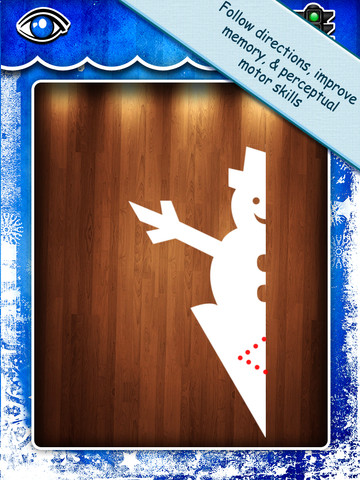
Purple glittery snowflakes !! FREE again for a limited time, Snowflake Station for the iPad helps kids discover the beauty of symmetry – a key concept in math, science, art, & architecture. The app has 3 sections: Trace a Flake, Creation Station, and Make it Snow. Trace a Flake includes step-by-step instructions for cutting 36 different snowflakes/other symmetrical shapes. In the Creation Station, kids create their own flakes/shapes. There are six different folds, 10 different colored paper, and 10 different colors of glitter to choose from. Kids make “cuts” with their fingers. The tape button works as an undo button. Kids can monitor their progress in the upper left hand corner of the cutting board. Creations can be saved to use in the Make it Snow section of the app which does exactly that! Kids use their creations to make it snow in a photo of their choosing. They can use the iPad’s camera to take a picture or use an already saved photo from the camera roll. There are also 10 winter scenes included in the app. Another option in this app is the ability to set up a Juddly (a safe, secure email) account for your child to share his/her creations with you. Very creative & very fun – all while learning about symmetry 🙂

Common Core Standards:

  • 1.G.3 – Partition a shape into four equal shares, describe the shares using the words halves, fourths, and quarters, and use the phrases half of, fourth of, and quarter of. Describe the whole as two of, or four of the shares. Understand for these examples that decomposing into more equal shares creates smaller shares.
  • 4.G.3. Recognize a line of symmetry for a two-dimensional figure as a line across the figure such that the figure can be folded along the line into matching parts. Identify line-symmetric figures and draw lines of symmetry.

Not only does this app meet CCSS in math, it can also be used in creative writing – The Day It Snowed Orange, Alien Invasion, etc. Awesome – highly recommended!

Snowflake Station - Mrs. Judd's Games, LLC

0

MyScript Calculator

myscript

Just named by Apple as 1 of  10 Apps That WOW and FREE  – MyScript Calculator is an amazing app. It performs mathematical operations literally by hand! You write the problem … it solves the problem! The app is very simple to use. Just write the mathematical equation on the screen. MyScript technology converts the symbols and numbers to digital text and delivers the answers. It supports the following operations: basic operations (+, -, x, ÷, +/‒, 1/x), additional operations ( %, √, x!, |x|), powers/exponentials (ℯx, xy , x2), trigonometry, and more. Very cool!! MyScript Calculator also won the Mobile App Showdown at CES 2013!!

MyScript Calculator - Vision Objects