0

Counting Dots

Counting Dots

FREE again today – Counting Dots, a counting app for young iPad users. Kids learn to recognize/count numbers by popping colorful dots in this simple but visually appealing game. The app has three settings – counting by one, fives, or tens. There are also settings for sound, hinting, and enabling vibrations (iPhone only). The app is advertised as helping kids count from one to a million. I counted by ones to 20 and by tens to 100  – didn’t quite make it to a million. 🙂 This app is by the same developer that did Rain Dots (see my March 1 review). Recommended!

Counting Dots - Helping kids count from one to one million! - Ellie's Games, LLC

0

More Everyday Math ® APPS: Baseball Multiplication 1-6, Baseball Multiplication 1-12, Top It Subtraction, Tric Trac,

FREE for a limited time – 4 different apps from McGraw Hill Everyday Math ®. If your school system uses this program to teach math, you may want to take advantage of this offer. These apps normally sell for $1.99 each.

Baseball Multiplication

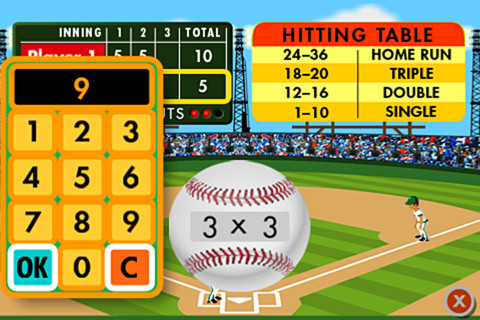
Everyday Math’s Baseball Multiplication comes in 2 versions (1 – 6 facts and 1 – 12 facts) and both versions work the same way. Two players play a 3 inning baseball game as they practice their facts.

Common Core Standards met:

  • 3.OA.7 –  By the end of Grade 3, know from memory all products of two one-digit numbers.

Everyday Mathematics® Baseball Multiplication™ 1–6 Facts - McGraw-Hill School Education Group Baseball Multiplication 1 – 6

Everyday Mathematics® Baseball Multiplication™ 1-12 Facts - McGraw-Hill School Education Group Baseball Multiplication 1 – 12

Top It

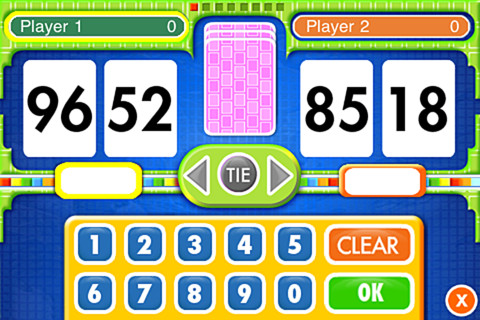
Everyday Math’s Top-It Subtraction for iPhone/iPad is a two player game. It is fun easy way for kids to practice reinforce 2-digit subtraction computation and number comparisons.

Everyday Mathematics® Subtraction Top-It™ - McGraw-Hill School Education Group

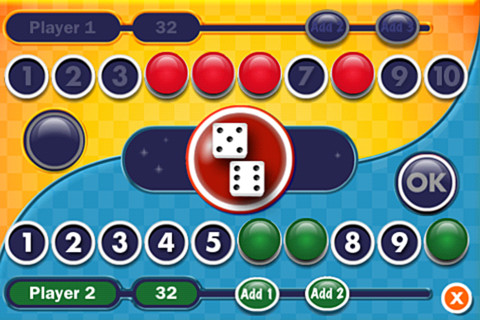
Tric TracEveryday Math’s Tric Trac is a 2 player game for kids to practice their addition facts. Players roll dice, find the sum, then match the sum to numbers in their hand. Every match eliminates that number or numbers from their hand and reduces their score. The player with the lowest score wins!

Common Core Standards met:

  • 1.OA.6 – Add and subtract within 20, demonstrating fluency for addition and subtraction within 10.

Everyday Mathematics® Tric-Trac™ - McGraw-Hill School Education Group

0

Teach Me Toddler

Teach Me Toddler

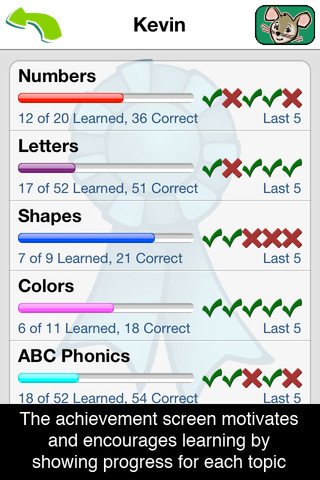
FREE today – Teach Me Toddler, a fabulous app for teaching your little one letters, numbers, shapes, colors, phonics (letter sounds), and counting. The app includes parental controls so that parents/teachers can choose which areas they want their child/children to work on. Up to 40 players can be entered and the topics for each player can vary – it’s fully customizable by individual! And… the app keeps track of each child’s performance – perfect for a preschool or kindergarten classroom. Teachers could start by assigning general practice for all then reset the players and customize it to meet individual kids’ needs  – AWESOME!!

Kids are rewarded for correct answers with stickers or coins. Sticker scenes include the beach, reef, pirate cove, city, farm, and playground. Parents/teachers can set the number of correct responses needed for getting a sticker from 1 – 9. Completed scenes can be exported to share. 🙂

One of the BEST thing about this app is the appropriateness of the topics. It teaches numbers to 20, counting to 10, upper and lower case letters, 11 colors, 9 shapes, and letter sounds. I was so excited that it taught the hard and soft sound of c!! Download this one today – it is rarely FREE!

TeachMe: Toddler - 24x7digital LLC

0

Sail Through Math

sail through math

Ahoy there!! FREE again (normally $1.99), Sail through Math from McGraw Hill – a fun way for students to practice their math facts/skills. There are 3 levels of play for addition, subtraction, multiplication, and division facts. Other areas covered are addition equations. subtraction equations, multiplication equations, two-step equations, names for numbers, patterns/factors/multiples, and compare numbers. This app provides of great practice built around a pirate theme – complete with music and firing cannonballs! At the end of each game, the child can see what problems he/she missed as well as a percentage score. What a fun way to learn basic facts – in the classroom, at home, in the car on a way to an evening activity. I used to tell my students to practice during commercials – 10 to 15 minutes a day works wonders. This app provides a fun way to accomplish that goal 🙂

Common Core Standards met:

  • 1.OA.6 – Add and subtract within 20, demonstrating fluency for addition and subtraction within 10.
  • 2.OA.2 – Fluently add and subtract within 20 using mental strategies. By end of Grade 2, know from memory all sums of two one-digit numbers.
  • 3.OA.7 – Fluently multiply and divide within 100, using strategies such as the relationship between multiplication and division or properties of operations. By the end of Grade 3, know from memory all products of two one-digit numbers.

Sail Through Math - McGraw-Hill School Education Group

0

MathLands – Kids Logic Game & Brain Builder for Math and Critical Thinking

MathLands

All I can say is WOW! MathLands is a completely FREE math app that makes kids THINK! Kids have to use logic, problem solving skills, and critical thinking to solve 5 levels of 5 different puzzles. Each puzzle is timed, has hints available, and has a section that tells the history of the puzzle. Kids can choose to start over. They can try again to get a better score or they can try again to get the BEST score (the app tells what is the best possible score). I love that this app challenges kids to be the best!! There is also a Math Comics section – problems are written in comic strip form. Kids solve the word problems by using the interactive manipulatives on the page. In a word full of math apps that stress practice and drill, this app is like a breath of fresh air. LOVE it !!!!

MathLands - Kids Logic Game & Brain Builder for Math and Critical Thinking - Mamanijo

0

Pick-a-Path

Pick a Path

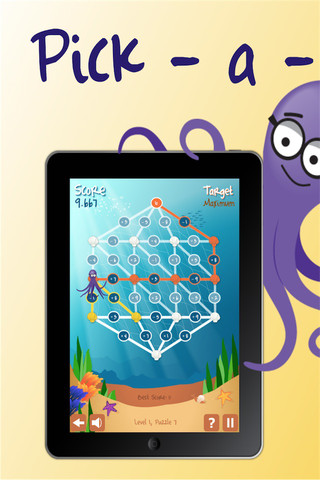
Pick-a-Path is a FREE math game from the National Council of Teachers of Mathematics. Kids help Okta the octopus reach a target number by choosing the best path from the top maze to the bottom of a maze. There are 7 different levels with 7 puzzles in each level. The puzzles start with basic operations then move to fractions, negative numbers, decimals, and other more difficult skills. Kids have to plan out a strategy to reach the target which can be a specific value, a minimum value, or a maximum value. This app provides a lot of good skills practice. And… as an extra added bonus, kids have to think of a strategy!

Pick-a-Path - National Council of Teachers of Mathematics

0

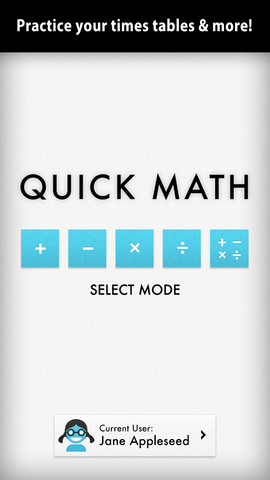
Sakura Quick Math

Sakura Quick Math

FREE today – Sakura Quick Math. Kids practice basic math (addition, subtraction, multiplication, division, and mixed operations) while racing against the clock. Three problems appear on the screen. Kids use their fingers to write the answers as quickly as they can. The app uses handwriting recognition to check the answers – very slick! If the number is not written neatly, the app does not recognize it and in my opinion that is a bonus. I spent 30+ years telling kids that part of their job was to write legible answers :). This app helps to reinforce that message! As a child’s skills grow, the app can be made more challenging because there are 3 levels of difficulty. You can create multiple users in this app and the app keeps track of each user’s progress in bar graph form. Very cool way for kids to practice their facts!

Common Core Standards met:

  • 1.OA.6 – Add and subtract within 20, demonstrating fluency for addition and subtraction within 10.
  • 2.OA.2 – Fluently add and subtract within 20 using mental strategies. By end of Grade 2, know from memory all sums of two one-digit numbers.
  • 3.OA.7 – Fluently multiply and divide within 100, using strategies such as the relationship between multiplication and division or properties of operations. By the end of Grade 3, know from memory all products of two one-digit numbers.

Sakura Quick Math - Shiny Things

0

3 FREE Virtual Math Manipulatives

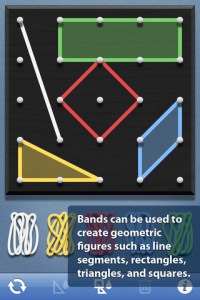
Geoboard by The Math Learning Center (a nonprofit organization dedicated to K – 12 education) is a FREE app that turns your iPhone/iPad into a virtual geoboard. Geoboards can be used as tools to teach mathematical concepts such as polygons, perimeter, area, line segments, angles, congruent shapes, symmetry, fractions, etc. Shapes are created by stretching bands on the geoboard’s pegs. There are 5 colors of bands in the iPhone version and 8 in the iPad version. There is also a tool to fill in shapes. On the iPad version, you can switch from the standard 25 peg board to a 150 peg board to create more complex shapes. This is a great app with the potential to be used in so many ways.

Highly recommended for your virtual math tool kit!

Geoboard, by The Math Learning Center - Clarity Innovations

FREE for the iPad, Virtual Manipulatives contains math manipulatives for teaching fractions, decimals, and percents. Included are tiles/circles divided into halves, thirds, fourth, fifths, sixths, eighths, tenths, and 12ths AND their corresponding decimals and percentages! The manipulatives are color coded across the settings so that 1/2 is blue as is .50 and 50%. Kids drag tile pieces onto the work area to compare fractions/decimals/percentages. In the settings you can change from tiles to circles, make the pieces transparent, and hide the numbers on the pieces. Completed work can be easily saved to photos. Finding equivalent fractions has never been so slick – WOW!!

Common Core Standards

  • 3.NF.3 – Explain equivalence of fractions in special cases, and compare fractions by reasoning about their size. Understand two fractions as equivalent (equal) if they are the same size, or the same point on a number line.
  • 4.NF.1 – Explain why a fraction a/b is equivalent to a fraction (n Ă— a)/(n Ă— b) by using visual fraction models, with attention to how the number and size of the parts differ even though the two fractions themselves are the same size. Use this principle to recognize and generate equivalent fractions.

Highly Recommended!
Virtual Manipulatives! - ABCya.com

equivalent fractions

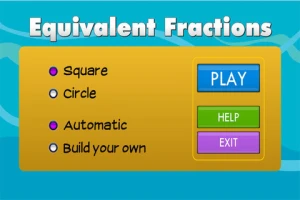
From the National Council of Teachers of Mathematics comes a FREE app called Equivalent Fractions. Kids create equivalent fractions by dividing and shading squares or circles. Circles can be divided into 24ths. Squares can be divided into 144ths. In the play mode, a fraction is shown and kids must create 2 additional fractions that are equivalent. All 3 fractions must have different denominators. The app also places the fractions on a number line – a great visual for comparing! There is also a “build your own” mode which would be fabulous to use for guided exploration & practice. Kids could also use this section as a virtual manipulative when working independently. This app is an excellent resource for the classroom !!

Common Core Standards met:

  • 3.NF.3 – Explain equivalence of fractions and compare fractions by reasoning about their size. Understand two fractions as equivalent (equal) if they are the same size, or the same point on a number line. Recognize and generate simple equivalent fractions, e.g., 1/2 = 2/4, 4/6 = 2/3). Explain why the fractions are equivalent, e.g., by using a visual fraction model.

Highly Recommended!

Equivalent Fractions - National Council of Teachers of Mathematics

0

Hickory Dickory Dock

Hickory Dickory Dock for the iPhone/iPad is FREE again for a limited time. Your child can learn to read a clock to the nearest hour while playing with an adorable, purple mouse. Kids begin by setting the time on the clock. For each hour there is an exploration that sends the lovable little mouse bouncing, springing and sleeping his way through the nursery rhyme accompanied by catchy music, sounds effects, and fun animations. The explorations in Hickory Dickory Dock simulate principles of physics –  gravity, collision, friction, weight, etc. as kids play pinball with the mouse, balance weights on a set of scales, and bounce the mouse off the walls of the clock. Very cute for preschoolers – a fun way to learn how to tell time with some physics slipped in as a bonus 🙂

Hickory Dickory Dock - Mindshapes Limited

0

What Time is is Mr. Wolf?

What Time

What Time is it Mr. Wolf? (by Teacher’s Pet) is FREE for a limited time. Back in July, I reviewed another app by the same name by Joy Preschool. This app features a Wilfred the Wolf who spins the clock on the face of the moon 10 times. Kids have to choose the correct answer and drag it under the moon. The wolf giggles and says “well done” if the answer is correct. The app’s setting allows you to choose what interval of time you would like your child to work on – hours, half hours (half past), quarter hours, 10 minutes, or 5 minutes. Answers can be displayed in words, digitally, or mixed. You can also set the number of answers per question.

The Common Core Standards expect first graders to tell time to the 1/2 hour, second graders to tell time in 5 minute intervals (AM and PM), and third graders to tell time to the minute. So, this app would work well for first and second graders but not third graders. I like that this app includes practice with the words  – half past, quarter after, quarter to. It is a difficult concept for some kids to understand.

Common Core Standards met:

  • 1.MD.3 – Tell and write time in hours and half-hours using analog and digital clocks.
  • 2.MD.7 – Tell and write time from analog and digital clocks to the nearest five minutes, using a.m. and p.m.

What Time is it Mr. Wolf? - by Teacher's Pet - Teacher's Pet