0

Spinlight Studio Apps on sale for $.99!

WOW!! Spinlight Studio’s apps are on sale for only $.99.
Tally Tots

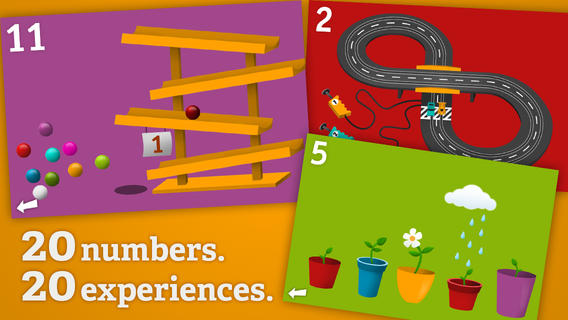
Tally Tots Counting is an educational app that teaches kids to count to 20. The app features 20 interactive mini-games that make learning numbers and counting fun. Kids race 2 cars, make bubbles in 6 colors, place 10 shapes into a puzzle, feed a chipmunk 19 acorns, etc. The app features something unique for each number with lots of positive verbal encouragement along the way. Tally Tots Counting is the perfect choice for young kids learning to count!

Download link: https://itunes.apple.com/us/app/tallytots/id424070269?mt=8&uo=4

operation mathOperation Math is a great educational app from Spinlight Studio. Kids will have fun practicing basic addition, subtraction, multiplication, & division tables in this interactive “spy” game. The object of the game is to stop Dr. Odd’s quest to eliminate the world’s even numbers. In order to do so, kids must complete 105 missions by solving equations. Missions can be selected based on a child’s skill level and/or the operation (+, -, +/-, x, ÷, x/÷ or +/-/x/÷). Of course, time is of the essence so kids have to answer problems in 60 seconds or less. By doing so, they lock doors along their escape routes. And as they complete missions, they earn the gear of a seasoned spy. What a great game – I love how the app integrates math practice into a really cool game for kids. I especially like the modes which permit kids to practice multiple operations at a time. It makes kids pay attention to operation signs and quickly switch their thinking. What a fun way for kids to practice facts and meet CCSS! No wonder Operation Math was given a 2012 Parents’ Choice Award. Get it today – kids will LOVE it!

Common Core State Standards met:

  • 1.OA.6 – Add and subtract within 20, demonstrating fluency for addition and subtraction within 10.
  • 2.OA.2 – Fluently add and subtract within 20 using mental strategies. By end of Grade 2, know from memory all sums of two one-digit numbers.
  • 3.OA.7 – Fluently multiply and divide within 100, using strategies such as the relationship between multiplication and division or properties of operations. By the end of Grade 3, know from memory all products of two one-digit numbers.

Download link: https://itunes.apple.com/us/app/operation-math/id487387270?mt=8&uo=4
Yodel

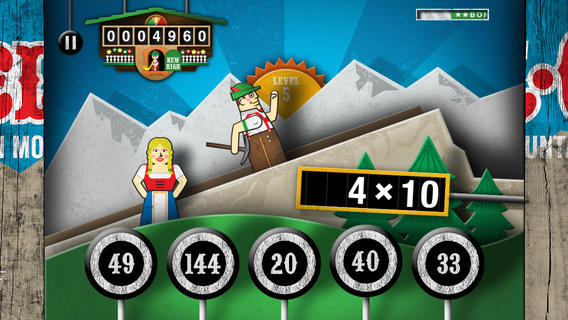
Kids will have fun learning basic addition, subtraction, multiplication, and division math tables with YodelOh™ Math Mountain. The object of the game is to score enough points to keep Hans from falling off the cliff. In order to do so, kids have to answer problems quickly and avoid the crazy charging sheep. And as kids score points, the questions get harder. The app also includes high-score charts that track the best 15 games for all 5 modes. I especially like the mode which permits kids to practice all 4 operations at a time. It makes kids pay attention to operation signs and quickly switch their thinking. What a fun way for kids to practice facts and it meets CCSS! Get it today. 🙂

Common Core State Standards met:

  • 1.OA.6 – Add and subtract within 20, demonstrating fluency for addition and subtraction within 10.
  • 2.OA.2 – Fluently add and subtract within 20 using mental strategies. By end of Grade 2, know from memory all sums of two one-digit numbers.
  • 3.OA.7 – Fluently multiply and divide within 100, using strategies such as the relationship between multiplication and division or properties of operations. By the end of Grade 3, know from memory all products of two one-digit numbers.

Download math: https://itunes.apple.com/us/app/yodeloh-math-mountain/id634946225?mt=8&uo=4

gappy learns

Gappy Learns Reading has beginning readers constructing 200+ three-letter words – 174 of the words following the cvc pattern. There are also 37 three-letter sight words included. Kids start with basic letter and sound identification then progress to making words. As they work through the app, kids earn parts to redesign Gappy’s house – with over 700 possible combinations. Parents can disable the music, change letters from upper case to lower case, and control the number of word lists used in the settings. I like that the app varies which letters (beginning, middle, end) of the words are missing in the easy levels. In the medium level, two letters are missing and in the hard level, all letters are missing. Kids are gradually learning to spell – nicely done for little readers. 🙂

Download link: https://itunes.apple.com/us/app/gappy-learns-reading/id614840334?mt=8&uo=6

Also $.99  – Gappy Learns Writing

Download link: https://itunes.apple.com/us/app/gappy-learns-writing/id691260469?mt=8&uo=6
winky

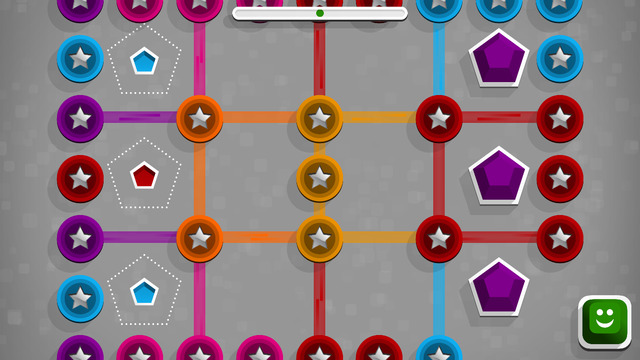
Winky Think Logic Puzzles by Spinlight Studio feature 180 different puzzles. Kids slide shapes and match colors through three levels of puzzles that become increasingly more difficult. As they play, kids must use reasoning, observation, and spacial cognition to advance to the next level. Winky Think is a fun app that makes kids think!

Download link: https://itunes.apple.com/us/app/winky-think-logic-puzzles/id923072172?mt=8&uo=4

AlphaTotsAlphaTots Alphabet is a GREAT ABC app for kids! What makes this educational app unique is that it uses 26 action words to teach the alphabet. Kids are asked to complete 26 interactive tasks, for example: b – build a robot, p – play instruments, z – zap alien spaceships, etc. This app has been featured on The Today Show and has received a lot of positive press. It is a VERY fun app for toddlers/preschoolers who are learning their alphabet!!

Download link: https://itunes.apple.com/us/app/alphatots-alphabet-learning/id436142340?mt=8&uo=4

SwapsiesSwapsies Jobs is a cute educational app for toddlers. The app features 10 community helpers – baker, pilot, mail carrier, doctor, police officer, firefighter, builder, astronaut, engineer, and rancher. There are two different modes: a dress-up game and an interactive quiz. In the dress-up game mode, kids mix-and-match hats, tops, & bottoms to find the correct combination. Once the clothes are properly matched, a fun activity is unlocked for each occupation. The quiz mode is age-appropriate. Kids are asked to make connections, reason, and classify – find 3 things that fly, find 2 things that are round, find 5 things a baker uses, etc. Additional information is available in the parents’ section where you can download the Swapsies Occupations App Guide. This app was featured in Apple’s Apps for Preschool and Kindergarten. It’s also a Parents Choice Award winner. Nicely done!!

Download link: https://itunes.apple.com/us/app/swapsies-jobs/id416577459?mt=8&uo=6

Also on sale – Swapsies Sports

Download link: https://itunes.apple.com/us/app/swapsies-sports/id716848871?mt=8&uo=4

PixelAlso only $.99 – Pixel and Parker, an educational app that puts a new spin on storytelling – literally! Parker and Pixel (his cat) are best friends. One day Pixel is missing so Parker sets out to find him. Kids use a game spinner to determine the order of the story’s events in this cute tale. The story is never the same twice. The app also features 30+ activities that engage readers while advancing the plot of the story. This app would be great for a lesson on the elements of story. The characters, setting, problem, and conclusion are the same but the order of events can be changed! Cute colorful illustrations also add to the appeal of this story. Pixel and Parker is the first in a planned series of adventures. 🙂 Great idea!

Download link: https://itunes.apple.com/us/app/pixel-and-parker/id548751986?mt=8&uo=4

geographyGeography Drive USA™ is a fabulous geography app for up to 3 players. This educational app teaches kids about the 50 U.S. states – their shapes, capitals, nicknames, postal abbreviations, flags, key symbols and more. As kids travel on a cross-county adventure, they stop in each state to answer trivia questions about national rivers, mountains, parks and time zones, important trails and railroads, major U.S. cities, landmarks, and attractions. When they answer questions correctly, they unlock airports and fuel stations – essential to stay in the game. The more you know, the further you go. 🙂

Additional fun features include: a visitor center with state brochures and regional & national maps, a game-based newspaper with headlines that recognize player achievements, trophies waiting to be claimed & displayed, and the ability to customize and upgrade the players’ cars. There are also 4 bonus games included. Love this app – it’s the perfect blend of fun and learning!

2013 Gold Parents’ Choice Award, 2013 Children’s Technology Review Editor’s Choice Award, and featured on Fox News.

Download link: https://itunes.apple.com/us/app/geography-drive-usa/id579100969?mt=8&uo=4

0

Math Apps from Spinlight – on Sale!

Check out Spinlight Studio’s $.99 sale. Here are two great math apps at a great price!

Tally Tots

Tally Tots Counting is an educational app that teaches kids to count to 20. The app features 20 interactive mini-games that make learning numbers and counting fun. Kids race 2 cars, make bubbles in 6 colors, place 10 shapes into a puzzle, feed a chipmunk 19 acorns, etc. The app features something unique for each number with lots of positive verbal encouragement along the way. Tally Tots Counting is the perfect choice for young kids learning to count!

Download link: https://itunes.apple.com/us/app/tallytots/id424070269?mt=8&uo=4

operation mathOperation Math is a great educational app from Spinlight Studio. Kids will have fun practicing basic addition, subtraction, multiplication, & division tables in this interactive “spy” game. The object of the game is to stop Dr. Odd’s quest to eliminate the world’s even numbers. In order to do so, kids must complete 105 missions by solving equations. Missions can be selected based on a child’s skill level and/or the operation (+, -, +/-, x, ÷, x/÷ or +/-/x/÷). Of course, time is of the essence so kids have to answer problems in 60 seconds or less. By doing so, they lock doors along their escape routes. And as they complete missions, they earn the gear of a seasoned spy. What a great game – I love how the app integrates math practice into a really cool game for kids. I especially like the modes which permit kids to practice multiple operations at a time. It makes kids pay attention to operation signs and quickly switch their thinking. What a fun way for kids to practice facts and meet CCSS! No wonder Operation Math was given a 2012 Parents’ Choice Award. Get it today – kids will LOVE it!

Common Core State Standards met:

1.OA.6 – Add and subtract within 20, demonstrating fluency for addition and subtraction within 10.
2.OA.2 – Fluently add and subtract within 20 using mental strategies. By end of Grade 2, know from memory all sums of two one-digit numbers.
3.OA.7 – Fluently multiply and divide within 100, using strategies such as the relationship between multiplication and division or properties of operations. By the end of Grade 3, know from memory all products of two one-digit numbers.

Download link: https://itunes.apple.com/us/app/operation-math/id487387270?mt=8&uo=4

0

Flashcard Ninja

flashcard ninjaFREE for a limited time – Flashcard Ninja, an educational app for practicing addition and subtraction with numbers 1 – 20. Kids embark on a journey to become a math ninja. They can record their own sounds to accompany the ninja’s karate moves – a feature that is sure to be a hit. As they answer mixed addition/subtraction questions posed by the ninja master, the “math ninjas” win trophies for their trophy room. A 10, 20, or 30 second timer can be set to allow more time for kids who need it. The timer can also be turned completely off. I wish the app had a setting to customize a child’s practice – addition only, subtraction only, mixed facts up to 10, etc. It would also be nice if the app gathered data. Perhaps the developers will add these options in an update. In the meantime, I can see how this app might appeal to some kids who are otherwise reluctant to practice math. So, check it out while it’s free to see if it works for your children.

Download link: https://itunes.apple.com/us/app/flashcard-ninja-1-20/id540438755?mt=8&uo=4

0

Math Racer®

FREE for a limited time – an educational app that  normally sells for $7.99. Math Racer times how fast kids can answer 10, 20, 50 or 100 problems in 7 different games: addition, subtraction, multiplication, division, add/subtract, multiply/divide, or all operations. I like kids being able to practice related operations together – it makes them pay attention to operational signs & see connections. The app keeps high scores for all areas. It shows which problems were missed and how long it took to answer each question (to the hundredth of a second). Teachers and parents can use this tracking system to document kids’ progress.

This app provides a simple but fun way for kids to practice their facts. I can’t imagine that they won’t love racing the clock to improve their scores. If it is loaded on an iPhone, kids could easily practice their facts in the car on their way to after-school lessons. 🙂

Common Core Standards met:

  • 1.OA.6 – Add and subtract within 20, demonstrating fluency for addition and subtraction within 10.
  • 2.OA.2 – Fluently add and subtract within 20 using mental strategies. By end of Grade 2, know from memory all sums of two one-digit numbers.
  • 3.OA.7 – Fluently multiply and divide within 100, using strategies such as the relationship between multiplication and division or properties of operations. By the end of Grade 3, know from memory all products of two one-digit numbers.

Recommended!

Math ® - i4software

0

Grandma’s Kitchen

grandma

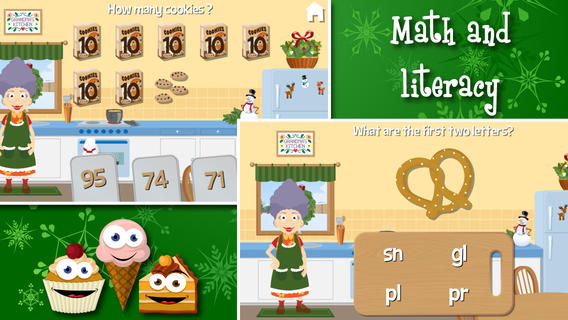
Only $.99 – Grandma’s Kitchen, an adorable educational app for preschoolers. Kids join dancing grandma in her kitchen. The app features 8 educational games – all thematically linked. Kids will love helping grandma around the kitchen and they will be learning math & reading as they help. The app also features short videos of real kitchen tools in action. The following concepts are integrated into the games: consonant blends, telling time to the hour, colors, vocabulary, healthy eating choices, compound words, numeral recognition/counting, addition, identifying equal parts of a whole, pattern recognition, and more!

I love this app – it seamlessly integrates important educational content into fun thematic games. And, little ones will learn how kitchen items work. I especially like the when Grandma asks for a kiss on the cheek – so cute! Highly recommended.

Download: https://itunes.apple.com/us/app/grandmas-kitchen/id602808356?mt=8&uo=4

0

Factor Samurai

Factor Samurai

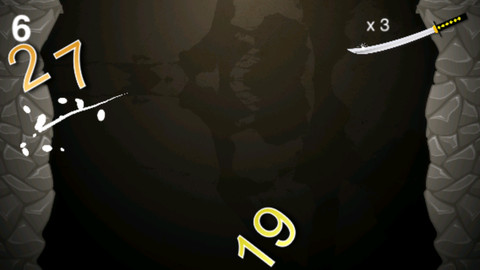
FREE again for a limited time – Factor Samurai, a fun game to practice multiplication/division while looking for prime factors. The goal of the game is to cut falling numbers down to their prime numbers. So if the number 14 is on the screen, it would be cut once to become 2 and 7. If the number 18 is on the screen, it would be cut twice – first to 3 and 6 and then the 6 would be cut to 2 and 3. The game has three levels – grasshopper, apprentice, and master. The speed of the falling numbers increases in each level. Once a player has cut 3 numbers that are already prime, the game is over. The score (showing how many numbers were cut down to their prime) is displayed! There is an option to play the game through the Game Center. This educational app is fun – a game that helps kids with an important math standard!

Common Core Standards met:

  • 4.OA.4 Find all factor pairs for a whole number in the range 1–100. Recognize that a whole number is a multiple of each of its factors. Determine whether a given whole number in the range 1–100 is a multiple of a given one-digit number. Determine whether a given whole number in the range 1–100 is prime or composite.

Factor Samurai - Third Rail, LLC

0

Quick Math – Multiplication & Arithmetic Game

quick math

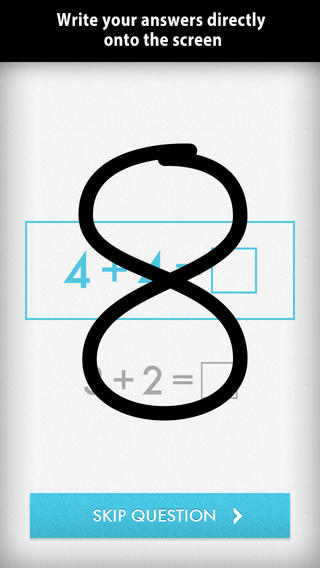
Also only $.99 – Quick Math – Multiplication & Arithmetic Game, an educational app that encourages math fluency in addition, subtraction, multiplication, division, & mixed operations. Kids race against the clock to improve their scores. Handwriting recognition allows the players to write the answers directly on the screen – a very slick feature. There are 4 game levels: beginner, intermediate, advance, and extreme. This app features LOTS of great practice for multiple levels of math students. It can be shared among students and it tracks each student’s progress – perfect for the classroom. The math gets progressively harder as students improve their skills. I love how the app encourages self-improvement and legible writing! Teachers could assign 10 minutes of practice each day for their students. I am sure the results would be significant. What a fabulous tool for the classroom – perfect for a daily warm-up, at a math center, or for fluency practice after completing an assignment.

Common Core Standards met:

1.OA.6 – Add and subtract within 20, demonstrating fluency for addition and subtraction within 10.
2.OA.2 – Fluently add and subtract within 20 using mental strategies. By end of Grade 2, know from memory all sums of two one-digit numbers.
3.OA.7 – Fluently multiply and divide within 100, using strategies such as the relationship between multiplication and division or properties of operations. By the end of Grade 3, know from memory all products of two one-digit numbers.
Download link: https://itunes.apple.com/us/app/quick-math-arithmetic-times/id537802071?mt=8&uo=4

0

8 GREAT Apps for Teaching Fractions

Here are 8 great apps for teaching fractions and the first three on the list are FREE!

fractions

Currently FREE  – Fractions by Brainingcamp, an excellent educational app for teaching fractions. The app covers 7 topics: introduction to fractions, equivalent fractions, common denominators, comparing/ordering fractions, adding/subtracting fractions, multiplying fractions, and dividing fractions. Each topic includes: a narrated lesson (with visual models), virtual manipulatives for kids to explore, practice questions to check understanding, and a challenging game for additional practice. Kids earn badges as they work through the components of each topic.

WOW – I love everything about this app. The lessons are wonderful. The manipulatives are designed to promote understanding of the concepts presented. The practice questions give students and their teachers a check of their understanding. And, the challenging games helps kids further master the topic. It would be a fabulous for grades 3 and beyond!

Common Core State Standards met:

  • 3.NF.1. Understand a fraction 1/b as the quantity formed by 1 part when a whole is partitioned into b equal parts; understand a fraction a/b as the quantity formed by a parts of size 1/b.
  • 3.NF.3 – Explain equivalence of fractions and compare fractions by reasoning about their size. Understand two fractions as equivalent (equal) if they are the same size. Recognize and generate simple equivalent fractions, e.g., 1/2 = 2/4, 4/6 = 2/3).
  • 4.NF.3 – a. Understand addition and subtraction of fractions as joining and separating parts referring to the same whole.
  • 5.NF.3 – Interpret a fraction as division of the numerator by the denominator (a/b = a ÷ b).

Download link: https://itunes.apple.com/us/app/fractions-by-brainingcamp/id471353363?mt=8&uo=4

on no fractrionsUpdated again in March 2014 – Oh No, Fractions! This FREE app just keeps getting better and better because the developer encourages teacher input. How wonderful is that – a developer willing to listen to teachers’ needs!

Oh No Fractions! is a great FREE iPhone/iPad app for comparing and exploring fractions. The educational app is simple to use – kids just swipe to the right or the left to indicate whether one fraction is “greater than” or “less than” or “equal to” a second fraction. As they work, kids can tap above each fraction to see if it can be reduced/simplified – a great feature. But, one of the best features of this app is the “peek”/”prove it” feature. Kids can use a manipulative to “peek” at an answer before they commit to it or they can use the manipulative to “prove” their answer later. This feature is fabulous because it allows the child to visualize his/her answer. Kids can also use this app to practice finding the common denominator. Then they can use it for addition, subtraction, multiplication, and division of fractions. The app also generates corresponding decimals/percentages for each answer. What a great tool for helping kids to understand fractions!! It’s no wonder that it received the 2013 Children’s Technology Review Editor’s Choice Award.

Common Core Standards met:

  • 3.NF.3 – Explain equivalence of fractions and compare fractions by reasoning about their size. Understand two fractions as equivalent (equal) if they are the same size. Recognize and generate simple equivalent fractions, e.g., 1/2 = 2/4, 4/6 = 2/3).

Oh No Fractions! - Curious Hat Lab - Curious Hat

equivalent fractions

From the National Council of Teachers of Mathematics comes a FREE app called Equivalent Fractions. Kids create equivalent fractions by dividing and shading squares or circles. Circles can be divided into 24ths. Squares can be divided into 144ths. In the play mode, a fraction is shown and kids must create 2 additional fractions that are equivalent. All 3 fractions must have different denominators. The app also places the fractions on a number line – a great visual for comparing! There is also a “build your own” mode which would be fabulous to use for guided exploration & practice. Kids could also use this section as a virtual manipulative when working independently. This app is an excellent resource for the classroom!

Common Core Standards met:

  • 3.NF.3 – Explain equivalence of fractions and compare fractions by reasoning about their size. Understand two fractions as equivalent (equal) if they are the same size, or the same point on a number line. Recognize and generate simple equivalent fractions, e.g., 1/2 = 2/4, 4/6 = 2/3). Explain why the fractions are equivalent, e.g., by using a visual fraction model.

Equivalent Fractions - National Council of Teachers of Mathematics

tiny fractionsNow $4.99 but was FREE when it was released – Tiny Fractions. This educational app teaches identifying, comparing, ordering, finding equivalents, simplifying, adding, and subtracting fractions using vials of liquid. It starts out simple and gets more difficult as kids progress through the app. It also keeps track of the student’s progress – showing teachers/parents specifically which fractions were missed. Simply done and easy to use, this app does a great job helping kids visualize and learn fractions!

Common Core Standards met:

  • 3.NF.1. Understand a fraction 1/b as the quantity formed by 1 part when a whole is partitioned into b equal parts; understand a fraction a/b as the quantity formed by a parts of size 1/b.
  • 3.NF.3 – Explain equivalence of fractions and compare fractions by reasoning about their size. Understand two fractions as equivalent (equal) if they are the same size. Recognize and generate simple equivalent fractions, e.g., 1/2 = 2/4, 4/6 = 2/3).
  • 4.NF.3 – a. Understand addition and subtraction of fractions as joining and separating parts referring to the same whole.

Tiny Fractions - TapToLearn Software

slice fractions

Currently $3.99 – Slice Fractions was recently listed as one of Apple’s Best of 2014:Apps. Kids learn about fractions as they slice through ice and lava to clear a path for a cute mammoth. Along the way they collect silly hats for the mammoth to wear. As they solve the app’s 90+ physics puzzles, they are exposed to key concepts of fractions – partitioning, equivalent fraction, numerator/denominator notation, ordering, subtracting from a whole, etc. Kids will enjoy learning about fractions in this wordless environment that seems more like a game than math lessons. I love that the app encourages kids to be problem solvers. Its replay button permits them to try each puzzle again and again until they figure it out. Hints are only given when support is needed. The end result is that kids are learning through discovery! It’s no wonder that this app has received so many accolades: Apple Editor’s Choice, Editor’s Choice for Excellence in Design: Children’s Technology Review, Winner of a Parents’ Choice Gold Award 2014, Gold Medal Winner 2014: International Serious Play Awards, and Best Family Friendly Game 2014: Indie Prize Showcase Awards.

Common Core Standards met:

  • 2.G.2. Partition a rectangle into rows and columns of same-size squares and count to find the total number of them.
  • 2.G.3. Partition circles and rectangles into two, three, or four equal shares, describe the shares using the words halves, thirds, half of, a third of, etc., and describe the whole as two halves, three thirds, four fourths. Recognize that equal shares of identical wholes need not have the same shape.
  • 3.NF.1. Understand a fraction 1/b as the quantity formed by 1 part when a whole is partitioned into b equal parts; understand a fraction a/b as the quantity formed by a parts of size 1/b.
  • 3.NF.3 – Explain equivalence of fractions and compare fractions by reasoning about their size. Understand two fractions as equivalent (equal) if they are the same size. Recognize and generate simple equivalent fractions, e.g., 1/2 = 2/4, 4/6 = 2/3).
  • 4.NF.2. Compare two fractions with different numerators and different denominators, e.g., by creating common denominators or numerators, or by comparing to a benchmark fraction such as 1/2.
  • 4.NF.3b. Decompose a fraction into a sum of fractions with the same denominator in more than one way, recording each decomposition by an equation.

Download link: https://itunes.apple.com/us/app/slice-fractions/id794730213?mt=8&uo=4

squeebles

From England and currently $1.99 –  Squeebles Fractions, an app for the iPhone/iPad that is designed to teach fractions to 7 – 11 year olds. The Squeebles want to enter a cake making contest but their ingredients have been stolen by the Math Monster. By working on the app’s 4 games, kids help the Squeebles earn back their ingredients. In Piece of Cake, kids drag the fractional part of a cake to a Squeebles when he asks for it. The easy mode covers halves, fourths, thirds. The hard mode cover fractions to tenths. In Tricky Pairs, kids have to match pairs of equivalent fractions. In the easy mode they match 4 pairs and in the hard mode they match up to 9 pairs. Think Big has kids feeding cake to the Squeeble that calls out the biggest fraction. The easy mode covers halves, fourths, thirds. The hard mode cover fractions to twelfths. Super Sums requires kids to add fractions as quickly as they can and has three levels of difficulty. After earning ingredients, kids can create cakes and enter them in The Cake Show – fun! Another great thing about this app is that you can have more than one player. My only concern is that the easy mode of Piece of Cake requires kids to know some equivalent fractions – for example, it asked kids to pick 3/4 of a cake divided into 8 pieces, 1/3 of a cake divided into 6 pieces, etc. I wish it would have required a basic knowledge of fractions in the easy mode then moved on to equivalent fractions in the hard mode. This app is cute, fun, and provides great practice for a wide spectrum of kids.

Common Core Standards met:

  • 3.NF.3 – Explain equivalence of fractions and compare fractions by reasoning about their size. Understand two fractions as equivalent (equal) if they are the same size, or the same point on a number line. Recognize and generate simple equivalent fractions, e.g., 1/2 = 2/4, 4/6 = 2/3).
  • 4.NF.3 – a. Understand addition and subtraction of fractions as joining and separating parts referring to the same whole.

Download link: https://itunes.apple.com/us/app/squeebles-fractions/id557576867?mt=8&uo=4

equivalentCurrently $1.99 but often “goes free” – Everyday Mathematics® Equivalent Fractions™  for iPhone/iPad is fun easy way to reinforce fraction concepts. Note: the app uses a digital version of the fraction cards from the Everyday Math third grade book.

Common Core Standards met:

  • 3.NF.3 – Explain equivalence of fractions and compare fractions by reasoning about their size. Understand two fractions as equivalent (equal) if they are the same size, or the same point on a number line. Recognize and generate simple equivalent fractions, e.g., 1/2 = 2/4, 4/6 = 2/3). Explain why the fractions are equivalent, e.g., by using a visual fraction model.

Download link: https://itunes.apple.com/us/app/everyday-mathematics-equivalent/id417016316?mt=8&uo=4

Fraction Wall

Currently $1.99 – Fraction Wall, an app designed for small group or independent learning. This educational app has 4 sections: Teacher Tool, Complete the Wall, 2 Player Game, and Addition. The Teacher Tool can be used to show/discover equivalent fractions or it can be used to answer equivalent fraction problems. Complete the Wall has kids moving bricks on top of equivalent fractions. There are 4 levels: level 1 – halves and quarter; level 2 – halves, thirds, quarters and sixths; level 3 – halves, thirds; quarters fifths, sixths, tenths; level 4 – halves up to tenth. 2 Player Game has kids competing against each other to be the first to fill their wall of equivalent fractions. Addition has kids adding fractions to answer multiple choice questions. There is a clickable wall to help them visualize the answer if needed. This section also has 4 levels. The app can be customized to exclude more difficult fractions from the wall. This app would work well in the classroom – great for practicing and/or for using as a tool to visualize answers. Much more fun than a worksheet for practicing fractions!

Common Core Standards met:

  • 3.NF.3 – Explain equivalence of fractions and compare fractions by reasoning about their size. Understand two fractions as equivalent (equal) if they are the same size. Recognize and generate simple equivalent fractions, e.g., 1/2 = 2/4, 4/6 = 2/3).
0

Brainy Bugs Preschool Games

bug gamesSinging crickets! Brainy Bugs Preschool Games is FREE for a limited time. This super cute educational app for preschoolers has 4 sections: Cricket Concert, Bee Word Builder, Ant Tunnel Builder, and Spider Dot-to-Dot. In the Cricket Concert section, kids can select a song to hear the crickets sing together or they can tap on each cricket to play the song on their own. In Bee Word Builder, kids hear the phonic pronunciation of individual letters as they use them to put words together. Ant Tunnel Builder requires kids to rotate puzzle pieces so that the ants can march through a completed tunnel. Spider Dot-to-Dot has kids connecting dots in numerical order. Kids collect sticker rewards along the way. This app has a nice combination of learning games for preschoolers – cute, fun, & engaging! Who knew playing with bugs could be so much fun. 🙂

Bug Games HD - by Busy Bee Studios - Busy Bee Studios

0

Giggle Ghosts

FREE for a limited time – Giggle Ghosts, a cute counting app for preschoolers. The giggle ghosts are very cute – kids will love to hear them laugh. Kids help 20 ghosts get the party by bouncing them across rooftops. In the first level the sky is clear and they have to bounce 5 ghosts. The app counts to 5 and shows the written numbers. The second level is the same but there are leaves blowing in the sky. In the third level there are clouds in the sky and in the fourth level it is raining. Both provide additional counting practice from 1- 5. At the end, all 20 ghosts at the party are counted. This app is great for little ones – nothing scary, just fun & friendly ghosts going to a party. 🙂

Giggle Ghosts - by Busy Bee Studios - Busy Bee Studios