0

MyCQs (Multiple Choice Questions)

test maker

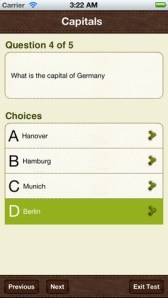
Create multiple choice quizzes/tests with this FREE educational app  – My CQs (Multiple Choice Questions). Teachers/parents can create multiple choice tests (with pictures, explanations, and unlimited questions) to help kids learn or review any subject. Since the app includes 6 lessons on how to write good multiple choice questions, older students can learn to create their own quizzes to help them study. Once a quiz/test has been created, kids can take and retake it and the app tracks their growth over time. Tests can also be shared with other members of the MyCQs community. LOTS of possibilities for using this app with every age-group of students!

My CQs (Multiple Choice Questions) was featured in The Guardian’s ‘Best iOS Apps This Week’, and listed in: Top 10 Free Education Apps – US, Top 10 Free Education Apps – Canada, Top 5 Free Education Apps – India, Top 30 Free Education Apps – UK.

MyCQs (Test Maker) - James Gupta

0

ClassDojo

ClassDojo is a FREE & fabulous tool that helps improve classroom behaviors. Teachers are using it in different ways: to give feedback in real-time, to track behavior, and to generate reports. Reward good behavior in real-time – all it takes is a click. You need one device (computer, smartphone, a laptop, or a tablet) and an internet connection. It is very easy to set up with your class list. Each student is assigned a cute, monster-like avatar. Kids earn points for positive behaviors and lose points for negative behaviors. ClassDojo is also fully customizable so you can delete behaviors from the original list and/or add your own behaviors. As you use it, it automatically logs any data that you input. This data can be used to generate behavior reports to share with parents and administrators. How awesome is that? You can go into a meeting/conference with reports in hand!

If I were still in the classroom, I would enter my class list twice – once for data on work/study habits and the other for data on behaviors. I would make my habits/behaviors match exactly what was on my report cards. Then as I used the app, I would also be gathering data for my report cards. At the end of the grading period, I would just print out the date and enter it on the report cards – how easy!  I would also have the data (in a printed report) to be able to back up any grade on the card.  “As you can see Mrs. Doe, Jane only turned in her homework 56% of the time.”  Instant data would also be available for the RTI process, IEPs or any other team meeting on a child. Wow – a fabulous educational app!!

Check out the website for more information: www.classdojo.com

Highly recommended !!

ClassDojo - Class Twist Inc

0

Comic Book

Comic Book

On sale for only $.99 – Comic Book. This app was named Best Photo App of 2011 and was the App of the Week in 12 different countries! Using the app’s selection of image filters, comic fonts, customizable captions, classic comic graphics and page layouts, you can easily change your photos into comics. So many creative uses for the classroom!! Download now, brainstorm uses for this educational app later!!

ComicBook! - 3DTOPO Inc.

0

Cool Writer

Cool Writer

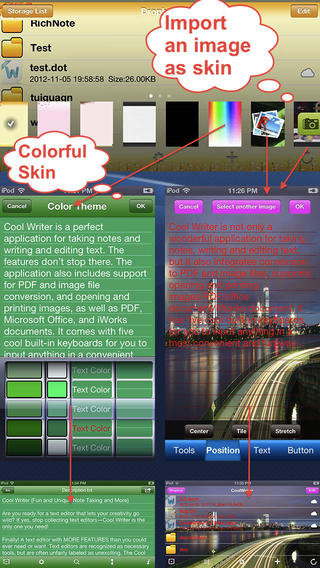
Free today – Cool Writer – Awesome Writing & Note Taking App and that it is! This educational app comes with 5 built-in keyboards to make writing and note taking fun. They are: Special Characters Keyboard with 2000 special characters, Emoji Keyboard with 471 emoticons, Article Keyboard with 400 popular characters/emoji article pictures, Crazy Text Keyboard with fun features like ‘upside-down’ letters, and Shortcut Keyboard that you can personalize. The app has 12 themes or you can create your own theme using images from your photo album. With it you can create, rename, delete, copy, and move your notes. You can also sort them by name, size, type, or time. There is even as search option. This app also converts text files to PDF or image format.

I visualize using this app as a digital version of the 5-subject notebook – kids could keep track of their class notes for all subjects in their device. It syncs with Dropbox so they can also access class notes at home. Teachers could share notes with students and vice versa. This app could be used to write exit slips at the end of a lesson and emailed to the teacher. Or, a teacher could assign reading/note taking for homework then have kids email the completed notes. Lots of possibilities here and slick enough that kids would probably enjoy using it – VERY cool!

Download link: https://itunes.apple.com/us/app/cool-writer-awesome-writing/id477698296?mt=8&uo=4

0

Compare a Twist

Compare a Twist

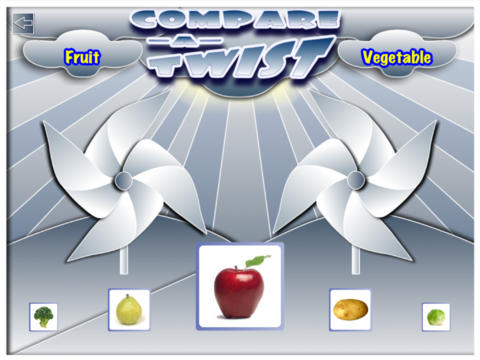
FREE for a limited time – Compare a Twist, an educational app. This easy-to-use app allows teachers and/or students to create lessons that compare/contrast or categorize items. The app supports the use of text and images making it useable for multiple levels of students. Compare/contrast or categorizing lessons can be created across the curriculum: Language Arts – long/short vowel sound, synonyms & antonyms, characteristics of the main characters; Math – factors of numbers, equivalent fractions, characteristics of geometric shapes; Science – living or nonliving, characteristics of animals. The possibilities are endless. The app gives students get instant feedback when they have completed the activity. Teachers can also use that information to check students’ understanding.

They say that the best way to learn something is to teach it… I think kids would really enjoy creating quizzes to share with their peers.

Download link: https://itunes.apple.com/us/app/compare-a-twist/id510922341?mt=8&uo=4

1

Shadow Puppet

Shadow Puppet

FREE for a limited time – Shadow Puppet, a photography app currently featured as one of the “Best New Apps” by Apple. Using this app, it’s easy to create “puppets” – recorded explanations of your photos. First you choose your photos and put them in the order. Then you talk about your pictures. Everything is recorded. Finished “puppets” can be shared via email, SMS, Facebook and/or Twitter. There are so many ways for everyone to use Shadow Puppet: to teach something new, to share adventures with friends, to record children talking about their experiences, to tell the story behind old family photos, etc.

And… the classroom uses for this app are only limited by your imagination: Take pictures of a child’s work and have him/her explain it to parents. Send pictures and voice recordings of the class field trip. Have kids give a step-by-step explanation of what happened in a science experiment. Draw & sequence pictures to retell a story. Make a “talking timeline” by sequencing photos of historical events. Have kids use it to present mini reports on any subject. Have virtual “pet day” – kids bring in pictures/recordings of their pets. Because you can use anything saved to your photo library, you can explain photos from the web, artwork created in other apps, and so much more. The possibilities for using this educational app are endless. What a fabulous resource!!

Download link: https://itunes.apple.com/us/app/shadow-puppet/id700902833?mt=8&uo=4

0

ScreenChomp

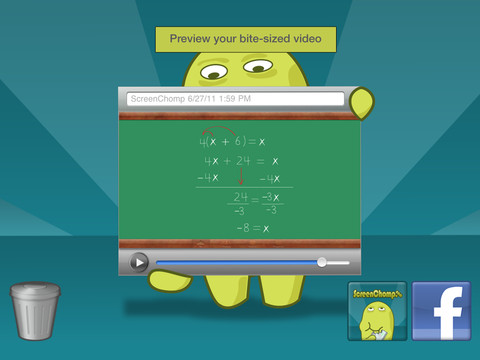
ScreenChomp is a powerful tool that can be used in so many ways and it’s FREE!! It is basically turns your iPad into a recordable whiteboard. You can use it to sketch out and record ideas for yourself or to share with others. Teachers can send tutorial videos home with kids. Kids can create videos to help each other. The possibilities for this educational app are only limited by one’s imagination.

Here is a link to a You Tube video that explains how it works: What is ScreenChomp? The iPad app to Record. Sketch. Share! – YouTube.

Highly recommended!

ScreenChomp - TechSmith Corporation

0

Teacher Clicker – Socrative / Student Clicker – Socrative

Still FREE and now even better!! Socrative has just added two additional quiz features: # 1 – Teachers can now add images to their questions. #2 – The system can now grade short answer questions. Teachers just input the acceptable answers and the system does the rest.  🙂

This website and app are unbelievably cool – they turn any device with a web browser (iPhone, iPad, laptops) into a student response clicker. If a teacher has access to any kind of wireless lab, he/she can engage the entire class in a game or quiz and watch the results in real-time. Teachers begin by using their teacher app or logging into t.socrative.com with their email and password. Once logged in, teachers are assigned a room number to share with their students. Students log in using their student app or at m.socrative.com and enter the “virtual room number” provided by the teacher. Teachers initiate an activity and students respond on their devices. Multiple choice and short answer quizzes are easy to create – types of questions can be mixed. Teachers can also choose to run the quiz as a Space Race game. The students’ responses are visible to the teacher in real-time. Teachers can see what each child answered individually as well as what the group answered collectively. And the best part is… the app grades, graphs the results, and generates a report as an Excel spreadsheet or an email.

What a powerful tool for teachers – a short quiz at the end of a lesson can pinpoint what students understand and what needs to be retaught. Hours of grading and analyzing test results are done immediately. Every student is involved – wow!

Highly recommended!

Teacher app Teacher Clicker - Socrative - Socrative           Student app Student Clicker - Socrative - Socrative

0

Science 360 for iPad

Science 360

FREE from the National Science Foundation comes Science 360 for iPad – scientific images and videos from around the world. This educational app covers a range of topics and breaking news from NSF-funded institutions.  New content is added weekly. Users can browse the app’s unique 360 display board to learn about something new or they can find specific content by searching keywords. It’s easy to save images and videos for later use right within the app – perfect for teachers who are gathering resources for a unit. The quality of the images is spectacular and they are available in HD for download to your iPad. Keep abreast of the latest scientific discoveries with this app – a great resource!!

Download link: https://itunes.apple.com/us/app/science360-for-ipad/id439928181?mt=8&uo=4

0

ClassDojo

Start out your school year with ClassDojo, a FREE & fabulous tool that helps improve classroom behaviors. Teachers are using it in different ways: to give feedback in real-time, to track behavior, and to generate reports. Reward good behavior in real-time – all it takes is a click. You need one device (computer, smartphone, a laptop, or a tablet) and an internet connection. It is very easy to set up with your class list. Each student is assigned a cute, monster-like avatar. Kids earn points for positive behaviors and lose points for negative behaviors. ClassDojo is also fully customizable so you can delete behaviors from the original list and/or add your own behaviors. As you use it, it automatically logs any data that you input. This data can be used to generate behavior reports to share with parents and administrators. How awesome is that? You can go into a meeting/conference with reports in hand!

If I were still in the classroom, I would enter my class list twice – once for data on work/study habits and the other for data on behaviors. I would make my habits/behaviors match exactly what was on my report cards. Then as I used the app, I would also be gathering data for my report cards. At the end of the grading period, I would just print out the date and enter it on the report cards – how easy!  I would also have the data (in a printed report) to be able to back up any grade on the card.  “As you can see Mrs. Doe, Jane only turned in her homework 56% of the time.”  Instant data would also be available for the RTI process, IEPs or any other team meeting on a child. Wow – a fabulous educational app!!

Check out the website for more information: www.classdojo.com

Highly recommended !!

ClassDojo - Class Twist Inc