0

Teacher Clicker – Socrative / Student Clicker – Socrative

Still FREE , so powerful! This website and app are unbelievably cool – they turn any device with a web browser (iPhone, iPad, laptops) into a student response clicker. If a teacher has access to any kind of wireless lab, he/she can engage the entire class in a game or quiz and watch the results in real-time. Teachers begin by using their teacher app or logging into t.socrative.com with their email and password. Once logged in, teachers are assigned a room number to share with their students. Students log in using their student app or at m.socrative.com and enter the “virtual room number” provided by the teacher. Teachers initiate an activity and students respond on their devices. Multiple choice and short answer quizzes are easy to create – types of questions can be mixed. Teachers can also choose to run the quiz as a Space Race game. The students’ responses are visible to the teacher in real-time. Teachers can see what each child answered individually as well as what the group answered collectively. And the best part is… the app grades, graphs the results, and generates a report as an Excel spreadsheet or an email.

What a powerful tool for teachers – a short quiz at the end of a lesson can pinpoint what students understand and what needs to be retaught. Hours of grading and analyzing test results are done immediately. Every student is involved – wow!

Highly recommended!

Teacher app Teacher Clicker - Socrative - Socrative           Student app Student Clicker - Socrative - Socrative

0

MyScript Calculator

myscript

FREE for your iPhone/iPad, MyScript Calculator is an amazing app. It performs mathematical operations using your handwriting! The app is simple to use and intuitive. Just write the mathematical equation on the screen. MyScript technology converts the symbols and numbers to digital text and delivers the answers. It supports the following operations: basic operations (+, -, x, ÷, +/‒, 1/x), additional operations ( %, √, x!, |x|), powers/exponentials (ℯx, xy , x2), trigonometry, and more. Very cool!!

MyScript Calculator - Vision Objects

0

Solar Walk – 3D Solar System Model

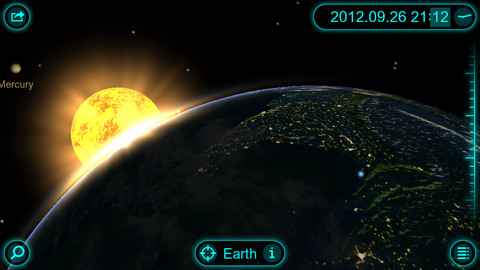
FREE today only, this app for the iPhone/iPad has you zooming through space to learn about our solar system and the Milky Way galaxy. Winner of a Parent’s Choice Gold Award and chosen by Apple as one of the Best App in 2010 & 201, this 3D model of the solar system will fascinate kids of all ages. This app features information about each of our planets (general information, figures, internal structure, & science missions), the planets’ moons (general information & figures), comets, dwarf planets and asteroids. Information and pictures of 8 satellites (such the Hubble Telescope and the ISS) are also included. 8 movies to explain some of Earth’s phenomena are included: Size Comparison, Earth’s Cycles, Solar Eclipse, Moon Phases, Tidal Phenomena, Major Circles of Latitude, Constellations, and Cassini-Huygens. The app permits you to zoom in for a close up view of each planet, moon, etc. or zoom out to get a view of our entire galaxy. If it’s in our solar system, you are going to be able to view it and learn about it with this app! Beautifully done 🙂

Solar Walk - 3D Solar System model - Vito Technology Inc.

Highly recommended!


0

More Halloween Apps

FREE today – Scrap It: Halloween HD for the iPad. You (or your child) can add a Halloween touch to your photos with this app. First take a photo or use an existing one. Using the photo editor, you can crop it and/or add an effect (about 40 filters available).  Then its time to get creative – add stickers, change the papers & tiles, add letters & numbers/ribbons/word art, and add & manipulate text using the text editor. Items can be resized, shadowed, sent to the back, sent to the front, etc. Creations are saved in My Scrap Pages. They can also be shared on Facebook, Twitter, Tumblr, via email. They can be saved to your camera roll or printed. I think kids would love decorating pictures of themselves, their family & friends, and the family pet 🙂 You could also create an electronic postcard or invitation with this app. Lots of possibilities!!

Scrap It: Halloween HD - Dirk Bost

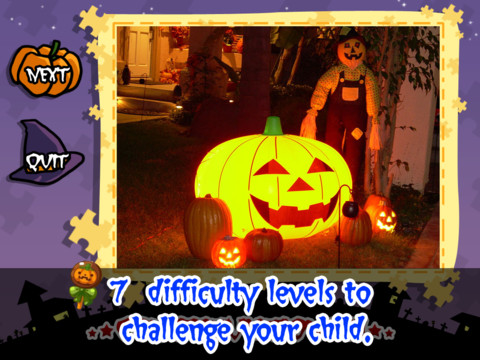
Halloween Jigsaw Puzzles is FREE for the iPad. It includes 18 puzzles with the option to purchase more. There are 7 levels of difficulty ranging from 4 to 49 pieces per puzzle. Most puzzle images are appropriate for younger kids but there are a few that are a bit iffy: scary-faced pumpkins, a few skeletons, and a witch in questionable attire. So if your child loves puzzles, check it out and be selective if your child scares easily.

Halloween Jigsaw Puzzles! - Toy Box

Dibu’s Monster Maker Lite is FREE for the iPhone/iPad. Dibu is a little boy who loves monsters so he created a machine to build them – I think this is how Dr. Frankenstein got started 🙂 The Monster Maker has hundreds of combinations of monsters waiting to be made. The lite version has 2 bodies to choose for the base.Then kids add hair, eyes, noses, mouths, hats & horns, tops, bottoms, and shoes. There is also a random monster generator which creates a monster with one tap. Finished monsters can be named then saved, printed, made into a puzzle, or emailed. This app also has a child lock that hides all promotional buttons and disables printing & emailing. And… there is a “parents only” button which gives written instructions for access to the app store. The developer does not want young children to end up there accidentally – how refreshing!

This app would be great to use with elementary aged kids. They could create a monster then write a descriptive paragraph about it. They could create two monsters and do a Venn diagram comparing and contrasting the monsters. Lots of possibilities!

Dibu's Monster Maker Lite - Playtend Apps LLP

1

ClassDojo

ClassDojo is a tool that helps teachers improve classroom behaviors. It is currently FREE because it is in beta form. It works with a smartphone, a laptop, or a tablet. Every student in your class gets their own cute little monster avatar. Kids earn points for positive behaviors and lose points for negative behaviors. As you use it, it automatically logs any data that you input. This data can be used to generate behavior reports to share with parents and administrators. It is very easy to set up and it is fully customizable – you can delete behaviors from the original list and add your own behaviors.Teachers are using it in different ways: to give feedback in real-time, to track behavior, and to generate reports.

If I were still in the classroom, I would enter my class list twice – once for data on work/study habits and the other for data on behaviors. I would make my habits/behaviors match exactly what was on my report cards. Then as I used the app, I would also be gathering data for my report cards. At the end of the grading period, I would just print out the date and enter it on the report cards – how easy!  I would also have the data (in a printed report) to be able to back up any grade on the card.  “As you can see Mrs. Doe, Jane only turned in her homework 56% of the time.”  Instant data would also be available for the RTI process, IEPs or any other team meeting on a child. Wow !!!!

Check out the website for more information: www.classdojo.com

Highly recommended !!

ClassDojo - Class Twist Inc

0

Super Stretch Yoga

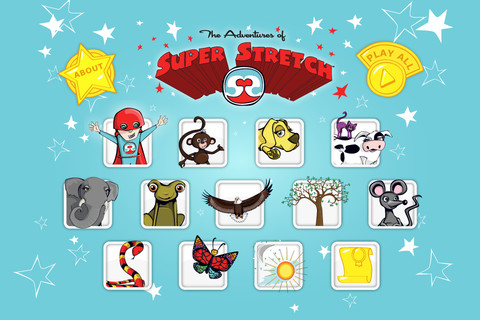
FREE today – This app for the iPhone/iPad was designed & created to teach 12 yoga poses to kids but the content can be used by everyone. Each lesson begins with an animated explanation of a pose by one of Super Stretch’s animal friends. Kids learn how movement and breathing make every day balanced. Following the explanation of each pose is a video clip of actual children demonstrating that pose so kids can see what it looks like. Once a child has gone through the 12 poses, he/she gets to share a favorite pose in a Super Stretch team photo. Kids are encouraged to “make NAMASTE part of their day” as they learn to find a balance in their lives. The Adventures of Super Stretch Code of Ethics uses NAMASTE is an acrostic for Nothing is impossible. Always be honest. Make the world a better place. Act with kindness. Share with others. Trust and belief in yourself. Enjoy and have fun. – what a fantastic message!  And… kids learn a healthy way to calm down & relieve stress while building self-awareness, self-esteem & respect for others. Wow!!

More and more teachers are bringing yoga into the schools because of its physical and emotional benefits. This app would be great to use on the Smartboard with the entire class.

Highly Recommended !

Super Stretch Yoga HD - The Adventures of Super Stretch, LLC English version          Super Stretch Yoga Spanish HD - The Adventures of Super Stretch, LLC Spanish version

0

Teacher Clicker – Socrative / Student Clicker – Socrative

This website and app are unbelievably cool – they turn any device with a web browser (iPhone, iPad, laptops) into a student response clicker. If a teacher has access to any kind of wireless lab, he/she can engage the entire class in a game or quiz and watch the results in real-time. Teachers begin by using their teacher app or logging into t.socrative.com with their email and password. Once logged in, teachers are assigned a room number to share with their students. Students log in using their student app or at m.socrative.com and enter the “virtual room number” provided by the teacher. Teachers initiate an activity and students respond on their devices. Multiple choice and short answer quizzes are easy to create – types of questions can be mixed. Teachers can also choose to run the quiz as a Space Race game. The students’ responses are visible to the teacher in real-time. Teachers can see what each child answered individually as well as what the group answered collectively. And the best part is… the app grades, graphs the results, and generates a report as an Excel spreadsheet or an email.

What a powerful tool for teachers – a short quiz at the end of a lesson can pinpoint what students understand and what needs to be retaught. Hours of grading and analyzing test results are done immediately. Every student is involved – wow!

Highly recommended!

Teacher app Teacher Clicker - Socrative - Socrative           Student app Student Clicker - Socrative - Socrative

0

gFlash+ Flashcards & Tests

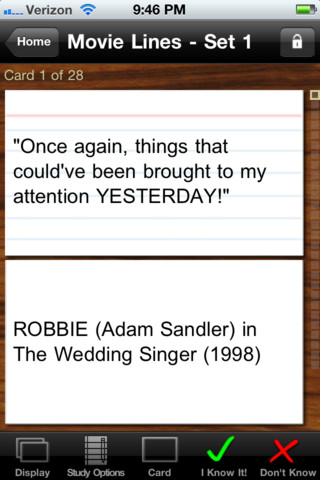
This iPod/iPad app was just updated today (8/26) and is currently FREE. It allows you to create, download, and manipulate flashcards for everything that you can imagine. You can create your cards in a Google docs spreadsheet and download it into the app or you can create your cards within the app. There is no limit on how many card sets you can have. Card sets created by leading educational publishers (Kaplan, Barron’s, McGraw-Hill, Wiley Publishing, etc.) are available as in-app purchases. You can also download and share sets from the gWhiz catalog. You must have an active wireless connection to download card sets or to use card sets with videos.

Once you have your cards ready, studying becomes simple. First choose box configuration or classic configuration. Both configurations keep track of the cards that are known & unknown. The box configuration has an unknown box, a known box, and a mastered box. As you go through the cards, the app keeps track of how many cards are in each box. In the classic mode, there is line of small cards on the right side of the screen. If you know a card, the little card turns green and if you do not know it, it turns read. It’s a nice visual for younger kids. A study score (percentage) is also given. Teachers of younger students could create the cards in Google docs for kids to download and study. This app is such a valuable tool for students of all ages to use in so many ways. I wish it would have been available when my kids were studying for the SAT and GRE. 🙂

Highly recommended!

gFlash+ Flashcards & Tests - gWhiz, LLC

0

Lists for Writers – ideas for creative writing

Designed for the iPhone/iPad this app is $1.99 but was FREE last week. As the name suggests, this app has many lists that would be helpful to writers as they brainstorm/develop their stories. Categories of lists included: CHARACTER (common first & last names, clothing, occupations, people’s roles & relationships), PERSONALITY (phobias, philias, obsessions, character traits, hobbies, emotions), PLOT (7 basic plots, 36 dramatic situations, conflicts, issues), SETTING (locations, cities, landforms/geography, weather), WORDS (verbs, nouns, etc.) and 7 miscellaneous lists. Several of the lists (such as phobias, 7 basic plots, & color words) include definitions. The updated version includes a notepad for writers to collect, edit, email, and/or print their ideas. This app would be a valuable tool for anyone trying to write a story. The lists would also provide great examples when teaching the elements of a story (characters, setting, etc.), character traits, parts of speech, etc. Great resource!!

Keep reading my blog to find out when apps are offered for FREE!

Recommended!

Lists for Writers - ideas for creative writing - Thinkamingo

0

Geo Walk HD – 3D World Fact Book

This app for the iPhone/iPad is FREE today (August 24, 2012) to celebrate “Back to School.” It features a moveable globe dotted with articles about people, animals, landmarks, plants, events, etc. related to the geographical region that you choose to explore. There are over 500 short articles (cards) in the app. Additional card sets are available as in-app purchases. Information can be viewed in two modes: global view and card stream. I really like the global view because it connects the information on the cards to their place. The globe is a physical globe without any sort of labeling – no landforms are named, no political borders are shown. Not all of the cards identify the location so some labeling would be helpful. There is also a quiz mode available if you would like to test yourself. Lots of great information to explore for both adults and children 🙂

Recommended!

Geo Walk HD - 3D World Fact Book - Vito Technology Inc.