0

Shadow Puppet Edu and Shadow Puppet

show puppet edu

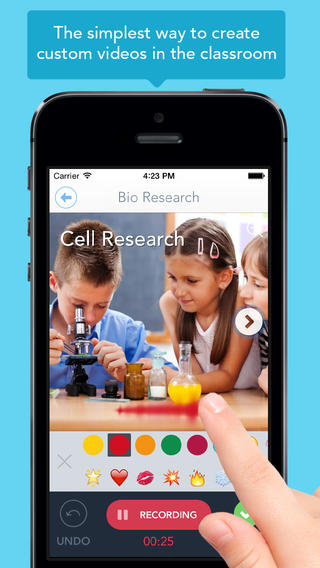
Just released yesterday – Shadow Puppet Edu, a FREE educational version of Shadow Puppet. Even kindergarten/first graders can create videos with this app which is very intuitive and easy to use. This educational version has a built-in, safe search that allows kids to search the Library of Congress, NASA Flickr Creative Commons, Yahoo Images, and Animated GIFs for images to add to their projects. And… it automatically adds the image credits to the end of the video. How cool as that? Kids can also add any photos that have been saved to their camera rolls. The possibilities for using this app are absolutely endless. Students can use it to create videos to: tell digital stories, explain concepts, present a project, describe an experience, show what they know, and more!! Teachers can create mini-lessons, share examples, enhance their lessons with imagery, etc. What a fabulous classroom tool!

Download link: https://itunes.apple.com/us/app/shadow-puppet-edu/id888504640?mt=8&uo=4

Shadow Puppet

Recently updated and still FREE – Shadow Puppet, a photography app which has been featured by Apple as one of the “Best New Apps” for over 6 months! Using this app, it’s easy to create “puppets” – recorded explanations of your photos. First you choose your photos and put them in the order. Then you talk about your pictures. Everything is recorded. Finished “puppets” can be shared via email, SMS, Facebook and/or Twitter. There are so many ways for everyone to use Shadow Puppet: to teach something new, to share adventures with friends, to record children talking about their experiences, to tell the story behind old family photos, etc.

The update has many new features. Now you can include video clips, add music, search the web for images, overlay text/stickers, and more! The FREE version of the app permits you to include up to 10 photos/video clips. For $1.99 you can get Puppet Essentials which allows you to add up to 100 items to each video and have access to more drawing & decorating tools. The update made this great app even better!

The classroom uses for this app are only limited by your imagination: Take pictures of a child’s work and have him/her explain it to parents. Send pictures and voice recordings of the class field trip. Have kids give a step-by-step explanation of what happened in a science experiment. Draw & sequence pictures to retell a story. Make a “talking timeline” by sequencing photos of historical events. Have kids use it to present mini reports on any subject. Have virtual “pet day” – kids bring in pictures/recordings of their pets. Because you can use anything saved to your photo library, you can explain photos from the web, artwork created in other apps, and so much more. The possibilities for using this educational app are endless. For more suggestions go to http://get-puppet.com/education. What a fabulous resource!!

Download link: https://itunes.apple.com/us/app/shadow-puppet/id700902833?mt=8&uo=4
0

Typic Kids

typic

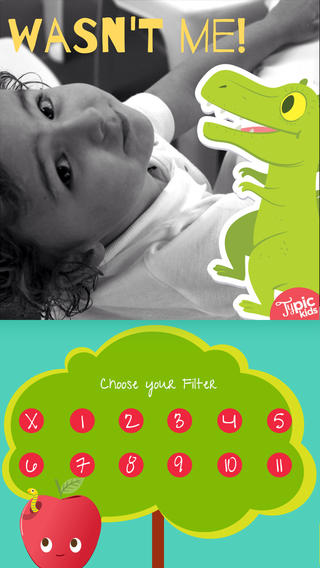
FREE app – Typic Kids, a fun photo editor for kids. The app is very easy to use. Just take or choose a picture, pick a filter, frame it, write a caption, choose a text color, add stickers, and share! This FREE app comes with 11 free filters, 6 free frames, 14 free fonts, and 10 free stickers. More options are available as in-app purchases. The wonderful Illustrations of Raeioul will make your family’s photos look fun and unique!

Download link: https://itunes.apple.com/us/app/typic-kids-fun-photo-editor/id806320241?mt=8&uo=4

0

Fold Cam

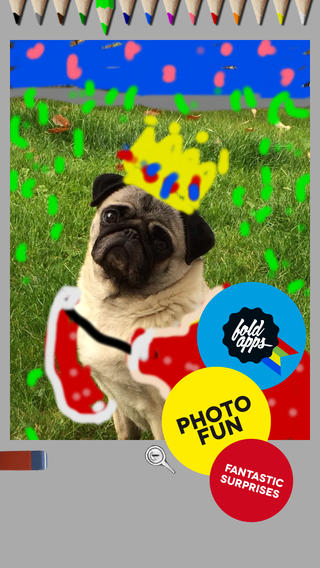
fold camFREE for iPhone/iPad – Fold Cam, an app that mixes photography with art. Fold Cam is simple to use  – just take a picture then decorate it with the colored pencils that appear at the top of the screen. The magnifying glass allows you to zoom in close to add details. The eraser makes it easy to fix. When you are finished enhancing your picture, you can share via Facebook, Twitter or email – easy & fun.

Kids would have fun with this app. Who wouldn’t like decorating the family pet? 🙂

Fold-Cam - Cribster

0

Shadow Puppet

Shadow PuppetUse the power of this app to create a unique Father’s Day tribute or greeting!!

Recently updated and still FREE – Shadow Puppet, a photography app which has been featured by Apple as one of the “Best New Apps” for over 6 months!  Using this app, it’s easy to create “puppets” – recorded explanations of your photos. First you choose your photos and put them in the order. Then you talk about your pictures. Everything is recorded. Finished “puppets” can be shared via email, SMS, Facebook and/or Twitter. There are so many ways for everyone to use Shadow Puppet: to teach something new, to share adventures with friends, to record children talking about their experiences, to tell the story behind old family photos, etc.

The update has many new features. Now you can include video clips, add music, search the web for images, overlay text/stickers, and more! The FREE version of the app permits you to include up to 10 photos/video clips. For $1.99 you can get Puppet Essentials which allows you to add up to 100 items to each video and have access to more drawing & decorating tools. The update made this great app even better!

The classroom uses for this app are only limited by your imagination: Take pictures of a child’s work and have him/her explain it to parents. Send pictures and voice recordings of the class field trip. Have kids give a step-by-step explanation of what happened in a science experiment. Draw & sequence pictures to retell a story. Make a “talking timeline” by sequencing photos of historical events. Have kids use it to present mini reports on any subject. Have virtual “pet day” – kids bring in pictures/recordings of their pets. Because you can use anything saved to your photo library, you can explain photos from the web, artwork created in other apps, and so much more. The possibilities for using this educational app are endless. For more suggestions go to http://get-puppet.com/education. What a fabulous resource!!

Download link: https://itunes.apple.com/us/app/shadow-puppet/id700902833?mt=8&uo=4
0

ProCollage – Photo Collage Maker & Photo Stitch Creator

procollage

FREE today only – ProCollage – Photo Collage Maker & Photo Stitch Creator, a wonderful app for creating collages! With ProCollage you can easily make creative collages with your photos and/or pictures from the internet – basically, any images that you have saved in your camera roll/photo stream. This app is incredibly intuitive and easy to use. There are three collage modes to choose from – template collage, freestyle collage, and stitching photo. All modes support up to 9 photos. In all modes it’s easy to: flip and rotate photos, add/replace photos, add text (60 colors & patterns), customize borders, corners & backgrounds, and more.
There are SO many fun uses of this app for education. Teachers, use ProCollage to make a collage of a student’s work or a collage of the school year’s highlights. Add collages of what’s happening in your classroom to your class newsletter, website, or blog. Have students use ProCollage to introduce themselves at the start of the year. Send students on a scavenger hunt of geometric shapes then have them make a ProCollage of what they found. Add a ProCollage to a report or make a ProCollage representing the main character of a book, etc. The list is only limited by your imagination! I LOVE educational apps like this – open-ended with great potential for creativity! WOW!!

Download link: https://itunes.apple.com/us/app/procollage-photo-collage-maker/id593389475?mt=8&uo=4

0

Still Shot

still shot

Ever wish that you could capture a still shot from a video? Well now you can. 🙂

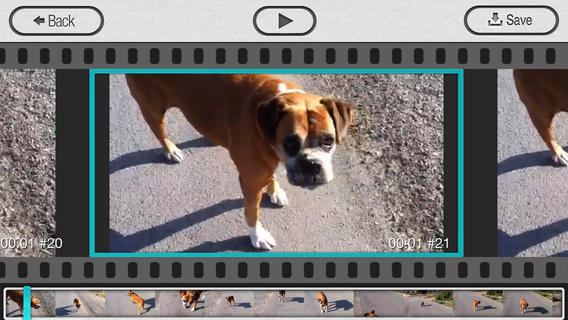
FREE today – Still Shot from the makers of Group Shot. This photography app can be used to catch the moment when your subject is on the move – perfect for kids and pets! It’s extremely easy to use – just load a video, choose your favorite frame, and save it to your camera roll. Your “still shot” will have the same resolution as the video. Once the picture has been saved, it can be printed, shared, pulled into another app, etc. There are so many ways to use this app in an educational setting. Freeze and save – scenes from play, moments from a field trip, segments of a demonstration, etc. Teachers/coaches can capture kids in action then analyze their movements frame by frame. Fabulous and FREE today!!

Download link: https://itunes.apple.com/us/app/stillshot/id520436425?mt=8&uo=4

0

Shadow Puppet

Shadow Puppet

Recently updated and still FREE – Shadow Puppet, a photography app which has been featured by Apple as one of the “Best New Apps” for over 6 moths!  Using this app, it’s easy to create “puppets” – recorded explanations of your photos. First you choose your photos and put them in the order. Then you talk about your pictures. Everything is recorded. Finished “puppets” can be shared via email, SMS, Facebook and/or Twitter. There are so many ways for everyone to use Shadow Puppet: to teach something new, to share adventures with friends, to record children talking about their experiences, to tell the story behind old family photos, etc.

The update has many new features. Now you can include video clips, add music, search the web for images, overlay text/stickers, and more! The FREE version of the app permits you to include up to 10 photos/video clips. For $1.99 you can get Puppet Essentials which allows you to add up to 100 items to each video and have access to more drawing & decorating tools. The update made this great app even better!

The classroom uses for this app are only limited by your imagination: Take pictures of a child’s work and have him/her explain it to parents. Send pictures and voice recordings of the class field trip. Have kids give a step-by-step explanation of what happened in a science experiment. Draw & sequence pictures to retell a story. Make a “talking timeline” by sequencing photos of historical events. Have kids use it to present mini reports on any subject. Have virtual “pet day” – kids bring in pictures/recordings of their pets. Because you can use anything saved to your photo library, you can explain photos from the web, artwork created in other apps, and so much more. The possibilities for using this educational app are endless. For more suggestions go to http://get-puppet.com/education. What a fabulous resource!!

Download link: https://itunes.apple.com/us/app/shadow-puppet/id700902833?mt=8&uo=4

0

Pocketbooth – the photobooth that fits in your pocket

pocketbooth

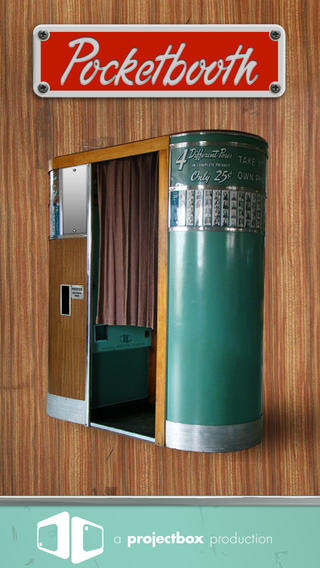
FREE today – Pocketbooth – the photobooth that fits in your pocket, an app that turns your iPhone/iPad into a 1950s-era vintage photobooth. Pocketbooth takes a series of photos (a few seconds apart) to create photo strips of your special events. The app includes five photo effects (1975, antique, B&W, color, sepia), two paper types, and two border styles. There are additional filters/borders available as in-app purchases. Pocketbooth can use either the front or the rear facing camera of your device. Photo strips can be shared via Facebook, Twitter, email, or they can be saved to your camera roll. They can  be printed on a wireless printer or you can have them professionally printed/mailed to your friends for an additional charge. Pocketbooth was chosen Starbuck’s App of the Week, featured as New and Noteworthy” by Apple, and listed as one of 2010’s Hottest Apps – iTunes Rewind. What a fabulous app to have for your next birthday party, family reunion, etc.

And teachers… how cool would it be to have a photobooth in your classroom? It would be perfect for taking pictures of special events – Dr. Seuss Day, St. Patrick’s Day, Halloween, Wacky Hair Day, Silly Hat Day, etc. The kids could help make the props. 🙂 It would also be great for special projects – animal reports (kids dress as their animal), biographies (kids dress as their person), the 100th day (kids dress as if they are 100 years old), etc. How fun!!

Download link: https://itunes.apple.com/us/app/pocketbooth-photobooth-that/id385145330?mt=8&uo=4

0

Halftone

Half Tone

FREE for a limited time – Halftone, a photography app with many educational uses. Named by Apple as a favorite photo app of 2011, Halftone makes it easy to turn your photos into vintage-looking comics that your friends and family will love! It’s simple to add paper styles, captions, speech balloons, graphic stamps, and fonts to your photos. Because it is so easy to use, this app would be great for creating the art to go with classroom projects – stories, book reports, newsletters, etc. Lots of creative uses for this educational app!

Halftone - Juicy Bits

0

Shadow Puppet

Shadow Puppet

FREE for a limited time – Shadow Puppet, a photography app that was featured by Apple as one of the “Best New Apps” for 4 weeks in a row! Using this app, it’s easy to create “puppets” – recorded explanations of your photos. First you choose your photos and put them in the order. Then you talk about your pictures. Everything is recorded. Finished “puppets” can be shared via email, SMS, Facebook and/or Twitter. There are so many ways for everyone to use Shadow Puppet: to teach something new, to share adventures with friends, to record children talking about their experiences, to tell the story behind old family photos, etc.

And… the classroom uses for this app are only limited by your imagination: Take pictures of a child’s work and have him/her explain it to parents. Send pictures and voice recordings of the class field trip. Have kids give a step-by-step explanation of what happened in a science experiment. Draw & sequence pictures to retell a story. Make a “talking timeline” by sequencing photos of historical events. Have kids use it to present mini reports on any subject. Have virtual “pet day” – kids bring in pictures/recordings of their pets. Because you can use anything saved to your photo library, you can explain photos from the web, artwork created in other apps, and so much more. The possibilities for using this educational app are endless. What a fabulous resource!!

Download link: https://itunes.apple.com/us/app/shadow-puppet/id700902833?mt=8&uo=4