0

gFlash+ Flashcards & Tests

This iPod/iPad app was just updated today (8/26) and is currently FREE. It allows you to create, download, and manipulate flashcards for everything that you can imagine. You can create your cards in a Google docs spreadsheet and download it into the app or you can create your cards within the app. There is no limit on how many card sets you can have. Card sets created by leading educational publishers (Kaplan, Barron’s, McGraw-Hill, Wiley Publishing, etc.) are available as in-app purchases. You can also download and share sets from the gWhiz catalog. You must have an active wireless connection to download card sets or to use card sets with videos.

Once you have your cards ready, studying becomes simple. First choose box configuration or classic configuration. Both configurations keep track of the cards that are known & unknown. The box configuration has an unknown box, a known box, and a mastered box. As you go through the cards, the app keeps track of how many cards are in each box. In the classic mode, there is line of small cards on the right side of the screen. If you know a card, the little card turns green and if you do not know it, it turns read. It’s a nice visual for younger kids. A study score (percentage) is also given. Teachers of younger students could create the cards in Google docs for kids to download and study. This app is such a valuable tool for students of all ages to use in so many ways. I wish it would have been available when my kids were studying for the SAT and GRE. 🙂

Highly recommended!

gFlash+ Flashcards & Tests - gWhiz, LLC

0

Lists for Writers – ideas for creative writing

Designed for the iPhone/iPad this app is $1.99 but was FREE last week. As the name suggests, this app has many lists that would be helpful to writers as they brainstorm/develop their stories. Categories of lists included: CHARACTER (common first & last names, clothing, occupations, people’s roles & relationships), PERSONALITY (phobias, philias, obsessions, character traits, hobbies, emotions), PLOT (7 basic plots, 36 dramatic situations, conflicts, issues), SETTING (locations, cities, landforms/geography, weather), WORDS (verbs, nouns, etc.) and 7 miscellaneous lists. Several of the lists (such as phobias, 7 basic plots, & color words) include definitions. The updated version includes a notepad for writers to collect, edit, email, and/or print their ideas. This app would be a valuable tool for anyone trying to write a story. The lists would also provide great examples when teaching the elements of a story (characters, setting, etc.), character traits, parts of speech, etc. Great resource!!

Keep reading my blog to find out when apps are offered for FREE!

Recommended!

Lists for Writers - ideas for creative writing - Thinkamingo

0

Geo Walk HD – 3D World Fact Book

This app for the iPhone/iPad is FREE today (August 24, 2012) to celebrate “Back to School.” It features a moveable globe dotted with articles about people, animals, landmarks, plants, events, etc. related to the geographical region that you choose to explore. There are over 500 short articles (cards) in the app. Additional card sets are available as in-app purchases. Information can be viewed in two modes: global view and card stream. I really like the global view because it connects the information on the cards to their place. The globe is a physical globe without any sort of labeling – no landforms are named, no political borders are shown. Not all of the cards identify the location so some labeling would be helpful. There is also a quiz mode available if you would like to test yourself. Lots of great information to explore for both adults and children 🙂

Recommended!

Geo Walk HD - 3D World Fact Book - Vito Technology Inc.

0

Artkive

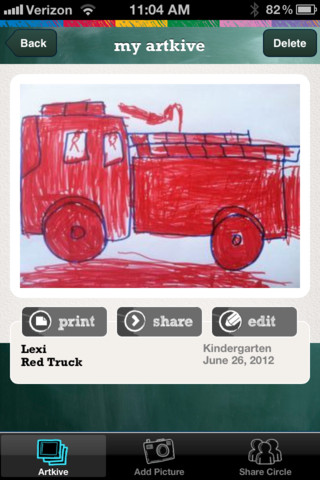
This newly released (August 11, 2012) app for the iPhone/iPad is FREE for a limited time. Artkive makes it easy to digitally store, share, and print (coming in an update) your children’s artwork/schoolwork.  First you create an account. Then enter the first names of your children. Take photos of their artwork/schoolwork or upload existing photos from your camera roll. Tag the photo with a child’s name, age or grade, the date, and a title. Very easy to do! You can then share their art with family & friends. You will also be able to have Artkive create digital books & other products with your child’s artwork/schoolwork. I am anxious to see how their products will compare in quality & price to existing photography sites. Artkive certainly makes it easy to collect and store your children’s artwork in one place.

What a great idea! I just downloaded this app and registered this evening. I am thinking about using it to create books for my adult children of their childhood projects (currently stored in boxes). I could also see it being used to create digital portfolios of children’s work. I will update this post as I work with the app, but in the meantime, you may want to try it yourself while it is free 🙂

Watch the video to learn more @ http://www.artkiveapp.com/

Recommended to try!

Artkive - The Kive Company

0

Common Core Standards

The Common Core Standards are coming!! Already adopted by 45 states, the Common Core Standards provide a consistent clear understanding of what students are expected to learn by subject and grade level. This FREE app puts the language arts and math standards (K – 12) at your fingertips.

Highly recommended for teachers!

Common Core Standards - MasteryConnect

0

GroupShot

Have you ever taken a family photo and have everyone looking great except for one person? With Group Shot you can swap out a face of a person who is not smiling, has closed eyes, is not looking at the camera, etc.

Start by selecting two or more pictures. The app will select and display the best one with the others on the right. Then color over the face that needs replaced and Group Shot will allow you to swap it for a better one from an alternative shot. Needless to say, the more similar the original shots are, the better the results.

I could have used this when I was trying to get pictures of the kids 🙂

GroupShot - Macadamia Apps