0

Toca Mini

image

FREE for a limited time – Toca Mini, another creative app from Toca Boca. With this app kids can create silly monsters, imaginary animals, or playful friends. Toca Minis can become whatever you want them to be. To start, kids add colors to the mini’s body, arms, & legs. Then they add details using a wide variety of stamps – bows, hats, buttons, polka dots, etc. Next, kids add facial features which brings their minis to life – they, ooh, ah, sneeze, smile, blink, and more.  Kids can also add hair, eyebrows, beards, mustaches, etc. With 60 different colors and 78 different stamps, there are thousands of possible combinations. When kids finish creating their own unique mini, they can take a snapshot and save it to the camera roll. Then they can print it, share it, pull it into a story writing app, and more. Creating a mini could be a great springboard for creative writing – descriptive paragraphs, a story about their created character/creature. Toca Boca has created another open-ended, creative app!

Download link: https://itunes.apple.com/us/app/toca-mini/id718082838?mt=8&uo=4

0

Celebrate Pi Day with 3 FREE Apps (National Council of Teachers of Mathematics)

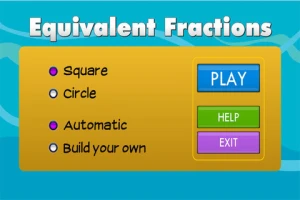
equivalent fractionsFrom the National Council of Teachers of Mathematics comes a FREE app called Equivalent Fractions. Kids create equivalent fractions by dividing and shading squares or circles. Circles can be divided into 24ths. Squares can be divided into 144ths. In the play mode, a fraction is shown and kids must create 2 additional fractions that are equivalent. All 3 fractions must have different denominators. The app also places the fractions on a number line – a great visual for comparing! There is also a “build your own” mode which would be fabulous to use for guided exploration & practice. Kids could also use this section as a virtual manipulative when working independently. This app is an excellent resource for the classroom!

Common Core Standards met:

  • 3.NF.3 – Explain equivalence of fractions and compare fractions by reasoning about their size. Understand two fractions as equivalent (equal) if they are the same size, or the same point on a number line. Recognize and generate simple equivalent fractions, e.g., 1/2 = 2/4, 4/6 = 2/3). Explain why the fractions are equivalent, e.g., by using a visual fraction model.

Equivalent Fractions - National Council of Teachers of Mathematics

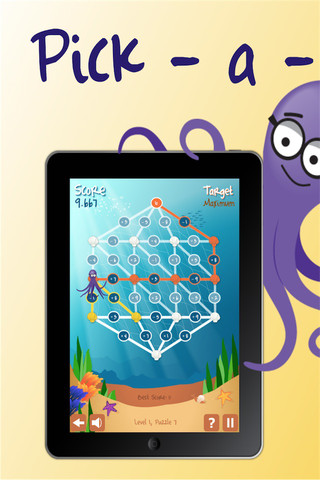
Pick a PathPick-a-Path is another FREE math game from the National Council of Teachers of Mathematics. Kids help Okta the octopus reach a target number by choosing the best path from the top maze to the bottom of a maze. There are 7 different levels with 7 puzzles in each level. The puzzles start with basic operations then move to fractions, negative numbers, decimals, and other more difficult skills. Kids have to plan out a strategy to reach the target which can be a specific value, a minimum value, or a maximum value. This app provides a lot of good skills practice. And… as an extra added bonus, kids have to think of a strategy!
Pick-a-Path - National Council of Teachers of Mathematics

Math concentration

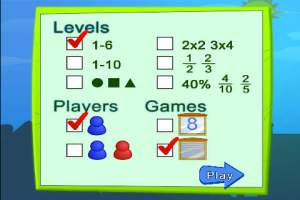
Math Concentration was developed by the National Council of Teachers of Mathematics for students from preschool through fifth grade. It’s a classic matching game that can be played by one or two players. There are six levels of play – numbers 1- 6, numbers 1 – 10, shapes, multiplication, fractions, and percentages & fractions. In all levels, numbers are represented in different ways – written names, digits, pictures, etc. The game also has two modes – a transparent board (for younger students) or a fully covered board. The game is simple to play and kids earn socks for completing all of the matches on the board. 🙂

Download link: https://itunes.apple.com/us/app/math-concentration/id458437534?mt=8&uo=4

0

Picture Math

picture mathFREE for a limited time – Picture Math, another great educational app from Brainingcamp. Kids (ages 5 – 12) learn about addition, subtraction, multiplication and division while solving picture puzzles. Each level begins with a narrated lesson. As kids solve math problems, they earn clues to the picture puzzle. The app features four hundred questions (fifty levels) complete with visual models. There are fifteen addition lessons, nine subtraction lessons, seventeen multiplication lessons, and nine division lessons. The progression of the lessons is well-designed. Kids must complete a level before moving to the next. This app is nicely done for elementary math students!

Download link: https://itunes.apple.com/us/app/picture-math/id951115848?mt=8&uo=4

0

Trading Cards

trading cards

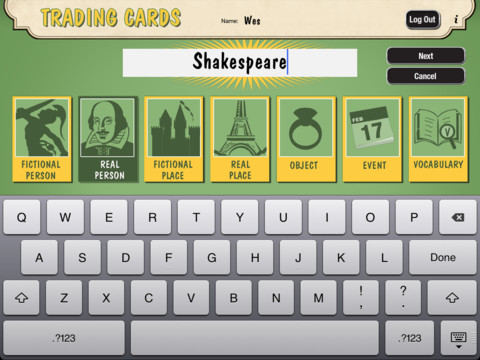
Fabulous educational app!!! ReadWriteThink’s Trading Cards is powerful FREE app developed by the International Reading Association. This educational app provides a unique way for kids to share their understanding of topics, generate their own study aids, create a fictional world to use in their writing, make their own trading cards, and more. There are 7 categories of cards available within the app: fictional person, real person, fictional place, real place, object, event, and vocabulary. Kids start by choosing a category and typing in the title of the card. Each category has specific questions which help kids create information-rich trading cards. Images can be added by using the device’s camera or by accessing pictures in the photo library. Kids can also sort their cards into collections such as characters from a book, heroes or villains, landmarks, the 50 states, vocabulary by subject, etc. The possibilities are endless! Cards can be shared via email, saved to the photo library, or printed on a wireless printer. And… the kid appeal is tremendous. Kids will LOVE trading their cards with their classmates. 🙂

Highly recommended!!

Trading Cards - International Reading Association

0

Professor Garfield Fact or Opinion

professor garfieldProfessor Garfield Fact or Opinion is a FREE educational app. The comic teaches kids why it is important to know difference between fact and opinion, especially when using the internet. Garfield’s friend, Nermal, gets an F on his report about goats because it includes facts & opinions. With the help of Professor Garfield, Nermal learns that not all information on the internet is true. He learns that fact is “something that can be proven to be true” and an opinion is “something that someone believes but cannot be proven.” Nermal learns how important it is to read with a questioning mind. After reading the comic strip, kids practice what they have learned by helping Nermal write a report about school lunches and by feeding facts to the Fact-Bot. I love this app! Kids start learning about fact vs opinion in second/third grade but many of them struggle with the concept. This app presents the content in a fun way then gives students the opportunity to apply what they have learned. It does a fabulous job of teaching kids an important element of critical reading – in my opinion. 🙂

Download link: https://itunes.apple.com/us/app/professor-garfield-fact-or/id401257010?mt=8&uo=4

0

Earthlapse

earthlapse

FREE for a limited time – Earthlapse, an app that turns your iPad/iPhone into a window aboard the International Space Station. The app comes with 7 views of Earth (aurora borealis, a tropical storm, Canadian arm of the ISS, the cupola of the ISS, Earth & clouds, Canada & northern USA, and aurora australis) captured by NASA astronauts. It also has 8 relaxing space soundtracks. Love the music! When you touch the screen, you can control what you see with your finger. You can also enable a clock and/or worldwide weather – a nice feature if you want to use it as a screen saver. It would be great to Airplay this app on a big screen in your classroom when kids were doing creative writing about space, living on the ISS, etc. 🙂

Download link: https://itunes.apple.com/us/app/earthlapse/id522003167?mt=8&uo=4

0

Toca Hair Salon

FREE again today – Toca Hair Salon, one of my favorite educational apps for toddlers! Kids go into the salon to groom 6 different characters. They can use the tools in the salon to style their hair – cut it, comb it, make it grow, shave it, color it, etc. Great sound effects are also included in this fun app. Kids or parents can take a photo of the finished creation and save it to their camera roll. If parents wish, creations may be posted on the Toca Boca Facebook page. The developers have also built-in options to turn off sounds, pictures, and news. What a great springboard for creative writing – give a character a whole new look and write a story to go with it. What a fun writing activity for a Wacky Hair Day!!

Toca Hair Salon - Toca Boca AB

0

YouTube Kids

youtube kids

Just released on February 23 and FREE – YouTube Kids, a child-geared version of YouTube. The app is designed for little ones to navigate – big buttons, easy scrolling, and instant full-screen. Kids can enjoy their favorites such as Sesame Street, Peppa Pig, and Reading Rainbow. They can find videos about things that interest them – science, music, crafts, etc. The app has four sections: shows, music, learning, and explore. I especially love the learning section which includes great programming from TedEd, Khan Academy, WhizKid Science, PBS Kids, and more. There is also a search option which is great for teachers looking for a video clip to enhance a lesson. Google is focused on kids’ safety so they’ve worked to build YouTube Kids to be a family friendly place. Parents can quickly notify YouTube if they see anything questionable. Even though this app greatly limits a child’s access to inappropriate content, supervision of your child’s online activity is always a good idea. 🙂

Download link: https://itunes.apple.com/us/app/youtube-kids/id936971630?mt=8&uo=4

0

Number Pieces

number piecesFREE educational app – Number Pieces from Math Learning Center. This educational app is the digital version of place value manipulatives, hands-on tools used to help students understand place value. Using the place value models within this app, kids can visualize the process of adding and subtracting ones, tens, and hundreds. The app has a function that permits kids to break apart pieces or join them together. This feature is fabulous for kids who need concrete examples. The app also includes expanding edge pieces which can be used to introduce arrays. Other features of the app include: three colors for identifying groups, drawing tools for labeling, a text tool for writing number sentences, zooming & scrolling for larger numbers. Thanks to the Math Learning Center, teachers & their students have another great app to add to their digital toolkits!

Common Core Standards:

  • 1.NBT.6. Subtract multiples of 10 in the range 10-90 from multiples of 10 in the range 10-90 (positive or zero differences), using concrete models or drawings and strategies based on place value, properties of operations, and/or the relationship between addition and subtraction; relate the strategy to a written method and explain the reasoning used.
  • 2.NBT.1 Understand that the three digits of a three-digit number represent amounts of hundreds, tens, and ones; e.g., 706 equals 7 hundreds, 0 tens, and 6 ones. Understand the following as special cases: a. 100 can be thought of as a bundle of ten tens — called a “hundred.” b. The numbers 100, 200, 300, 400, 500, 600, 700, 800, 900 refer to one, two, three, four, five, six, seven, eight, or nine hundreds (and 0 tens and 0 ones).

Download link: https://itunes.apple.com/us/app/number-pieces-by-math-learning/id605433778?mt=8&uo=4

0

TeleStory

telestory

FREE for a limited time – Telestory, another fabulously creative app from Launchpad Toys, the creators of Toontastic. Kids can write, direct, and star in their own TV shows with this educational app. Kids choose a theme to start: The News, Star Adventure, Eye Spy, or their own creation. Then they mix and match scenes to create their story. Next they craft a script using the prompts within the app or their own ideas. Then it’s time for the show! Kids choose one of fifty digital costumes for their performance.They perform and record their show which includes animated scenes and special effects. Recordings can be saved to the camera roll to be shared with classmates, family, and friends. How fun!!

Teachers, check out “The News” theme for use in your classroom. Kids can choose to be different types of reporters: The Beat, The Sports Roundup, The News Desk, The Weather, The Critic, or The Eye in the Sky. Then the learning begins. They could choose to read, summarize and report about current events. Or, they could choose to learn the science behind the weather so that they can explain it to their viewers. Or they could choose to write reviews of the literature that they are reading. Telestory News is a great tool for getting kids excited about non-fiction. Make it a part of your weekly routine with a new show rolled out every Friday. 🙂

Download link: https://itunes.apple.com/us/app/telestory/id915378506?mt=8&uo=4