0

gFlash+ Flashcards & Tests

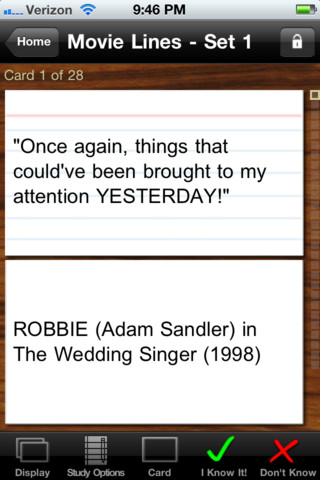
This iPod/iPad app was just updated today (8/26) and is currently FREE. It allows you to create, download, and manipulate flashcards for everything that you can imagine. You can create your cards in a Google docs spreadsheet and download it into the app or you can create your cards within the app. There is no limit on how many card sets you can have. Card sets created by leading educational publishers (Kaplan, Barron’s, McGraw-Hill, Wiley Publishing, etc.) are available as in-app purchases. You can also download and share sets from the gWhiz catalog. You must have an active wireless connection to download card sets or to use card sets with videos.

Once you have your cards ready, studying becomes simple. First choose box configuration or classic configuration. Both configurations keep track of the cards that are known & unknown. The box configuration has an unknown box, a known box, and a mastered box. As you go through the cards, the app keeps track of how many cards are in each box. In the classic mode, there is line of small cards on the right side of the screen. If you know a card, the little card turns green and if you do not know it, it turns read. It’s a nice visual for younger kids. A study score (percentage) is also given. Teachers of younger students could create the cards in Google docs for kids to download and study. This app is such a valuable tool for students of all ages to use in so many ways. I wish it would have been available when my kids were studying for the SAT and GRE. 🙂

Highly recommended!

gFlash+ Flashcards & Tests - gWhiz, LLC

0

iRiddles for Kids!

This FREE app for the iPhone/iPad is simple to use. Scroll through the 100 + riddles within the app and double tap to reveal the answer. You may already know many of these riddles – they are not necessarily new. But… they are kid appropriate. The only one that was a bit “off” is: If a fire hydrant has H2O on the inside, what does it have on the outside? K9P. The app has an index to the riddles included. There is also an option to email a riddle to a friend. I have always been a fan of riddles because they make kids think – brain exercise for elementary-aged kids with a smile or two along the way. 🙂

iRiddles for Kids! - D. Noel Keshwar

0

My Editing Buddy

This iPad app is a FREE simple to use word processor designed for use in elementary classrooms. But…there is so much more to this app. Kids can share their work with classmates and learn to edit using this app. To create an account, you need to provide an email address. The app can be used without an account but it will not save documents. After the account is created, just log in and create your document. Then it’s time to share your work with someone who will edit it. You can choose: “pass & edit” or “add to sharing network.” If you choose “pass & edit” you literally hand your work to someone for editing. Symbols and sticky notes are along the bottom of the screen when the app is in the editing mode. The “editor”  just drags the appropriate symbol in place to edit the document. A glossary of symbols is available by tapping the question mark. Sticky notes are available for more detailed feedback. When finished, your “editor” saves then returns your work. You can now swipe from your word processing version to the edited version and make revisions. If you choose “add to sharing network” your work will posted to your class for anyone to edit. Teachers need to set up a class for their students and provide students with the class password. Be aware that anyone who has an account can set up “a class” so teachers may have to monitor this option. What an awesome way to get kids involved in and excited about peer editing!!

Common Core Standards met:

  • K.W.5 /1.W.5/2.W.5/ – With guidance and support from adults, respond to questions and suggestions from peers and add details to strengthen writing as needed.
  • 3.W.5/4.W.5/5.W.5 – With guidance and support from peers and 5. adults, develop and strengthen writing as needed by planning, revising, and editing.

Highly Recommended!

My Editing Buddy - Interactive Elementary

0

Earth School

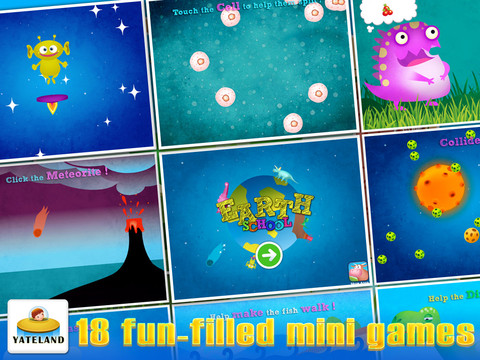
This app for iPhone/iPad is currently FREE. Designed for kids 2 – 6, it has 18 mini games for toddlers centered around the theme of Earth and its evolution. Here are some quotes from the app that will give you a feel for the content: “The universe began in a Big Bang.” /”Black Holes eat planets.” /”Ocean water originates from comets.”/The sun is about 4.5 billion years old.”/”A black hole is similar to a vacuum cleaner.”/”Life was born on Earth.”/We are composed of cells.”

The app builds vocabulary (volcano, collision, fossils, cells). Kids follow directions to complete the games: Help make the fish walk; Touch cells to help them split; Move the cloud; Touch all the eggs; Feed the dinosaur; etc. The animations & artwork in the games are appealing. The bottom line is that YOU need to decide if this app is appropriate for YOUR children as it deals with evolution vs creation.

Earth School HD - Yateland

0

Lists for Writers – ideas for creative writing

Designed for the iPhone/iPad this app is $1.99 but was FREE last week. As the name suggests, this app has many lists that would be helpful to writers as they brainstorm/develop their stories. Categories of lists included: CHARACTER (common first & last names, clothing, occupations, people’s roles & relationships), PERSONALITY (phobias, philias, obsessions, character traits, hobbies, emotions), PLOT (7 basic plots, 36 dramatic situations, conflicts, issues), SETTING (locations, cities, landforms/geography, weather), WORDS (verbs, nouns, etc.) and 7 miscellaneous lists. Several of the lists (such as phobias, 7 basic plots, & color words) include definitions. The updated version includes a notepad for writers to collect, edit, email, and/or print their ideas. This app would be a valuable tool for anyone trying to write a story. The lists would also provide great examples when teaching the elements of a story (characters, setting, etc.), character traits, parts of speech, etc. Great resource!!

Keep reading my blog to find out when apps are offered for FREE!

Recommended!

Lists for Writers - ideas for creative writing - Thinkamingo

0

Geo Walk HD – 3D World Fact Book

This app for the iPhone/iPad is FREE today (August 24, 2012) to celebrate “Back to School.” It features a moveable globe dotted with articles about people, animals, landmarks, plants, events, etc. related to the geographical region that you choose to explore. There are over 500 short articles (cards) in the app. Additional card sets are available as in-app purchases. Information can be viewed in two modes: global view and card stream. I really like the global view because it connects the information on the cards to their place. The globe is a physical globe without any sort of labeling – no landforms are named, no political borders are shown. Not all of the cards identify the location so some labeling would be helpful. There is also a quiz mode available if you would like to test yourself. Lots of great information to explore for both adults and children 🙂

Recommended!

Geo Walk HD - 3D World Fact Book - Vito Technology Inc.

0

Wee Sing & Learn ABC

FREE today (August 24, 2012), this app for the iPhone/iPad normally sells for $2.99. Wee Sing has been around for over 30 years. When my children were small, we always had a Wee Sing tape in our car. This app teaches toddlers the alphabet in a musically fun way. Every letter has a page with its own song featuring an animal with an instrument (both beginning with that letter). There are also three additional words for each letter which are pronounced and spelled. The real sound of every animal and each instrument are also included in the app. This app is well done with great attention to detail – a must have for every toddler 🙂

Highly recommended!!

Wee Sing & Learn ABC - zuuka incorporated

0

Math Racer®

FREE for a few days – this iPhone/iPad app normally sells for $4.99. Math Racer times how fast kids can answer 10, 20, 50 or 100 problems in 7 different games: addition, subtraction, multiplication, division, add/subtract, multiply/divide, or all operations. I like kids being able to practice related operations together – it makes them pay attention to operational signs & see connections. The app keeps high scores for all areas. It shows which problems were missed and how long it took to answer each question (to the hundredth of a second). Teachers and parents can use this tracking system to document kids’ progress. To compliment the tracking, I wish the app could then be programmed for kids to work specifically on the facts that are giving them trouble.

This app provides a simple but fun way for kids to practice their facts. I can’t imagine that they won’t love racing the clock to improve their scores. If it is loaded on an iPhone, kids could easily practice their facts in the car on their way to after school lessons. 🙂

Common Core Standards met:

  • 1.OA.6 – Add and subtract within 20, demonstrating fluency for addition and subtraction within 10.
  • 2.OA.2 – Fluently add and subtract within 20 using mental strategies. By end of Grade 2, know from memory all sums of two one-digit numbers.
  • 3.OA.7 – Fluently multiply and divide within 100, using strategies such as the relationship between multiplication and division or properties of operations. By the end of Grade 3, know from memory all products of two one-digit numbers.

Recommended!

Math ® - i4software

0

Artkive

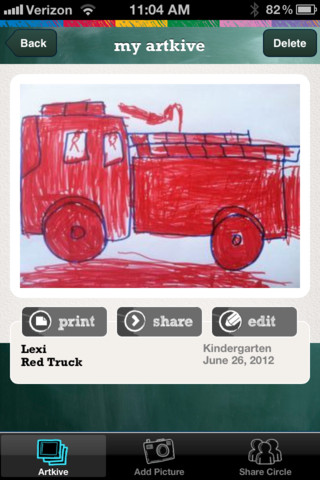
This newly released (August 11, 2012) app for the iPhone/iPad is FREE for a limited time. Artkive makes it easy to digitally store, share, and print (coming in an update) your children’s artwork/schoolwork.  First you create an account. Then enter the first names of your children. Take photos of their artwork/schoolwork or upload existing photos from your camera roll. Tag the photo with a child’s name, age or grade, the date, and a title. Very easy to do! You can then share their art with family & friends. You will also be able to have Artkive create digital books & other products with your child’s artwork/schoolwork. I am anxious to see how their products will compare in quality & price to existing photography sites. Artkive certainly makes it easy to collect and store your children’s artwork in one place.

What a great idea! I just downloaded this app and registered this evening. I am thinking about using it to create books for my adult children of their childhood projects (currently stored in boxes). I could also see it being used to create digital portfolios of children’s work. I will update this post as I work with the app, but in the meantime, you may want to try it yourself while it is free 🙂

Watch the video to learn more @ http://www.artkiveapp.com/

Recommended to try!

Artkive - The Kive Company

0

Spellosaur

This app is FREE for the iPhone/iPad so that you can see how it works before purchasing the premium version for $3.99. What makes this app different from others is that you are able to input your own words to study. In the FREE version you can input 5 words and have 1 user. In the premium version, you can input many words and have multiple users (with their own lists). After the words are added, there are 4 activities for kids to do with their list: listen & choose the correct word, complete the word by adding the missing letters, rearrange the scrambled word, spell the word. Then kids can take a test over their words. There are 2 voices to choose from – US English & English or kids/parents can record their own words. If the words are homonyms kids can also add a meaning to differentiate one word from another. In the premium version, lists can be saved so that kids can go back and review previously studied/learned words. The ability to add your own words adds a lot of flexibility to this app. It could be used for word study: word families, letter sounds, making plurals, prefixes and suffixes, etc.  Nicely done!!

Common Core Standards met:

  • K.RF.3/1.RF.3/2.RF.3/3.RF.3/4.RF.3/5.RF.3 – Know and apply grade-level phonics and word analysis skills in decoding words.

Recommended!

Spellosaur - Simulant