
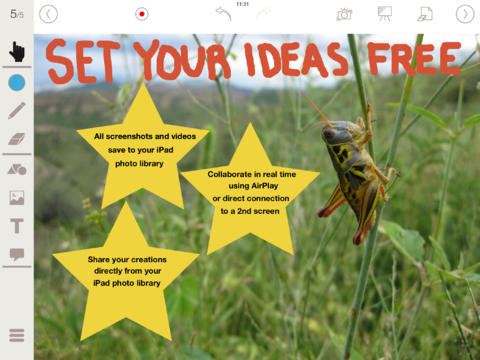
 FREE for a limited time – Stage Pro: Interactive Whiteboard and Document Camera, a teaching/demonstration tool for students and teachers. Stage Pro uses the iPad camera to display live videos, textbooks, student work, imported PDFs, etc. You can also use images from your photo library or the app’s free backgrounds: whiteboard, blackboard, graph paper, music, ruled, maps. Once your content is displayed, you can: sketch on it, take notes, add labels, etc. There’s even a laser pointer for you to use. Saving your work is easy with Stage Pro. With one click, you can take a screen shot that is saved to your photo library. You can also easily create video recordings with the ability to pause, resume, and/or save. Saved videos can be moved from your photo library into programs such as iMovie. There are so many ways you could use this app for classroom sharing. Pairing Stage Pro with Airplay gives you the flexibility to move around the classroom and get all of your students involved. Save $4.99 and check out Stage Pro while it’s FREE!
Download link: https://itunes.apple.com/us/app/stage-pro-interactive-whiteboard/id714477455?mt=8&uo=4


 Poetics – create, write and share visual poetry is FREE again. Writing visual poetry is easy with Poetics. The app combines photographic imagery and moveable text. Just choose a picture from your camera roll and write how it makes you feel – a word, a caption, or a poem. Or you can write a poem then search for the perfect image to accompany it. Words can be scaled, rotated, etc. as they are placed on the page. The app saves each project as it is being created. Finished poetry can be shared on Instagram, Facebook, postcards, and more. Kids could use Poetics to create and share postcards or journal entries of their summer activities. How fun!!
 appydazeblog