0

Leaf Snap

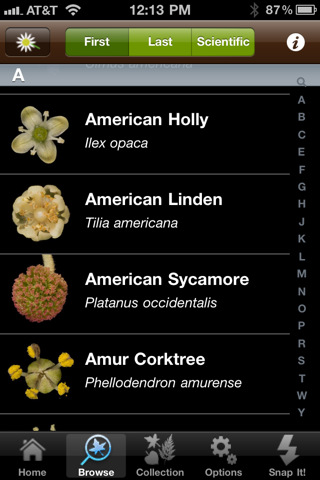
Leafsnap is an electronic field guide being developed by researchers at Columbia University, University of Maryland, and the Smithsonian Institution. The FREE app for the iPhone/iPad utilizes visual recognition software to help identify the species of a tree by taking a picture of its leaf. In the browse mode you can find high-resolution images of the leaves, bark, fruit, seeds and petiole of 184 trees in the United States. I love the idea of this app – it turns citizens into scientists. A walk in the woods with your child can become a science lesson. There is also a place within the app to “collect” your own leaves reinforcing the idea that when visiting nature we should ” take only picture and leave only footprints.” There are also 4 games in this app which test your knowledge of leaves, flowers, and fruits.

According to the Leafsnap website, in order for the leaf to be recognized, it must be a single leaf on a white background. You also must have a working internet connection when you press “snap-it” because the picture has to be sent to a server for processing. These criteria could be little tricky if you are on a walk in the woods. I headed to my backyard with my Smartphone and a square of white paper to check it out. I was able to snap a picture and get it to send. As technology moves forward this app will continue to improve. In the meantime, it’s exciting to be part a scientific collaborative effort!

Recommended!

Leafsnap - Columbia University, University of Maryland, and Smithsonian Institution

0

Happy Show HD

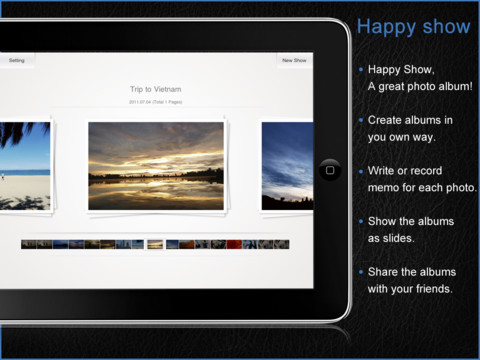
This iPad app normally sells for $2.99 but I was able to download it on a day that it was FREE. It allows you to easily create photo albums/slide shows. You can create multiple albums from your Photos or take photos with your iPad 2. You can write memos on the back of your photos (like in iPhoto) or record up to 30 second voice memos. Each page can hold up to 5 photos which can be rotated & zoomed or imported as a background. You can add text to each page and easily change its color and font. You can share your albums with friends via Facebook, Twitter, email, or download them from iPad to iPad over Wifi……or so they say.  I found the sharing options to be where the “bugs” are found.  It didn’t seem that you were really able to save or share “albums.” Rather, you could save and share single pages of your albums. Also, while trying the different share options, the app would freeze. I had to double-click the iPad home button to make all my open apps jiggle before I could completely close Happy Show.

This app was updated in December of 2011. I think I would wait for the next update before buying it. Hopefully the bugs will be worked out because it does have potential 🙂

0

Educreations

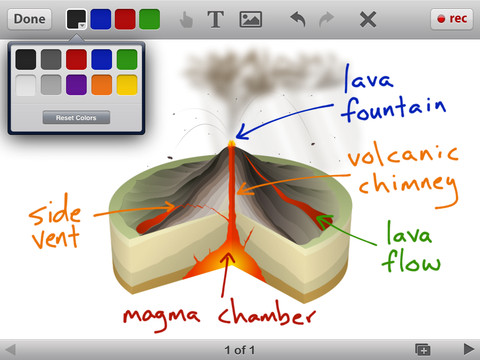
Educreations is another FREE app that turns your iPad into a recordable whiteboard (see earlier review on Screen Chomp). The app was just updated a few days ago – June 22, 2012.  Like Screen Chomp it is simple to use. Unlike Screen Chomp, you can build lessons with multiple pages or slides. And, the editing tools in Educreations allow you to resize and move images as well as create “animated playback” by dragging objects as you record.

Another bonus of this app is that free accounts are available at http://www.educreations.com where users can share their work as well as look at lessons created by others. This app is being used at all levels of education including the college level. I love Screen Chomp for younger kids but Educreations has more features.

Highly recommended!

Educreations Interactive Whiteboard - Educreations, Inc

0

Evernote

Evernote is an amazing FREE app. which allows you take notes and save ideas from multiple sources – the internet, emails, photos, recordings, etc.  It syncs your notes to a server so that all of your saved information is accessible on multiple devices and if that’s not amazing enough – it’s searchable.

Here is a short video from the company: Watch our videos to learn more about using Evernote. | Evernote.

There are limitless uses for Evernote. One of the things I use it for personally is a recipe file. I use the Evernote web clipper so my recipes are in computer, on my iPad, AND in my phone (when I get to the store to buy ingredients). You can use Evernote to organize your ideas if you are planning a party, redecorating a room, looking for a new house, etc.

Students can use Evernote too. I have friends whose kids use Evernote to organize information for school reports and/or tests. Evernote for School promotes the many ways that the program is being used in classrooms.

Evernote is one of those apps that are FREE but you can pay for an upgrade if you find that you want more space and/or features.

This app has a 4 star rating in the app store after being rated by over 100,000 people.

Highly recommended!

Evernote - Evernote