0

Operation Math

operation math

Spinlight Studio is celebrating the 12 Days of Christmas by giving away an app each day! Thank you, Spinlight Studio. Today’s FREE educational app is Operation Math. Kids will have fun practicing basic addition, subtraction, multiplication, & division math tables in this interactive “spy” game. The object of the game is to stop Dr. Odd’s quest to eliminate the world’s even numbers. In order to do so, kids must complete 105 missions by solving equations. Missions can be selected based on a child’s skill level and/or the operation (+, -, +/-, x, ÷, x/÷  or +/-/x/÷).  Of course, time is of the essence so kids have to answer problems in 60 seconds or less. By doing so, they lock doors along their escape routes. And as they complete missions, they earn the gear of a seasoned spy. What a great game – I love how the app integrates math practice into a really cool game for kids. I especially like the modes which permit kids to practice multiple operations at a time. It makes kids pay attention to operation signs and quickly switch their thinking. What a fun way for kids to practice facts and meet CCSS! No wonder Operation Math was given a 2012 Parents’ Choice Award. Get it today – kids will LOVE it!

Common Core State Standards met:

  • 1.OA.6 – Add and subtract within 20, demonstrating fluency for addition and subtraction within 10.
  • 2.OA.2 – Fluently add and subtract within 20 using mental strategies. By end of Grade 2, know from memory all sums of two one-digit numbers.
  • 3.OA.7 – Fluently multiply and divide within 100, using strategies such as the relationship between multiplication and division or properties of operations. By the end of Grade 3, know from memory all products of two one-digit numbers.

Download link: https://itunes.apple.com/us/app/operation-math/id487387270?mt=8&uo=4
0

YodelOh™ Math Mountain

Yodel

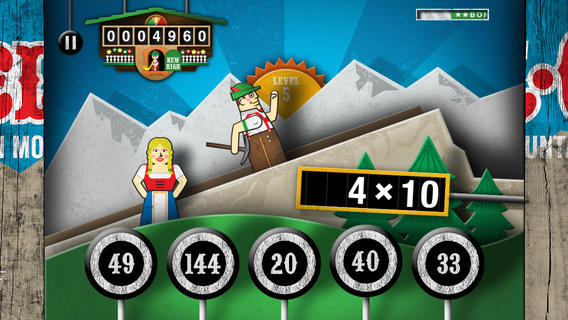
Spinlight Studio is celebrating the 12 Days of Christmas by giving away an app each day! Thank you, Spinlight Studio. Today’s FREE educational app is YodelOh™ Math Mountain. Kids will have fun learning basic addition, subtraction, multiplication, and division math tables with this game. The object of the game is to score enough points to keep Hans from falling off the cliff. In order to do so, kids have to answer problems quickly and avoid the crazy charging sheep. And as kids score points, the questions get harder. The app also includes high-score charts that track the best 15 games for all 5 modes. I especially like the mode which permits kids to practice all 4 operations at a time. It makes kids pay attention to operation signs and quickly switch their thinking. What a fun way for kids to practice facts and it meets CCSS! Get it today. 🙂

Common Core State Standards met:

  • 1.OA.6 – Add and subtract within 20, demonstrating fluency for addition and subtraction within 10.
  • 2.OA.2 – Fluently add and subtract within 20 using mental strategies. By end of Grade 2, know from memory all sums of two one-digit numbers.
  • 3.OA.7 – Fluently multiply and divide within 100, using strategies such as the relationship between multiplication and division or properties of operations. By the end of Grade 3, know from memory all products of two one-digit numbers.

Download math: https://itunes.apple.com/us/app/yodeloh-math-mountain/id634946225?mt=8&uo=4

0

Multiplications with Math Matthews

Math Mathews

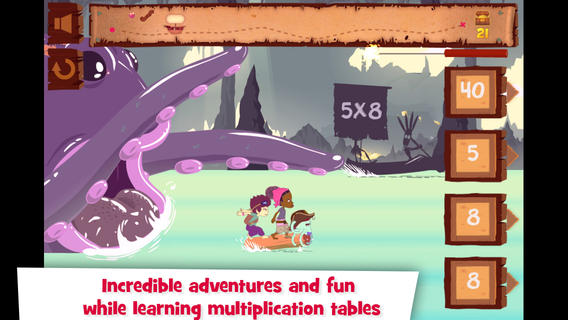
FREE today only – Multiplications with Math Matthews, a great new app for studying multiplication facts. Kids join Math Mathews and his crew on a high seas adventure to find treasure and break the curse that turned him into an octopus. There are so many great things about this app that make it perfect for the classroom. The app includes a diary (ship’s log) that gives the back story to this adventure that kids are about to join. I envision teachers using this narrative as a group activity to get kids excited about joining the crew. Then the app is divided into 3 mini-games with each game using a different method of practice. Kids earn badges and collect gold as they practice facts. The app allows you to set which facts it will review. This feature makes this game particularly valuable in the classroom. Teachers can start with ones & twos, add fives, then three & fours – adapting their students’ practice to their teaching. And…the app can be used with 7 different players – perfect for small group practice, centers, etc. It keeps track of the progress for each individual – another plus for teachers. If I was still teaching, I would definitely use this educational app in my third grade classroom  – it meet a CCSS for third grade multiplication. What a fabulous & fun learning tool for kids!!

Common Core State Standards met:

  • 3.OA.7 – By the end of Grade 3, know from memory all products of two one-digit numbers.

Download link: https://itunes.apple.com/us/app/multiplications-math-mathews/id611130011?mt=8&uo=4

0

What Time is is Mr. Wolf?

What Time

What Time is it Mr. Wolf? (by Teacher’s Pet) is FREE for a limited time. Make sure you get the correct one – there is another app by the same name by Joy Preschool. This app features a Wilfred the Wolf who spins the clock on the face of the moon 10 times. Kids have to choose the correct answer and drag it under the moon. The wolf giggles and says “well done” if the answer is correct. The app’s setting allows you to choose what interval of time you would like your child to work on – hours, half hours (half past), quarter hours, 10 minutes, or 5 minutes. Answers can be displayed in words, digitally, or mixed. You can also set the number of answers per question.

The Common Core Standards expect first graders to tell time to the 1/2 hour, second graders to tell time in 5 minute intervals (AM and PM), and third graders to tell time to the minute. So, this app would work well for first and second graders but not third graders. I like that this app includes practice with the words  – half past, quarter after, quarter to. It is a difficult concept for some kids to understand. Nicely done!!

Common Core Standards met:

  • 1.MD.3 – Tell and write time in hours and half-hours using analog and digital clocks.
  • 2.MD.7 – Tell and write time from analog and digital clocks to the nearest five minutes, using a.m. and p.m.

What Time is it Mr. Wolf? - by Teacher's Pet - Teacher's Pet

0

Space Cakes

Space CakeSpace Cakes (an educational app) is FREE – thanks to the support of Eli’s Cheesecake in Chicago. Kids use number sense and early math skills to complete intergalactic baking missions. They find themselves in a bakery filled with alien ingredients. They must follow a recipe to add the correct amount of each ingredient. Then they choose a 3D shape for their levitating batter and bake it. Next a topper, frosting, and sprinkles are added to finish their creations. Time for delivery – they steer the cake delivery spaceship back to Earth. Finally they celebrate their safe arrival with starburst, fireworks, and colorful confetti!  Kids can snap a photo of their creations to share them via email, save them in a gallery, or use them to inspire creative writing – descriptive paragraphs using math terms, a story about an intergalactic cake baking contest, etc. There is a section for parents/teachers which explains the educational value of the app and how it meets the CCSS. This app provides a fun way to work with math concepts AND a wonderful springboard for creative writing.

Space Cakes - Kids Bakery Game with Math and Numbers - Mrs. Judd's Games, LLC

0

3 FREE Virtual Math Manipulatives

Geoboard by The Math Learning Center (a nonprofit organization dedicated to K – 12 education) is a FREE app that turns your iPhone/iPad into a virtual geoboard. Geoboards can be used as tools to teach mathematical concepts such as polygons, perimeter, area, line segments, angles, congruent shapes, symmetry, fractions, etc. Shapes are created by stretching bands on the geoboard’s pegs. There are 5 colors of bands in the iPhone version and 8 in the iPad version. There is also a tool to fill in shapes. On the iPad version, you can switch from the standard 25 peg board to a 150 peg board to create more complex shapes. This is a great app with the potential to be used in so many ways.

Highly recommended for your virtual math tool kit!

Geoboard, by The Math Learning Center - Clarity Innovations

FREE for the iPad, Virtual Manipulatives contains math manipulatives for teaching fractions, decimals, and percents. Included are tiles/circles divided into halves, thirds, fourth, fifths, sixths, eighths, tenths, and 12ths AND their corresponding decimals and percentages! The manipulatives are color coded across the settings so that 1/2 is blue as is .50 and 50%. Kids drag tile pieces onto the work area to compare fractions/decimals/percentages. In the settings you can change from tiles to circles, make the pieces transparent, and hide the numbers on the pieces. Completed work can be easily saved to photos. Finding equivalent fractions has never been so slick – WOW!!

Common Core Standards

  • 3.NF.3 – Explain equivalence of fractions in special cases, and compare fractions by reasoning about their size. Understand two fractions as equivalent (equal) if they are the same size, or the same point on a number line.
  • 4.NF.1 – Explain why a fraction a/b is equivalent to a fraction (n × a)/(n × b) by using visual fraction models, with attention to how the number and size of the parts differ even though the two fractions themselves are the same size. Use this principle to recognize and generate equivalent fractions.

Highly Recommended!

Virtual Manipulatives! - ABCya.com

equivalent fractions

From the National Council of Teachers of Mathematics comes a FREE app called Equivalent Fractions. Kids create equivalent fractions by dividing and shading squares or circles. Circles can be divided into 24ths. Squares can be divided into 144ths. In the play mode, a fraction is shown and kids must create 2 additional fractions that are equivalent. All 3 fractions must have different denominators. The app also places the fractions on a number line – a great visual for comparing! There is also a “build your own” mode which would be fabulous to use for guided exploration & practice. Kids could also use this section as a virtual manipulative when working independently. This app is an excellent resource for the classroom !!

Common Core Standards met:

  • 3.NF.3 – Explain equivalence of fractions and compare fractions by reasoning about their size. Understand two fractions as equivalent (equal) if they are the same size, or the same point on a number line. Recognize and generate simple equivalent fractions, e.g., 1/2 = 2/4, 4/6 = 2/3). Explain why the fractions are equivalent, e.g., by using a visual fraction model.

Highly Recommended!

Equivalent Fractions - National Council of Teachers of Mathematics

0

Math Racer®

FREE for a limited time – an educational app that  normally sells for $4.99. Math Racer times how fast kids can answer 10, 20, 50 or 100 problems in 7 different games: addition, subtraction, multiplication, division, add/subtract, multiply/divide, or all operations. I like kids being able to practice related operations together – it makes them pay attention to operational signs & see connections. The app keeps high scores for all areas. It shows which problems were missed and how long it took to answer each question (to the hundredth of a second). Teachers and parents can use this tracking system to document kids’ progress.

This app provides a simple but fun way for kids to practice their facts. I can’t imagine that they won’t love racing the clock to improve their scores. If it is loaded on an iPhone, kids could easily practice their facts in the car on their way to after-school lessons. 🙂

Common Core Standards met:

  • 1.OA.6 – Add and subtract within 20, demonstrating fluency for addition and subtraction within 10.
  • 2.OA.2 – Fluently add and subtract within 20 using mental strategies. By end of Grade 2, know from memory all sums of two one-digit numbers.
  • 3.OA.7 – Fluently multiply and divide within 100, using strategies such as the relationship between multiplication and division or properties of operations. By the end of Grade 3, know from memory all products of two one-digit numbers.

Recommended!

Math ® - i4software

0

The Opposites

FREE again – The Opposites for the iPhone/iPad. Designed for kids 7+, this educational app requires the matching of increasingly difficult pairs of opposite words. There are two sections of the app: dictionary and play. In the dictionary section, words are listed next to their opposites. To learn the meaning, students just tap on the word and a definition appears. There are 10 levels with 100+ words per level. In the play section, words are pronounced by a boy or a girl as they appear in bubbles and float towards the top of the screen  Kids are to tap pairs of opposites as they appear – which makes the words turn a color then pop. The goal is to match 12 sets of opposites  – which completes the level. A bonus round then appears in which the student has 20 seconds to match up an entire  board full of opposites. This app starts off simply but becomes quite challenging in the later levels. It could be used for differentiating a lesson and/or for helping students grow their understanding of antonyms.

Common Core Standards met:

  • 4.L.5 – Demonstrate understanding of figurative language, word relationships, and nuances in word meanings. c.Demonstrate understanding of words by relating them to their opposites (antonyms) and to words with similar but not identical meanings (synonyms).
  • 5.L.5 – Demonstrate understanding of figurative language, word relationships, and nuances in word meanings. c. Use the relationship between particular words (e.g., synonyms, antonyms, homographs) to better understand each of the words.

Recommended!

The Opposites - Mindshapes Limited

0

Bluster

Bluster is a FREE app for the iPad developed by McGraw-Hill. It was designed to teach vocabulary and word development to students in grades 2 – 4. Topics covered are rhyming, prefixes & suffixes, word roots, synonyms, homophones, and adjectives. There are 3 modes of play – single, team, and versus. Team mode permits collaboration with a friend. Versus mode allows head-to-head play with the ability to disrupt your opponent by causing weather related attacks. Kids start by choosing their mode of play, grade level, and word match type. They then swipe through the list to match 3 words with the same meaning, rhyme, prefix, suffix, or word root. There are 10 groups of 3 to match in each round of play. What a fun way to present over 800 vocabulary words!

Common Core Standards met:

  • 2.L.4 – Determine the meaning of the new word formed when a known prefix is added to a known word (e.g., happy/unhappy, tell/retell). Use a known root word as a clue to the meaning of an unknown word with the same root (e.g., addition, additional).
  • 3.L.4 – Determine the meaning of the new word formed when a known affix is added to a known word (e.g., agreeable/disagreeable, comfortable/uncomfortable, care/careless, heat/preheat). Use a known root word as a clue to the meaning of an unknown word with the same root (e.g., company, companion).
  • 4.L.4 –  Use common, grade-appropriate Greek and Latin affixes and roots as clues to the meaning of a word (e.g., telegraph, photograph, autograph).
  • 4.L.5. Demonstrate understanding of words by relating them to their opposites (antonyms) and to words with similar but not identical meanings (synonyms).

Recommended!

Bluster! - McGraw-Hill School Education Group

0

Tellagami

Telegami

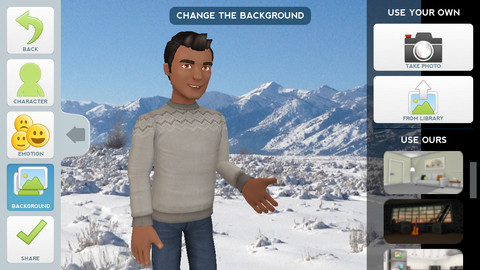
Currently FREE, Tellagami (rhymes with origami) is a unique storytelling app. Short stories called gamis are easy to create. First you select and customize a character by choosing his/her skin tone, eye color, hair color, and clothing. Then you choose an emotion – happy, sad, surprised, angry, scared, silly. Next you choose a background from the app, from your photo library, or create one by using your camera. You are now ready to create your gami. You can record your gami in you own voice or choose the text button to type in what your character will say  – the limit is 450 characters. Gamis can be shared via email, messaging, Facebook, or Twitter.

This educational app is fabulous!! Its uses are only limited by your imagination!! Kids can use gamis to introduce themselves at the beginning of the year. They can customize gamis to look like themselves and be reporters, scientists, teachers, etc. They can create the character (and setting) from a book they are reading. They can message or email a parent to explain what they are learning in class. Teachers could use gamis as interactive exit slips. The list is endless. Kids will LOVE creating gamis!

Tellagami ™ - Tellagami Inc.