0

Math Evolve

Math Evolve

FREE for  limited time – the full version of Math Evolve, an app that combines math practice (addition, subtraction, multiplication, division) with an arcade-style game that kids will enjoy playing. Math Evolve has 12 levels, 19 different enemies, and 6 challenging bosses that can be played on 3 difficulty settings. The app has 2 modes: practice mode and story mode. In practice mode, a parent or teacher can choose which math facts to practice and monitor a child’s progress. In the story mode, kids embark on math adventure across three environments: microscopic, ocean, and space. The difficulty of the math and the difficulty of the game can be set independently which makes the game fun for all ages. The app supports up to 5 players. Statistics are kept in the player history section so parent/teachers can evaluate how kids are progressing. This app would be great for independent practice in a classroom. It has customizable practice built into a fun game AND it collects statistical data – awesome!

For more information go to http://mathevolve.com.

Common Core Standards met:

  • 1.OA.6 – Add and subtract within 20, demonstrating fluency for addition and subtraction within 10.
  • 2.OA.2 – Fluently add and subtract within 20 using mental strategies. By end of Grade 2, know from memory all sums of two one-digit numbers.
  • 3.OA.7 – Fluently multiply and divide within 100, using strategies such as the relationship between multiplication and division or properties of operations. By the end of Grade 3, know from memory all products of two one-digit numbers.

Math Evolve: A Fun Math Game - Zephyr Games

0

Space Cakes

Space CakeSpace Cakes was released on April 25 and it is FREE – thanks to the support of Eli’s Cheesecake in Chicago. Kids use number sense and early math skills to complete intergalactic baking missions. They find themselves in a bakery filled with alien ingredients. They must follow a recipe to add the correct amount of each ingredient. Then they choose a 3D shape for their levitating batter and bake it. Next a topper, frosting, and sprinkles are added to finish their creations. Time for delivery – they steer the cake delivery spaceship back to Earth. Finally they celebrate their safe arrival with starburst, fireworks, and colorful confetti!  Kids can snap a photo of their creations to share them via email, save them in a gallery, or use them to inspire creative writing – descriptive paragraphs using math terms, a story about an intergalactic cake baking contest, etc. There is a section for parents/teachers which explains the educational value of the app and how it meets the CCSS. This app provides a fun way to work with math concepts AND a wonderful springboard for creative writing.

Space Cakes - Kids Bakery Game with Math and Numbers - Mrs. Judd's Games, LLC

0

Snowflake Station

Snowflake Station

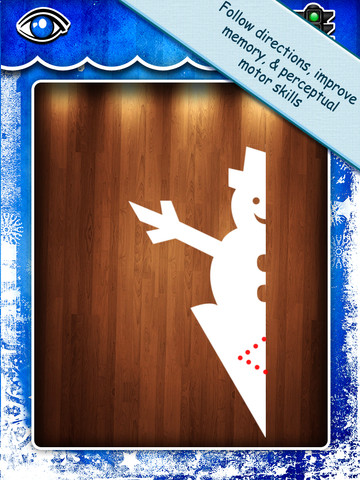
Purple glittery snowflakes !! FREE again for a limited time, Snowflake Station for the iPad helps kids discover the beauty of symmetry – a key concept in math, science, art, & architecture. The app has 3 sections: Trace a Flake, Creation Station, and Make it Snow. Trace a Flake includes step-by-step instructions for cutting 36 different snowflakes/other symmetrical shapes. In the Creation Station, kids create their own flakes/shapes. There are six different folds, 10 different colored paper, and 10 different colors of glitter to choose from. Kids make “cuts” with their fingers. The tape button works as an undo button. Kids can monitor their progress in the upper left hand corner of the cutting board. Creations can be saved to use in the Make it Snow section of the app which does exactly that! Kids use their creations to make it snow in a photo of their choosing. They can use the iPad’s camera to take a picture or use an already saved photo from the camera roll. There are also 10 winter scenes included in the app. Another option in this app is the ability to set up a Juddly (a safe, secure email) account for your child to share his/her creations with you. Very creative & very fun – all while learning about symmetry 🙂

Common Core Standards:

  • 1.G.3 – Partition a shape into four equal shares, describe the shares using the words halves, fourths, and quarters, and use the phrases half of, fourth of, and quarter of. Describe the whole as two of, or four of the shares. Understand for these examples that decomposing into more equal shares creates smaller shares.
  • 4.G.3. Recognize a line of symmetry for a two-dimensional figure as a line across the figure such that the figure can be folded along the line into matching parts. Identify line-symmetric figures and draw lines of symmetry.

Not only does this app meet CCSS in math, it can also be used in creative writing – The Day It Snowed Orange, Alien Invasion, etc. Awesome – highly recommended!

Snowflake Station - Mrs. Judd's Games, LLC

0

More Everyday Math ® APPS: Baseball Multiplication 1-6, Baseball Multiplication 1-12, Top It Subtraction, Tric Trac,

FREE for a limited time – 4 different apps from McGraw Hill Everyday Math ®. If your school system uses this program to teach math, you may want to take advantage of this offer. These apps normally sell for $1.99 each.

Baseball Multiplication

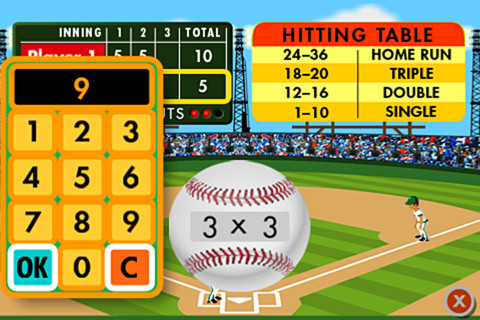
Everyday Math’s Baseball Multiplication comes in 2 versions (1 – 6 facts and 1 – 12 facts) and both versions work the same way. Two players play a 3 inning baseball game as they practice their facts.

Common Core Standards met:

  • 3.OA.7 –  By the end of Grade 3, know from memory all products of two one-digit numbers.

Everyday Mathematics® Baseball Multiplication™ 1–6 Facts - McGraw-Hill School Education Group Baseball Multiplication 1 – 6

Everyday Mathematics® Baseball Multiplication™ 1-12 Facts - McGraw-Hill School Education Group Baseball Multiplication 1 – 12

Top It

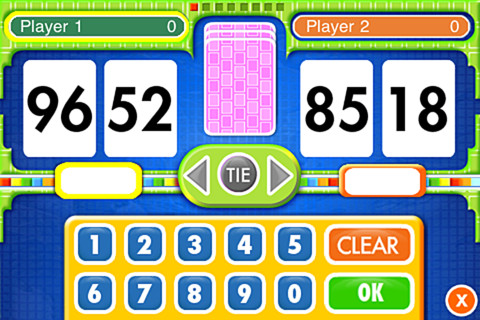
Everyday Math’s Top-It Subtraction for iPhone/iPad is a two player game. It is fun easy way for kids to practice reinforce 2-digit subtraction computation and number comparisons.

Everyday Mathematics® Subtraction Top-It™ - McGraw-Hill School Education Group

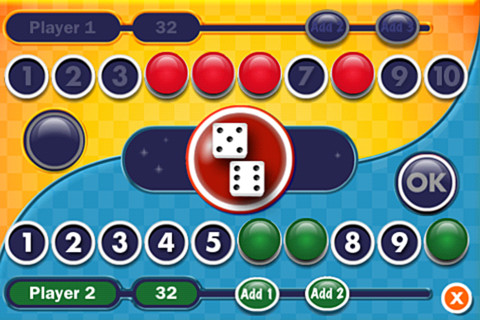
Tric TracEveryday Math’s Tric Trac is a 2 player game for kids to practice their addition facts. Players roll dice, find the sum, then match the sum to numbers in their hand. Every match eliminates that number or numbers from their hand and reduces their score. The player with the lowest score wins!

Common Core Standards met:

  • 1.OA.6 – Add and subtract within 20, demonstrating fluency for addition and subtraction within 10.

Everyday Mathematics® Tric-Trac™ - McGraw-Hill School Education Group

0

Little Writer – The Tracing App for Kids

FREE again – Little Writer is a letter writing app for the iPhone/iPad that is designed to teach 3 – 6 year olds how to write upper & lower case letters, numbers, shapes, and words. It starts by showing the shape of the letter and naming it. The child traces along lines to write the letter. Then the child is praised and told what letter, number, shape or word he/she has just written. When writing a word, the letters are presented one at a time with the full word shown in the upper right-hand corner. When the word is finished, a picture pops up with the child’s writing underneath it.

There are a lot of great things about this app. I like the size of the letters  – nice and big for little hands. I also like that there are subtle dotted lines on the page. But, the best part of this app is the ability to customize it. You can turn items on or off in order to introduce letters, numbers, etc. slowly. You can record your voice or your child’s voice pronouncing the names of the letters, numbers, etc. You can add in your own pictures & words so that your child can learn to write his/her own name and names of family members or whatever you wish! You can add additional letters for foreign words so that you can use it to teach simple words in another language. SO many possibilities……

Common Core Standards met:

  • K.RF.1 – Recognize and name all upper and lowercase letters of the alphabet.

Highly Recommended!

Little Writer - The Tracing App for Kids - Innovative Mobile Apps

0

Sail Through Math

sail through math

Ahoy there!! FREE again (normally $1.99), Sail through Math from McGraw Hill – a fun way for students to practice their math facts/skills. There are 3 levels of play for addition, subtraction, multiplication, and division facts. Other areas covered are addition equations. subtraction equations, multiplication equations, two-step equations, names for numbers, patterns/factors/multiples, and compare numbers. This app provides of great practice built around a pirate theme – complete with music and firing cannonballs! At the end of each game, the child can see what problems he/she missed as well as a percentage score. What a fun way to learn basic facts – in the classroom, at home, in the car on a way to an evening activity. I used to tell my students to practice during commercials – 10 to 15 minutes a day works wonders. This app provides a fun way to accomplish that goal 🙂

Common Core Standards met:

  • 1.OA.6 – Add and subtract within 20, demonstrating fluency for addition and subtraction within 10.
  • 2.OA.2 – Fluently add and subtract within 20 using mental strategies. By end of Grade 2, know from memory all sums of two one-digit numbers.
  • 3.OA.7 – Fluently multiply and divide within 100, using strategies such as the relationship between multiplication and division or properties of operations. By the end of Grade 3, know from memory all products of two one-digit numbers.

Sail Through Math - McGraw-Hill School Education Group

0

Grammar Wonderland (Primary) & Grammar Wonderland (Elementary)

grammar primary

grammar

FREE again – the full versions of Grammar Wonderland (Primary) & Grammar Wonderland (Elementary). In both games kids lead their characters through different adventures as they practice  nouns, verbs, adjectives, and more. The primary version is for younger children – the words are read and some levels include pictures. The app does not teach the parts of speech but it provides lots of practice for kids in a fun game-like environment. After teaching a lesson about parts of speech, teachers can have kids show what they know with this app. Practice is provided for the following: common nouns, proper, nouns, concrete nouns, abstract nouns, singular nouns, plural nouns, possessive nouns, pronouns, action verbs, present-tense verbs, past-tense verbs, future-tense verbs, linking verbs, adjectives, articles, comparative/superlative adjectives, and more! Many parts of speech are taught in both apps – perfect for differentiating your instruction for a variety of reading levels. Both also apps permit multiple player – great for the classroom!

Recommended!!  – Download them today 🙂

Grammar Wonderland Primary       Grammar Wonderland (Primary) - McGraw-Hill School Education Group

Grammar Wonderland Elementary       Grammar Wonderland (Elementary) - McGraw-Hill School Education Group

0

Sakura Quick Math

Sakura Quick Math

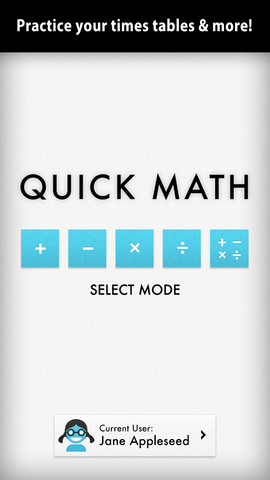
FREE today – Sakura Quick Math. Kids practice basic math (addition, subtraction, multiplication, division, and mixed operations) while racing against the clock. Three problems appear on the screen. Kids use their fingers to write the answers as quickly as they can. The app uses handwriting recognition to check the answers – very slick! If the number is not written neatly, the app does not recognize it and in my opinion that is a bonus. I spent 30+ years telling kids that part of their job was to write legible answers :). This app helps to reinforce that message! As a child’s skills grow, the app can be made more challenging because there are 3 levels of difficulty. You can create multiple users in this app and the app keeps track of each user’s progress in bar graph form. Very cool way for kids to practice their facts!

Common Core Standards met:

  • 1.OA.6 – Add and subtract within 20, demonstrating fluency for addition and subtraction within 10.
  • 2.OA.2 – Fluently add and subtract within 20 using mental strategies. By end of Grade 2, know from memory all sums of two one-digit numbers.
  • 3.OA.7 – Fluently multiply and divide within 100, using strategies such as the relationship between multiplication and division or properties of operations. By the end of Grade 3, know from memory all products of two one-digit numbers.

Sakura Quick Math - Shiny Things

0

3 FREE Virtual Math Manipulatives

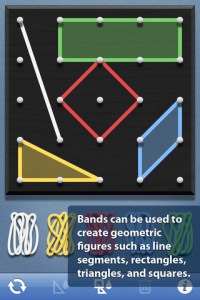
Geoboard by The Math Learning Center (a nonprofit organization dedicated to K – 12 education) is a FREE app that turns your iPhone/iPad into a virtual geoboard. Geoboards can be used as tools to teach mathematical concepts such as polygons, perimeter, area, line segments, angles, congruent shapes, symmetry, fractions, etc. Shapes are created by stretching bands on the geoboard’s pegs. There are 5 colors of bands in the iPhone version and 8 in the iPad version. There is also a tool to fill in shapes. On the iPad version, you can switch from the standard 25 peg board to a 150 peg board to create more complex shapes. This is a great app with the potential to be used in so many ways.

Highly recommended for your virtual math tool kit!

Geoboard, by The Math Learning Center - Clarity Innovations

FREE for the iPad, Virtual Manipulatives contains math manipulatives for teaching fractions, decimals, and percents. Included are tiles/circles divided into halves, thirds, fourth, fifths, sixths, eighths, tenths, and 12ths AND their corresponding decimals and percentages! The manipulatives are color coded across the settings so that 1/2 is blue as is .50 and 50%. Kids drag tile pieces onto the work area to compare fractions/decimals/percentages. In the settings you can change from tiles to circles, make the pieces transparent, and hide the numbers on the pieces. Completed work can be easily saved to photos. Finding equivalent fractions has never been so slick – WOW!!

Common Core Standards

  • 3.NF.3 – Explain equivalence of fractions in special cases, and compare fractions by reasoning about their size. Understand two fractions as equivalent (equal) if they are the same size, or the same point on a number line.
  • 4.NF.1 – Explain why a fraction a/b is equivalent to a fraction (n × a)/(n × b) by using visual fraction models, with attention to how the number and size of the parts differ even though the two fractions themselves are the same size. Use this principle to recognize and generate equivalent fractions.

Highly Recommended!
Virtual Manipulatives! - ABCya.com

equivalent fractions

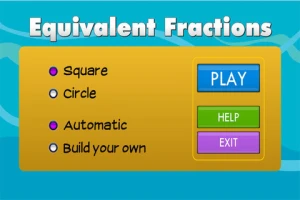
From the National Council of Teachers of Mathematics comes a FREE app called Equivalent Fractions. Kids create equivalent fractions by dividing and shading squares or circles. Circles can be divided into 24ths. Squares can be divided into 144ths. In the play mode, a fraction is shown and kids must create 2 additional fractions that are equivalent. All 3 fractions must have different denominators. The app also places the fractions on a number line – a great visual for comparing! There is also a “build your own” mode which would be fabulous to use for guided exploration & practice. Kids could also use this section as a virtual manipulative when working independently. This app is an excellent resource for the classroom !!

Common Core Standards met:

  • 3.NF.3 – Explain equivalence of fractions and compare fractions by reasoning about their size. Understand two fractions as equivalent (equal) if they are the same size, or the same point on a number line. Recognize and generate simple equivalent fractions, e.g., 1/2 = 2/4, 4/6 = 2/3). Explain why the fractions are equivalent, e.g., by using a visual fraction model.

Highly Recommended!

Equivalent Fractions - National Council of Teachers of Mathematics

0

The Opposites

FREE again – The Opposites for the iPhone/iPad. Designed for kids 7+, this app requires the matching of increasingly difficult pairs of opposite words. There are two sections of the app: dictionary and play. In the dictionary section, words are listed next to their opposites. To learn the meaning, students just tap on the word and a definition appears. There are 10 levels with 100+ words per level. In the play section, words are pronounced by a boy or a girl as they appear in bubbles and float towards the top of the screen  Kids are to tap pairs of opposites as they appear – which makes the words turn a color then pop. The goal is to match 12 sets of opposites  – which completes the level. A bonus round then appears in which the student has 20 seconds to match up an entire  board full of opposites. This app starts off simply but becomes quite challenging in the later levels. It could be used for differentiating a lesson and/or for helping students grow their understanding of antonyms.

Common Core Standards met:

  • 4.L.5 – Demonstrate understanding of figurative language, word relationships, and nuances in word meanings. c.Demonstrate understanding of words by relating them to their opposites (antonyms) and to words with similar but not identical meanings (synonyms).
  • 5.L.5 – Demonstrate understanding of figurative language, word relationships, and nuances in word meanings. c. Use the relationship between particular words (e.g., synonyms, antonyms, homographs) to better understand each of the words.

Recommended!

The Opposites - Mindshapes Limited