0

What Time is is Mr. Wolf?

What Time

What Time is it Mr. Wolf? (by Teacher’s Pet) is FREE for a limited time. Back in July, I reviewed another app by the same name by Joy Preschool. This app features a Wilfred the Wolf who spins the clock on the face of the moon 10 times. Kids have to choose the correct answer and drag it under the moon. The wolf giggles and says “well done” if the answer is correct. The app’s setting allows you to choose what interval of time you would like your child to work on – hours, half hours (half past), quarter hours, 10 minutes, or 5 minutes. Answers can be displayed in words, digitally, or mixed. You can also set the number of answers per question.

The Common Core Standards expect first graders to tell time to the 1/2 hour, second graders to tell time in 5 minute intervals (AM and PM), and third graders to tell time to the minute. So, this app would work well for first and second graders but not third graders. I like that this app includes practice with the words  – half past, quarter after, quarter to. It is a difficult concept for some kids to understand.

Common Core Standards met:

  • 1.MD.3 – Tell and write time in hours and half-hours using analog and digital clocks.
  • 2.MD.7 – Tell and write time from analog and digital clocks to the nearest five minutes, using a.m. and p.m.

What Time is it Mr. Wolf? - by Teacher's Pet - Teacher's Pet

0

Preschool University – phonics/spelling apps

spelling-magic

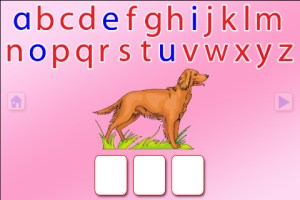
Moveable Alphabet option from ABC Spelling Magic

Wow!! Preschool University has 12 phonics/spelling apps available for FREE again. There are links to all below. I have them grouped by the skills that they teach and from easiest to most difficult. The first group teaches letter sounds.

  • ABC Magic Phonics – initial letter sounds, 1 picture for each letter       ABC MAGIC PHONICS - PRESCHOOL UNIVERSITY
  • ABC Magic 2 –  initial letter sounds, 4 pictures for each letter       ABC MAGIC 2 - PRESCHOOL UNIVERSITY
  • ABC Magic 3 Line Match – Kids apply what they know about sounds by matching. There are 2 modes: matching 2 pictures with the same beginning sounds or matching letters to a picture that starts with that sound.       ABC MAGIC 3 Line Match - PRESCHOOL UNIVERSITY
  • ABC Magic 4  – Kids are given a letter and they must find pictures of 3,6,or 9 items that begin with that sound.       ABC MAGIC 4 - PRESCHOOL UNIVERSITY
  • ABC Magic 5 Letter Sound Matching – Kids match sounds in 2 modes: picture to letter or letter to picture. As kids become more advanced, you can increase their number of choices (4, 6, or 9) and increase the number of matches per round (5,10,15,20,or 25). ABC MAGIC 5 Letter Sound Matching - PRESCHOOL UNIVERSITY
  • ABC Magic 6 – is the same as Sound Beginnings (follows #8).
  • ABC Magic 7 Memory Match – A matching game with 2 options: match letter to letter or match picture to picture. Letter sounds and picture names are pronounced with the option of turning the sounds off. Grids of 12, 16, or 20 are available.       ABC MAGIC 7 Memory Match - PRESCHOOL UNIVERSITY
  • ABC Magic 8 Sound Matching – This app is an extension of ABC Magic 7. It’s another matching game with 2 options: letter to picture having that beginning sound or picture to another picture with the same beginning sound. Letter sounds and picture names are pronounced with the option of turning the sounds off. Grids of 12, 16, or 20 are available.       ABC MAGIC 8 Sound Matching - PRESCHOOL UNIVERSITY
  • Sound Beginnings – This app is the most advanced of the letter sound teaching apps. It is called sound beginnings but actually teaches beginning, middle, and ending sounds. There are two options: a picture to letter and letter to picture. As kids become more advanced, you can increase their number of choices (3,4, or 5) and increase the number of matches per round (5,10,15,20,or 25). Awesome practice for beginning readers!!       SOUND BEGINNINGS - PRESCHOOL UNIVERSITY

The second group of apps uses letter sounds to spell words that phonetically regular. There are 2 ways to use each of these apps. Word Jumble provides the  child with the letters of the word and the child puts them in order. Moveable Alphabet (the more difficult option) has the entire alphabet across the top of the page and the child must find the correct letters to spell the word. If a child touches a picture, the app reads the word. If a child touches a letter, the app gives the sound for that letter. Each vowel is taught in isolation but there is also a shuffle option which provides mixed practice. Vowels are printed in blue and consonants are in red so you can reinforce the CVC (consonant, vowel, consonant) pattern.

  • ABC Spelling Magic Short Vowels – teaches short vowels       ABC SPELLING MAGIC Short Vowel Words - PRESCHOOL UNIVERSITY
  • ABC Spelling Magic 2 Consonant Blends – teaches consonant blends and consonant clusters       ABC SPELLING MAGIC 2 Consonant Blends - PRESCHOOL UNIVERSITY
  • ABC Spelling Magic 3 Blends & Syllables – GREAT practice spelling multi-syllable words       ABC SPELLING MAGIC 3 Blends and Syllables - PRESCHOOL UNIVERSITY
  • Sentence Reading Magic – Kids built 2 or 3 words sentences using phonetically regular words.       SENTENCE READING MAGIC - PRESCHOOL UNIVERSITY

These apps provide a lot of good practice for preschoolers and early readers!!

Common Core Standards met:

  • K. RF.3 – Know and apply grade-level phonics and word analysis skills in decoding words. Demonstrate basic knowledge of one-to-one letter-sound correspondences by producing the primary sound or many of the most frequent sounds for each consonant. Associate the short sounds with common spellings (graphemes) for the five major vowels.
0

Snowflake Station

snowflake

Purple glittery snowflakes !! FREE again for a limited time, Snowflake Station for the iPad helps kids discover the beauty of symmetry – a key concept in math, science, art, & architecture. The app has 3 sections: Trace a Flake, Creation Station, and Make it Snow. Trace a Flake includes step-by-step instructions for cutting 36 different snowflakes/other symmetrical shapes. In the Creation Station, kids create their own flakes/shapes. There are six different folds, 10 different colored paper, and 10 different colors of glitter to choose from. Kids make “cuts” with their fingers. The tape button works as an undo button. Kids can monitor their progress in the upper left hand corner of the cutting board. Creations can be saved to use in the Make it Snow section of the app which does exactly that! Kids use their creations to make it snow in a photo of their choosing. They can use the iPad’s camera to take a picture or use an already saved photo from the camera roll. There are also 10 winter scenes included in the app. Another option in this app is the ability to set up a Juddly (a safe, secure email) account for your child to share his/her creations with you. Very creative & very fun – all while learning about symmetry 🙂

Common Core Standards:

  • 1.G.3 – Partition a shape into four equal shares, describe the shares using the words halves, fourths, and quarters, and use the phrases half of, fourth of, and quarter of. Describe the whole as two of, or four of the shares. Understand for these examples that decomposing into more equal shares creates smaller shares.
  • 4.G.3. Recognize a line of symmetry for a two-dimensional figure as a line across the figure such that the figure can be folded along the line into matching parts. Identify line-symmetric figures and draw lines of symmetry.

Not only does this app meet CCSS in math, it can also be used in creative writing – The Day It Snowed Orange, Alien Invasion, etc. Awesome – highly recommended!

Snowflake Station - Mrs. Judd's Games, LLC

0

Grammar Wonderland (Primary) & Grammar Wonderland (Elementary)

grammar primary

grammar

FREE today – the full versions of Grammar Wonderland (Primary) & Grammar Wonderland (Elementary). In both games kids lead their characters through different adventures as they practice  nouns, verbs, adjectives, and more. The primary version is for younger children – the words are read and some levels include pictures. The app does not teach the parts of speech but it provides lots of practice for kids in a fun game-like environment. After teaching a lesson about parts of speech, teachers can have kids show what they know with this app. Practice is provided for the following: common nouns, proper, nouns, concrete nouns, abstract nouns, singular nouns, plural nouns, possessive nouns, pronouns, action verbs, present-tense verbs, past-tense verbs, future-tense verbs, linking verbs, adjectives, articles, comparative/superlative adjectives, and more! Many parts of speech are taught in both apps – perfect for differentiating your instruction for a variety of reading levels. Both also apps permit multiple player – great for the classroom!

Recommended!!  – Download them today 🙂

Grammar Wonderland Primary       Grammar Wonderland (Primary) - McGraw-Hill School Education Group

Grammar Wonderland Elementary       Grammar Wonderland (Elementary) - McGraw-Hill School Education Group

0

Tellagami

Telegami

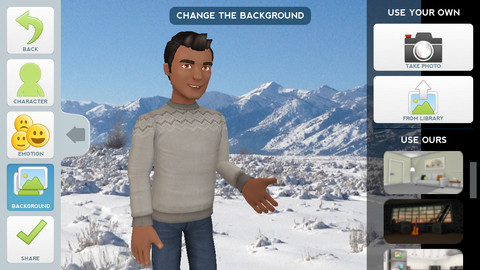
Currently FREE, Tellagami (rhymes with origami) is a unique storytelling app. Short stories called gamis are easy to create. First you select and customize a character by choosing his/her skin tone, eye color, hair, and clothing. Then you add emotion – happy, sad, surprised, angry, scared, silly. Next you choose a background from the app, from your photo library, or by using your camera. You are now ready to create your gami. You can record your gami in you own voice or choose the text button to type in what your character will say  – the limit is 450 characters. Gamis can be shared via email, messaging, Facebook, or Twitter.

The app is fabulous!! Its uses are only limited by your imagination!! Kids can customize their characters to look like themselves and be reporters, scientists, teachers, etc. They  create the character and setting from a book they are reading. They could message or email a parent to explain what they are learning in class. Teachers could use gamis as interactive exit slips. The list is endless. Kids will LOVE creating gamis!

Tellagami ™ - Tellagami Inc.

0

Sail Through Math

sail through math

Ahoy there!! FREE again (normally $1.99), Sail through Math from McGraw Hill – a fun way for students to practice their math facts/skills. There are 3 levels of play for addition, subtraction, multiplication, and division facts. Other areas covered are addition equations. subtraction equations, multiplication equations, two-step equations, names for numbers, patterns/factors/multiples, and compare numbers. This app provides of great practice built around a pirate theme – complete with music and firing cannonballs! At the end of each game, the child can see what problems he/she missed as well as a percentage score. What a fun way to learn basic facts – in the classroom, at home, in the car on a way to an evening activity. I used to tell my students to practice during commercials – 10 to 15 minutes a day works wonders. This app provides a fun way to accomplish that goal 🙂

Common Core Standards met:

  • 1.OA.6 – Add and subtract within 20, demonstrating fluency for addition and subtraction within 10.
  • 2.OA.2 – Fluently add and subtract within 20 using mental strategies. By end of Grade 2, know from memory all sums of two one-digit numbers.
  • 3.OA.7 – Fluently multiply and divide within 100, using strategies such as the relationship between multiplication and division or properties of operations. By the end of Grade 3, know from memory all products of two one-digit numbers.

Sail Through Math - McGraw-Hill School Education Group

0

Marble Math

Marble Math

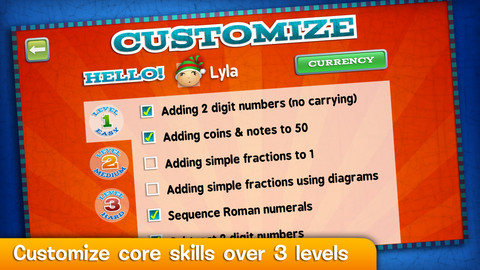
FREE today only – Marble Math. There are lots of good reviews of this app for 9 – 12 year olds which was selected by Apple as New & Noteworthy. Kids solve a variety of math problems as they navigate their way through a series of marble mazes. Concepts included are addition/subtraction/multiplication/division, adding/sequencing fractions with different denominators, factoring, adding/subtracting negative integers and more! The game supports multiple players and it allows you to customize specific skills for each player – what a great option! Another great thing about this app  – when a player answers incorrectly, he/she can choose of 3 options: try again, show me, or next problem. Kids earn marbles as they answer correctly and high scores are recorded. This game blends fun with the practice of common core skills. Worth downloading!

Common Core Standards met:

  • 3.OA.7 Fluently multiply and divide within 100, using strategies such as the relationship between multiplication and division
  • 4.OA.4 Find all factor pairs for a whole number in the range 1–100.
  • 4.NF.3 Understand a fraction a/b with a > 1 as a sum of fractions 1/b. a. Understand addition and subtraction of fractions as joining and separating parts referring to the same whole.

Marble Math - Artgig Studio

0

Super Readers – A Dolch Sight Words Based Story Book App That Will Help Turn Your Child Into a Super Reader!

super readers

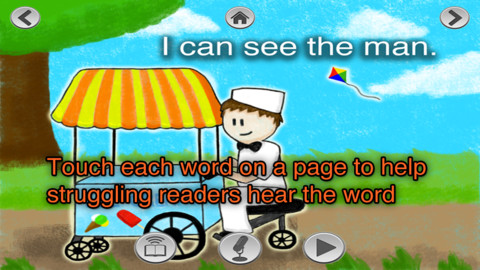
FREE for a limited time – Super Readers, an animated storybook app for early readers! This app uses the Dolch sight words in 10 vocabulary controlled stories at 5 different reading levels: kindergarten, beginning first, middle first, end of first, and beginning second. Kids can choose to have the stories read to them with automatic text highlighting or they can touch individual words to have them read. Another great feature  – kids can record themselves reading the book and then play it back. What a wonderful confidence builder for little ones trying to build their fluency!!

Common Core Standards met:

K.RF.3 – Know and apply grade-level phonics and word analysis skills in decoding words. c. Read common high-frequency words by sight (e.g., the, of, to, you, she, my, is, are, do, does).

Recommended!

Super Readers - A Dolch Sight Words Based Story Book App That Will Help Turn Your Child Into a Super Reader! - Jorge Sanchez

0

The Opposites

The Opposites is currently FREE for the iPhone/iPad. Designed for kids 7+, this app requires the matching of increasingly difficult pairs of opposite words. There are two sections of the app: dictionary and play. In the dictionary section, words are listed next to their opposites. To learn the meaning, students just tap on the word and a definition appears. There are 10 levels with 100+ words per level. In the play section, words are pronounced by a boy or a girl as they appear in bubbles and float towards the top of the screen  Kids are to tap pairs of opposites as they appear – which makes the words turn a color then pop. The goal is to match 12 sets of opposites  – which completes the level. A bonus round then appears in which the student has 20 seconds to match up an entire  board full of opposites. This app starts off simply but becomes quite challenging in the later levels. It could be used for differentiating a lesson and/or for helping students grow their understanding of antonyms.

Common Core Standards met:

  • 4.L.5 – Demonstrate understanding of figurative language, word relationships, and nuances in word meanings. c.Demonstrate understanding of words by relating them to their opposites (antonyms) and to words with similar but not identical meanings (synonyms).
  • 5.L.5 – Demonstrate understanding of figurative language, word relationships, and nuances in word meanings. c. Use the relationship between particular words (e.g., synonyms, antonyms, homographs) to better understand each of the words.

Recommended!

The Opposites - Mindshapes Limited

0

Same Meaning Magic (Synonyms)

same meaning

The day I downloaded this iPhone/ iPad app it was FREE. It is now $.99. In this word game, kids help two young magicians named Leo & Luna by choosing a synonym for the bolded word in the sentence. Kids earn coins for choosing the correct answers. At the end of each level, you are shown the number of questions answered, the amount of money collected, and a percentage score for that level. There are 5 levels of play from very easy to very hard. Although I found some overlap in the earlier levels, the difficulty of the sentences definitely increased. Lots of good practice…  This game could be used in a one iPad classroom to teach using context clues. The app could also be used as an independent or buddy activity. Also available is Same Meaning Magic Part II for an additional $.99.

Keep reading my blog to find out when these apps are offered for FREE.

Common Core Standards met:

  • 4.L.5 – Demonstrate understanding of figurative language, word relationships, and nuances in word meanings. c.Demonstrate understanding of words by relating them to their opposites (antonyms) and to words with similar but not identical meanings (synonyms).
 Same Meaning Magic (Synonyms) - NRCC Games