0

Grammaroplois

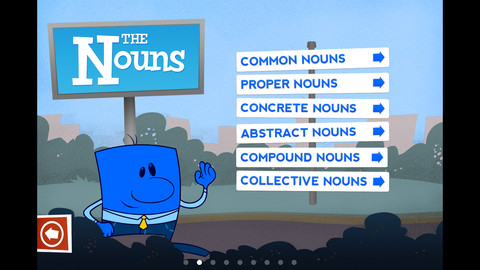
Grammaropolis is billed as the place where grammar lives. It teaches 8 parts of speech (nouns, verbs, adjectives, adverbs, pronouns, conjunctions, prepositions, interjections) using animated characters based on the roles that they play in sentences. Every part of speech has its own neighborhood. Kids follow a map which takes them through a series of activities (songs, books, videos, and quizzes) to learn about the featured part of speech. If they complete everything on the map, they earn a badge. Cutely designed and simple to use, this app teaches parts of speech in a fun, “Schoolhouse Rock”  like way. The songs are catchy and upbeat so kids will love them 🙂

Nouns is a FREE download with the other parts of speech available as in-app purchases. I was impressed that this app covered so many kinds of nouns – common, proper, concrete, abstract, compound, and collective. This app would work well to introduce/teach nouns in a one iPad classroom.

Common Core Standards:

1.L.1  – b. Use common, proper, and possessive nouns.

2.L.1  – a. Use collective nouns (e.g., group). b. Form and use frequently occurring irregular plural nouns (e.g., feet, children, teeth, mice, fish).

3.L.1  – b.Form and use regular and irregular plural nouns. c. Use abstract nouns (e.g., childhood).

Grammaropolis - Grammaropolis LLC

0

Problem Solving – choosing the correct operation

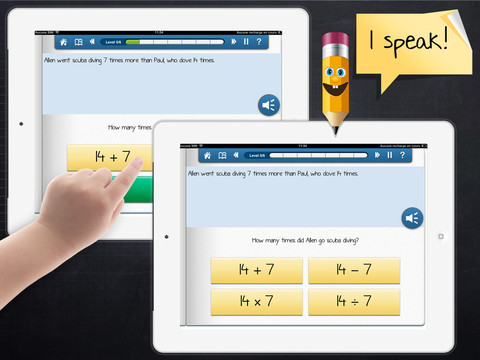
This iPad app (for kids in grade 3+) was FREE the day that I downloaded it but usually costs $1.99. Kids read/listen to word problems then have to choose the correct operation – addition, subtraction, multiplication, division. The problem is written but there is also the option of having it read aloud – just push the sound button. Equations (all containing the same numbers) are written beneath the problem and the child chooses the one that uses the correct operation. If the correct equation is chosen, it turns green. The answers are not a part of the equation and the child is not required to do the computation. Kids have to get 6 problems correct in a level before advancing to the next level. There are a total of 6 levels. Problems involving money are written in British pounds. The app’s language can easily be changed from English to French or Spanish.

This app provides practice in a much-needed area. Too many word problems are missed simply because the wrong operation is chosen. I wish this app would highlight clue words such as total, more, less, fewer, etc. Teaching kids to read and understand the question is critical. I also think that students should have to solve the problem – to meet the Common Core State Standards. Regardless, this app provides much-needed practice of a critical step in problem-solving.

Keep reading my blog to find out when apps become FREE.

Common Core Standards:

  • 2.OA.1 Use addition and subtraction within 100 to solve one- and two-step word problems involving situations of adding to, taking from, putting together, taking apart, and comparing, with unknowns in all positions
  • 3.OS.3 Use multiplication and division within 100 to solve word problems in situations involving equal groups.

Problem solving: choosing the correct operation - myBlee - MyBlee

0

Kids Shop

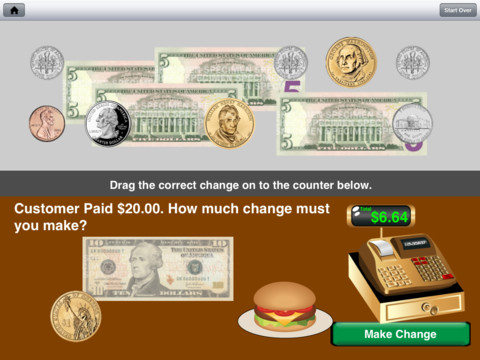
FREE for this weekend only! Kids Shop is another money app for the iPad from the developers of Coin Math – see my previous review. Kids Shop takes off where Coin Math left off by including bills (ones, fives, tens, & twenties) when asking kids to pay for items or make change. 5 levels of shopping and 5 levels of making change make this app suitable for multiple ages. There are hints and voiced instructions for younger learners. Coins can be tapped & turned so that kids can see both the fronts & backs. Kids can also tap and drag coins into groups for easier counting. The only thing that could make this app better is if it kept track a child’s/children’s progress. This app is well done and provides a lot of great practice. Download it today!

Common Core Standard:

  • 2.MD.8 – Solve word problems involving dollar bills, quarters, dimes, nickels, and pennies, using $ and ¢ symbols appropriately.

Highly recommended!

Kids Shop - Recession Apps LLC

0

Coin Math

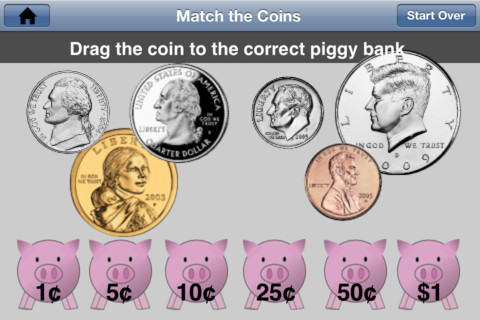
FREE this weekend only – Coin Math for the iPhone/iPad is the best coin app that I have reviewed to date. It teaches kids to recognize, count, add, and make change with U.S. coins. Kids learn to recognize pennies, nickels, dimes, quarters, half dollars & dollar coins – both front and back. They match the front of coins to their backs. They also match coins to their values. After learning the value of the coins, kids practice counting combinations of coins – two levels. Once kids have learned to count the coins, they learn how to pay for items – 3 levels. Finally, kids learn how to make change –  3 levels. This app is well thought out and teaches about coins in a logical & sequential way. It can be used by kids in grades K – 3 because it has so many levels. The only thing that could make this app better is if it kept track a child’s/children’s progress. Teachers and parents, take note – if you have kids that need to learn/practice using coins, download this app today!

Common Core Standard:

  • 2.MD.8 – Solve word problems involving dollar bills, quarters, dimes, nickels, and pennies, using $ and ¢ symbols appropriately.

Highly recommended!

Coin Math - Recession Apps LLC

0

Marble Math Junior

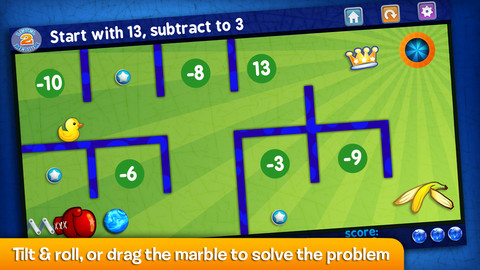
FREE for one day, November 2, 2012  – Marble Math Junior for the iPhone/iPad. Kids solve a variety of math problems as they roll marbles through a series of mazes. There are three levels. Level 1 covers addition to 10, equivalent numbers, sequencing of ordinal and cardinal numbers, and shape recognition. Level 2 covers adding coins to $1.00, addition/subtraction to 20, time to the hour, and comparing/sequencing numbers to 100. Level 3 covers money to $2.00, telling time by 15 min. intervals, fractions (1/2, 1/3, 1/4), multiples (2,3,5,10), addition to 100, and sequencing to 1000. Currency can be customized 5 ways: Australian dollar, Canadian dollar, Euro, British pound, & U.S. dollar. Not only does the game supports multiple players but it also allows you to customize specific skills for each player to practice – what a great option! Another great thing about this app  – when a player answers incorrectly, he/she can choose of 3 options: try again, show me, or next problem. Kids earn marbles as they answer correctly and high scores are recorded. Worth downloading!

Common Core Standards met:

  • K.OA.2  – Add and subtract within 10, e.g., by using objects or drawings to represent the problem.
  • K.CC.2 – Correctly name shapes regardless of their orientations or overall size.
  • 1.OA.6 – Add and subtract within 20, demonstrating fluency for addition and subtraction within 10.
  • 1.MD.3 – Tell and write time in hours and half-hours using analog and digital clocks.
  • 2.MD.8 – Solve word problems involving dollar bills, quarters, dimes, nickels, and pennies, using $ and ¢ symbols appropriately.
  • 2.OA.1 -Use addition and subtraction within 100

Recommended!

Marble Math Junior - Artgig Studio

0

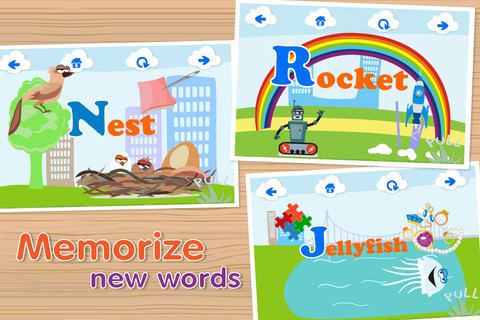
ABC Games – Montessori Phonics-enabled Alphabet

ABC Games – Montessori Phonics-enabled Alphabet for the iPhone/iPad is FREE for a limited time. It is designed to teach 2 – 5 year olds the letters of the alphabet and their sounds. Kids may explore the alphabet in any order that they wish. There are over 100 animations which correspond to the letters of the alphabet. The 3 words for each letter are pronounced and spelled. The illustrations are animated cartoons. Pages for each letter are uncluttered – simply presented but engaging. The app also has a parent section that shows how often your child has visited each letter. Nicely done!

Common Core Standards met:

  • K.RF.1 – Demonstrate understanding of the organization and basic features of print. Recognize and name all upper and lowercase letters of the alphabet.

Recommended!

Interactive ABC HD - Pre-reading for Kids - Kids Academy Company

0

Count Money FREE

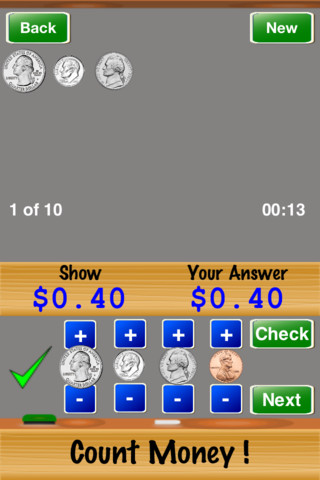
FREE iPhone/iPad app for counting money. This FREE version has two levels – easy and medium. The full version has two additional levels and a quiz mode. This app is simple to use. Kids count quarters, dimes, nickels and pennies to show an amount of money. They press + and – buttons to add coins to their work area until they are ready to check their answer. The app tallies the number correct out of 10, 25, or 50. A concern – the app only shows the heads of the coins. Kids need to see heads, tails, and different kinds of quarters, etc. It would also be more challenging to require kids to come up with the least number of coins for the amount of money. When I was teaching, I found that some kids avoided using quarters and nickels because it was more difficult. This app provides good basic practice for kids but eventually kids will need more of a challenge before they master counting money – perhaps that is available in the full version.

This app provides some of the background knowledge that kids will need to meet this second grade standard.

Common Core Standard:

  • 2.MD.8 – Solve word problems involving dollar bills, quarters, dimes, nickels, and pennies, using $ and ¢ symbols appropriately.

Count Money ! - Horizon Business, Inc.

0

Squeebles Fractions

From England and FREE today – this app for the iPhone/iPad is designed to teach fractions to 7 – 11 year olds. The Squeebles want to enter a cake making contest but their ingredients have been stolen by the Math Monster. By working on the app’s 4 games, kids help the Squeebles earn back their ingredients. In Piece of Cake, kids drag the fractional part of a cake to a Squeebles when he asks for it. The easy mode covers halves, fourths, thirds. The hard mode cover fractions to tenths. In Tricky Pairs, kids have to match pairs of equivalent fractions. In the easy mode they match 4 pairs and in the hard mode they match up to 9 pairs. Think Big has kids feeding cake to the Squeeble that calls out the biggest fraction. The easy mode covers halves, fourths, thirds. The hard mode cover fractions to twelfths. Super Sums requires kids to add fractions as quickly as they can and has three levels of difficulty. After earning ingredients, kids can create cakes and enter them in The Cake Show – fun! Another great thing about this app is that you can have more than one player. My only concern is that the easy mode of Piece of Cake requires kids to know some equivalent fractions – for example, it asked kids to pick 3/4 of a cake divided into 8 pieces, 1/3 of a cake divided into 6 pieces, etc. I wish it would have required a basic knowledge of fractions in the easy mode then moved on to equivalent fractions in the hard mode. This app is cute, fun, and provides great practice for a wide spectrum of kids.

Common Core Standards met:

  • 3.NF.3 – Explain equivalence of fractions and compare fractions by reasoning about their size. Understand two fractions as equivalent (equal) if they are the same size, or the same point on a number line. Recognize and generate simple equivalent fractions, e.g., 1/2 = 2/4, 4/6 = 2/3).
  • 4.NF.3 – a. Understand addition and subtraction of fractions as joining and separating parts referring to the same whole.

Recommended!

Squeebles Fractions - KeyStageFun

0

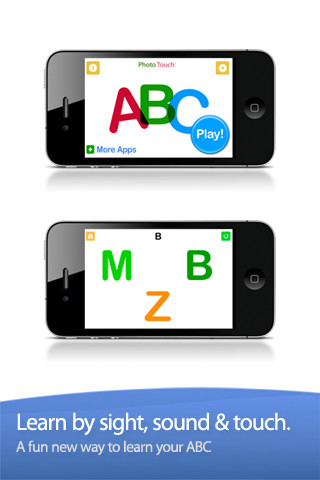
ABC Alphabet Phonics – Preschool Kids Game Free Lite

This FREE app is designed for the iPhone/iPad for 0 – 6 year olds. It gives kids practice in letter identification – both upper and lower case. Settings can be switched from plain letters to letters with animals, kids, monkeys, and sketches. With the letter/animal option, an animal that starts with the letter is next to it. You can add your voice or your child’s voice to customize the app. You can also turn letters on and off, mix and match upper and lower case, etc. I did find a glitch when mixing the upper and the lower case letters – the instructions said to touch the f, both F and f were displayed as possible answer but only F was correct. Needless to say, that could be very confusing to a child learning letter names. The other concern that I have with this app is the title – ABC Alphabet Phonics. Phonics is not part of the app at all. This app does not introduce any letter sounds. It simply gives kids practice differentiating between letters – touch the Q, touch the g, touch the H, etc. That is it – with plain letters or letters with illustrations. If your child would benefit from this kind of drill, you may want to download this app.

Common Core Standards met:

  • K.RF.1 – ….. Recognize and name all upper and lowercase letters of the alphabet.

ABC Alphabet Phonics - Preschool Kids Game Free Lite - GrasshopperApps.com

0

i Learn With Poko: Fun Counting & Addition

Toddlers and preschoolers (ages 3 – 6) learn how to count and add numbers with this app for the iPhone/iPad. There are 3 games included: Bowling (counting & adding to 6), Building Blocks (adding to 10), and Poko’s Toys (add toys up to 15). Each game is divided into 3 levels of increasing difficulty. All i Learn With apps have the option for children to register so that they can earn rewards to play with on Planet Boing (a FREE central app that goes with the i Learn With series). Registration also allows parents to track their child’s progress. Detailed reports are generated telling parents the number of attempts for each game as well as the rate of success. The report also allows a parent to compare their child’s progress with other children of the same age. The i LearnWith program is brought to you by the developers of PBS KIDS PLAY and CBC Wonderworld online learning programs.

Common Core Standards met:

  • K.OA.2  – Add and subtract within 10, e.g., by using objects or drawings to represent the problem.

This app is currently $1.99. Keep reading my blog to find out when it is offered for FREE.

Recommended.

i Learn With Poko: Fun Counting and Addition! - Tribal Nova