0

ClassDojo

ClassDojo is a FREE & fabulous tool that helps improve classroom behaviors. Teachers are using it in different ways: to give feedback in real-time, to track behavior, and to generate reports. Reward good behavior in real-time – all it takes is a click. You need one device (computer, smartphone, a laptop, or a tablet) and an internet connection. It is very easy to set up with your class list. Each student is assigned a cute, monster-like avatar. Kids earn points for positive behaviors and lose points for negative behaviors. ClassDojo is also fully customizable so you can delete behaviors from the original list and/or add your own behaviors. As you use it, it automatically logs any data that you input. This data can be used to generate behavior reports to share with parents and administrators. How awesome is that? You can go into a meeting/conference with reports in hand!

If I were still in the classroom, I would enter my class list twice – once for data on work/study habits and the other for data on behaviors. I would make my habits/behaviors match exactly what was on my report cards. Then as I used the app, I would also be gathering data for my report cards. At the end of the grading period, I would just print out the date and enter it on the report cards – how easy!  I would also have the data (in a printed report) to be able to back up any grade on the card.  “As you can see Mrs. Doe, Jane only turned in her homework 56% of the time.”  Instant data would also be available for the RTI process, IEPs or any other team meeting on a child. Wow – a fabulous educational app!!

Check out the website for more information: www.classdojo.com

Highly recommended !!

ClassDojo - Class Twist Inc

0

Sandbox Web Browser & RabbleBrowser from Float Mobile Learning

FREE for a limited time – 2 web browsing tools from Float Mobile Learning. Check them out while they are FREE. 🙂

sandbox

Sandbox Web Browser allows teachers/administrators to customize the appearance of the user interface on students’ devices. By using Sandbox, teachers can restrict students to a predetermined list of websites (called a whitelist) – perfect for classroom research. Bookmarks for approved sites can also be added. A passcode is set to prevent students from changing the settings. Sandbox also returns to a preset home page when the device goes idle. This app can be used to configure an individual device or it can be used to configure multiple devices by using a property list file. The app includes extensive instructions for configuring Sandbox to meet the specific your needs. It also includes instructions for restricting access to Safari, the App Store, You Tube, and other built-in apps through your device.

Download link: https://itunes.apple.com/us/app/sandbox-web-browser/id562054411?mt=8&uo=4

rabble

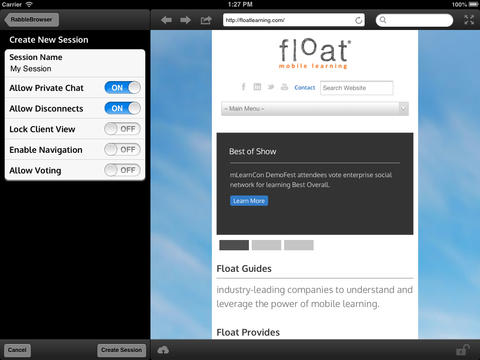
RabbleBrowser is a collaborative web browsing and file sharing tool. A teacher or student leader can facilitate a shared web-browsing/file-sharing experience with an unlimited number of locally-connected others in their group. Other features of this app include: integrating chats, saving bookmarks, sharing of personal files, social sharing via email/Facebook/Twitter, and printing. This app looks fantastic for teacher collaboration – meetings, professional development days, college classes, etc.

Download link: https://itunes.apple.com/us/app/rabblebrowser/id432616026?mt=8&uo=4

0

Team Shake

Team Shake

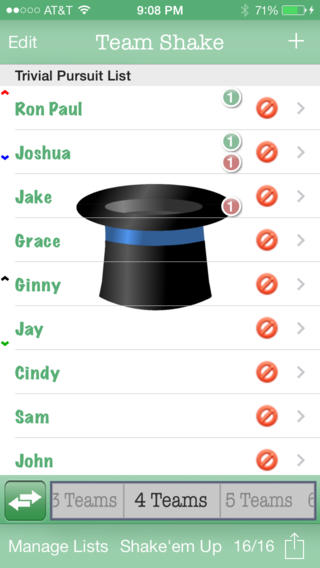
FREE for a limited time – Team Shake, a tool that helps select teams for games, sporting events, tournaments, school projects, etc. If you have to put people in groups, this is the app for you. 🙂 You can easily create 1 –  64 teams. First, enter the names of the participants by using the keyboard or by importing a file. Then set each student’s gender and level of strength. Temporarily disable the names of people who are absent then literally shake the your device (or press the shake button.) The app generates color-coded balanced teams. There are all sorts of additional features that let you customize this app to fit your needs. You can set groups of people to always be on the same team, set groups of people to always be on different teams, create teams where all players have the same strength, and more. I would enter my class multiple times by subject so that I could set the levels strength for each area. Very cool educational tool for teachers, coaches, and anyone else who works with groups!

Download link: https://itunes.apple.com/us/app/team-shake/id390812953?mt=8&uo=4

0

Smart White Board HD

super white board

FREE – Smart White Board HD, is super simple to use! One finger writes, 2 fingers erase, 3 fingers clears all. Press the save button or shake your device to save an image. You can write in black, blue, or red and in 3 thicknesses. The app also includes a simple voice recorder. Just press record, talk, stop & name your file, and it is saved to a list. You can then email your recording if you wish to share it. Teachers can get rid of their classroom whiteboards, markers, and erasers! Have kids show their work, explain their thoughts, etc. with this simple educational app!

Smart White Board HD - Pad read

0

Comic Book

Comic Book

On sale for only $.99 – Comic Book. This app was named Best Photo App of 2011 and was the App of the Week in 12 different countries! Using the app’s selection of image filters, comic fonts, customizable captions, classic comic graphics and page layouts, you can easily change your photos into comics. So many creative uses for the classroom!! Download now, brainstorm uses for this educational app later!!

ComicBook! - 3DTOPO Inc.

0

Cool Writer

Cool Writer

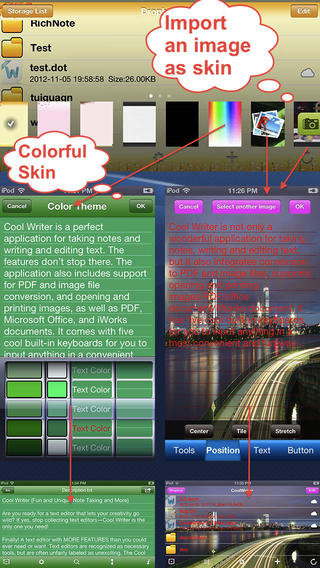
Free today – Cool Writer – Awesome Writing & Note Taking App and that it is! This educational app comes with 5 built-in keyboards to make writing and note taking fun. They are: Special Characters Keyboard with 2000 special characters, Emoji Keyboard with 471 emoticons, Article Keyboard with 400 popular characters/emoji article pictures, Crazy Text Keyboard with fun features like ‘upside-down’ letters, and Shortcut Keyboard that you can personalize. The app has 12 themes or you can create your own theme using images from your photo album. With it you can create, rename, delete, copy, and move your notes. You can also sort them by name, size, type, or time. There is even as search option. This app also converts text files to PDF or image format.

I visualize using this app as a digital version of the 5-subject notebook – kids could keep track of their class notes for all subjects in their device. It syncs with Dropbox so they can also access class notes at home. Teachers could share notes with students and vice versa. This app could be used to write exit slips at the end of a lesson and emailed to the teacher. Or, a teacher could assign reading/note taking for homework then have kids email the completed notes. Lots of possibilities here and slick enough that kids would probably enjoy using it – VERY cool!

Download link: https://itunes.apple.com/us/app/cool-writer-awesome-writing/id477698296?mt=8&uo=4

0

Compare a Twist

Compare a Twist

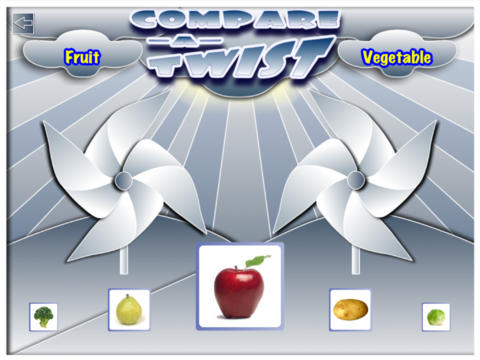
FREE for a limited time – Compare a Twist, an educational app. This easy-to-use app allows teachers and/or students to create lessons that compare/contrast or categorize items. The app supports the use of text and images making it useable for multiple levels of students. Compare/contrast or categorizing lessons can be created across the curriculum: Language Arts – long/short vowel sound, synonyms & antonyms, characteristics of the main characters; Math – factors of numbers, equivalent fractions, characteristics of geometric shapes; Science – living or nonliving, characteristics of animals. The possibilities are endless. The app gives students get instant feedback when they have completed the activity. Teachers can also use that information to check students’ understanding.

They say that the best way to learn something is to teach it… I think kids would really enjoy creating quizzes to share with their peers.

Download link: https://itunes.apple.com/us/app/compare-a-twist/id510922341?mt=8&uo=4

1

Shadow Puppet

Shadow Puppet

FREE for a limited time – Shadow Puppet, a photography app currently featured as one of the “Best New Apps” by Apple. Using this app, it’s easy to create “puppets” – recorded explanations of your photos. First you choose your photos and put them in the order. Then you talk about your pictures. Everything is recorded. Finished “puppets” can be shared via email, SMS, Facebook and/or Twitter. There are so many ways for everyone to use Shadow Puppet: to teach something new, to share adventures with friends, to record children talking about their experiences, to tell the story behind old family photos, etc.

And… the classroom uses for this app are only limited by your imagination: Take pictures of a child’s work and have him/her explain it to parents. Send pictures and voice recordings of the class field trip. Have kids give a step-by-step explanation of what happened in a science experiment. Draw & sequence pictures to retell a story. Make a “talking timeline” by sequencing photos of historical events. Have kids use it to present mini reports on any subject. Have virtual “pet day” – kids bring in pictures/recordings of their pets. Because you can use anything saved to your photo library, you can explain photos from the web, artwork created in other apps, and so much more. The possibilities for using this educational app are endless. What a fabulous resource!!

Download link: https://itunes.apple.com/us/app/shadow-puppet/id700902833?mt=8&uo=4

0

Homework+

Homework+

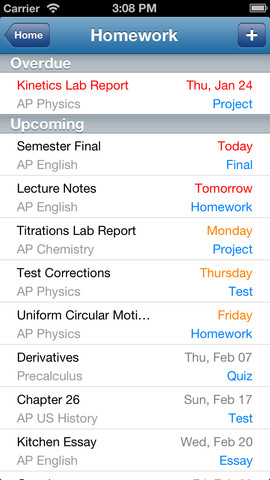
FREE again, for a limited time – Homework+, a simple to use homework/test planner. This educational app is geared towards older students who are taking multiple classes. It could also be used with younger kids as an electronic assignment book. It’s never too early to teach kids how to be organized. 🙂

To set up the app, first edit the subject list & category lists to reflect what you are studying. After that, it is very easy to add assignments to the calendar – just give the assignment a title, choose the subject & category, put in the due date, choose a level of priority, and save. As you finish an assignment, mark it as complete and the app moves it to the finished list. App badges show you how many assignments you have and how many you have finished. Notifications can be set (1 or 2 days before) to remind you of an upcoming assignment. The app also keeps track of overdue assignments. Very slick and intuitive – great for teaching kids to be organized!!

Homework+ - Chijang Huang

0

Bitsboard – Education, Games, and Flashcards for Learning Reading, Spelling, and more

Bitsboard

Bitsboard is a FREE app for education with so many uses – it’s ideal for teaching languages, vocabulary, sight words, spelling, and more. This educational app comes with three games: Flashcards (10,000+ free flash cards with fully customizable settings), Explore (reviews all flashcards), and Photo Touch (spot the correct item game). There are 7 additional games available as in-app purchases. Bitsboard is easy to use and fully customizable so you can use it to create games for whatever you are teaching. And as an extra added bonus, you can see what other people have created – the app includes FREE access to the Bitsboard catalog which includes thousands of flashcards with lessons covering a variety of topics. If all of that hasn’t convinced you that you need this app, this feature certainly will –  Bitsboard supports multiple users and keeps track of their progress!!

Recommended – a great app with loads of potential!!

Bitsboard - Education, Games, and Flashcards for Learning Reading, Spelling, and more - GrasshopperApps.com