0

Popboardz

Popboardz

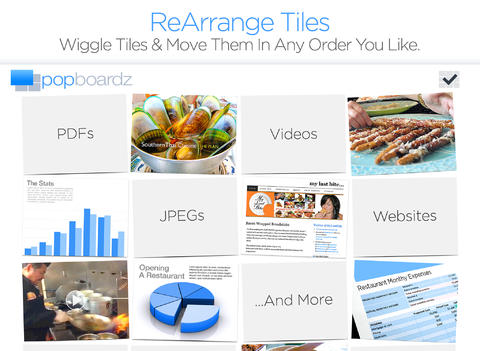
Recently updated and FREE for a limited time – Popboardz, a productivity tool that normally sells for $4.99.  Popboardz makes it easy to organize, store, and present information. Each board is a grid with 16 spaces for content so that all of your PDFs, images, videos, websites, can be arranged on one screen. Unlike other presentation tools, Popboardz makes it easy to customize your presentation to meet the needs of your group. Just click on the grid space that contains the example, information, or link that you would like present next! It’s easy to skip around. This app would be fabulous to use in the classroom. A teacher could organize all his/her digital resources for a unit on one board. That board can be saved so it is always ready to present! It is also easy to edit and/or rearrange boards so that lessons can be tweaked as new resources become available. Students could also use Popboardz – to organize information, to present projects, to give reports, and more. What a great educational app!

Download link: https://itunes.apple.com/us/app/popboardz/id563989511?mt=8&uo=4
0

Trading Cards

trading cards

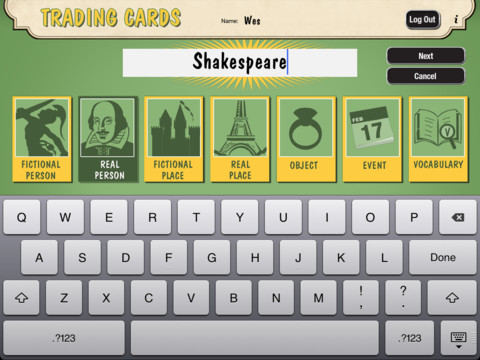
Fabulous educational app!!! ReadWriteThink’s Trading Cards is powerful FREE app developed by the International Reading Association. This educational app provides a unique way for kids to share their understanding of topics, generate their own study aids, create a fictional world to use in their writing, make their own trading cards, and more. There are 7 categories of cards available within the app: fictional person, real person, fictional place, real place, object, event, and vocabulary. Kids start by choosing a category and typing in the title of the card. Each category has specific questions which help kids create information-rich trading cards. Images can be added by using the device’s camera or by accessing pictures in the photo library. Kids can also sort their cards into collections such as characters from a book, heroes or villains, landmarks, the 50 states, vocabulary by subject, etc. The possibilities are endless! Cards can be shared via email, saved to the photo library, or printed on a wireless printer. And… the kid appeal is tremendous. Kids will LOVE trading their cards with their classmates 🙂

Highly recommended!!

Trading Cards - International Reading Association

0

Homework+

Homework+

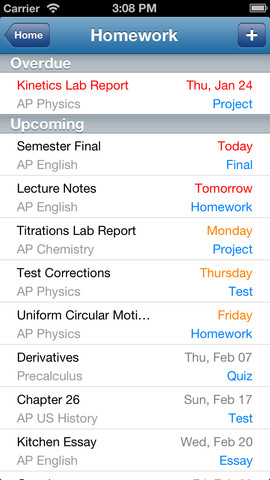
FREE again, for a limited time – Homework+, a simple to use homework/test planner. This educational app is geared towards older students who are taking multiple classes. It could also be used with younger kids as an electronic assignment book. It’s never too early to teach kids how to be organized. 🙂

To set up the app, first edit the subject list & category lists to reflect what you are studying. After that, it is very easy to add assignments to the calendar – just give the assignment a title, choose the subject & category, put in the due date, choose a level of priority, and save. As you finish an assignment, mark it as complete and the app moves it to the finished list. App badges show you how many assignments you have and how many you have finished. Notifications can be set (1 or 2 days before) to remind you of an upcoming assignment. The app also keeps track of overdue assignments. Very slick and intuitive – great for teaching kids to be organized!!

Homework+ - Chijang Huang

0

ScreenChomp

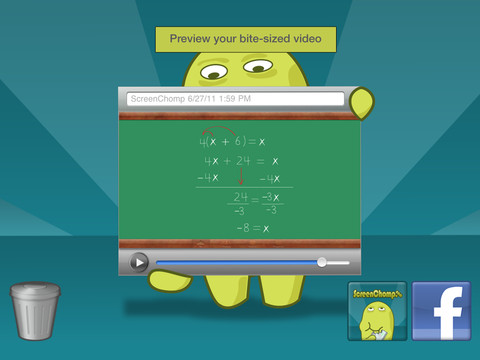
ScreenChomp is a powerful tool that can be used in so many ways and it’s FREE!! It is basically turns your iPad into a recordable whiteboard. You can use it to sketch out and record ideas for yourself or to share with others. Teachers can send tutorial videos home with kids. Kids can create videos to help each other. The possibilities for this educational app are only limited by one’s imagination.

Here is a link to a You Tube video that explains how it works: What is ScreenChomp? The iPad app to Record. Sketch. Share! – YouTube.

Highly recommended!

ScreenChomp - TechSmith Corporation

0

Record of Reading

Record of Reading

Record of Reading by Clemson University is a FREE educational app that was most recently updated on April 24, 2013. The app provides an electronic form for taking running records (an assessment of oral reading developed by Marie M. Clay). The teacher still needs to do the coding and the analysis of the child’s reading. But… the app has formulas for accuracy and self-corrections embedded in it so that there is no need for a calculator!! The app also records the student’s voice as the teacher is taking the record. After the running record is completed, it can be saved and/or emailed! If you are an elementary school teacher who regularly uses running records, you are going to want to check this educational app out. 🙂

A fabulous tool for elementary teachers – thank you Clemson!!

Record of Reading - Clemson University

0

Trading Cards

trading cards

Fabulous educational app!!! ReadWriteThink’s Trading Cards is powerful FREE app developed by the International Reading Association. This educational app provides a unique way for kids to share their understanding of topics, generate their own study aids, create a fictional world to use in their writing, make their own trading cards, and more. There are 7 categories of cards available within the app: fictional person, real person, fictional place, real place, object, event, and vocabulary. Kids start by choosing a category and typing in the title of the card. Each category has specific questions which help kids create information-rich trading cards. Images can be added by using the device’s camera or by accessing pictures in the photo library. Kids can also sort their cards into collections such as characters from a book, heroes or villains, landmarks, the 50 states, vocabulary by subject, etc. The possibilities are endless! Cards can be shared via email, saved to the photo library, or printed on a wireless printer. And… the kid appeal is tremendous. Kids will LOVE trading their cards with their classmates 🙂

Highly recommended!!

Trading Cards - International Reading Association

0

Teacher Clicker – Socrative / Student Clicker – Socrative

Still FREE and now even better!! Socrative has just added two additional quiz features: # 1 – Teachers can now add images to their questions. #2 – The system can now grade short answer questions. Teachers just input the acceptable answers and the system does the rest.  🙂

This website and app are unbelievably cool – they turn any device with a web browser (iPhone, iPad, laptops) into a student response clicker. If a teacher has access to any kind of wireless lab, he/she can engage the entire class in a game or quiz and watch the results in real-time. Teachers begin by using their teacher app or logging into t.socrative.com with their email and password. Once logged in, teachers are assigned a room number to share with their students. Students log in using their student app or at m.socrative.com and enter the “virtual room number” provided by the teacher. Teachers initiate an activity and students respond on their devices. Multiple choice and short answer quizzes are easy to create – types of questions can be mixed. Teachers can also choose to run the quiz as a Space Race game. The students’ responses are visible to the teacher in real-time. Teachers can see what each child answered individually as well as what the group answered collectively. And the best part is… the app grades, graphs the results, and generates a report as an Excel spreadsheet or an email.

What a powerful tool for teachers – a short quiz at the end of a lesson can pinpoint what students understand and what needs to be retaught. Hours of grading and analyzing test results are done immediately. Every student is involved – wow!

Highly recommended!

Teacher app Teacher Clicker - Socrative - Socrative           Student app Student Clicker - Socrative - Socrative

0

Tellagami

Telegami

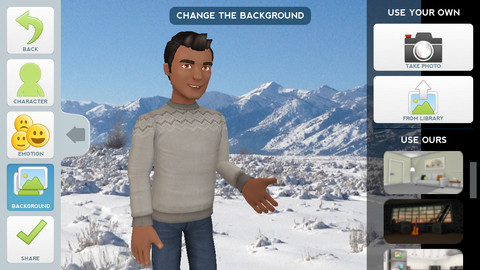
Currently FREE, Tellagami (rhymes with origami) is a unique storytelling app. Short stories called gamis are easy to create. First you select and customize a character by choosing his/her skin tone, eye color, hair color, and clothing. Then you choose an emotion – happy, sad, surprised, angry, scared, silly. Next you choose a background from the app, from your photo library, or create one by using your camera. You are now ready to create your gami. You can record your gami in you own voice or choose the text button to type in what your character will say  – the limit is 450 characters. Gamis can be shared via email, messaging, Facebook, or Twitter.

This educational app is fabulous!! Its uses are only limited by your imagination!! Kids can use gamis to introduce themselves at the beginning of the year. They can customize gamis to look like themselves and be reporters, scientists, teachers, etc. They can create the character (and setting) from a book they are reading. They can message or email a parent to explain what they are learning in class. Teachers could use gamis as interactive exit slips. The list is endless. Kids will LOVE creating gamis!

Tellagami ™ - Tellagami Inc.

0

Speech Journal

Speech Journal

FREE again for a limited time – Speech Journal. Parents, teachers, and speech pathologists will love this customizable voice recorder that allows recorded messages to be paired with imported images. This educational app is very easy to use. First the child creates a profile to store and save recordings. Then he/she chooses an image – by using the device’s camera or from the photo library. Next the voice recording is added. When completed, the child may listen to the recording, erase and rerecord it, or save the recording. Additional recordings can be added to create a slideshow. Recordings can be shared with other teachers, parents, grandparents, etc. via email. Suggested uses for Speech Journal include: customized picture sequences, expressive language exercises, articulation drills, multi-step directions, picture schedules, family picture albums, and more! A fabulous resource with so many uses. 🙂

Speech Journal - Mobile Education Store LLC

0

Popboardz

Popboardz

Recently updated and FREE for a limited time – Popboardz, a productivity tool that normally sells for $4.99.  Popboardz makes it easy to organize, store, and present information. Each board is a grid with 16 spaces for content so that all of your PDFs, images, videos, websites, can be arranged on one screen. Unlike other presentation tools, Popboardz makes it easy to customize your presentation to meet the needs of your group. Just click on the grid space that contains the example, information, or link that you would like present next! It’s easy to skip around. This app would be fabulous to use in the classroom. A teacher could organize all his/her digital resources for a unit on one board. That board can be saved so it is always ready to present! It is also easy to edit and/or rearrange boards so that lessons can be tweaked as new resources become available. Students could also use Popboardz – to organize information, to present projects, to give reports, and more. What a great educational app!

Download link: https://itunes.apple.com/us/app/popboardz/id563989511?mt=8&uo=4