0

ClassDojo

Start out your school year with ClassDojo, a FREE & fabulous tool that helps improve classroom behaviors. Teachers are using it in different ways: to give feedback in real-time, to track behavior, and to generate reports. Reward good behavior in real-time – all it takes is a click. You need one device (computer, smartphone, a laptop, or a tablet) and an internet connection. It is very easy to set up with your class list. Each student is assigned a cute, monster-like avatar. Kids earn points for positive behaviors and lose points for negative behaviors. ClassDojo is also fully customizable so you can delete behaviors from the original list and/or add your own behaviors. As you use it, it automatically logs any data that you input. This data can be used to generate behavior reports to share with parents and administrators. How awesome is that? You can go into a meeting/conference with reports in hand!

If I were still in the classroom, I would enter my class list twice – once for data on work/study habits and the other for data on behaviors. I would make my habits/behaviors match exactly what was on my report cards. Then as I used the app, I would also be gathering data for my report cards. At the end of the grading period, I would just print out the date and enter it on the report cards – how easy!  I would also have the data (in a printed report) to be able to back up any grade on the card.  “As you can see Mrs. Doe, Jane only turned in her homework 56% of the time.”  Instant data would also be available for the RTI process, IEPs or any other team meeting on a child. Wow – a fabulous educational app!!

Check out the website for more information: www.classdojo.com

Highly recommended !!

ClassDojo - Class Twist Inc

0

Pic Collage

Pic Collage

FREE with in-app purchases – Pic Collage, a fabulous app for creating collages! With PicCollage you easily create creative collages with your pictures and/or pictures from the internet. You can change photos into backgrounds, clip them into cutouts, apply filters, add borders, and more! You can also add stickers and text.  So many fun uses of this app for education – have students make a Pic Collage to introduce themselves at the start of the year, send students on a scavenger hunt of geometric shapes then have them make a Pic Collage of what they found, add a PIc Collage to a science report, Make a Pic Collage representing the main character of a book, etc. The list is only limited by your imagination! I LOVE educational apps like this – open-ended with great potential for creativity! WOW!!

Download link: https://itunes.apple.com/us/app/pic-collage/id448639966?mt=8&uo=4

0

Artkive

Now that it is summer, you may want to create a digital book of your child’s latest year in school. You can use Artkive, a productivity app, to do so. You may have heard of  this app because it has been featured on THE TODAY SHOW and in Real Simple magazine.

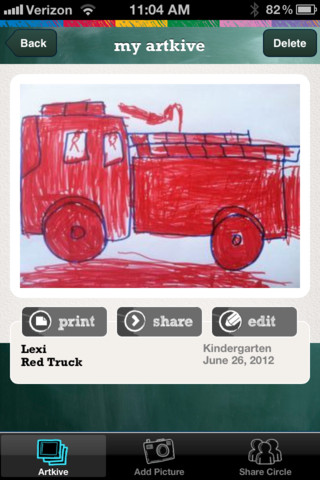
Artkive makes it easy to digitally store, share, and print your children’s artwork/schoolwork. Originally released on August 11, 2012  – this app for the iPhone/iPad is FREE again. It is very easy to use…. First you create an account. Then enter the first names of your children. Take photos of their artwork/schoolwork or upload existing photos from your camera roll. Tag the photo with a child’s name, age or grade, the date, and a title. So simple! You can then share their art with family & friends. You will also be able to have Artkive create digital books & other products using your child’s artwork/schoolwork. You can even order a few holiday presents while you’re at it. 🙂 Artkive makes it easy to collect, store, and share your children’s artwork.

What a great idea! As a parent, you can use it to create books for your children, of any age. I plan to make gift books for my adult children of the art/work that I have saved for years – yay, no more clutter!! As a teacher, you could use it to create digital portfolios of children’s work. Lots of possibilities with this one…. try it yourself while it is free!

To learn more @ http://www.artkiveapp.com/

Recommended!

Artkive - The Kive Company

0

ClassDojo

Recently updated, ClassDojo is a FREE & fabulous tool that helps improve classroom behaviors. Teachers are using it in different ways: to give feedback in real-time, to track behavior, and to generate reports. Reward good behavior in real-time – all it takes is a click. You need one device (computer, smartphone, a laptop, or a tablet) and an internet connection. It is very easy to set up with your class list. Each student is assigned a cute, monster-like avatar. Kids earn points for positive behaviors and lose points for negative behaviors. ClassDojo is also fully customizable so you can delete behaviors from the original list and/or add your own behaviors. As you use it, it automatically logs any data that you input. This data can be used to generate behavior reports to share with parents and administrators. How awesome is that? You can go into a meeting/conference with reports in hand!

If I were still in the classroom, I would enter my class list twice – once for data on work/study habits and the other for data on behaviors. I would make my habits/behaviors match exactly what was on my report cards. Then as I used the app, I would also be gathering data for my report cards. At the end of the grading period, I would just print out the date and enter it on the report cards – how easy!  I would also have the data (in a printed report) to be able to back up any grade on the card.  “As you can see Mrs. Doe, Jane only turned in her homework 56% of the time.”  Instant data would also be available for the RTI process, IEPs or any other team meeting on a child. Wow – a fabulous educational app!!!!

Check out the website for more information: www.classdojo.com

Highly recommended !!

ClassDojo - Class Twist Inc

0

Tellagami

Telegami

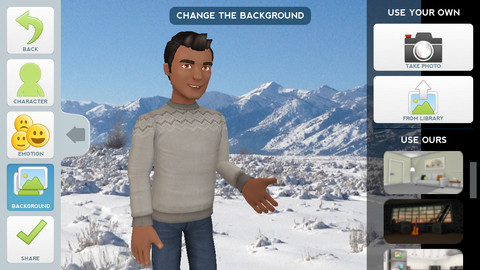
Currently FREE, Tellagami (rhymes with origami) is a unique storytelling app. Short stories called gamis are easy to create. First you select and customize a character by choosing his/her skin tone, eye color, hair color, and clothing. Then you choose an emotion – happy, sad, surprised, angry, scared, silly. Next you choose a background from the app, from your photo library, or create one by using your camera. You are now ready to create your gami. You can record your gami in you own voice or choose the text button to type in what your character will say  – the limit is 450 characters. Gamis can be shared via email, messaging, Facebook, or Twitter.

The educational app is fabulous!! Its uses are only limited by your imagination!! Kids can use gamis to introduce themselves at the beginning of the year. They can customize gamis to look like themselves and be reporters, scientists, teachers, etc. They can create the character (and setting) from a book they are reading. They can message or email a parent to explain what they are learning in class. Teachers could use gamis as interactive exit slips. The list is endless. Kids will LOVE creating gamis!

Tellagami ™ - Tellagami Inc.

0

Paper Camera

Paper Camera

FREE today only – Paper Camera, an app that permits you to add special effects to your photos in real-time. Just open the app, choose camera or video, then choose one of the 12 special effects – comic boom, sketch up, acquarello, old printer, con tours, neon cola, bleaching, gotham noir, half ton, granny’s paper, pastel perfect or andy pop. The effects are applied to your photo as you make the shot! You can point you camera at a scene and toggle between effects to decide which one to use. The app also permits you to “paper-ize” existing photos from your photo library/camera roll. Very slick!!

SO many educational ideas for this app… Video your kids playing using the cartoon mode. Add special effects to digital artwork. Create party invitation using the andy mode. The list could go on and on – so creative!!

Paper Camera - JFDP Labs Limited

0

Halftone

Half Tone

Halftone was FREE over the weekend but is now back to $.99. Named by Apple as a favorite photo app of 2011, Halftone makes it easy to turn your photos into vintage-looking comics that your friends and family will love!  It’s simple to add paper styles, captions, speech balloons, graphic stamps, and fonts to your photos. Because it is so easy to use, this app would be great for creating the art to go with classroom projects – for stories, book reports, newsletters, etc. Lots of creative uses for this educational app!

Keep reading my blog to find out when this app goes FREE again!

Halftone - Juicy Bits

1

ToonCamera

ToonCamera

FREE for a limited time – ToonCamera, a very cool photography app that turns photos and videos into cartoons. Using this app you can apply real-time cartoon effects to record videos, snap photos, or convert existing videos/photos. Your artistic creations can be saved or shared through email, Facebook, Twitter, Flickr, Tumblr, Instagram, and YouTube. There are multiple effects that you can apply to your photos – cartoon, pencil, stipple, & ink. Easy to use, this app would be great for creating the art to go with classroom projects – for stories, book reports, newsletters, etc. VERY COOL!!

ToonCamera - Code Organa

0

Homework+

Homework+

FREE again, for a limited time – Homework+, a simple to use homework/test planner. This educational app is geared towards older students who are taking multiple classes. It could also be used with younger kids as an electronic assignment book. It’s never too early to teach kids how to be organized. 🙂

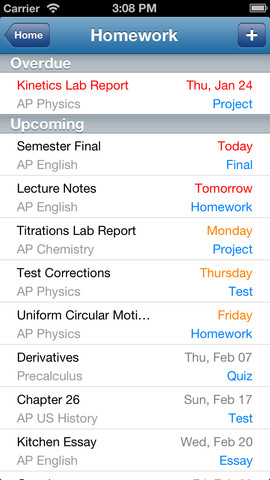
To set up the app, first edit the subject list & category lists to reflect what you are studying. After that, it is very easy to add assignments to the calendar – just give the assignment a title, choose the subject & category, put in the due date, choose a level of priority, and save. As you finish an assignment, mark it as complete and the app moves it to the finished list. App badges show you how many assignments you have and how many you have finished. Notifications can be set (1 or 2 days before) to remind you of an upcoming assignment. The app also keeps track of overdue assignments. Very slick and intuitive – great for teaching kids to be organized!!

Homework+ - Chijang Huang

0

Bitsboard Pro – Education, Games, and Flashcards for Learning Reading, Spelling, and more

Bitsboard

Just yesterday, I reviewed Bitsboard and today Bitsboard Pro is FREE for a limited time. Both versions are ideal for teaching languages, vocabulary, sight words, spelling, and more. However, Bitsboard Pro has many more options than the FREE version. It has 10 games – the 3 in the FREE version: Flashcards (10,000+ free flash cards with fully customizable settings), Explore (reviews all flashcards), and Photo Touch (spot the correct item game) PLUS… the 7 games that are in-app purchases in the FREE version. Both educational apps are easy to use and fully customizable so that you can use them to create games for whatever you are teaching. And, you can see that people have done just that because within the app you have access to the Bitsboard catalog. It includes thousands of flashcards with lessons covering a variety of topics. If all of that hasn’t convinced you that you need this app, this feature certainly will – Bitsboard Pro supports multiple users and keeps track of their progress!!

Recommended – a great app with loads of potential!!

Bitsboard PRO - The Best Educational Games and Flash Cards in 1 App - GrasshopperApps.com