0

Smart White Board HD

super white board

FREE whiteboard app, Smart White Board HD, is super simple to use! One finger writes, 2 fingers erase, 3 fingers clears all. Press the save button or shake your device to save an image. You can write in black, blue, or red and in 3 thicknesses. The app also includes a simple voice recorder. Just press record, talk, stop & name your file, and it is saved to a list. You can then email your recording if you wish to share it. Teachers can get rid of their classroom whiteboards, markers, and erasers! Have kids show their work, explain their thoughts, etc. with this simple app!

Smart White Board HD - Pad read

0

Trading Cards

trading cards

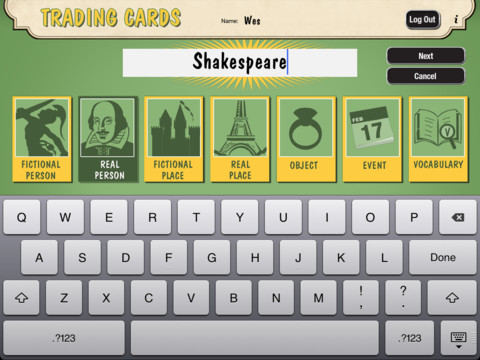
Fabulous app!!! ReadWriteThink’s Trading Cards is powerful FREE app developed by the International Reading Association. This app provides a unique way for kids to share their understanding of topics, generate their own study aids, create a fictional world to use in their writing, make their own trading cards, and more. There are 7 categories of cards available within the app: fictional person, real person, fictional place, real place, object, event, and vocabulary. Kids start by choosing a category and typing in the title of the card. Each category has specific questions which help kids create information-rich trading cards. Images can be added by using the device’s camera or by accessing pictures in the photo library. Kids can also sort their cards into collections such as characters from a book, heroes or villains, landmarks, the 50 states, vocabulary by subject, etc. The possibilities are endless! Cards can be shared via email, saved to the photo library, or printed on a wireless printer. And… the kid appeal is tremendous. Kids will LOVE trading their cards with their classmates 🙂

Highly recommended!!

Trading Cards - International Reading Association

1

Rhyme Lite

rhyme

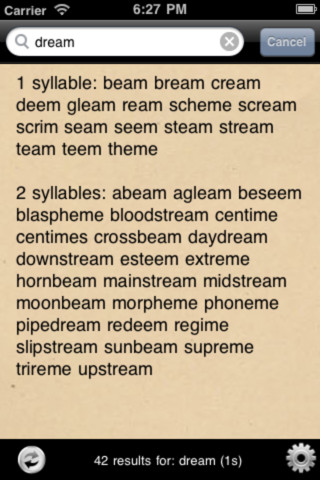
It’s called Rhyme Lite but it contains over 120,00 words – nothing lite about that!! This app for the iPad is simple to use. It is basically a rhyming dictionary at your fingertips. Just type in a word and the app will generate 1 syllable or 2 syllable rhyming words. There is also the option for 3 syllable rhyming words. BEWARE – words that are inappropriate for a school setting are included.  So…. if you have kids that are inclined to look up “bad words” in the dictionary, they will probably use this app to find rhymes for those “bad” words. Consider yourself warned  – it is billed as an app for poets, rappers, and romantics rather than a kids. That being said – it would be a useful tool for teachers who are trying to generate lists of words that rhyme, words that sound alike but look different, etc.

Rhyme Lite | must-have for poets, song writers, rappers and romantics - A2rt

0

SketchTime – Quick Sketching and Photo Tracing

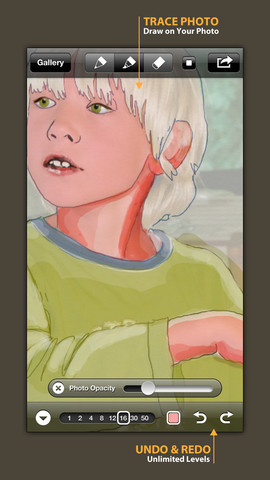
FREE today! SketchTime for the iPhone/iPad makes sketching and tracing simple – as they should be! Just open the sketch pad, pick your gel-like pen or marker, and go. This app is very simple to use with all the tools right at your fingertips. It’s also very quick to change from pen to marker and to change sizes & colors. Photos can be imported in color or black and white and the adjustable transparency makes them easy to trace. Finished sketches can be locked to prevent deleting/editing. There is also a playback option.

This app would be awesome to have in a classroom. Students could sketch out answers to math problems, sketch what they visualize as they read, illustrate the meanings of words, sketch to explain a concept in science, etc. The possibilities are endless. When a sketch is complete, it can easily be saved, emailed, tweeted, and/or duplicated. Kids would love having their sketches featured and as they explain their thinking to others. Great app that can be used across the curriculum with all ages – this one is a keeper!

Highly recommended!

SketchTime - Quick Sketching & Photo Tracing - Hansol Huh

0

Doodle Buddy – Paint, Draw, Scribble, Sketch – It’s Addictive

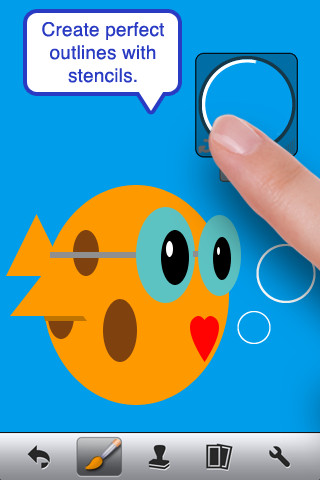
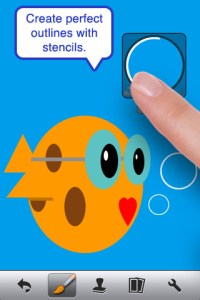
The FREE version of Doodle Buddy (for the iPhone/iPad) is great for drawing and creating pictures. It comes with five kinds of tools. The drawing tool has several options – a brush, chalk, glitter, smudge, an eraser, and a color picker with thousands of colors. The stamper tool includes 80+ stamps with the option of making them small or large. Each stamper makes a funny sound when used. The stencil tool comes 6 stencils (basic shapes) with the option to buy other sets as an in-app purchase. Sets available to purchase are theme-based such as fashion, beach, cars, princess, dinosaurs, Christmas, and more. The text tool has 4 fonts with the ability to resize them. Text can be written in any color you choose. The background tool has about 30 backgrounds to choose from or you have the ability to pull in your own photos. Armed with such great tools, you can only imagine the fun you or your child will have creating a works of art! And…. the finished masterpieces can be saved to your photo album and/or shared via email. Fun!!!

There are so many fun ways to use this app. Kids can use it to illustrate their stories because saved illustrations can easily be pulled into a story writing app such as My Story – see my review from June 27. Have kids draw pictures of their vacation then save into photos and use as additional pictures or backgrounds for a photo vacation booklet created on Snapfish, etc. Make a book for Father’s Day, Mother’s Day, a grandparent, etc. – incorporating your child’s drawings and family photos. If creating a family cookbook, have kids do the illustrations. The list goes on……

Highly recommended!

Doodle Buddy for iPad – Paint, Draw, Scribble, Sketch – It’s Addictive! - Pinger, Inc.

1

ClassDojo

ClassDojo is a tool that helps teachers improve classroom behaviors. It is currently FREE because it is in beta form. It works with a smartphone, a laptop, or a tablet. Every student in your class gets their own cute little monster avatar. Kids earn points for positive behaviors and lose points for negative behaviors. As you use it, it automatically logs any data that you input. This data can be used to generate behavior reports to share with parents and administrators. It is very easy to set up and it is fully customizable – you can delete behaviors from the original list and add your own behaviors.Teachers are using it in different ways: to give feedback in real-time, to track behavior, and to generate reports.

If I were still in the classroom, I would enter my class list twice – once for data on work/study habits and the other for data on behaviors. I would make my habits/behaviors match exactly what was on my report cards. Then as I used the app, I would also be gathering data for my report cards. At the end of the grading period, I would just print out the date and enter it on the report cards – how easy!  I would also have the data (in a printed report) to be able to back up any grade on the card.  “As you can see Mrs. Doe, Jane only turned in her homework 56% of the time.”  Instant data would also be available for the RTI process, IEPs or any other team meeting on a child. Wow !!!!

Check out the website for more information: www.classdojo.com

Highly recommended !!

ClassDojo - Class Twist Inc

0

Geoboard by Math Learning Center


From The Math Learning Center (a nonprofit organization dedicated to K – 12 education) comes this FREE app that turns your iPhone/iPad into a virtual geoboard. Geoboards can be used as tools to teach mathematical concepts such as polygons, perimeter, area, line segments, angles, congruent shapes, symmetry, fractions, etc. Shapes are created by stretching bands on the geoboard’s pegs. There are 5 colors of bands in the iPhone version and 8 in the iPad version. There is also a tool to fill in shapes. On the iPad version, you can switch from the standard 25 peg board to a 150 peg board to create more complex shapes. This is a great app with the potential to be used in so many ways.

Highly recommended for your virtual math tool kit!

Check out my August 12 review of Virtual Manipulatives for another great app to add to your virtual math tool kit.

Geoboard, by The Math Learning Center - Clarity Innovations

0

My Editing Buddy

This iPad app is a FREE simple to use word processor designed for use in elementary classrooms. But…there is so much more to this app. Kids can share their work with classmates and learn to edit using this app. To create an account, you need to provide an email address. The app can be used without an account but it will not save documents. After the account is created, just log in and create your document. Then it’s time to share your work with someone who will edit it. You can choose: “pass & edit” or “add to sharing network.” If you choose “pass & edit” you literally hand your work to someone for editing. Symbols and sticky notes are along the bottom of the screen when the app is in the editing mode. The “editor”  just drags the appropriate symbol in place to edit the document. A glossary of symbols is available by tapping the question mark. Sticky notes are available for more detailed feedback. When finished, your “editor” saves then returns your work. You can now swipe from your word processing version to the edited version and make revisions. If you choose “add to sharing network” your work will posted to your class for anyone to edit. Teachers need to set up a class for their students and provide students with the class password. Be aware that anyone who has an account can set up “a class” so teachers may have to monitor this option. What an awesome way to get kids involved in and excited about peer editing!!

Common Core Standards met:

  • K.W.5 /1.W.5/2.W.5/ – With guidance and support from adults, respond to questions and suggestions from peers and add details to strengthen writing as needed.
  • 3.W.5/4.W.5/5.W.5 – With guidance and support from peers and 5. adults, develop and strengthen writing as needed by planning, revising, and editing.

Highly Recommended!

My Editing Buddy - Interactive Elementary

0

Chalk_Board

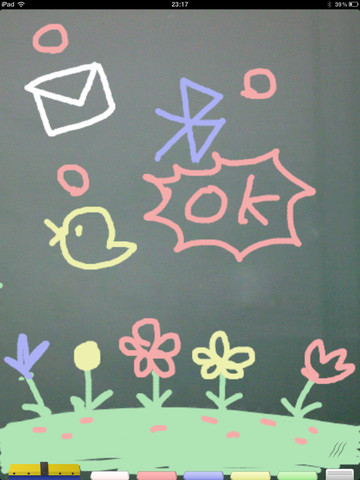
This FREE app for the iPad changes your device into a chalkboard. It has five colors of chalk and three erase options (undo, erase with finger, erase all). It even sounds like you are writing on a chalkboard as you use it! When you have finished your work, you can share it 5 different ways – publish on a shared list, save it to photos, tweet it, email it, or share via bluetooth. Unfortunately, the ability to publish to a shared list makes this app a problem for classroom use. Anyone can draw anything and submit it to be voted on. So kids using this app can see those drawing – appropriate or not. 😦  So sad, because this app could have taken the place of whiteboards in your classroom – no need for dry erase markers/erasers.

If there was a way to disable parts of this app I would highly recommend it but until then….use cautiously if at all.

CHALK_BOARD - conol, Inc.