FREE – Smart Whiteboard HD, an educational app that is super simple to use! One finger writes, 2 fingers erase, 3 fingers clears all. Press the save button or shake your device to save an image. Writing can be done in black, blue, or red with 3 width choices. The app also includes a simple voice recorder. Just press record, talk, stop & name your file, and it is saved to a list. You can then email your recording if you wish to share it. Teachers can get rid of their classroom whiteboards, markers, and erasers! Have kids show their work, explain their thoughts, etc. with this simple educational app!
Tag Archives: classroom tool apps
ClassDojo
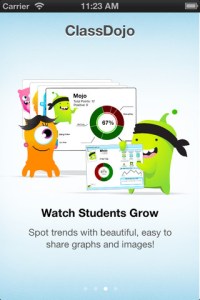
ClassDojo is a FREE & fabulous tool that helps improve classroom behaviors. Rewarding good behavior in real-time is easy – all it takes is a click. To use ClassDojo, you only need one device (computer, smart phone, a laptop, or a tablet) and an internet connection. It is very easy to set up. Each student on your class list is assigned a cute, monster-like avatar. Kids earn points for positive behaviors and lose points for negative behaviors. ClassDojo is also fully customizable so you can delete behaviors from the original list and/or add your own behaviors. As you use it, it automatically logs any data that you input. This data can be used to generate behavior reports to share with parents and administrators. How awesome is that? You can go into a meeting/conference with reports in hand! And now, parents can check online to see what kind of day their child is having.
And, ClassDojo just keeps getting better. FREE messaging has been added to the app. Teachers can now send “direct” messages and/or photos to individual parents or they can “broadcast” a message to all parents. Sending reminders, assignments, homework, permission slips, etc. just became easier! Another newer addition to ClassDojo the option of creating groups. Teachers can now put students into groups – making it simple to award table points, team points etc. Fostering a collaborative classroom culture is simple with ClassDojo.
If I was still in the classroom, I would enter my class list twice – once for data on work/study habits and the other for data on behaviors. I would make my habits/behaviors match exactly what was on my report cards. Then as I used the app, I would also be gathering data for my report cards. At the end of the grading period, I would just print out the date and enter it on the report cards – how easy! I would also have the data (in a printed report) to be able to back up any grade on the card. “As you can see Mrs. Doe, Jane only turned in her homework 56% of the time.” Instant data would also be available for the RTI process, IEPs or any other team meeting on a child. What a powerful tool for teachers! An educational app that has the ability to positively impact the learning environment – LOVE it!!
Check out the website for more information: www.classdojo.com

Photo Mapo
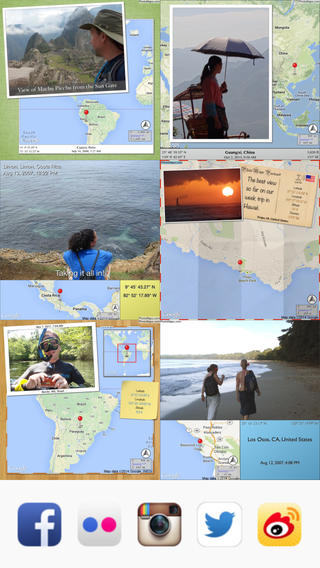
FREE today – Photo Mapo, an easy-to-use photography app/fabulous tool for classroom projects. This app easily transforms any photo into a mapped masterpiece. The app features twenty-three styles. Projects can be customize by changing the background, map type, & zoom level. There is also an option to add a 180 character description. Finished projects can be shared by email or saved to the camera roll. How fabulous!! Kids can use this app to connect events (real or make-believe) to their settings. They can use it with: pictures of grandparents/great-grandparents to show their native countries, with scanned drawings of story scenes to show the setting, with pictures/drawing of animals to show their habitats, with historical photos to show locations, etc. Kids could also create virtual postcards with this app. Photo Mapo has loads of potential for classroom use!
Direct Link: https://itunes.apple.com/us/app/photo-mapo-add-map-to-your/id525258687?mt=8
Number Pieces
FREE educational app – Number Pieces from Math Learning Center. This educational app is the digital version of place value manipulatives, hands-on tools used to help students understand place value. Using the place value models within this app, kids can visualize the process of adding and subtracting ones, tens, and hundreds. The app has a function that permits kids to break apart pieces or join them together. This feature is fabulous for kids who need concrete examples. The app also includes expanding edge pieces which can be used to introduce arrays. Other features of the app include: three colors for identifying groups, drawing tools for labeling, a text tool for writing number sentences, zooming & scrolling for larger numbers. Thanks to the Math Learning Center, teachers & their students have another great app to add to their digital toolkits!
Common Core Standards:
- 1.NBT.6. Subtract multiples of 10 in the range 10-90 from multiples of 10 in the range 10-90 (positive or zero differences), using concrete models or drawings and strategies based on place value, properties of operations, and/or the relationship between addition and subtraction; relate the strategy to a written method and explain the reasoning used.
- 2.NBT.1 Understand that the three digits of a three-digit number represent amounts of hundreds, tens, and ones; e.g., 706 equals 7 hundreds, 0 tens, and 6 ones. Understand the following as special cases: a. 100 can be thought of as a bundle of ten tens — called a “hundred.” b. The numbers 100, 200, 300, 400, 500, 600, 700, 800, 900 refer to one, two, three, four, five, six, seven, eight, or nine hundreds (and 0 tens and 0 ones).
Download link: https://itunes.apple.com/us/app/number-pieces-by-math-learning/id605433778?mt=8&uo=4
Poetics – create, write and share visual poetry
Poetics – create, write and share visual poetry, is FREE again. Writing visual poetry is easy with Poetics. The app combines photographic imagery and moveable text. Just choose a picture from your camera roll and write how it makes you feel – a word, a caption, or a poem. Or you can write a poem then search for the perfect image to accompany it. Words can be scaled, rotated, etc. as they are placed on the page. The app saves each project as it is being created. Finished poetry can be shared on Instagram, Facebook, postcards, and more. Kids could use Poetics to create and share postcards or journal entries of their summer activities. How fun!!
Direct Link https://itunes.apple.com/us/app/poetics-create-write-share/id543995959?mt=8&uo=6&at=&ct=
Number Line, by the Math Learning Center
Number Line, by the Math Learning Center is a fantastic FREE app that will help kids visualize number patterns and understand number operations. The app is well-designed with several useful features. The number line can be set by ones, twos, fives, tens, twenty-fives, and hundreds. It can also be customized to show multiples of any whole number from 1 to 100. This feature is perfect for skip counting and/or for visualizing multiplication. The app permits kids to add and manipulate forward & backward jumps – a great feature for teaching addition & subtraction. This feature also helps kids visualize multiplication as repeated addition of the same number and division as repeated subtraction of the same number. Teachers are able to hide or reveal numbers on the number line. This feature can be used to challenge kids to apply what they know in order to figure out the missing number/numbers. Teachers can also use this feature to teach kids how to solve more difficult patterns that are missing several numbers; such as 4, __, __, 16. Kids can use the drawing tools to show what they know. They can write equations and expressions with the text tool. They can screen shot their work and use it as an exit slip after a lesson. Add this one to your virtual toolkit today – “seeing math” helps kids understand it. 🙂
Download Link: https://itunes.apple.com/us/app/number-line-by-math-learning/id751816884?mt=8&uo=4
Artkive
Now that it is summer, you may want to create a digital book of your child’s latest year in school. You can use Artkive, a productivity app, to do so. You may have heard of this app because it has been featured on THE TODAY SHOW and in Real Simple magazine.
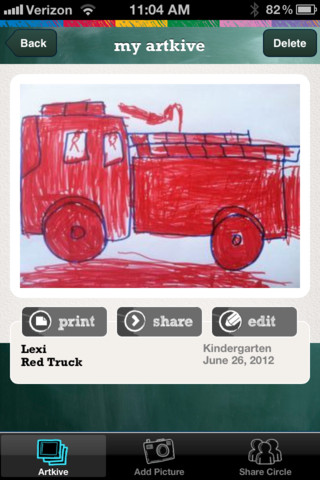
Artkive makes it easy to digitally store, share, and print your children’s artwork/schoolwork. Originally released on August 11, 2012 – this app for the iPhone/iPad is FREE again. It is very easy to use…. First you create an account. Then enter the first names of your children. Take photos of their artwork/schoolwork or upload existing photos from your camera roll. Tag the photo with a child’s name, age or grade, the date, and a title. So simple! You can then share their art with family & friends. You will also be able to have Artkive create digital books & other products using your child’s artwork/schoolwork. You can even order a few holiday presents while you’re at it. 🙂 Artkive makes it easy to collect, store, and share your children’s artwork.
What a great idea! As a parent, you can use it to create books for your children, of any age. I plan to make gift books for my adult children of the art/work that I have saved for years – yay, no more clutter!! As a teacher, you could use it to create digital portfolios of children’s work. Lots of possibilities with this one…. try it yourself while it is free!
To learn more @ http://www.artkiveapp.com/
Smart Whiteboard HD
FREE – Smart Whiteboard HD, an educational app that is super simple to use! One finger writes, 2 fingers erase, 3 fingers clears all. Press the save button or shake your device to save an image. Writing can be done in black, blue, or red with 3 Width choices. The app also includes a simple voice recorder. Just press record, talk, stop & name your file, and it is saved to a list. You can then email your recording if you wish to share it. Teachers can get rid of their classroom whiteboards, markers, and erasers! Have kids show their work, explain their thoughts, etc. with this simple educational app!

Shadow Puppet
Use the power of this app to create a unique Father’s Day tribute or greeting!!
Fabulous and FREE – Shadow Puppet is a photography app which has been featured by Apple as a Best New Apps. Using this app, it’s easy to create “puppets” – recorded explanations of your photos. First you choose your photos and put them in the order. Then you talk about your pictures. Everything is recorded. Finished “puppets” can be shared via email, SMS, Facebook and/or Twitter. There are so many ways for everyone to use Shadow Puppet: to teach something new, to share adventures with friends, to record children talking about their experiences, to tell the story behind old family photos, etc.
Recent updates have added many new features. Now you can include video clips, add music, search the web for images, overlay text/stickers, and more! The FREE version of the app permits you to include up to 10 photos/video clips. For $1.99 you can get Puppet Essentials which allows you to add up to 100 items to each video and have access to more drawing & decorating tools. The update made this great app even better!
The classroom uses for this app are only limited by your imagination: Take pictures of a child’s work and have him/her explain it to parents. Send pictures and voice recordings of the class field trip. Have kids give a step-by-step explanation of what happened in a science experiment. Draw & sequence pictures to retell a story. Make a “talking timeline” by sequencing photos of historical events. Have kids use it to present mini reports on any subject. Have virtual “pet day” – kids bring in pictures/recordings of their pets. Because you can use anything saved to your photo library, you can explain photos from the web, artwork created in other apps, and so much more. The possibilities for using this educational app are endless. For more suggestions go to http://get-puppet.com/education. What a fabulous resource!!
Download link: https://itunes.apple.com/us/app/shadow-puppet/id700902833?mt=8&uo=4
Use Your Handwriting GOLD
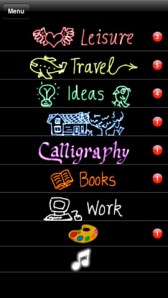
FREE for a limited time… a “productivity” app called Use Your Handwriting GOLD. This app normally sells for $9.99 and it has LOTS of potential for classroom/kid use! You can use your finger to write notes, messages, lists, etc. on your device (iPhone/iPad) screen. You can choose 5 different styles of writing in 22 different colors – there is even a rainbow option! Notes, lists, etc. are saved into categories – which you set. This app is great for kids because writing is not confined to a limited space – the app will move the writing to the left so a line can be completed. After “done” is tapped, the app shrinks the writing and adds it to the area above!
There are SO many uses for this app. Kids could use this app to take notes in class – choosing different color for each subject. They could write poetry in color! Teachers could have their students use this app to create exit slips. Or, students could use the app to take notes, respond to what they’ve read, etc. Younger students could practice their cursive writing with this app. Anything created in the app can be emailed/messaged to the teacher. At home, your kids can use the app to write thank you notes to grandparents which can be delivered via email or MMS. And the BEST part of this app is that it preserves the child’s drawings & handwriting! VERY cool!!