0

Spelling Star

spelling star

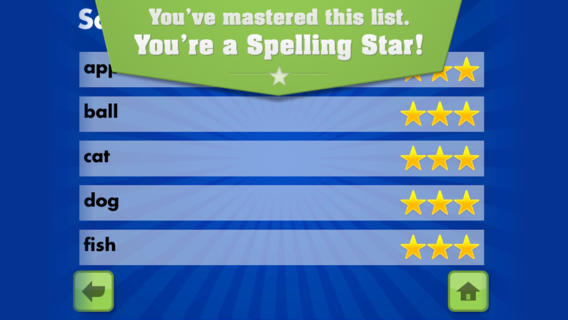
FREE for  limited time – Spelling Star, an educational app for practicing spelling lists. The app is simple to use – just type in and record the words. You may also include sentences to clarify the words’ meanings. Kids must spell each word correctly three times to become a Spelling Star.  Words are presented in random order. As kids practice, they can get a hint – a quick look at the word spelled correctly. When they spell a word without a hint, they earn a star. Spelling Star provides feedback after each word is spelled with the option to “try again” when an error is made. This educational app is great for home and/or school. Parents can use it to input spelling lists for multiple kids. Kids may enjoy inputting their own lists at the beginning of the week which would be GREAT practice! Teachers can create lists on one device and share those lists with anyone who has the Spelling Star app. Simple to use, effective, and tracks progress – what more do you need? 🙂

Download link: https://itunes.apple.com/us/app/spelling-star/id557070660?mt=8&uo=4

0

Walter’s Flying Bus

Walter's Flying Bus

FREE for a limited time – Walter’s Flying Bus, a story inspired by the real-life dreams of Walter and his friends (orphaned, special needs children in Uganda.) Walter finds an abandoned bus. With his friends and a little work, the engine soon roars to life! This e-book is inspirational – a celebration of the talents & beauty of every child. It is narrated in English, Spanish and Luganda (a primary language of Uganda). The educational app also includes mini-documentaries of the real-life children featured in the book. According to the developer  – “ONE HUNDRED PERCENT of after-tax profits from App sales go to efforts helping orphans with special needs, including advocacy, care, and adoption assistance grants.” Nice story with a great message!

Walter's Flying Bus - Chosen and Dearly Loved, LLC

0

FunSlides HD

imageFREE today – FunSlides HD, a fabulous photography app that creates videos of your slide shows. This app is extremely easy to use. Just choose photos from your camera roll. Then add music, voice, text and/or transitions. Press a button and it turns your slide show into a video. It’s THAT simple – easy enough for kids to use! Which is why I am recommending it. Kids could use this app to create all sorts of projects – timelines, reports, montages, etc. Finished projects can be shared via email or YouTube. Very user friendly and fun!!

Download link: https://itunes.apple.com/us/app/funslides-hd-make-hd-video/id590225705?mt=8&uo=4

0

ABCmouse.com 26 A-Z Music Videos

a to z

FREE – A to Z Music Videos. This app has 26 animated videos  – one for each letter of the alphabet. As kids watch the videos, they earn tickets to unlock other videos. There is also an option to purchase tickets to unlock videos more quickly. The videos are top-notch! They help children learn letter names and sounds AND develop vocabulary. Every video is produced in a different musical style, so kids are also introduced to a wide variety of musical genres. This app is a must-have for preschool, kindergarten, and first grade teachers – a perfect introduction to the letters of the alphabet!

Common Core Standards met:

  • K. RF.3 – Know and apply grade-level phonics and word analysis skills in decoding words. Demonstrate basic knowledge of one-to-one letter-sound correspondences by producing the primary sound or many of the most frequent sounds for each consonant. Associate the short sounds with common spellings (graphemes) for the five major vowels.

ABCmouse.com 26 A-Z Music Videos - Age of Learning, Inc.

0

What Time is is Mr. Wolf?

What Time

What Time is it Mr. Wolf? (by Teacher’s Pet) is FREE for a limited time. Make sure you get the correct one – there is another app by the same name by Joy Preschool. This educational app features a Wilfred the Wolf who spins the clock on the face of the moon 10 times. Kids have to choose the correct answer and drag it under the moon. The wolf giggles and says “well done” if the answer is correct. The app’s setting allows you to choose what interval of time you would like your child to work on – hours, half hours (half past), quarter hours, 10 minutes, or 5 minutes. Answers can be displayed in words, digitally, or mixed. You can also set the number of answers per question.

The Common Core Standards expect first graders to tell time to the 1/2 hour, second graders to tell time in 5 minute intervals (AM and PM), and third graders to tell time to the minute. So, this app would work well for first and second graders but not third graders. I like that this app includes practice with the words  – half past, quarter after, quarter to. It is a difficult concept for some kids to understand. Nicely done!!

Common Core Standards met:

  • 1.MD.3 – Tell and write time in hours and half-hours using analog and digital clocks.
  • 2.MD.7 – Tell and write time from analog and digital clocks to the nearest five minutes, using a.m. and p.m.

What Time is it Mr. Wolf? - by Teacher's Pet - Teacher's Pet
