0

COOL Classroom Tools for the New School Year, part 1

Looking to try something new in your classroom this year? Consider trying these 7 apps. 🙂 They will help you grade student work, keep in contact with parents, establish class discipline/routines, help students be organized, track student progress with ePortfolios, and create tutorial videos.  And five of them are still FREE – wow!

1. Socrative 

Still FREE and getting better with every upgrade – Socrative, an app that turns any device with a web browser into a student response clicker. I have been a fan of Socrative since I first discovered it two years ago. It’s one of those apps that I wish had been around when I was still in the classroom. Last July, Socrative added two additional quiz features. # 1 – Teachers can now add images to their questions. #2 – The system can now grade short answer questions. Teachers just input the acceptable answers and the system does the rest. 🙂

The Socrative website and app are unbelievably cool – they turn any device with a web browser (iPhone, iPad, laptops) into a student response clicker. If a teacher has access to any kind of wireless lab, he/she can engage the entire class in a game or quiz and watch the results in real-time. Teachers begin by using their teacher app or logging into t.socrative.com with their email and password. Once logged in, teachers are assigned a room number to share with their students. Students log in using their student app or at m.socrative.com and enter the “virtual room number” provided by the teacher. Teachers initiate an activity and students respond on their devices. Multiple choice and short answer quizzes are easy to create – types of questions can be mixed. Teachers can also choose to run the quiz as a Space Race game. The students’ responses are visible to the teacher in real-time. Teachers can see what each child answered individually as well as what the group answered collectively. And the best part is… the app grades, graphs the results, and generates a report as an Excel spreadsheet or an email.

What a powerful tool for teachers – a short quiz at the end of a lesson can pinpoint what students understand and what needs to be reviewed. Hours of grading and analyzing test results are done immediately. Every student is involved – wow!

Link to new user guide: http://www.socrative.com/materials/SocrativeUserGuide.pdf

Teacher app Teacher Clicker - Socrative - Socrative           Student app Student Clicker - Socrative - Socrative

2. Remind 101

Used by over 700,000 teachers…

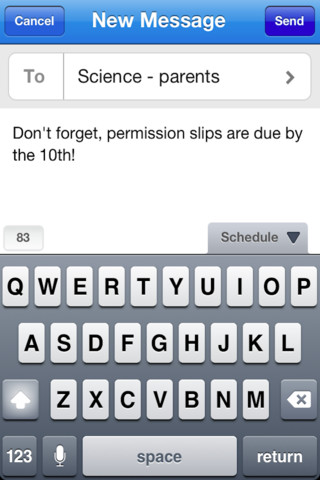
Remind 101 a FREE iPhone/iPad app that provides a safe way for teacher to text or email parents/students. To start, a teacher goes to the Remind 101 website to add his/her class list. A unique code is generated and the teacher shares that code with parents/students. The parent or student then sends a text message with the code to subscribe to the teacher’s class. From that point on, the parent/student will receive any message that the teacher sends from Remind 101. Teachers can text or email their entire class in minutes – homework assignments, field trip reminders, etc. All phone numbers remain private –  students never see the teacher’s phone # and the teachers never see the students’ numbers. This app has been written about by NBC, NPR, Huffington Post, Edutopia, and Edweek. Wow – what a great tool for improving communications but maintaining your privacy!

Remind101 - remind101

3. Class Dojo

Class Dojo just added FREE messaging! A teacher can now send “direct” messages to individuals and/or “broadcast” messages. This great FREE app just got better!!

ClassDojo is a FREE & fabulous tool that helps improve classroom behaviors. Rewarding good behavior in real-time is easy – all it takes is a click. To use ClassDojo, you only need one device (computer, smart phone, a laptop, or a tablet) and an internet connection. It is very easy to set up. Each student on your class list is assigned a cute, monster-like avatar. Kids earn points for positive behaviors and lose points for negative behaviors. ClassDojo is also fully customizable so you can delete behaviors from the original list and/or add your own behaviors. As you use it, it automatically logs any data that you input. This data can be used to generate behavior reports to share with parents and administrators. How awesome is that? You can go into a meeting/conference with reports in hand! And now, parents can check online to see what kind of day their child is having.

If I were still in the classroom, I would enter my class list twice – once for data on work/study habits and the other for data on behaviors. I would make my habits/behaviors match exactly what was on my report cards. Then as I used the app, I would also be gathering data for my report cards. At the end of the grading period, I would just print out the date and enter it on the report cards – how easy!  I would also have the data (in a printed report) to be able to back up any grade on the card.  “As you can see Mrs. Doe, Jane only turned in her homework 56% of the time.”  Instant data would also be available for the RTI process, IEPs or any other team meeting on a child. What a powerful tool for teachers! An educational app that has the ability to positively impact the learning environment – LOVE it!!

Check out the website for more information: www.classdojo.com

ClassDojo - Class Twist Inc

4. Homework+

Homework+

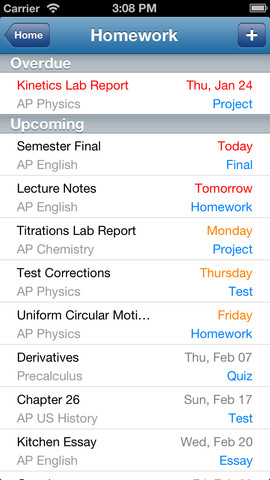
Currently $.99 – Homework+, a simple to use homework/test planner. This educational app is geared towards older students who are taking multiple classes. It could also be used with younger kids as an electronic assignment book. It’s never too early to teach kids how to be organized. 🙂

To set up the app, first edit the subject list & category lists to reflect what you are studying. After that, it is very easy to add assignments to the calendar – just give the assignment a title, choose the subject & category, put in the due date, choose a level of priority, and save. As you finish an assignment, mark it as complete and the app moves it to the finished list. App badges show you how many assignments you have and how many you have finished. Notifications can be set (1 or 2 days before) to remind you of an upcoming assignment. The app also keeps track of overdue assignments. Very slick and intuitive – great for teaching kids to be organized!!

Homework+ - Chijang Huang

5. Too Noisy

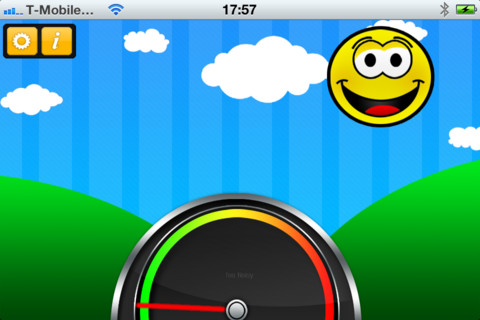
Too Noisy Lite is a FREE noise meter for iPhone/iPad. It measures the level of noise in a room and graphically displays whether it is at an acceptable level or not. If the level is acceptable, a smiling face is displayed. If the noise level increases beyond a level of acceptability, the graphic changes to indicate that the noise level is NOT acceptable. In the settings, a teacher/adult can adjust the sensitivity of the meter to go with the activity. A testing situation could be set at a 99% sensitivity level and group work could be set at a much lower sensitivity level. The meter worked when I tried it but, I was not in a large room with a group of kids. I would think that the FREE version is worth a try to see if it works for your situation. There is also a PRO version available for $.99. By using an Apple Digital AV adapter or a VGA adapter, Too Noisy can be projected on a TV or monitor so kids can learn what noise level is acceptable – cool idea! Another great FREE educational app!

Too Noisy - Walsall Academy

6. Easy Portfolio

eportfolios

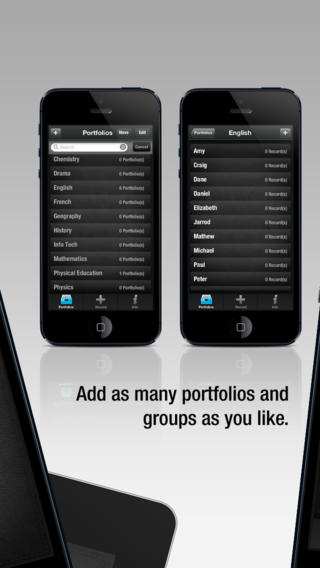
Currently $1.99 – Easy Portfolio – ePortfolio Tool for Students & Teachers. Download this educational app today to start getting organized for the upcoming school year. Easy Portfolio makes it simple for teachers to create ePortfolios for individuals, groups, or subjects. Individual student portfolios can be used to track student progress, highlight student achievement, monitor classroom behavior/work habits, and more. Subject portfolios can be used to organize teacher resources – videos, websites, images, etc. Imagine having everything you need to teach a unit or to make a presentation in one portfolio. The possibilities for using Easy Portfolio are endless.

Easy Portfolio is very simple to use. Just name your portfolios to begin. Then it’s easy to add videos, images, audio recordings or music, notes, URLs and digital documents. Added files are stored by type and can be sorted by date or ABC order. Files can also be shared via email or Dropbox. How wonderful it would be to have a digital portfolio for every student in your class. It would make getting ready for parent-teacher conferences or a IEP meeting a breeze! Capture and share your students’ learning this year with Easy Portfolio🙂

Download link: https://itunes.apple.com/us/app/easy-portfolio-eportfolio/id516212900?mt=8&uo=4

7. Educreations 

Educreations is great FREE app that turns your iPad into a recordable whiteboard. You can create tutorial videos for a variety of purposes: teach a lesson, create example math problems, explain a diagram, add commentary to your photos, etc. This educational app records & replays your voice, handwriting and/or drawings.Educreations is simple to use and permits you to build lessons with multiple pages. The editing tools allow you to: add text to any page, add photos, resize and move images, easily erase drawing mistakes, create “animated playback” by dragging objects as you record, and more.

But the best thing about this app is the ability to share your work. Free accounts are available at http://www.educreations.com where you can share your work as well as look at lessons created by others. Students can be given online access to the lessons that you have created there. Or, you can embed your lessons on your class blog/website. Students can watch a lesson before class or review a lesson after class. Absent students can watch from home. You can post information to help students with their homework. You can tutor someone online. Parents can log in to find out what is going on in class so they can help their children. What a powerful tool!! This app is being used at all levels of education including the college level. The features of Educreations make it a standout among the recordable whiteboard apps!

Educreations Interactive Whiteboard - Educreations, Inc

0

7 Great Preschool Apps from Piikea Street – FREE!!

FREE for a limited time – 7 GREAT apps for preschoolers from Piikea Street LLC.

Counting Bees

Kids lead bees to flowers and learn to count (to 20) using Counting Bees, an educational app for preschoolers. Counting is taught in ranges of increasing difficulty: 1-5, 1-10, 1-15, and 1-20. Using this app, kids also can learn to count in multiple languages – English, Spanish, French, Italian, German, Mandarin Chinese, Cantonese Chinese, and Japanese. Simple to use and nicely done!

Download link: https://itunes.apple.com/us/app/counting-bees/id481053635?mt=8&uo=4

Memeory TrainMemory Train is fun game of concentration and focus for preschoolers and primary students. Kids hop on the train with Spacey the elephant to help him remember what he sees on his way to the circus. They earn stars, badges, and peanuts (of course) as they advance through 10 different levels. This educational app includes slots for 4 players so that friends & family can join the fun. There are no words spoken (just music) so this app can be used by children of all languages. Another excellent educational app from Pi’ikea!

Download Link: https://itunes.apple.com/us/app/memory-train/id465224643?mt=8&uo=4

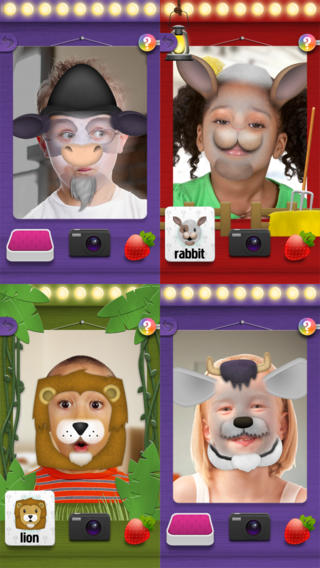
Mask Jumble AnimalsMask Jumbled Animals is a fun educational app for kids. It turns their faces into animal faces! Kids look into the app’s mirror and animal parts will appear on their faces. They tap to match the ears, nose, chin, and hair in order to complete 1 of 20 different animal masks. When the mask is complete, kids catch strawberries in their mouths to unlock a new mask. The mask puzzles are really cute for preschoolers who will be delighted to be an elephant, a lion, a panda, etc. But… the best part of this app is the ability to take pictures of kids in their masks which makes this app a fabulous resource for creative writing! Pull those pictures into a story writing app and off you go. 🙂

Download link: https://itunes.apple.com/us/app/mask-jumble-animals/id548763608?mt=8&uo=4

Also available is Mask Jumble Halloween. It works the same way as Mask Jumbled Animals but with 10 Halloween masks.

Download link: https://itunes.apple.com/us/app/mask-jumble-halloween/id564777575?mt=8&uo=4

photo boboPhoto Bobo is an adorable photo browsing app for babies & toddlers. Bobo the monkey swings in and out of photos, drops bananas, and plays funny tricks as little ones browse through pictures. It is safe to let kids browse through camera roll pictures with this app because there is no edit, share, or delete button. That being said, young kids can still tap out of the app so it’s best to supervise. 🙂 When Bobo adds sunglasses, a hat, or a mustache to a pic, they seem to end up in the correct spot which is pretty amazing. Really cute – check it out!!

Download link: https://itunes.apple.com/us/app/photo-bobo/id722364512?mt=8&uo=4

Interactive Alphabet ABCsInteractive Alphabet is one of the best alphabet apps that I have reviewed for babies, toddlers, & preschoolers. It’s so cute and well designed! To start you choose an accent (American or British) and a mode. It has 3 modes for your developing child – baby, explore, and trace. The baby mode takes your child on a guided, touchable tour of the alphabet. The explore mode lets children discover the sights & sounds of the alphabet at their own pace. It features fun activities that kids will want to explore multiple times. In the trace mode, kids learn to properly trace letters (lower case, upper case, or mixed) and words. The app keeps track of your child’s progress by starring the letters & words that are traced most often. The app can also be personalized by adding your own words and pictures. Your child can learn to trace his/her own name as well as the names of other family members, family pets, etc. This educational app truly lays the foundation for reading and spelling! Fabulous – this developer seems to have thought of everything!

Download link: https://itunes.apple.com/us/app/interactive-alphabet-abcs/id383967580?mt=8&uo=4

xylophoneAnd last but not least… Xylophone from Interactive Alphabet, a toddler friendly xylophone that helps kids play nine different songs: Twinkle Twinkle Little Star, Doe a Deer, Happy Birthday, Ode to Joy, Old MacDonald, Row your Boat, Mary Had a Little Lamb, Jingle Bells, and Rudolph the Red Nosed Reindeer. Kids just follow the helping hand to play – how fun!

Download link: https://itunes.apple.com/us/app/xylophone-from-interactive/id486202429?mt=8&uo=4

0

Interactive Alphabet ABCs

Interactive Alphabet ABCsFREE again – Interactive Alphabet is one of the best alphabet apps that I have seen for babies, toddlers, & preschoolers. It’s so cute and well designed! To start you choose an accent (American or British) and a mode. It has 3 modes for your developing child – baby, explore, and trace. The baby mode takes your child on a guided, touchable tour of the alphabet. The explore mode lets children discover the sights & sounds of the alphabet at their own pace. It features fun activities that kids will want to explore multiple times. In the trace mode, kids learn to properly trace letters (lower case, upper case, or mixed) and words. The app keeps track of your child’s progress by starring the letters & words that are traced most often. The app can also be personalized by adding your own words and pictures. Your child can learn to trace his/her own name as well as the names of other family members, family pets, etc. This educational app truly lays the foundation for reading and spelling! Fabulous – this developer seems to have thought of everything!

Download link: https://itunes.apple.com/us/app/interactive-alphabet-abcs/id383967580?mt=8&uo=4

0

Sail Through Math

sail through math

Ahoy there!! FREE again (normally $1.99), Sail through Math from McGraw Hill – a fun way for students to practice their math facts/skills. There are 3 levels of play for addition, subtraction, multiplication, and division facts. Other areas covered are addition equations. subtraction equations, multiplication equations, two-step equations, names for numbers, patterns/factors/multiples, and compare numbers. This app provides of great practice built around a pirate theme – complete with music and firing cannonballs! At the end of each game, the child can see what problems he/she missed as well as a percentage score. What a fun way to learn basic facts – in the classroom, at home, in the car on a way to an evening activity. I used to tell my students to practice during commercials – 10 to 15 minutes a day works wonders. This app provides a fun way to accomplish that goal. 🙂

Common Core Standards met:

  • 1.OA.6 – Add and subtract within 20, demonstrating fluency for addition and subtraction within 10.
  • 2.OA.2 – Fluently add and subtract within 20 using mental strategies. By end of Grade 2, know from memory all sums of two one-digit numbers.
  • 3.OA.7 – Fluently multiply and divide within 100, using strategies such as the relationship between multiplication and division or properties of operations. By the end of Grade 3, know from memory all products of two one-digit numbers.

Sail Through Math - McGraw-Hill School Education Group

0

7 Educational Apps About Sharks

Shark Week (starting on August 10) is Discovery Channel’s week of TV programs dedicated to sharks. The programming event began in 1988 and it’s now broadcast in 72 countries.

Here’s some educational apps for kids that I found about these creatures who capture the interest of so many people – young and old!

Shark Goes to the Doctor

FREE – SeaWorld: Ruckus Reader presents – Shark Goes to the Doctor, an engaging story that follows a sand tiger shark as it is checked by vets. Kids learn interesting facts about sharks’ lives.

Download link for SeaWorld: Ruckus Readerhttps://itunes.apple.com/us/app/seaworld-ruckus-reader/id515220048?mt=8&uo=4

Shark tank

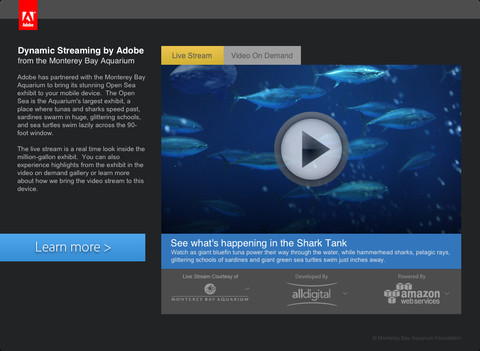
FREE – Sea TV is a collaborative effort between Adobe and Monterey Bay Aquarium (a highly ranked U.S. aquarium) to bring its Open Seas Exhibit to your mobile device! The Open Sea is a million gallon exhibit with a 90-foot window. You may see sharks speed past, sardines swimming in glittering schools, and/or sea turtles on the live video stream. You can also watch videos on demand.

Download link for Sea TVhttps://itunes.apple.com/us/app/sea-tv/id530529039?mt=8&uo=4

shark track 1

shark track 2

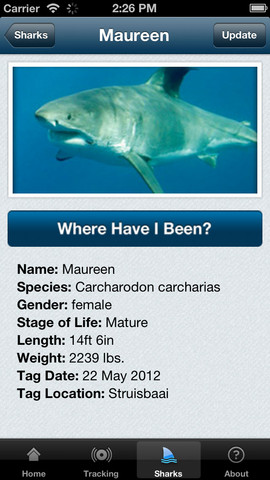
FREE – Global Shark Tracker lets you follow the navigational pattern of sharks that have been tagged with satellite tracking technology.  The purpose of this tracking is for shark conservation and the collection of data on the health of sharks. Very cool!

Download link for Global Shark Tracker:https://itunes.apple.com/us/app/global-shark-tracker/id570772231?mt=8&uo=4

sharky

Currently $.99 – Sparky the Shark, a fun interactive story for kids. Sparky is a friendly shark who does not understand why he frightens people. He and his penguin pal, Dax, try to fix the problem by getting Sparky a new look. They try different teeth and a variety of disguises. Eventually Sparky is accepted for who he is. The app has 2 modes – “read to me” and “read it myself.” There are 90+ interactive hidden hot spots in the story for kids to discover. There is also a “fun disguises page” where kids can dress Sparky in goofy teeth, hats, ties, & googly eyes. Then they can take his photo. What a great app – a fun interactive experience with an important message about wanting to be accepted and believing in one’s self. No wonder it was a finalist in the Australian Mobile Awards!

Download link: https://itunes.apple.com/us/app/sparky-shark-funny-animated/id478654371?mt=8&uo=4

Discovery Kids Sharks

Currently $4.99 – Discovery Kids Sharks for kids 6+. If your child loves sharks, this is a must-have educational app! Kids will learn: shark anatomy, types of sharks, how sharks hunt, where sharks live, and about shark families. The app includes 5 interactive games and 30 digital trading cards that can be shared via email. This app has a great mix of videos (from Discovery’s Shark Week files), fabulous photos of sharks in their natural environment, 150+ interesting shark facts, and a few games. Teachers could use the information in this app to teach a lesson on comparing and contrasting – using a Venn diagram or other graphic organizer. Kids will love learning about sharks using this fun, cool app!

Discovery  Kids Sharks - Parragon

Currently $3.99, Treasure Kai and the Lost Gold of Shark Island is an adventure story of a 10-year-old treasure hunter named Kai. Kai is always dreaming about treasure and looking for it in his parents’ store: The Treasure Shop. Kai’s dreams magically transport him to Shark Island where he finds a treasure chest. And so the adventure begins…. Kids help in the hunt for gold by choosing from 8 different treasure chests. Each chest reveals another clue – leading Kai through more adventures. Along the way there are animations to discover, great sound effects, and an original score. This digital story is similar to the “choose your own adventure” books with an “Indiana Jones” feel to it. It is different every time it is read with thousands of ways to find the treasure. This app would be great for kids who are a bit older and becoming independent readers. Very cool 🙂

Visit the website for a preview http://treasurekai.com/. After reading the story, your child can go back to the website for a variety of extras: watch fun fact videos, go behind the scenes, play a video game, work some puzzles, and more.

Treasure Kai and the Lost Gold of Shark Island - Interactive Book App for Kids - Treasure Bound Books

ocean

Currently $2.99 – Ocean – Animal Adventures for Kids, an educational app for preschoolers. Kids will become sea life experts as they explore 3 ocean scenes – a coral reef, a shark reef, and the deep-sea. The app has two modes – one for tapping/interacting with the creatures and the other for listening to/learning facts about them. Kids will learn fun facts about more than 30 animals and be delighted with the 60+ animations. The app is narrated in 12 languages – English, German, French, Spanish, Russian, Swedish, Japanese, Chinese, Portuguese (Brazilian), Turkish, Dutch and Italian. Check out this cute interactive book for your 1 – 5 year old today. 🙂

Download link: https://itunes.apple.com/us/app/ocean-animal-adventures-for/id819165012?mt=8&uo=4

0

Dr. Seuss’s Cat in the Hat Color & Creat

cat in the hatFREE today – Dr. Seuss’s Cat in the Hat Color & Create, a coloring activity app for kids. This educational app was named one of the Top 25 iPad Apps for Kids by Time Magazine in September of 2012. It features nine creative tools: an eraser, 16 stickers, 11 patterns, 6 Magic Hat animations, 3 kinds of confetti for the Confetti Cannon, and 32 colors of crayons, chalk, paints, or paint buckets. There are two coloring packs included with the app. Additional coloring packs and/or art supplies are available as in-app purchases. Kids can take photos of their creations which are saved to the camera roll. The app would be great for creating “on the go” – in a car, in a restaurant, at the doctor’s office, etc. Check it out for the Seuss fan in your house. 🙂

Download link: https://itunes.apple.com/us/app/dr.-seusss-cat-in-hat-color/id537256407?mt=8&uo=4

0

13 Alphabet Apps :)

Here are thirteen of my favorite ABC apps. They vary in style but they are all nicely done. All thirteen were free when I downloaded them but only four are currently free. Sign up to receive my blog via email so that you don’t miss out on good FREE apps! I only write about apps that I would recommend. Enjoy!!

endless

Once named an Editor’s Choice in the app store, Endless Alphabet is currently $6.99 but it occasionally goes on sale. This adorable interactive app combines learning letters & their sounds with learning vocabulary. There are currently 26 words featured in this educational app – one for each letter of the alphabet. But the app promises to be truly endless with new words to be added.

Kids tap a letter and its word appears of the screen. Then silly monsters come by and knock it over. Kids work to reconstruct the word with animated, talking letters. To teach the meaning of the word, there is also a short animation included. Words featured include: bellow, cooperate, gargantuan, portrait, quarrel – clearly not words found in the average ABC book. The vocabulary development in this app makes it appropriate for a wide range of kids.

Love this app – it’s silly, fun, and educational. My friend’s grandson learned all the letters and sounds of the alphabet because he loved this app so much. 🙂 It’s super cute!!

Endless Alphabet - Callaway Digital Arts Inc.

AlphaTotsCurrently $2.99 – AlphaTots Alphabet, a GREAT ABC app for kids! What makes this educational app unique is that it uses 26 action words to teach the alphabet. Kids are asked to complete 26 interactive tasks, for example: b – build a robot, p – play instruments, z – zap alien spaceships, etc. This app has been featured on The Today Showand has received a lot of positive press. It is a VERY fun app for toddlers/preschoolers who are learning their alphabet!!

Download link: https://itunes.apple.com/us/app/alphatots-alphabet-learning/id436142340?mt=8&uo=4

word wizard

Currently $2.99 – Word Wizard – Talking Movable Alphabet. This educational app features advanced text to speech capabilities to help kids with reading and spelling. Emergent readers can utilize the phonics movable alphabet to explore and play with words and sentences. As they do so, the app pronounces and spell-checks their work. Consonant letters are blue and vowels are red – helping kids to become aware of the differences. The short pronunciation of the vowels is featured as the letters are moved onto the board. Once a word is spelled, the app changes the vowel’s pronunciation for that word if necessary. If a word is not recognized by the app, it is still pronounced (according to the rules of phonics) but it is highlighted in red. How cool is that?!

Word Wizard can also be used for spelling practice. The app features lists of words – more than 1,400 words in all. I love that it includes the 1000 most frequently used words. Learning to recognize these words is important to a child’s overall reading fluency. The app also lets you add your own word lists. Teachers can add in their weekly spelling list and track the progress of their students. Reports can be emailed from teacher to parent or from parent to teacher. There are lots of possibilities for using this app – teach letter sounds, explore word patterns, small group word building, spelling practice, the list goes on… It’s no wonder that this app was featured in the New York Times, featured by Apple as “New and Noteworthy” and named a winner of a Parents’ Choice Award.

Download link: https://itunes.apple.com/us/app/word-wizard-talking-movable/id447312716?mt=8&uo=4

Montessori ABC for Kids HD

Currently $3.99  – Kids Academy · ABC Alphabet Phonics App HD. This educational app has two sections: animated flashcards (to teach kids the letters/sounds) and traceable worksheets (to teach kids how to write the letters). The flashcard section has cute animations to teach kids letters & sounds in a fun way. The writing section has two modes (right-handed and left-handed) to teach upper and lower case letters. The app is designed to have multiple users and parents can track their children’s progress. Nicely done!!

Common Core Standards met:

  • K.RF.1 – Demonstrate understanding of the organization and basic features of print. Recognize and name all upper and lowercase letters of the alphabet.

Montessori ABC for Kids HD: Learn and Trace Alphabet Letters - Kids Academy Company

Interactive Alphabet ABCs

Currently $2.99  – Interactive Alphabet is one of the best alphabet apps that I have seen for babies, toddlers, & preschoolers. It’s so cute and well designed! To start you choose an accent (American or British) and a mode. It has 3 modes for your developing child – baby, explore, and trace. The baby mode takes your child on a guided, touchable tour of the alphabet. The explore mode lets children discover the sights & sounds of the alphabet at their own pace. It features fun activities that kids will want to explore multiple times. In the trace mode, kids learn to properly trace letters (lower case, upper case, or mixed) and words. The app keeps track of your child’s progress by starring the letters & words that are traced most often. The app can also be personalized by adding your own words and pictures. Your child can learn to trace his/her own name as well as the names of other family members, family pets, etc. This educational app truly lays the foundation for reading and spelling! Fabulous – this developer seems to have thought of everything!

Download link: https://itunes.apple.com/us/app/interactive-alphabet-abcs/id383967580?mt=8&uo=4

FREE again – Little Writer is a letter writing app for the iPhone/iPad that is designed to teach 3 – 6 year olds how to write upper & lower case letters, numbers, shapes, and words. It starts by showing the shape of the letter and naming it. The child traces along lines to write the letter. Then the child is praised and told what letter, number, shape or word he/she has just written. When writing a word, the letters are presented one at a time with the full word shown in the upper right-hand corner. When the word is finished, a picture pops up with the child’s writing underneath it.

There are a lot of great things about this app. I like the size of the letters  – nice and big for little hands. I also like that there are subtle dotted lines on the page. But, the best part of this app is the ability to customize it. You can turn items on or off in order to introduce letters, numbers, etc. slowly. You can record your voice or your child’s voice pronouncing the names of the letters, numbers, etc. You can add in your own pictures & words so that your child can learn to write his/her own name and names of family members or whatever you wish! You can add additional letters for foreign words so that you can use it to teach simple words in another language. SO many possibilities……

Common Core Standards met:

  • K.RF.1 – Recognize and name all upper and lowercase letters of the alphabet.

Little Writer - The Tracing App for Kids - Innovative Mobile Apps

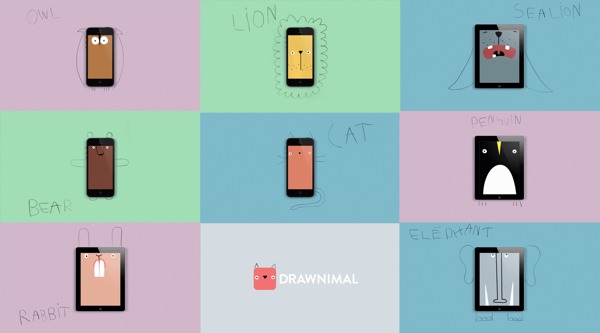
Currently $1.99 – Drawnimal, an ABC app for kids that has them thinking (and drawing) outside the box. Kids begin by placing the device on a piece of paper or other drawing surface. Then they draw around the device (as shown above) to complete the drawing of an animal. When they press play, the app identifies the animal. Finally, they tap the animal for a delightful surprise! Kids will love the animal animations that they helped to create. It’s the perfect combination of an alphabet app and a drawing app for little ones. And, it’s in 5 languages – English, Spanish, Dutch, Italian, and French. It’s super cute and super fun!

Download link: https://itunes.apple.com/us/app/drawnimal/id586239095?mt=8&uo=4

My A - Z 2FREE again – My A – Z, a fully customizable alphabet app. Using this educational app, you can easily create alphabet flashcards for your kids with personal pictures and personal recordings of up to 30 seconds! The app comes with words & pictures for each letter of the alphabet but you have the ability to edit those and/or add your own. Just use already existing photos from your photo albums or use your device’s camera to take new photos. Easy!!

There are so many fun uses for this app. You can help kids make alphabet cards of their family, friends, or a family vacation. They can include recorded greetings from the people pictured! The app can also be used to make alphabet cards for another language, to teach math terms, or make holiday editions of alphabet cards. Obviously, the audience for this app is not just limited to toddlers. It would be fun for older kids to create their own ABC flashcards in any subject area. The possibilities are endless!

My A-Z - Night & Day Studios, Inc.

a to zFREE – A to Z Music Videos. This educational app has 26 animated videos  – one for each letter of the alphabet. As kids watch the videos, they earn tickets to unlock other videos. There is also an option to purchase tickets to unlock videos more quickly. The videos are top-notch! They help children learn letter names and sounds AND develop vocabulary. Every video is produced in a different musical style, so kids are also introduced to a wide variety of musical genres. This app is a must-have for preschool, kindergarten, and first grade teachers – a perfect introduction to the letters of the alphabet!

Common Core Standards met:

  • K. RF.3 – Know and apply grade-level phonics and word analysis skills in decoding words. Demonstrate basic knowledge of one-to-one letter-sound correspondences by producing the primary sound or many of the most frequent sounds for each consonant. Associate the short sounds with common spellings (graphemes) for the five major vowels.

ABCmouse.com 26 A-Z Music Videos - Age of Learning, Inc.

My Beastly ABCs

Currently $2.99 – My Beastly ABCs, an educational app featured in USA Today’s Top 10 iPad Apps for Kids. Kids join a young boy (who is reluctant to get out of bed) on a magical adventure through a not-so-ordinary day! Told in rhyme, the story recounts the boy’s day as he encounters 26 friendly monsters (one for each letter of the alphabet) from all over the world. Kids join in this interactive tale as they play hide & seek with a Boogey Monster, learn how to floss from a Vampire, uproot a Mandrake family, and much more. The app is narrated by Jim Dale with whimsical background music & great sound effects. It has 3 play modes: with narration, without narration, or auto-play. Everything about this app is top quality – beautifully illustrated with the perfect amount of animation & interactivity. There is also an index that gives kids monster facts & descriptions. Kids can read and learn about each of the beasts’ unique characteristics and place of origin. Lots of fun!!

Download link: https://itunes.apple.com/us/app/my-beastly-abcs/id578158826?mt=8&uo=4

art abc

FREE again, Art ABC for the iPhone/iPad. Like all alphabet books, this educational app teaches kids the names & sounds of each letter. What makes it unique is that it also incorporates famous works of art. Each letter of the alphabet is presented on a fine art background. There is also a hidden object (with the featured letter) in the background. Kids explore the page by tapping to reveal each object – each in a different way! The app also contains a list of all the famous art included in the app – titles, artists, nationality, medium used, year, and location of the painting. This educational app could also be used with older students in art class. Nicely done!!

ART ABC - hwa pyung song

Currently $2.99 – Wee Sing & Learn ABC for the iPhone/iPad normally sells for $2.99. Wee Sing has been around for over 30 years. When my children were small, we always had a Wee Sing tape in our car. This app teaches toddlers the alphabet in a musically fun way. Every letter has a page with its own song featuring an animal with an instrument (both beginning with that letter). There are also three additional words for each letter which are pronounced and spelled. The real sound of every animal and each instrument are also included in the app. This app is well done with great attention to detail – a must have for every toddler 🙂

Wee Sing & Learn ABC - zuuka incorporated

abc expedition

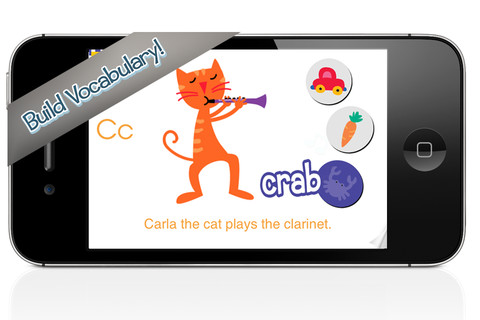
ABC Expedition is currently $2.99. Captain Wallace leads a tour of the zoo in this aesthetically pleasing alphabet app. The alphabet letters are placed on large buttons  – easy for kids to push. Each button take the child to an animated page featuring that letter. The page contains both upper & lower case letters and an animal (with its word) that begins with that letter. The animated animals are appealing and include sound effects. GRReat! Both words and letters are pronounced when the child touches them. This app is simple but well done – love the unique color scheme! What a great app for toddlers who love animals and are learning the alphabet. Use it before or after a trip to the zoo! Keep reading my blog to find out when apps are offered for FREE.

ABC Expedition - Meldmedia Inc.

0

Curious World

curious world

Partially FREE from Houghton Mifflin Harcourt – Curious World, an educational app for young kids. Silly characters named Izzy & Mac lead kids through a world of curious adventures. The app has four themed activity packs available. The Light & Shadows Pack is always FREE. And to celebrate the launch of the app, the Curious George Dinosaur Discovery Pack is also FREE for a limited time. Each pack has five or more activities, including a real-world experience for families to enjoy together. The app also includes a Curiosity Toolkit which includes drawing/coloring tools, stickers, puzzles, a camera, and a microphone. Kids can take a picture with the app’s camera then turn it into a four, nine, or sixteen piece puzzle – what a fun feature!  Preschoolers (ages 3 – 5) will love Izzy & Mac and their cute new app! 

Download link: https://itunes.apple.com/us/app/curious-world/id894474902?mt=8&uo=4

0

WWF Together

wwf

FREE and fabulous – WWF Together, named by Apple as one of the 10 Apps That WOW. This beautifully designed, educational app for the iPad was originally released in January 2013 by the World Wildlife Federation. The app features 8 endangered species – giant pandas, marine turtles, polar bears, elephants, tigers, bison, whales, and snow leopards. The unique and engaging features of this app include: stories about these endangered animals with playful interactive elements, fabulous high-definition videos and image galleries featuring photos by renowned environmental photographer Morten Koldby, cool facts about each animal, and a 3D interactive globe that shows your proximity to 70 different animals around the world. The app also includes an origami of each animal that folds up, creating an animated video for you to share. You can also download instructions for making your own origami. Everything about this app is wonderful – including the music. You and your children will fall in love with the magnificent creatures presented in this engaging app.

Highly recommended!

WWF Together - World Wildlife Fund

0

Fingerpaint Magic II

fingerprint magic

FREE for a limited time  – Fingerpaint Magic II, a fingerpainting app for kids and adults. Creating a digital masterpiece with this app is easy and there’s no mess to clean up! Just tap on the screen and start painting… with one or all of your fingers. You can use randomly generated colors or choose your own colors. You can set the size, life, velocity, and tilt of your brush. There are ten neutral backgrounds included or you can choose one of your photos as a background. Another fun feature of the app is mirroring. Strokes can be mirrored diagonally or in all four corners. Use Fingerpaint Magic II to enhance your photos or create your own wallpapers. Or, just use it to create and share art with family and friends. This app would be fun for little ones and great for developing their fine motor skills. 🙂

Download link: https://itunes.apple.com/us/app/fingerpaint-magic-ii/id735937898?mt=8&uo=4

Also FREE – Fingerpaint Magic, the original version of this app.

Download link: https://itunes.apple.com/us/app/fingerpaint-magic/id586165483?mt=8&uo=4