0

Labo Drawing Apps on Sale!

labo

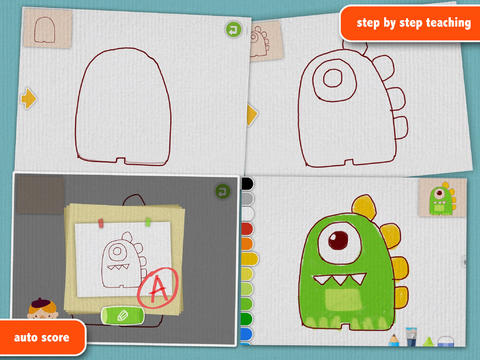
On sale for $.99 – Labo Drawing Lessons. This educational app has 3 different modes: drawing lessons, free drawing, and PK. In the lesson mode, your child will learn to draw 40 different things from 5 categories: animals, plants, vehicles, monsters, people. The app utilizes a step-by-step teaching method then scores the drawing after it has been completed. In the free drawing mode, kids work on a blank canvas and draw their own creations. They are not scored in this mode. They can choose from 3 tools (pencil, crayon, brush) and 18 different colors. They can also pull in photos from the camera roll to use as a background. In both modes, kids can take pictures of their drawings, redo them, or trash them. If they take a picture, the creation is stored in the photo gallery and saved to the device’s camera roll. Once a drawing is on the camera roll, it can be shared, printed, or pulled into other apps. Finally, there is a PK mode which permits a child to compete with their parents or friends to see who can draw faster. Check out this YouTube video to see how this app works: http://www.youtube.com/watch?

Download link: https://itunes.apple.com/us/app/labo-drawing-lessons-3y+/id879834557?mt=8&uo=4

Also on sale for $.99…

Labo Car Designer: https://itunes.apple.com/us/app/labo-car-designer-4y+/id872564909?mt=8

Labo Dancing Kids: https://itunes.apple.com/us/app/labo-dancing-kids-magical/id903392264?mt=8

Labo Pebble Art: https://itunes.apple.com/us/app/labo-pebble-art-make-crafts/id928944711?mt=8

Labo Fabric Friends: https://itunes.apple.com/us/app/labo-fabric-friends-making/id966500443?mt=8

Labo Train: https://itunes.apple.com/us/app/labo-train-creative-draw-play/id914323527?mt=8

0

Animal Pre-K Learning Games for Kids with Skills on the Farm

farmFREE for a limited time – Animal Pre-K Learning Games for Kids with Skills on the Farm, a cute educational app for preschoolers. Lily the farmer leads kids through a series of games that teach preschool/K skills: colors, shapes, counting 1 – 10, groups & categories, sequencing & patterns, addition & subtraction. I like that the app teaches shapes in two ways – a circle and a donut, an oval and a watermelon, a rectangle and a bus, etc. And, I was particularly impressed that it names a kite shape as a rhombus. As kids play, they help the cute farm animals (Pinkie the pig, Oliver the horse, Bessie the cow, Cordelia the chicken, Gordon the goat, Sherman the sheep, Webster the duck, Pete the frog) find their way back home. The app is bright, colorful and full of positive encouragement. Nicely done, this app is sure to appeal to little ones.

Download link: https://itunes.apple.com/us/app/animal-pre-k-learning-games/id882334452?mt=8&uo=4

0

Math Duel

Math Duel

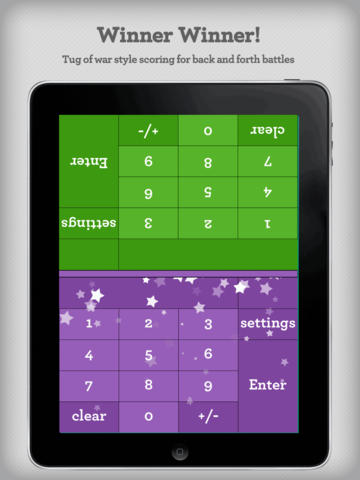
FREE for a limited time – Math Duel-2 Player Mathematical Game.This educational app pits two players against each other on the same device which makes it perfect for sharing iPads in the classroom. The app has a split screen interface – students sit facing each other on either end of the iPad. As kids answer math equations, the app keeps separate scores for each student. The best thing about this app is that it is fully customizable (on both sides) which makes it a fabulous tool for individualizing instruction for a wide range of students. Equations can be set with 1 – 5 terms. Largest numbers possible can be from 1 – 100. Negative numbers can be turned on/off. Kids can practice addition, subtraction, multiplication, division or any combination of these operations. Fabulous and fun for daily classroom math practice in multiple grades!

Common Core Standards met:

  • 1.OA.6 – Add and subtract within 20, demonstrating fluency for addition and subtraction within 10.
  • 2.OA.2 – Fluently add and subtract within 20 using mental strategies. By end of Grade 2, know from memory all sums of two one-digit numbers.
  • 3.OA.7 – Fluently multiply and divide within 100, using strategies such as the relationship between multiplication and division or properties of operations. By the end of Grade 3, know from memory all products of two one-digit numbers.

Download link: https://itunes.apple.com/us/app/math-duel-2-player-mathematical/id495077699?mt=8&uo=4

0

Sago Mini Bug Builder

bug buider

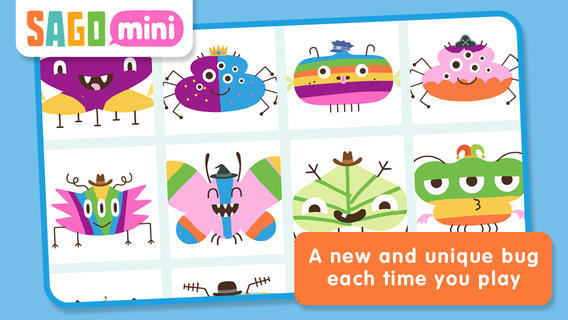
On sale for $.99 – Sago Mini Bug Builder, an educational app for toddlers/preschoolers. Kids create, hatch, and play with cute little critters. They can transform 1 of 8 shapes into a colorful bug, add some color, then bring it to life. They can also add a funny hat, feed it a snack, clean up its mess, and take its picture. Kids can make unlimited number of unique bugs using this app which is very cute & creative! Older kids could create bugs to use for creative writing – a descriptive paragraph, a story, a dialog. Or, they could create 2 bugs to compare and contrast. Check out this colorful & creative app while it’s on sale!

Download link: https://itunes.apple.com/us/app/sago-mini-bug-builder/id657821775?mt=8&uo=4

0

Sight Word Sentence Builder

sight word sentencesFREE for a limited time – Sight Word Sentence Builder. This app has kids building sentences using the Dolch sight words. Learning sight words is an important component of early reading. Being able to automatically recognize sight words improves a child’s reading fluency. Kids start by choosing one of three themes – classic, little princess, or train. The app has four levels of difficulty. Each level contains simple sentences that are constructed from sight words. After listening to a sentence, kids click and drag words to build that sentence. There is an option to have the sentence repeated if needed. There is also an option to turn off the audio so that kids can try to construct the sentences on their own. These options make the app suitable for multiple levels of kids. The app tracks a child’s levels, scores, and the amount of time played over a seven day and thirty day period of time. It does not have an option for multiple players so the app would have to be reset before using it with a second player. Check it out for your beginning reader!

Direct Link:  https://itunes.apple.com/us/app/sight-words-sentence-builder/id527718967?mt=8

0

This Day in History

This Day in History

One of my favorite FREE resources…

WORLD BOOK  – This Day in History for iPad is a great FREE resource for the classroom. Historical events for the day are displayed on a calendar page. You can click on links to related media such as articles, photos/illustrations, music, speeches and more! When I was teaching, I had students  do “morning work” (correct punctuation, capitalization, & spelling in two sentences) while I took attendance, did lunch count, etc. This educational app would have been perfect for that daily assignment because I always used information about something interesting that happened that day. After correcting the sentences, the kids and I would discuss the history of that day. I was always amazed at how well kids retained what we had discussed during the opening minutes of every day. Throughout the year they would often remark, “We learned about that in our morning work.” You may want to try making this educational app part of your classroom’s morning routine. 🙂

WORLD BOOK - This Day in History for iPad - Software MacKiev

0

Bubl Ice Cream – A musical dessert for kids

creations bubl ice creamFREE for a limited time – Bubl ice Cream – A musical dessert for kids. Kids can create musical ice cream concoctions for six different characters (Santa, Rudolph, a snowman, a pirate, a yeti, or a princess) with this fun app. Kids start by selecting a character. They fill the character’s cone or dish with scoops of ice cream. Then they add a musical sauce and top it all off with berries, sprinkles, cookies, etc. As they work, their creations are arranged into unique musical compositions. Fun for little ones!

Direct Link https://itunes.apple.com/us/app/bubl-ice-cream-musical-dessert/id892939714?mt=8

0

Word Wonderland (Primary) and Word Wonderland (Elementary)

Word Wonderland

FREE for a limited time – Word Wonderland (Primary) and Word Wonderland (Elementary), games that have kids hopping, eating, and shaking their way to the end of a game board as they sort words. Children start by creating name badges – the app permits multiple children to play. In the primary (K – 2) version, kids help to guide a friendly frog through the pond as they sort words by sounds – short vowels. long vowels, r controlled vowels, blends, digraphs, and more. In the elementary (3 – 6) version, kids guide an astronaut crab through the space station as they sort more difficult words by sounds, inflectional endings, Greek/Latin roots, etc. These educational apps provide a fun way for kids to sort words but I must admit that I am a bit apprehensive about encouraging kids to shake the iPad. Check it out for yourself while the full versions are FREE.

Download links: https://itunes.apple.com/us/app/word-wonderland-primary-full/id611436564?mt=8&uo=4 and https://itunes.apple.com/us/app/word-wonderland-elementary/id634947932?mt=8&uo=4

0

Coding for Kids – 3 FREE & Fabulous Apps

Why teach kids to code? Coding is what makes computer software work. Understanding the basics of programming will help your child be prepared for the jobs of the future. And, in the process your child will be using logic, solving problems, and having fun! Check out these apps and try coding yourself. Then try it with your students. We are living in creative, exciting times – be part of it!! 🙂

Here are fabulous FREE resources to use:
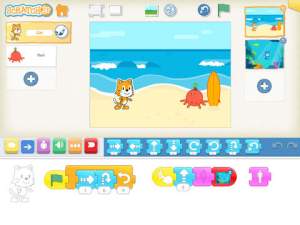
scratch jrFREE app – ScratchJr is designed to teach kids how to code their own stories and/or games. Specifically developed for younger children, ScratchJr is based on Scratch programming language (http://scratch.mit.edu) which is used by millions around the world. The app includes an introduction video and examples of sample projects. Once the add button is pressed, the app opens to a page with a friendly looking cat in a blank square surrounded by programming tools. Then the fun begins. Kids snap together programming blocks to make the cat move – forward, backward, right, left, hop, etc. They can choose to add a setting to their story/game by selecting one of the twenty-eight different backgrounds. They can add additional characters and/or objects to their scenes. They can make their character talk either by using word bubbles or by recording their own voices. They can control timing, speed, and the sequencing of events. The app can be simple but it becomes more complex as kids start to figure things out. For example, they can learn to program multiple characters to move in sequence, move together, etc. Kids can also add themselves to the story. They simply choose one of the fifteen “faceless” characters then add in their own face using the iPad’s built-in camera. How cool is that? As kids learn to program, they are also learning to problem solve, design projects, and be creative on the computer. LOVE this app!

Download link: https://itunes.apple.com/us/app/scratchjr/id895485086?mt=8&uo=4
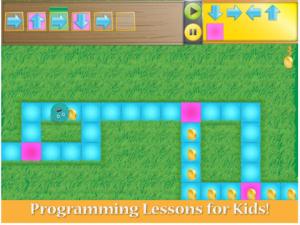
kodableFREE for iPad – Kodable, an introduction to programming for kids 5+. The fuzzFamily has crashed their spaceship on Smeeborg. Kids help the fuzzes through Smeeborg’s mazes by creating drag & drop instructions for them to follow. As they code, kids need to remember that fuzzes follow instructions exactly as they are written. After coding the instructions, kids hit play to watch the fuzzes roll through the maze. They are rewarded with stars, coins, and extra members of the fuzzFamily if they are successful. This educational app comes with 45 free levels which become progressively more difficult. Additional content is available as an in-app purchase.

Download link: https://itunes.apple.com/us/app/kodable/id577673067?mt=8&uo=4
Hopscotch HD

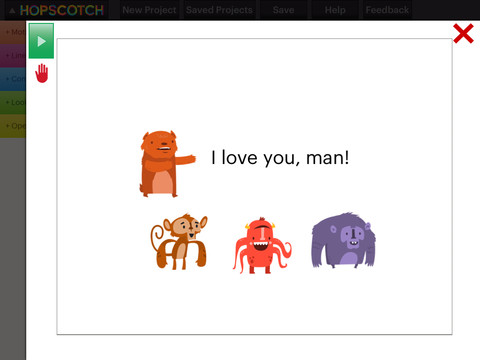
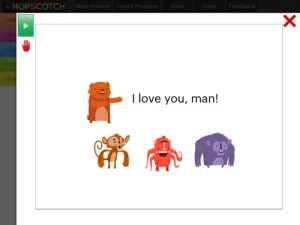
Hopscotch HD is an educational app that teaches kids how to program their own games and animations! Introduce kids to computer science with this app. 🙂 Kids drag and drop “method blocks” into scripts. When they are done, they can press play to see their code in action! Why teach kids coding? According to the developer – there will be about 1.4 million computer jobs by 2020 and only 400,000 computer science students. Many coders first fell in love with coding when they were  8-12 year old children. Hopscotch is based on a visual programming language named Scratch which was developed by MIT. It promotes STEM education (science, technology, engineering and math) in a fun way – by making coding kid-friendly!  LOVE it!!

Hopscotch HD - Hopscotch Technologies

0

Sago Mini Doodlecast

On sale for $.99 – Sago Mini Doodlecast, an adorable drawing app for kids. This educational app is unique in several ways. First of all, it features 30+ open-ended drawing prompts that inspire creativity. Kids draw pictures to answer questions such as: Who lives on this planet? What is wet? What makes you happy? As your child draws, short videos of the entire drawing process are created, with accompanying audio. The app encourages parent/child play – recording your child’s creation (stroke by stroke) along with your conversation about his/her drawing. And, the app supports more than 14 languages. Parents can use the app as a teaching tool or to encourage kids to express their feelings. Finished videos can be shared with friends and family – perfect for grandparents who live far away! Super sweet app!!

Download link: https://itunes.apple.com/us/app/sago-mini-doodlecast/id469487373?mt=8&uo=4