0

Math Magician

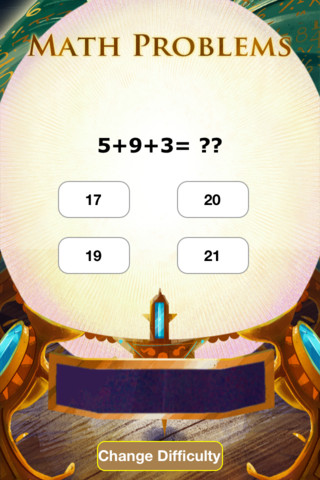
FREE for a limited time – Math Magician, an educational math app for elementary students developed by abc teach.com and VLinks Media. Recently updated, the app now has 4 levels – beginning, easy, medium, and hard. Several math concepts are covered within each level. The easy level covers counting 1-120, skip counting by 2 & 5, addition 1-20, subtraction 1-20, and greater/less than 0-20. The medium level covers: skip counting (10 and 100), addition 0-100, subtraction 0-100, add/subtract by 10, greater/less than 0-100, multiplication 1-10, and division 1-10. The hard level covers: addition 100-500, subtraction 50-200, multiplication facts 0-12 and division facts, 0-12. There are 35,000 multiple choice questions in all.

The object of the game is to use the power of numbers to help the magician regain his treasures. Kids do so by solving problems that appear in the Magic Crystal Ball. As they solve the problems, their progress is shown on the Magic Meter Bar. Once they have correctly answered about 20 problems, they unlock one of the treasures. This app provides lots of good math practice wrapped in a magical theme.

Common Core Standards met:

  • 1.OA.6 – Add and subtract within 20, demonstrating fluency for addition and subtraction within 10.
  • 2.OA.2 – Fluently add and subtract within 20 using mental strategies. By end of Grade 2, know from memory all sums of two one-digit numbers.
  • 3.OA.7 – Fluently multiply and divide within 100, using strategies such as the relationship between multiplication and division or properties of operations. By the end of Grade 3, know from memory all products of two one-digit numbers.

Keep reading my blog to find out when apps are offered for FREE.

Math Magician - abcteach

0

Fetch! Lunch Rush

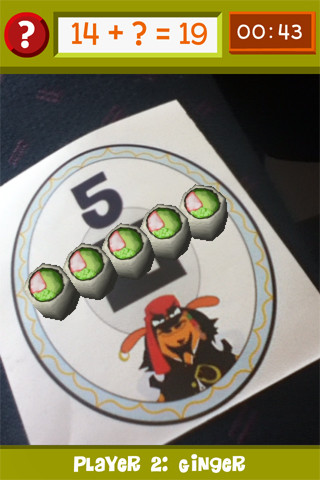
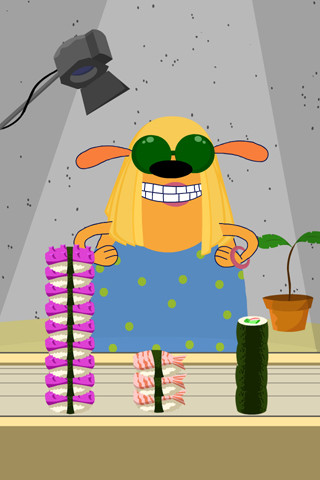
From our friends at PBS comes Fetch! Lunch Rush, a very unique FREE math game app for iPhone/iPad.  In this multi-player game, it is the students’ task to keep up with the lunch orders from Ruff Ruffman’s movie crew. The challenge is to keep track of how many pieces of sushi everyone wants by adding and subtracting. Before the game begins, game pieces have to be printed from the PBS website and distributed around the room. As the sushi orders come in, students have to find the game piece with the correct answer to the problem. Using the camera lens on their device, they focus in on then tap the sushi. The sushi pieces magically move to the table in front of their character (as seen above). Students have to think fast and keep moving to fill all of the sushi orders before their friends do. What a fun educational app!

Common Core Standards met:

  • 1.OA.6 – Add and subtract within 20, demonstrating fluency for addition and subtraction within 10.
  • 2.OA.2 – Fluently add and subtract within 20 using mental strategies. By end of Grade 2, know from memory all sums of two one-digit numbers.

Highly recommended!

FETCH! LUNCH RUSH - PBS KIDS

0

YodelOh™ Math Mountain

Yodel

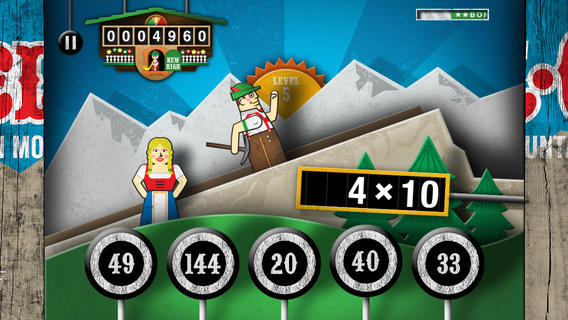
Spinlight Studio is celebrating the 12 Days of Christmas by giving away an app each day! Thank you, Spinlight Studio. Today’s FREE educational app is YodelOh™ Math Mountain. Kids will have fun learning basic addition, subtraction, multiplication, and division math tables with this game. The object of the game is to score enough points to keep Hans from falling off the cliff. In order to do so, kids have to answer problems quickly and avoid the crazy charging sheep. And as kids score points, the questions get harder. The app also includes high-score charts that track the best 15 games for all 5 modes. I especially like the mode which permits kids to practice all 4 operations at a time. It makes kids pay attention to operation signs and quickly switch their thinking. What a fun way for kids to practice facts and it meets CCSS! Get it today. 🙂

Common Core State Standards met:

  • 1.OA.6 – Add and subtract within 20, demonstrating fluency for addition and subtraction within 10.
  • 2.OA.2 – Fluently add and subtract within 20 using mental strategies. By end of Grade 2, know from memory all sums of two one-digit numbers.
  • 3.OA.7 – Fluently multiply and divide within 100, using strategies such as the relationship between multiplication and division or properties of operations. By the end of Grade 3, know from memory all products of two one-digit numbers.

Download math: https://itunes.apple.com/us/app/yodeloh-math-mountain/id634946225?mt=8&uo=4

0

3 FREE Virtual Math Manipulatives

Geoboard by The Math Learning Center (a nonprofit organization dedicated to K – 12 education) is a FREE app that turns your iPhone/iPad into a virtual geoboard. Geoboards can be used as tools to teach mathematical concepts such as polygons, perimeter, area, line segments, angles, congruent shapes, symmetry, fractions, etc. Shapes are created by stretching bands on the geoboard’s pegs. There are 5 colors of bands in the iPhone version and 8 in the iPad version. There is also a tool to fill in shapes. On the iPad version, you can switch from the standard 25 peg board to a 150 peg board to create more complex shapes. This is a great app with the potential to be used in so many ways.

Highly recommended for your virtual math tool kit!

Geoboard, by The Math Learning Center - Clarity Innovations

FREE for the iPad, Virtual Manipulatives contains math manipulatives for teaching fractions, decimals, and percents. Included are tiles/circles divided into halves, thirds, fourth, fifths, sixths, eighths, tenths, and 12ths AND their corresponding decimals and percentages! The manipulatives are color coded across the settings so that 1/2 is blue as is .50 and 50%. Kids drag tile pieces onto the work area to compare fractions/decimals/percentages. In the settings you can change from tiles to circles, make the pieces transparent, and hide the numbers on the pieces. Completed work can be easily saved to photos. Finding equivalent fractions has never been so slick – WOW!!

Common Core Standards

  • 3.NF.3 – Explain equivalence of fractions in special cases, and compare fractions by reasoning about their size. Understand two fractions as equivalent (equal) if they are the same size, or the same point on a number line.
  • 4.NF.1 – Explain why a fraction a/b is equivalent to a fraction (n × a)/(n × b) by using visual fraction models, with attention to how the number and size of the parts differ even though the two fractions themselves are the same size. Use this principle to recognize and generate equivalent fractions.

Highly Recommended!

Virtual Manipulatives! - ABCya.com

equivalent fractions

From the National Council of Teachers of Mathematics comes a FREE app called Equivalent Fractions. Kids create equivalent fractions by dividing and shading squares or circles. Circles can be divided into 24ths. Squares can be divided into 144ths. In the play mode, a fraction is shown and kids must create 2 additional fractions that are equivalent. All 3 fractions must have different denominators. The app also places the fractions on a number line – a great visual for comparing! There is also a “build your own” mode which would be fabulous to use for guided exploration & practice. Kids could also use this section as a virtual manipulative when working independently. This app is an excellent resource for the classroom !!

Common Core Standards met:

  • 3.NF.3 – Explain equivalence of fractions and compare fractions by reasoning about their size. Understand two fractions as equivalent (equal) if they are the same size, or the same point on a number line. Recognize and generate simple equivalent fractions, e.g., 1/2 = 2/4, 4/6 = 2/3). Explain why the fractions are equivalent, e.g., by using a visual fraction model.

Highly Recommended!

Equivalent Fractions - National Council of Teachers of Mathematics

0

Math Racer®

FREE for a limited time – an educational app that  normally sells for $4.99. Math Racer times how fast kids can answer 10, 20, 50 or 100 problems in 7 different games: addition, subtraction, multiplication, division, add/subtract, multiply/divide, or all operations. I like kids being able to practice related operations together – it makes them pay attention to operational signs & see connections. The app keeps high scores for all areas. It shows which problems were missed and how long it took to answer each question (to the hundredth of a second). Teachers and parents can use this tracking system to document kids’ progress.

This app provides a simple but fun way for kids to practice their facts. I can’t imagine that they won’t love racing the clock to improve their scores. If it is loaded on an iPhone, kids could easily practice their facts in the car on their way to after-school lessons. 🙂

Common Core Standards met:

  • 1.OA.6 – Add and subtract within 20, demonstrating fluency for addition and subtraction within 10.
  • 2.OA.2 – Fluently add and subtract within 20 using mental strategies. By end of Grade 2, know from memory all sums of two one-digit numbers.
  • 3.OA.7 – Fluently multiply and divide within 100, using strategies such as the relationship between multiplication and division or properties of operations. By the end of Grade 3, know from memory all products of two one-digit numbers.

Recommended!

Math ® - i4software

0

The Opposites

FREE again – The Opposites for the iPhone/iPad. Designed for kids 7+, this educational app requires the matching of increasingly difficult pairs of opposite words. There are two sections of the app: dictionary and play. In the dictionary section, words are listed next to their opposites. To learn the meaning, students just tap on the word and a definition appears. There are 10 levels with 100+ words per level. In the play section, words are pronounced by a boy or a girl as they appear in bubbles and float towards the top of the screen  Kids are to tap pairs of opposites as they appear – which makes the words turn a color then pop. The goal is to match 12 sets of opposites  – which completes the level. A bonus round then appears in which the student has 20 seconds to match up an entire  board full of opposites. This app starts off simply but becomes quite challenging in the later levels. It could be used for differentiating a lesson and/or for helping students grow their understanding of antonyms.

Common Core Standards met:

  • 4.L.5 – Demonstrate understanding of figurative language, word relationships, and nuances in word meanings. c.Demonstrate understanding of words by relating them to their opposites (antonyms) and to words with similar but not identical meanings (synonyms).
  • 5.L.5 – Demonstrate understanding of figurative language, word relationships, and nuances in word meanings. c. Use the relationship between particular words (e.g., synonyms, antonyms, homographs) to better understand each of the words.

Recommended!

The Opposites - Mindshapes Limited

0

Bluster

Bluster is a FREE app for the iPad developed by McGraw-Hill. It was designed to teach vocabulary and word development to students in grades 2 – 4. Topics covered are rhyming, prefixes & suffixes, word roots, synonyms, homophones, and adjectives. There are 3 modes of play – single, team, and versus. Team mode permits collaboration with a friend. Versus mode allows head-to-head play with the ability to disrupt your opponent by causing weather related attacks. Kids start by choosing their mode of play, grade level, and word match type. They then swipe through the list to match 3 words with the same meaning, rhyme, prefix, suffix, or word root. There are 10 groups of 3 to match in each round of play. What a fun way to present over 800 vocabulary words!

Common Core Standards met:

  • 2.L.4 – Determine the meaning of the new word formed when a known prefix is added to a known word (e.g., happy/unhappy, tell/retell). Use a known root word as a clue to the meaning of an unknown word with the same root (e.g., addition, additional).
  • 3.L.4 – Determine the meaning of the new word formed when a known affix is added to a known word (e.g., agreeable/disagreeable, comfortable/uncomfortable, care/careless, heat/preheat). Use a known root word as a clue to the meaning of an unknown word with the same root (e.g., company, companion).
  • 4.L.4 –  Use common, grade-appropriate Greek and Latin affixes and roots as clues to the meaning of a word (e.g., telegraph, photograph, autograph).
  • 4.L.5. Demonstrate understanding of words by relating them to their opposites (antonyms) and to words with similar but not identical meanings (synonyms).

Recommended!

Bluster! - McGraw-Hill School Education Group

0

Spelling City

Spelling City  – a FREE educational app for the iPhone/iPad! I LOVE Spelling City. It is a phenomenal website where teachers can input their weekly spelling lists so kids can go online to practice their spelling in so many fun ways – hang mouse, match it, which word, sentence unscramble, etc. I used Spelling City in my classroom for the last several years and the kids & parents loved it. The app has several preloaded lists and the best part…..kids can access the their teacher’s list (providing that he/she uses Spelling City, of course) by using their zip code, school name, and teacher’s name. Practice spelling in the car on a way to a soccer game or while waiting in the dentist’s office. AWESOME!!

Common Core Standards met:

  • K.RF.3  – Distinguish between similarly spelled words by identifying the sounds of the letters that differ.
  • 1.RF.3 – Recognize and read grade-appropriate irregularly spelled words.
  • 2.RF.3 – Identify words with inconsistent but common spelling-sound correspondences. AND Recognize and read grade-appropriate irregularly spelled words.
  • 3.RF.3 – Read grade-appropriate irregularly spelled words.
  • 4.RF.3 – Use combined knowledge of all letter-sound correspondences, syllabication patterns, and morphology (e.g., roots and affixes) to read accurately unfamiliar multisyllabic words in context and out of context.
  • 5.RF.3 – Use combined knowledge of all letter-sound correspondences, syllabication patterns, and morphology (e.g., roots and affixes) to read accurately unfamiliar multisyllabic words in context and out of context.

Highly recommended!

SpellingCity - SpellingCity

0

Super Duper Idioms

Super Duper 2

Super Duper

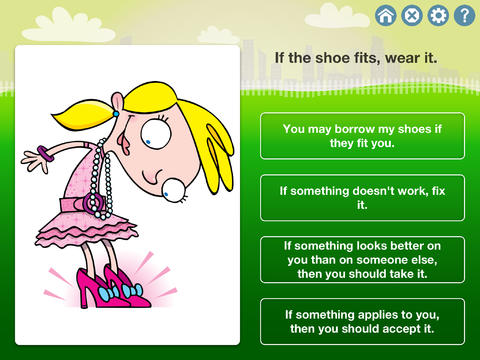
Newly released educational app – Super Duper Idioms helps kids (and adults) understand 500 common English idioms. Try the first 50 for FREE. You may purchase additional packs of 50 for $2.99 per pack. The app is cutely illustrated and features 4 fun games: multiple choice, super-duper secret decoder, fill in the blank, and search & circle. The questions are written but there is also audio support for students who have difficulty reading. The level of difficulty can be adjusted by choosing to have  2, 3, or 4 choice answers. The app can be set to read the correct answer after incorrect and/or correct response which is helpful to students who are learning the meanings. An unlimited number of players are permitted – making this app perfect for use in the classroom. And the best part…. it keeps track of data so teachers and parents can see student progress over time. The app uses graphs which can be emailed, printed, and/or shared – awesome!  This app would be great for kids as well as adult ESL students who are learning English idioms – nicely done!

Common Core Standards met:

  • 4.L.5b and 5.L.5b Demonstrate understanding of figurative language, word relationships, and nuances in word meanings. b. Recognize and explain the meaning of common idioms, adages, and proverbs.

https://itunes.apple.com/us/app/super-duper-idioms/id657415898?mt=8&uo=4

0

ABCmouse.com – Ham with Jam, Dan & Jan, Hen in the Pen, Big Pig & Little Pig, To Run is Fun, Big Bug & Little Bug

FREE for a limited time – 6 beginning reading apps!! These educational apps for the iPhone/iPad are from the ABC Mouse word family beginning reader series. I chose to downloaded The Hen in the Pen to review the series. Each story emphasizes words from a particular word family. There are also easy sight words in the stories. There are several ways that the books can be read: Read to Me, Read with Pause, I Can Read It, and Hear the Words. I really like the Hear the Words option. It allows the child to read alone but tap any word that he/she gets stuck on. There are parent tips on the title page that explain word families and sight words for beginning readers. There are also parent tips throughout the books. The illustrations are colorful and support the text so that kids can use picture clues as they read. The story lines are very simple. But, that is not a negative thing because these apps are more about the process of reading than the actual story. When my son was an early reader, he loved books like these because he could read them “all by himself” and that alone makes them worth downloading 🙂 And…. they are currently FREE.

Common Core Standards met:

K.RF.3 – Know and apply grade-level phonics and word analysis skills in decoding words. c. Read common high-frequency words by sight (e.g., the, of, to, you, she, my, is, are, do, does). d. Distinguish between similarly spelled words by identifying the sounds of the letters that differ.

Recommended!

ABCmouse.com Ham and Jam - Age of Learning, Inc. Ham with Jam    ABCmouse.com Dan and Jan - Age of Learning, Inc. Dan and Jan

ABCmouse.com The Hen in the Pen - Age of Learning, Inc. Hen in the Pen     ABCmouse.com Big Pig and Little Pig - Age of Learning, Inc. Big Pig & Little Pig

ABCmouse.com To Run is Fun - Age of Learning, Inc. To Run is Fun   ABCmouse.com Big Bug and Little Bug - Age of Learning, Inc. Big Bug and Little Bug