0

Miximal

miximal 2FREE for a limited time – Miximal, another cute educational app from the makes of Drawnimal. This fun app is a digital version of a traditional flip book. Kids mix and match tops, middles, and bottoms of animals. In the process they create silly and unique creatures. The app features over 1000 animal combinations with accompanying animations and fun sounds. The app also generates a three syllable name for each new creature that is created.  Kids can take a screen shot of their new creature and write a story about it. Teachers could use this app for a group lesson on syllables because there is a logical pattern. The app can also be switched to five different languages: English, French, German, Italian, and Spanish. Check it out. It’s another fun app from Yatatoy and Lucas Zanatto!

Download link: https://itunes.apple.com/us/app/miximal/id829623705?mt=8&uo=4

0

Starfall ABCs

image

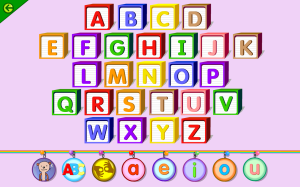
FREE for a limited time – Starfall ABCs. Kids will learn to recognize letters and their sounds with this well-developed app. Upper and lower case letters are introduced along with the sound of the letter and three words that begin with that letter/sound. Some words are shown in sentences and there are also some games. The app also includes two versions of the ABC song – one traditional and one which includes examples of words beginning with each letter. There is also a section that teaches kids to sign each letter. Last but not least, there is a special section for each vowel. The short sounds of the vowels are taught within words – an excellent addition to an alphabet app. Highly recommended!!

Direct link: https://itunes.apple.com/us/app/starfall-abcs/id395623983?mt=8

0

Flow Math Apps

multiflowFREE for a limited time  – three educational apps to help strengthen basic math skills: 1. FlowPlus: Add, Subtract, Enter the Flow 2. DivisionFlow: Division Re-envisioned  and 3. Multiflow: Times Tables Reimagined. The apps have four sections: Enter the Flow, Mad Minute, Reversals, and Pick’Em. In the Enter the Flow section, kids can choose a beginner setting which allows ten seconds per question or a normal setting which allows five seconds per question. The Flow adapts the level of practice to the child’s performance. The Mad Minute section has two levels: easy (numbers 1-12) or hard (numbers 6-20). Kids have one minute to answer as many questions as possible. The Reversal section changes things – giving students the answer then they have to choose the question. The Pick’Em section lets kids choose the range of tables that they would like to practice. It has three levels: easy (numbers 1-12), hard (numbers 6-20), or all. If you are looking for an electronic version of flashcards, look no further. Go with the FLOW….

Download Links:

Flow Plus: Add, Subtract, Enter the Flow: https://itunes.apple.com/us/app/flowplus-add.-subtract.-enter/id554731577?mt=8&uo=4

Division Flow:Division Re-envisioned: https://itunes.apple.com/us/app/divisionflow-division-re-envisioned./id566078565?mt=8&uo=4

Multiflow: Times Tables Reimaginedhttps://itunes.apple.com/us/app/multiflow-times-tables-reimagined/id539888378?mt=8&uo=4

0

ToonCamera

ToonCamera

FREE for a limited time – ToonCamera, a very cool photography app that turns photos and videos into cartoons. Using this app you can apply real-time cartoon effects to record videos, snap photos, or convert existing videos/photos. Your artistic creations can be saved or shared through email, Facebook, Twitter, Flickr, Tumblr, Instagram, and YouTube. There are multiple effects that you can apply to your photos – cartoon, pencil, stipple, & ink. Easy to use, this app would be great for creating the art to go with classroom projects – for stories, book reports, newsletters, etc. VERY COOL!!

ToonCamera - Code Organa

0

Toca Hair Salon

FREE again today – Toca Hair Salon, one of my favorite educational apps for toddlers! Kids go into the salon to groom 6 different characters. They can use the tools in the salon to style their hair – cut it, comb it, make it grow, shave it, color it, etc. Great sound effects are also included in this fun app. Kids or parents can take a photo of the finished creation and save it to their camera roll. If parents wish, creations may be posted on the Toca Boca Facebook page. The developers have also built-in options to turn off sounds, pictures, and news. What a great springboard for creative writing – give a character a whole new look and write a story to go with it. What a fun writing activity for a Wacky Hair Day!!

Toca Hair Salon - Toca Boca AB

0

9 Tiggly Apps are FREE!

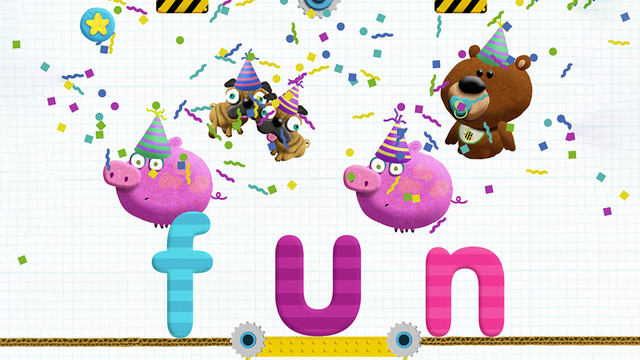
Tiggly StoryTiggly Story Maker: Build Words and Record Your Own Tales makes creating three-letter words (with the CVC pattern) fun. Two consonants sit on the bottom of the screen with a space in between them. The five vowels dangle above the space. Kids drop a vowel into the space to see if they can make a word. If a word is made, the animated object appears on the screen. If a word is not made, the vowel springs off the page. This app is great for reinforcing short vowel sounds and the CVC pattern – a nice addition to a kindergarten or first grade classroom. Tiggly apps are unique because they can be used with or without Tiggly Word & Shape Toys which are available for purchase within the app.

Direct Link https://itunes.apple.com/us/app/tiggly-story-maker-build-words/id969256436?mt=8

Here are links to other Tiggly Apps that are now FREE. I have not reviewed these apps.

Tiggly Doctor: Check up on your verbs in this fun spelling game. Direct link: https://itunes.apple.com/us/app/tiggly-doctor-check-up-on/id971257252?mt=8

Tiggly Safari  shapes to create animals. Direct link:  https://itunes.apple.com/us/app/tiggly-safari/id716679050?mt=8

Tiggly Submarine Preschool ABC Game  Direct link: https://itunes.apple.com/us/app/tiggly-submarine-preschool/id966609991?mt=8

Tiggly Addventure: Number Line & Math Learning Game for Preschool. Direct link: https://itunes.apple.com/us/app/tiggly-addventure-number-line/id923545246?mt=8

Tiggly Chef: Preschool Math Cooking Game. Direct Link https://itunes.apple.com/us/app/tiggly-chef-preschool-math/id923367559?mt=8

Tiggly Cardtoons: Learn to Count with 25 Interactive Kids Stories. Direct link: https://tunes.apple.com/us/app/tiggly-cardtoons-learn-to/id923540012?mt=8

Tiggly Draw. Direct link: https://itunes.apple.com/us/app/tiggly-draw/id718952421?mt=8

Tiggly Stamp. Direct link: https://itunes.apple.com/us/app/tiggly-stamp/id716727860?mt=8

0

Path On – Swipe to Type

Path On

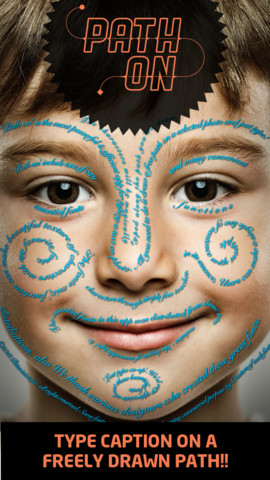
FREE today – Path On, a must-have app with many creative uses!! What does Path On do? It permits you to put text in a path across photos from your albums or taken with your device’s camera. It’s extremely simple to use. Text can be typed in a free path, square, circle, paragraph or spiral. You can also change font styles, colors, and effects. Path On is classified as a photo & video app but there are so many possibilities for using this app in education. Kids could type descriptions of themselves on their pictures, write poetry to go with an image, take photos then point out geometric shapes found in their environment, write a thank you note on a picture of them with the gift, create a timeline by using a series of pictures, create a travel log of the family vacation, and on and on and on. Creations can be saved and shared via Facebook, Instagram, Flickr, Twitter & email. WOW – what a fabulous tool!!

Path on - Peta Vision

0

Even Monsters Get Sick

This cute, interactive story for the iPad is on sale for only $.99. Even Monsters Get Sick is a story written for kids 5+ about a boy and his pet monster. Kids can follow along or read on their own as Harry, the boy, tries to discover what is wrong with his monster. The story is great, the artwork is appealing, and there are animations on every page. It’s a fun story with a positive message about caring – perfect! 🙂

Even Monsters Get Sick - Busy Bee Studios

0

8 Everyday Math® APPS are FREE!

FREE again!!!

8 educational apps from McGraw Hill’s Everyday Math® – If your school system uses this program to teach math, you may want to take advantage of this offer. 🙂

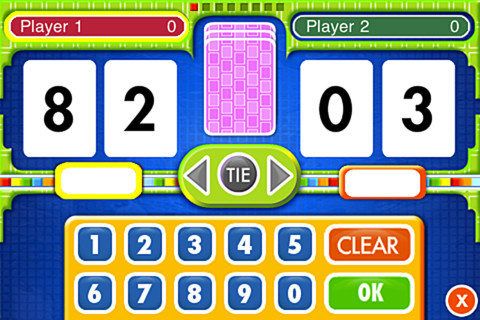
Everyday Math® Addition Top-It app for iPhone/iPad is a two player game. It is fun easy way for kids to practice basic addition facts from 1 – 10 and greater than/less than.

Common Core Standards met:

  • 1.OA.6 – Add and subtract within 20, demonstrating fluency for addition and subtraction within 10.
  • 2.OA.2 – Fluently add and subtract within 20 using mental strategies. By end of Grade 2, know from memory all sums of two one-digit numbers.

Everyday Mathematics® Addition Top It - McGraw-Hill School Education Group

Everyday Math® Beat the Computer app for iPhone/iPad is fun easy way for kids to practice basic multiplication facts. They race against the computer to score as many points as they can.

Common Core Standards met:

  • 3.OA.7 –  By the end of Grade 3, know from memory all products of two one-digit numbers.

Everyday Mathematics® Beat the Computer™ Multiplication - McGraw-Hill School Education GroupEveryday Math® Squeeze Monster app for iPhone/iPad is a two player game. Designed for younger students, it reinforces number line concepts and number comparisons.

Everyday Mathematics® Monster Squeeze™ - McGraw-Hill School Education Group
Everyday Math® Equivalent Fractions app for iPhone/iPad is fun easy way to reinforce fraction concepts. Note: the app uses a digital version of the fraction cards from the Everyday Math third grade book.

Common Core Standards met:

  • 3.NF.3 – Explain equivalence of fractions and compare fractions by reasoning about their size. Understand two fractions as equivalent (equal) if they are the same size, or the same point on a number line. Recognize and generate simple equivalent fractions, e.g., 1/2 = 2/4, 4/6 = 2/3). Explain why the fractions are equivalent, e.g., by using a visual fraction model.
Everyday Mathematics® Equivalent Fractions™ - McGraw-Hill School Education Group
Everyday Math® Divisibility Dash app for iPhone/iPad is fun easy way to practice recognizing multiples of a number and applying divisibility tests.

Common Core Standards met:

  •  4.OA.4 – Find all factor pairs for a whole number in the range 1–100. Recognize that a whole number is a multiple of each of its factors. Determine whether a given whole number in the range 1–100 is a multiple of a given one-digit number. Determine whether a given whole number in the range 1–100 is prime or composite.

Everyday Mathematics® Divisibility Dash™ - McGraw-Hill School Education GroupTric Trac

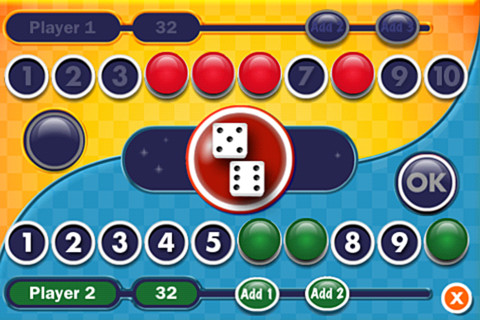
Everyday Math® Tric Trac is a 2 player game for kids to practice their addition facts. Players roll dice, find the sum, then match the sum to numbers in their hand. Every match eliminates that number or numbers from their hand and reduces their score. The player with the lowest score wins!

Direct Link: https://itunes.apple.com/us/app/everyday-mathematics-tric/id413520637?mt=8

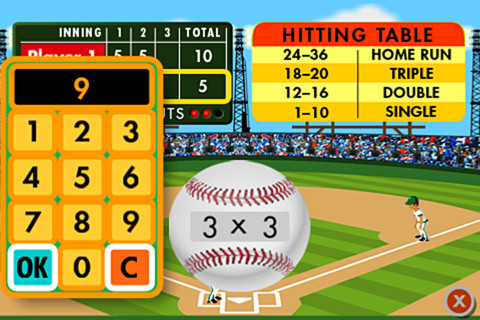
Baseball MultiplicationEveryday Math® Baseball Multiplication 1 – 12 Facts. Two players play a 3 inning baseball game as they practice their facts.

Common Core Standards met:

  • 3.OA.7 – By the end of Grade 3, know from memory all products of two one-digit numbers.

Direct Link: https://geo.itunes.apple.com/us/app/everyday-mathematics-baseball/id430854300?mt=8
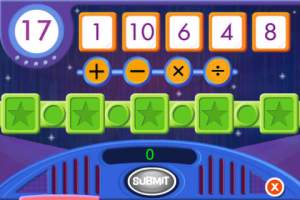
name that number name that numberEveryday Math® Name That Number offers kids a fun way to practice computation and order of operations. Players must use five number tiles to reach a target number. They may add, subtract, multiply, and/or divide. One problem – the app does not have parentheses which restricts the types of number sentences that kids can make.

Direct Link: https://itunes.apple.com/us/app/everyday-mathematics-name/id414295469?mt=8

0

Stickyboard 2

stickyboard-2-ipad-appFREE for a limited time – Stickyboard 2, a giant whiteboard with a never-ending stack of sticky notes. If you are looking to capture ideas in your classroom or at your next meeting, check out the electronic version of this classic organizer. Unlike their paper counterparts, these sticky notes don’t fall off or get lost. And, they are more environmentally friendly. The app also feature Magic Arrange which makes arranging and rearranging the notes much simpler. Entire boards can be emailed as PDF files – great for sharing ideas. Check out this fabulous tool while it’s FREE!

Download link: https://itunes.apple.com/us/app/stickyboard-2/id466102928?mt=8&uo=4