0

Smart Whiteboard HD

super white boardFREE – Smart Whiteboard HD, an educational app that is super simple to use! One finger writes, 2 fingers erase, 3 fingers clears all. Press the save button or shake your device to save an image. Writing can be done in black, blue, or red with 3 Width choices. The app also includes a simple voice recorder. Just press record, talk, stop & name your file, and it is saved to a list. You can then email your recording if you wish to share it. Teachers can get rid of their classroom whiteboards, markers, and erasers! Have kids show their work, explain their thoughts, etc. with this simple educational app!

Smart White Board HD - Pad read

0

Nighty Night Circus

nighty night circus

FREE today – Nighty Night Circus, the sequel to the popular bedtime app “Nighty Night!“ This time kids find themselves in a circus setting with eight circus animals. They put the animals to bed by switching off the lights or blowing out candles. Each circus animal wants to show his tricks off before going to sleep – super cute! The app has all of the same great features as the original – cute animals, sleepy lullaby music, great narration, and fabulous artwork done by Heidi Wittlinger. It’s no wonder that Nighty Night Circus is on Apple’s Best of 2014 list!

Direct Link: https://itunes.apple.com/us/app/nighty-night-circus-bedtime/id931936670?mt=8&uo=6

0

Shadow Puppet

Shadow Puppet

Use the power of this app to create a unique Father’s Day tribute or greeting!!

Fabulous and FREE – Shadow Puppet is a photography app which has been featured by Apple as a Best New Apps. Using this app, it’s easy to create “puppets” – recorded explanations of your photos. First you choose your photos and put them in the order. Then you talk about your pictures. Everything is recorded. Finished “puppets” can be shared via email, SMS, Facebook and/or Twitter. There are so many ways for everyone to use Shadow Puppet: to teach something new, to share adventures with friends, to record children talking about their experiences, to tell the story behind old family photos, etc.

Recent updates have added many new features. Now you can include video clips, add music, search the web for images, overlay text/stickers, and more! The FREE version of the app permits you to include up to 10 photos/video clips. For $1.99 you can get Puppet Essentials which allows you to add up to 100 items to each video and have access to more drawing & decorating tools. The update made this great app even better!

The classroom uses for this app are only limited by your imagination: Take pictures of a child’s work and have him/her explain it to parents. Send pictures and voice recordings of the class field trip. Have kids give a step-by-step explanation of what happened in a science experiment. Draw & sequence pictures to retell a story. Make a “talking timeline” by sequencing photos of historical events. Have kids use it to present mini reports on any subject. Have virtual “pet day” – kids bring in pictures/recordings of their pets. Because you can use anything saved to your photo library, you can explain photos from the web, artwork created in other apps, and so much more. The possibilities for using this educational app are endless. For more suggestions go to http://get-puppet.com/education. What a fabulous resource!!

Download link: https://itunes.apple.com/us/app/shadow-puppet/id700902833?mt=8&uo=4

0

Chili Fish

chili fishFREE for a limited time – Chili Fish, a fun art app for children. Kids use their imaginations to create fish for their very own underwater kingdom. First they use a variety of colors to paint and/or stamp their fish. Then they choose from different eyes, tails, fins, mouths, etc. The result is a completely new fish every time. Each fish has its own personality, speed, and taste in food. They can also lay eggs to create new fishy friends. Kids can snap pictures of their fish and save them to the camera roll. Then they can print, share, or write about them. Check out this open-ended and interactive app. Kids will enjoy exploring and interacting with the aquatic world that they help to create!

Direct Link https://itunes.apple.com/us/app/chili-fish/id907053583?mt=8&uo=6

0

La Luna: The Story Project

On sale for only $.99 – La Luna, an educational app based on Pixar’s Oscar-nominated short film. This app was selected as “Innovative Kids App” in the U.S. for the App Store’s Best of 2013! It includes the full theatrical release of the short film.

La Luna is a beautifully told fable of a young boy coming to age. It features the original artwork of Enrico Casarosa, the film’s director. The app includes 3 ways to enjoy the interactive story – as a short film, an interactive video, or a storybook. Also included is a fascinating “Behind the Scenes” section which explores the process of creation from storyboard to screen. Kids will learn about storyboards, turntables, sound design, visual design, and progression reel. They will love getting a glimpse of the process that Pixar uses to create its movies. And, the story is absolutely magical!

Highly recommended – do not miss this extraordinary app!!

Direct Link: https://itunes.apple.com/us/app/la-luna-the-story-project/id657554982?mt=8&uo=6

0

Spelling Star

spelling star

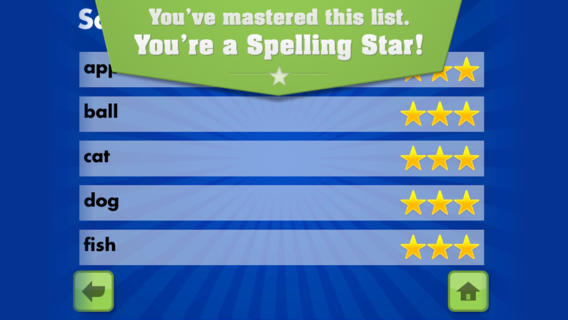
FREE for  limited time – Spelling Star, an educational app for practicing spelling lists. The app is simple to use – just type in and record the words. You may also include sentences to clarify the words’ meanings. Kids must spell each word correctly three times to become a Spelling Star.  Words are presented in random order. As kids practice, they can get a hint – a quick look at the word spelled correctly. When they spell a word without a hint, they earn a star. Spelling Star provides feedback after each word is spelled with the option to “try again” when an error is made. This educational app is great for home and/or school. Parents can use it to input spelling lists for multiple kids. Kids may enjoy inputting their own lists at the beginning of the week which would be GREAT practice! Teachers can create lists on one device and share those lists with anyone who has the Spelling Star app. Simple to use and tracks progress – what more do you need? 🙂

Download link: https://itunes.apple.com/us/app/spelling-star/id557070660?mt=8&uo=4

0

Walter’s Flying Bus

Walter's Flying Bus

FREE for a limited time – Walter’s Flying Bus, a story inspired by the real-life dreams of Walter and his friends (orphaned, special needs children in Uganda.) Walter finds an abandoned bus. With his friends and a little work, the engine soon roars to life! This e-book is inspirational – a celebration of the talents & beauty of every child. It is narrated in English, Spanish and Luganda (a primary language of Uganda). The educational app also includes mini-documentaries of the real-life children featured in the book. According to the developer  – “ONE HUNDRED PERCENT of after-tax profits from App sales go to efforts helping orphans with special needs, including advocacy, care, and adoption assistance grants.” Nice story with a great message!

Walter's Flying Bus - Chosen and Dearly Loved, LLC

0

Use Your Handwriting GOLD

Use yourUse Your Handwriting

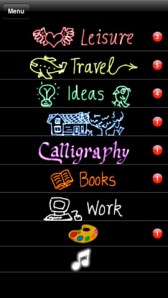
FREE for a limited time… a “productivity” app called Use Your Handwriting GOLD. This app normally sells for $9.99 and it has LOTS of potential for classroom/kid use! You can use your finger to write notes, messages, lists, etc. on your device (iPhone/iPad) screen. You can choose 5 different styles of writing in 22 different colors – there is even a rainbow option! Notes, lists, etc. are saved into categories – which you set. This app is great for kids because writing is not confined to a limited space – the app will move the writing to the left so a line can be completed. After “done” is tapped, the app shrinks the writing and adds it to the area above!

There are SO many uses for this app. Kids could use this app to take notes in class – choosing different color for each subject. They could write poetry in color! Teachers could have their students use this app to create exit slips. Or, students could use the app to take notes, respond to what they’ve read, etc. Younger students could practice their cursive writing with this app. Anything created in the app can be emailed/messaged to the teacher. At home, your kids can use the app to write thank you notes to grandparents which can be delivered via email or MMS. And the BEST part of this app is that it preserves the child’s drawings & handwriting! VERY cool!!

Use Your Handwriting GOLD - Gee Whiz Stuff

0

Tiny Dentist

Tiny Dentist

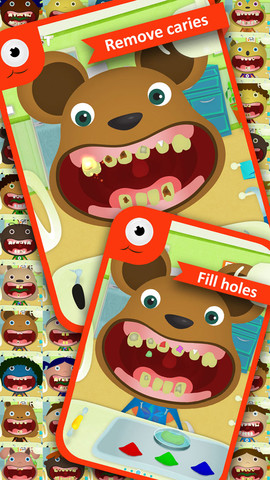
FREE again – Tiny Dentist. Kids get to be a dentist for a day with this educational app that teaches about dental treatments and instruments. Dozens of patients with dental problems need fixed. The “dentist” has the tools to: remove cavities & fill in the hole, remove plaque, use water & air sprays, remove decayed teeth, put on braces, and more! The app was developed to alleviate children’s fear of the dentist. Visual instructions for using the different tools are found in the grown-ups section. Another fun feature of the app is the ability to take before and after pictures of the patient. 🙂 Check it out!!

Tiny Dentist - fantastoonic

0

Drive About Number Neighborhood

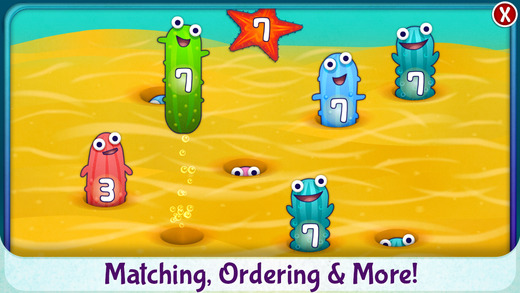
drive aroundFREE for a limited time – Drive About Number Neighborhood, an educational app that helps kids practice beginning numbers. Kids are required to match, count, write, identify, or order numbers in nine fun games. They tap sea pickles with the correct the target number in Catch-a-Sea-Pickle. They trace numbers in the sky in Cloud Writing. See-Saw has kids balancing animals to make equal sums. All of the games in Drive About: Number Neighborhood give your child practice in early numeracy. Kids can proceed at their own pace as they drive, fly or sail in a world of educational free play – perfect for preschoolers!!
Direct Link https://itunes.apple.com/us/app/drive-about-number-neighborhood/id864136403?mt=8&uo=6