0

Toca Hair Salon Me

hair salon meFREE for a limited time – Toca Hair Salon Me, the newest addition to the popular Toca Hair Salon apps. Using this app, kids can create a whole new look for themselves and/or their family & friends. They simply import a picture from the camera roll and “the styling” can begin. The salon is equipped with all the right tools to style hair. They can cut it, comb it, make it grow, shave it, color it, etc. They can also wash it, blow it dry, curl it or straighten it. Great sound effects add to the fun! After they finish the styling, they can add fun accessories – glasses, bow, mustaches, etc. They can even use their own photos for the background. Kids or parents can take a photo of the finished creation and save it to their camera roll. What a great springboard for creative writing – give yourself a whole new look and write a story to go with it. What a fun activity for a Wacky Hair Day!!

Download link: https://itunes.apple.com/us/app/toca-hair-salon-me/id730873197?mt=8&uo=4

0

SpeakaLegend, SpeakaZoo & Winston Show

speakalegend

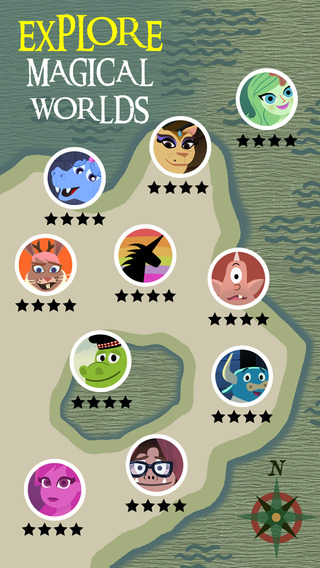
From the creators of the Winston Show & SpeakaZoo comes a new app called SpeakaLegend which is FREE for a limited time. Kids befriend and speak to 10 different legendary characters: Big Foot, Loch Ness Monster, Mermaid, Fairy, Cyclops, Minotaur, Dragon, Jackalope, Sphinx and Unicorn. The app uses speech recognition technology so that kids can have actual conversations with the characters. They become world explorers on a magical quest to find and speak to the Unicorn. Check out this ingenious and fun app from ToyTalk – great for helping kids with conversational language. Before children can speak with the characters, parents are required to give permission via email. Read more about Toy Talk’s privacy policy at: ToyTalk | Legal | Privacy Policy.
Download link: https://itunes.apple.com/us/app/speakalegend/id908466608?mt=8&uo=4

Here are my earlier reviews of other Toy Talk apps.

speak a zooFrom the creators of the Winston Show comes another FREE app – SpeakaZoo, the only zoo where the animals talk with you. This educational  app is currently featured as one of the “Best New Apps” by Apple. The SpeakaZoo houses 20 different animals from 4 different habitats. Each one has a lot of character – a fast-talking octopus, a porcupine that needs a hug, an angry beaver, a sleepy bear, etc. And each character has a lot to talk about. The animals ask kids questions then “listen” to their answers. The conversation continues when the animal responds to what the child just answered – fun!

Parents are asked to create an account with a valid email address so that they have full control over all account information and content for children under 13. From the ToyTalk privacy policy FAQs: “ToyTalk apps involve characters that interact with users. When children use ToyTalk apps, audio recordings and photographs of such interactions are captured as part of this use. We may add the ability to capture video in the future. In that case, we will update this FAQ to describe how we use those recordings too.” Read more at: http://www.toytalk.com/legal/

Download link: https://itunes.apple.com/us/app/speakazoo/id850553929?mt=8&uo=4

winston

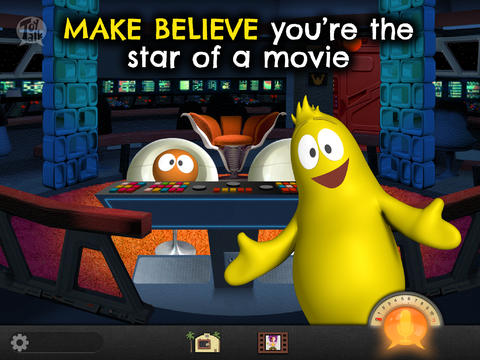
FREE – The Winston Show, an adorable app for kids 6+. Winston (a self-proclaimed, yellow fellow) and his sidekick Ellington have created the first talk show starring you! Special guests include Blackbeard the Pirate, Marie Antoinette, and the Blue Whale. Kids visit 6 different studios within the app. In Studio 1, they become a contestant on a quiz show called Win with Winston. Studio 2 features Fireside Chats on a variety of kid-friendly subjects such as magic and chores. In Studios, 3 kids can choose to become the star in two movies: Squabble Among the Stars or Winston Sly, Private Eye. They battle colorful characters (such as Lewis & Clark) in Studio 4′s You vs., another game show. Studio 5 is the Costume Department where kids can play dress-up in an assortment of costumes. And finally, Studio 6 features the Writing Room where kids choose the path of a story. This app is fabulous for helping kids with conversational language because the characters listen and talk back! It’s quite ingenious and could be really fun – for kids and adults. Adults will love seeing kids interact with Winston and friends. And, they will understand all of the jokes. 🙂 Delightful!!

From the ToyTalk privacy policy FAQs: “Users under 13 are only authorized to use ToyTalk apps under their parent/guardian’s account. As a result, we do not knowingly collect emails or other contact information directly from children under 13. ToyTalk apps involve characters that interact with users. When children use ToyTalk apps, audio recordings and photographs of such interactions are captured as part of this use. We may add the ability to capture video in the future. In that case, we will update this FAQ to describe how we use those recordings too.”  Read more at: http://www.toytalk.com/legal/

Download link: https://itunes.apple.com/us/app/winston-show/id669541931?mt=8&uo=4

1

Mad Libs

The new & improved app, Mad Libs, is now available for iOS 7.0 or higher.

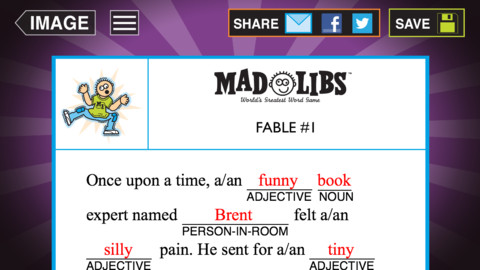
What are Mad Libs? They are stories with words left out. Over 120,000,000 Mad Libs books have been sold to date and MadLibs.com gets 50,000 visitors per month. And now, Mad Libs is a FREE educational app for the iPhone/iPad with over 3.7 million downloads. 21 stories are included with this app. Additional stories are available as in-app purchases.

Here’s how they work: A “reader” selects a story but he/she doesn’t tell the “writers” (other players) what it is about. Then the “reader” calls out the types of words (adjective, noun, collective noun, verb, ing words, etc.) needed to complete the story. The “writers” generate words to fill in the blanks in the story. Once all the blanks have been filled, the “reader” reads the story aloud. The result is usually a silly story which kids LOVE! And to add to the fun, the upgrade permits you to add photos & images to your story. Mad Libs are a great classroom activity when you have 10 minutes before lunch, you’re waiting for a guest, etc. Kids enjoy playing Mad Libs but in order to play, they have to know parts of speech. Who knew learning parts of speech could be so much fun!?!

Mad Libs - Penguin Group USA

0

Art Mail

Artmail

FREE again for a limited time! Add a personal touch to your emails with Art Mail, an app for writing and sending handwritten notes. This app is not billed as an educational app but it could/should be. 🙂 The app features several choices of stationery plus the option of using your camera to create a unique background. The writing is a brush style (similar to a fountain pen) with several color options. But the best part of this app is the scaling feature – which makes this app great for kids. Users can fill up the entire screen and the app automatically shrinks the word/words to fit in a letter format. Subsequent words are shrunk to match the size of the other words. A red cursor can be moved around to change the location of the words. Little hands will be able to write thank you notes to grandparents or to add a note of explanation to a photo. In the classroom, teachers could use it is SO many ways – for good copies of their writing, to communicate with parents, as an exit slip after a lesson, etc. I LOVE that this app preserves the child’s writing!! Very cool app – perhaps an upgrade will include the ability to pull in pictures from the photo library which would make it even better!!

ArtMail - Wen Yun Rong

0

Shadow Puppet

Shadow PuppetThanksgiving is only a few weeks away. Use this app with kids to create and share unique “I Am Thankful” presentations.

Recently updated and still FREE – Shadow Puppet is a photography app which was featured by Apple as a “Best New Apps” about a year ago. Using this app, it’s easy to create “puppets” – recorded explanations of your photos. First you choose your photos and put them in the order. Then you talk about your pictures. Everything is recorded. Finished “puppets” can be shared via email, SMS, Facebook and/or Twitter. There are so many ways for everyone to use Shadow Puppet: to teach something new, to share adventures with friends, to record children talking about their experiences, to tell the story behind old family photos, etc.

The recent updates have added many new features. Now you can include video clips, add music, search the web for images, overlay text/stickers, and more! The FREE version of the app permits you to include up to 10 photos/video clips. For $1.99 you can get Puppet Essentials which allows you to add up to 100 items to each video and have access to more drawing & decorating tools. The update made this great app even better!

The classroom uses for this app are only limited by your imagination: Take pictures of a child’s work and have him/her explain it to parents. Send pictures and voice recordings of the class field trip. Have kids give a step-by-step explanation of what happened in a science experiment. Draw & sequence pictures to retell a story. Make a “talking timeline” by sequencing photos of historical events. Have kids use it to present mini reports on any subject. Have virtual “pet day” – kids bring in pictures/recordings of their pets. Because you can use anything saved to your photo library, you can explain photos from the web, artwork created in other apps, and so much more. The possibilities for using this educational app are endless. For more suggestions go to http://get-puppet.com/education. What a fabulous resource!!

Download link: https://itunes.apple.com/us/app/shadow-puppet/id700902833?mt=8&uo=4

0

3 FREE Poetry Apps from the International Reading Association

Planning a poetry unit? The International Reading Association has some apps that may help.

Here are three.
They are FREE. 🙂

acrosticAcrostic Poem helps kids learn about and write acrostic poetry. An acrostic poem uses a word as its subject. The word is written vertically so that each letter begins a line of the poem. All lines of the poem describe or relate to the subject word. The poem does not have to rhyme. Acrostic poems are easy to write and great for having kids introduce themselves, Mother’s Day, Father’s Day, etc.

The app is perfect for a classroom where devices are shared because each student creates his/her own profile. The app explains an acrostic poem and gives an example. Then the student enters his/her topic word. The app advances to a brainstorming page where the student can enter ideas to help write the poem. Then the app advances to a “write your poem” page. The brainstormed words are displayed to help. Work can be saved in progress – reinforcing the elements of the writing process. Finished poems can be saved to the device’s camera roll or emailed. This app mirrors ReadWriteThink’s popular acrostic poem web-based interactive: http://www.readwritethink.org/classroom-resources/student-interactives/acrostic-poems-30045.html. Students can send their editable poems to an email address and then open them in the online tool!

Download link: https://itunes.apple.com/us/app/acrostic-poem/id724841119?mt=8&uo=4

diamanteDiamante Poem helps kids learn about and write diamante poetry. Diamante poems can be written about one central topic or two opposing topics such as day/night. A diamante poem has seven lines and is written in the shape of a diamond. The first and last lines are just one word – nouns. The second and sixth line are two words – adjectives. The third and fifth lines are three words – “ing” words. And the middle line has four+ words – nouns or prepositional phrases. Diamante poems are great for teaching parts of speech and synonyms/antonyms.

The app is perfect for a classroom where devices are shared because each student creates his/her own profile. The app explains a diamante poem and gives two examples – a synonym poem and an antonym poem. Then the student enters his/her beginning and ending topic words. The app advances to a “write your poem” page where the student enters his/her words. The app reminds students which kids of words should be used on each line. Work can be saved in progress – reinforcing the elements of the writing process. Finished poems can be saved to the device’s camera roll or emailed. This app mirrors ReadWriteThink’s popular diamante poem web-based interactive: http://www.readwritethink.org/classroom-resources/student-interactives/diamante-poems-30053.html. Students can send their editable poems to an email address and then open them in the online tool!

Download link: https://itunes.apple.com/us/app/diamante-poem/id724953313?mt=8&uo=4

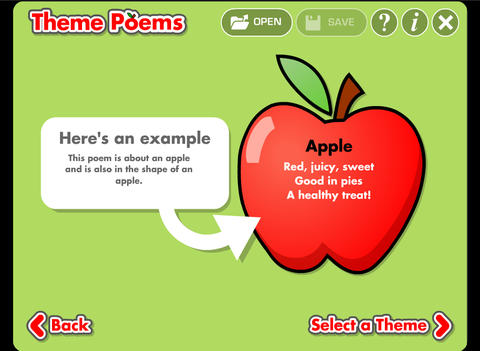
theme poemTheme Poem helps kids learn about and write theme poetry. A theme poem is sometimes called a shape poem. It is written in the shape of what the poem is about. For example, the apple poem is written in the shape of an apple.

Again, this app is perfect for a classroom where devices are shared because each student creates his/her own profile. The app gives an example of a theme poem. Then the student selects one of 5 themed files – nature, school, sports, celebrations, shapes. Each themed file has 5 – 8 shapes for students to choose. Once a shape is chosen, the app advances to a “think of words” page for the student to brainstorm his/her ideas. Then the app advances to a “write your poem” page. The brainstormed words are displayed to help. Work can be saved in progress – reinforcing the elements of the writing process. Finished poems can be saved to the device’s camera roll or emailed. This app mirrors ReadWriteThink’s popular theme poem web-based interactive: http://www.readwritethink.org/files/resources/interactives/theme_poems/. Students can send their editable poems to an email address and then open them in the online tool!

Download link: https://itunes.apple.com/us/app/theme-poem/id724978211?mt=8&uo=4

0

News-O-Matic

news

Check out a FREE trial of News-o-Matic, an educational newspaper app for kids 7 – 11 years old. A new edition is published every Monday through Friday. Each edition features 5 articles from the news – sports, science, world news, wacky events, etc. The articles are kid-friendly and age-appropriate. Kids can read on their own or have the articles read to them. Important vocabulary words are underlined and linked to their definitions. The articles also include fun facts, a map for locating where the news is happening, videos, and games. Once registered, kids can connect to the News Room to draw pictures, express opinions, or ask questions about the news. This app helps kids become informed citizens of the world!

The FREE trial lasts for 2 weeks. After that, you must subscribe: yearly – $19.99. monthly – $1.99, or weekly – $0.99. If you subscribe before the end of your free trial, you get a special rate. Teachers, there is also a News-o-Matic School Edition. It comes with a teacher’s guide which includes discussion prompts, comprehension questions, Lexile reading levels, and more. And, it’s a great resource for non-fiction reading!

Download link: https://itunes.apple.com/us/app/news-o-matic-daily-reading/id578023255?mt=8&uo=4

0

Funny Jokes Storybook

FREE for a limited time – Funny Jokes Storybook. All of the jokes are riddles. They are narrated by children or kids can also choose to read the riddles on their own. Each riddle is presented on two pages: question page followed by the answer page. This arrangement is great because kids can think about the questions then guess the answers. The riddles are kid appropriate – great for kids 8+ who are beginning to understand word play. Here is an example: How was the Roman Empire cut in half? With a pair of Caesars. 🙂 I have always been a fan of riddles. They make kids think – brain exercise for elementary-aged kids with a smile or two along the way.

Download link: https://itunes.apple.com/us/app/funny-jokes-storybook/id829817398?mt=8&uo=4

Also FREE for a limited time from the same developer – Tongue Twisters Read-Along For Kids

Download link: https://itunes.apple.com/us/app/tongue-twisters-read-along/id843540940?mt=8&uo=4

0

7 Fabulous Apps for Teaching Fractions

fractions

Currently FREE  – Fractions by Brainingcamp, an excellent educational app for teaching fractions. The app covers 7 topics: introduction to fractions, equivalent fractions, common denominators, comparing/ordering fractions, adding/subtracting fractions, multiplying fractions, and dividing fractions. Each topic includes: a narrated lesson (with visual models), virtual manipulatives for kids to explore, practice questions to check understanding, and a challenging game for additional practice. Kids earn badges as they work through the components of each topic.

WOW – I love everything about this app. The lessons are wonderful. The manipulatives are designed to promote understanding of the concepts presented. The practice questions give students and their teachers a check of their understanding. And, the challenging games helps kids further master the topic. It would be a fabulous for grades 3 and beyond!

Common Core State Standards met:

  • 3.NF.1. Understand a fraction 1/b as the quantity formed by 1 part when a whole is partitioned into b equal parts; understand a fraction a/b as the quantity formed by a parts of size 1/b.
  • 3.NF.3 – Explain equivalence of fractions and compare fractions by reasoning about their size. Understand two fractions as equivalent (equal) if they are the same size. Recognize and generate simple equivalent fractions, e.g., 1/2 = 2/4, 4/6 = 2/3).
  • 4.NF.3 – a. Understand addition and subtraction of fractions as joining and separating parts referring to the same whole.
  • 5.NF.3 – Interpret a fraction as division of the numerator by the denominator (a/b = a ÷ b).

Download link: https://itunes.apple.com/us/app/fractions-by-brainingcamp/id471353363?mt=8&uo=4

on no fractrionsUpdated again in March 2014 – Oh No, Fractions! This FREE app just keeps getting better and better because the developer encourages teacher input. How wonderful is that – a developer willing to listen to teachers’ needs!

Oh No Fractions! is a great FREE iPhone/iPad app for comparing and exploring fractions. The educational app is simple to use – kids just swipe to the right or the left to indicate whether one fraction is “greater than” or “less than” or “equal to” a second fraction. As they work, kids can tap above each fraction to see if it can be reduced/simplified – a great feature. But, one of the best features of this app is the “peek”/”prove it” feature. Kids can use a manipulative to “peek” at an answer before they commit to it or they can use the manipulative to “prove” their answer later. This feature is fabulous because it allows the child to visualize his/her answer. Kids can also use this app to practice finding the common denominator. Then they can use it for addition, subtraction, multiplication, and division of fractions. The app also generates corresponding decimals/percentages for each answer. What a great tool for helping kids to understand fractions!! It’s no wonder that it received the 2013 Children’s Technology Review Editor’s Choice Award.

Common Core Standards met:

  • 3.NF.3 – Explain equivalence of fractions and compare fractions by reasoning about their size. Understand two fractions as equivalent (equal) if they are the same size. Recognize and generate simple equivalent fractions, e.g., 1/2 = 2/4, 4/6 = 2/3).

Oh No Fractions! - Curious Hat Lab - Curious Hat

equivalent fractions

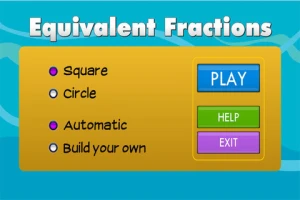
From the National Council of Teachers of Mathematics comes a FREE app called Equivalent Fractions. Kids create equivalent fractions by dividing and shading squares or circles. Circles can be divided into 24ths. Squares can be divided into 144ths. In the play mode, a fraction is shown and kids must create 2 additional fractions that are equivalent. All 3 fractions must have different denominators. The app also places the fractions on a number line – a great visual for comparing! There is also a “build your own” mode which would be fabulous to use for guided exploration & practice. Kids could also use this section as a virtual manipulative when working independently. This app is an excellent resource for the classroom!

Common Core Standards met:

  • 3.NF.3 – Explain equivalence of fractions and compare fractions by reasoning about their size. Understand two fractions as equivalent (equal) if they are the same size, or the same point on a number line. Recognize and generate simple equivalent fractions, e.g., 1/2 = 2/4, 4/6 = 2/3). Explain why the fractions are equivalent, e.g., by using a visual fraction model.

Equivalent Fractions - National Council of Teachers of Mathematics

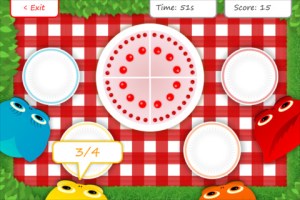
tiny fractionsNow $4.99 but was FREE when it was released – Tiny Fractions. This educational app teaches identifying, comparing, ordering, finding equivalents, simplifying, adding, and subtracting fractions using vials of liquid. It starts out simple and gets more difficult as kids progress through the app. It also keeps track of the student’s progress – showing teachers/parents specifically which fractions were missed. Simply done and easy to use, this app does a great job helping kids visualize and learn fractions!

Common Core Standards met:

  • 3.NF.1. Understand a fraction 1/b as the quantity formed by 1 part when a whole is partitioned into b equal parts; understand a fraction a/b as the quantity formed by a parts of size 1/b.
  • 3.NF.3 – Explain equivalence of fractions and compare fractions by reasoning about their size. Understand two fractions as equivalent (equal) if they are the same size. Recognize and generate simple equivalent fractions, e.g., 1/2 = 2/4, 4/6 = 2/3).
  • 4.NF.3 – a. Understand addition and subtraction of fractions as joining and separating parts referring to the same whole.
Tiny Fractions - TapToLearn Software

squeebles

From England and currently $1.99 –  Squeebles Fractions, an app for the iPhone/iPad that is designed to teach fractions to 7 – 11 year olds. The Squeebles want to enter a cake making contest but their ingredients have been stolen by the Math Monster. By working on the app’s 4 games, kids help the Squeebles earn back their ingredients. In Piece of Cake, kids drag the fractional part of a cake to a Squeebles when he asks for it. The easy mode covers halves, fourths, thirds. The hard mode cover fractions to tenths. In Tricky Pairs, kids have to match pairs of equivalent fractions. In the easy mode they match 4 pairs and in the hard mode they match up to 9 pairs. Think Big has kids feeding cake to the Squeeble that calls out the biggest fraction. The easy mode covers halves, fourths, thirds. The hard mode cover fractions to twelfths. Super Sums requires kids to add fractions as quickly as they can and has three levels of difficulty. After earning ingredients, kids can create cakes and enter them in The Cake Show – fun! Another great thing about this app is that you can have more than one player. My only concern is that the easy mode of Piece of Cake requires kids to know some equivalent fractions – for example, it asked kids to pick 3/4 of a cake divided into 8 pieces, 1/3 of a cake divided into 6 pieces, etc. I wish it would have required a basic knowledge of fractions in the easy mode then moved on to equivalent fractions in the hard mode. This app is cute, fun, and provides great practice for a wide spectrum of kids.

Common Core Standards met:

  • 3.NF.3 – Explain equivalence of fractions and compare fractions by reasoning about their size. Understand two fractions as equivalent (equal) if they are the same size, or the same point on a number line. Recognize and generate simple equivalent fractions, e.g., 1/2 = 2/4, 4/6 = 2/3).
  • 4.NF.3 – a. Understand addition and subtraction of fractions as joining and separating parts referring to the same whole.

Download link: https://itunes.apple.com/us/app/squeebles-fractions/id557576867?mt=8&uo=4

equivalent

Currently $1.99 but often “goes free” – Everyday Mathematics® Equivalent Fractions™  for iPhone/iPad is fun easy way to reinforce fraction concepts. Note: the app uses a digital version of the fraction cards from the Everyday Math third grade book.
Common Core Standards met:

  • 3.NF.3 – Explain equivalence of fractions and compare fractions by reasoning about their size. Understand two fractions as equivalent (equal) if they are the same size, or the same point on a number line. Recognize and generate simple equivalent fractions, e.g., 1/2 = 2/4, 4/6 = 2/3). Explain why the fractions are equivalent, e.g., by using a visual fraction model.

Download link: https://itunes.apple.com/us/app/everyday-mathematics-equivalent/id417016316?mt=8&uo=4
Fraction Wall

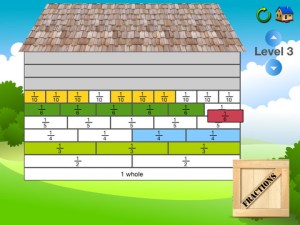
Currently $1.99 – Fraction Wall, an app designed for small group or independent learning. This educational app has 4 sections: Teacher Tool, Complete the Wall, 2 Player Game, and Addition. The Teacher Tool can be used to show/discover equivalent fractions or it can be used to answer equivalent fraction problems. Complete the Wall has kids moving bricks on top of equivalent fractions. There are 4 levels: level 1 – halves and quarter; level 2 – halves, thirds, quarters and sixths; level 3 – halves, thirds; quarters fifths, sixths, tenths; level 4 – halves up to tenth. 2 Player Game has kids competing against each other to be the first to fill their wall of equivalent fractions. Addition has kids adding fractions to answer multiple choice questions. There is a clickable wall to help them visualize the answer if needed. This section also has 4 levels. The app can be customized to exclude more difficult fractions from the wall. This app would work well in the classroom – great for practicing and/or for using as a tool to visualize answers. Much more fun than a worksheet for practicing fractions!

Common Core Standards met:

  • 3.NF.3 – Explain equivalence of fractions and compare fractions by reasoning about their size. Understand two fractions as equivalent (equal) if they are the same size. Recognize and generate simple equivalent fractions, e.g., 1/2 = 2/4, 4/6 = 2/3).
0

Curious George at the Zoo

Curious George at the Zoo is currently FREE (again) for iPhone/iPad. Designed for preschoolers, this educational app has kids helping Curious George wake, clean, and feed animals in the zoo. Introduced by the Man with the Yellow Hat (of course), the app then asks your child where he/she would like to go. But, buyer beware  –  there is only one section of zoo (Sunny Safari) included with the initial purchase of the app – normally $.99.

There are 5 animals for kids to learn about in this app – the hippo. giraffe, lion, parrot, and elephant. First they wake the animal up, then they clean it and feed it – fairly simple activities. Also included are age-appropriate video clips about each animal. Kids can play a game (Safari Showers) and collect stickers.

I have always loved Curious George books – the stories are timeless and can be enjoyed by kids from preschool through first/second grade. The simplicity of this app makes it most appropriate for Curious George’s youngest fans (2 – 3 year olds). I am disappointed that kids are given “a choice” of where they would like go in the app when there is only one area available without additional purchases. Choices are presented in a cute pop-up book but 3 out of 4 pages are covered by a huge “tap here to purchase” button. It feels similar to having the candy in the checkout line of the grocery story. That being said, if you have a 2 or 3-year-old that loves Curious George, you may want to download this app.

Curious George at the Zoo for iPad - Houghton Mifflin Harcourt