0

Animal Pre-K Learning Games for Kids with Skills on the Farm

farmFREE for a limited time – Animal Pre-K Learning Games for Kids with Skills on the Farm, a cute educational app for preschoolers. Lily the farmer leads kids through a series of games that teach preschool/K skills: colors, shapes, counting 1 – 10, groups & categories, sequencing & patterns, addition & subtraction. I like that the app teaches shapes in two ways – a circle and a donut, an oval and a watermelon, a rectangle and a bus, etc. And, I was particularly impressed that it names a kite shape as a rhombus. As kids play, they help the cute farm animals (Pinkie the pig, Oliver the horse, Bessie the cow, Cordelia the chicken, Gordon the goat, Sherman the sheep, Webster the duck, Pete the frog) find their way back home. The app is bright, colorful and full of positive encouragement. Nicely done, this app is sure to appeal to little ones.

Download link: https://itunes.apple.com/us/app/animal-pre-k-learning-games/id882334452?mt=8&uo=4
0

Math Duel

Math Duel

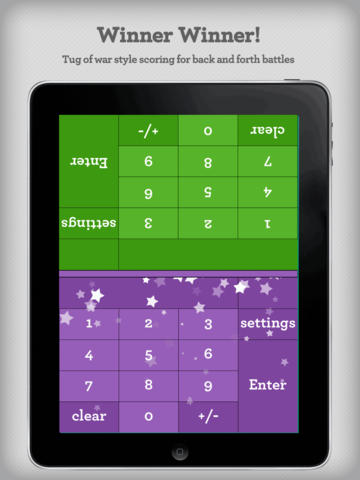
FREE for a limited time – Math Duel-2 Player Mathematical Game.This educational app pits two players against each other on the same device which makes it perfect for sharing iPads in the classroom. The app has a split screen interface – students sit facing each other on either end of the iPad. As kids answer math equations, the app keeps separate scores for each student. The best thing about this app is that it is fully customizable (on both sides) which makes it a fabulous tool for individualizing instruction for a wide range of students. Equations can be set with 1 – 5 terms. Largest numbers possible can be from 1 – 100. Negative numbers can be turned on/off. Kids can practice addition, subtraction, multiplication, division or any combination of these operations. Fabulous and fun for daily classroom math practice in multiple grades!

Common Core Standards met:

  • 1.OA.6 – Add and subtract within 20, demonstrating fluency for addition and subtraction within 10.
  • 2.OA.2 – Fluently add and subtract within 20 using mental strategies. By end of Grade 2, know from memory all sums of two one-digit numbers.
  • 3.OA.7 – Fluently multiply and divide within 100, using strategies such as the relationship between multiplication and division or properties of operations. By the end of Grade 3, know from memory all products of two one-digit numbers.

Download link: https://itunes.apple.com/us/app/math-duel-2-player-mathematical/id495077699?mt=8&uo=4

0

Sago Mini Bug Builder

bug buider

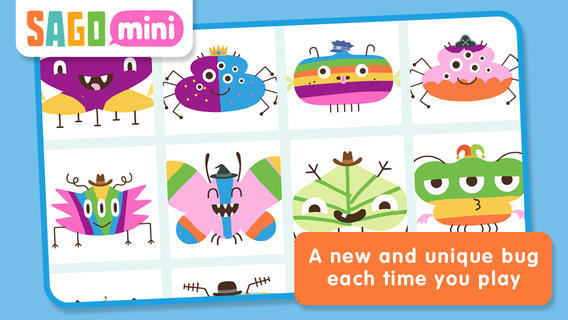
On sale for $.99 – Sago Mini Bug Builder, an educational app for toddlers/preschoolers. Kids create, hatch, and play with cute little critters. They can transform 1 of 8 shapes into a colorful bug, add some color, then bring it to life. They can also add a funny hat, feed it a snack, clean up its mess, and take its picture. Kids can make unlimited number of unique bugs using this app which is very cute & creative! Older kids could create bugs to use for creative writing – a descriptive paragraph, a story, a dialog. Or, they could create 2 bugs to compare and contrast. Check out this colorful & creative app while it’s on sale!

Download link: https://itunes.apple.com/us/app/sago-mini-bug-builder/id657821775?mt=8&uo=4

0

Sight Word Sentence Builder

sight word sentencesFREE for a limited time – Sight Word Sentence Builder. This app has kids building sentences using the Dolch sight words. Learning sight words is an important component of early reading. Being able to automatically recognize sight words improves a child’s reading fluency. Kids start by choosing one of three themes – classic, little princess, or train. The app has four levels of difficulty. Each level contains simple sentences that are constructed from sight words. After listening to a sentence, kids click and drag words to build that sentence. There is an option to have the sentence repeated if needed. There is also an option to turn off the audio so that kids can try to construct the sentences on their own. These options make the app suitable for multiple levels of kids. The app tracks a child’s levels, scores, and the amount of time played over a seven day and thirty day period of time. It does not have an option for multiple players so the app would have to be reset before using it with a second player. Check it out for your beginning reader!

Direct Link:  https://itunes.apple.com/us/app/sight-words-sentence-builder/id527718967?mt=8

0

Word Wonderland (Primary) and Word Wonderland (Elementary)

Word Wonderland

FREE for a limited time – Word Wonderland (Primary) and Word Wonderland (Elementary), games that have kids hopping, eating, and shaking their way to the end of a game board as they sort words. Children start by creating name badges – the app permits multiple children to play. In the primary (K – 2) version, kids help to guide a friendly frog through the pond as they sort words by sounds – short vowels. long vowels, r controlled vowels, blends, digraphs, and more. In the elementary (3 – 6) version, kids guide an astronaut crab through the space station as they sort more difficult words by sounds, inflectional endings, Greek/Latin roots, etc. These educational apps provide a fun way for kids to sort words but I must admit that I am a bit apprehensive about encouraging kids to shake the iPad. Check it out for yourself while the full versions are FREE.

Download links: https://itunes.apple.com/us/app/word-wonderland-primary-full/id611436564?mt=8&uo=4 and https://itunes.apple.com/us/app/word-wonderland-elementary/id634947932?mt=8&uo=4

0

Grammar Wonderland (Primary) & Grammar Wonderland (Elementary)

grammar primary

grammar

FREE for a limited time – the full versions of Grammar Wonderland (Primary) & Grammar Wonderland (Elementary). In both games kids lead their characters through different adventures as they practice nouns, verbs, adjectives, and more. The primary version is for younger children – the words are read and some levels include pictures. The app does not teach the parts of speech but it provides lots of practice for kids in a fun game-like environment. After teaching a lesson about parts of speech, teachers can have kids show what they know with this app. Practice is provided for the following: common nouns, proper, nouns, concrete nouns, abstract nouns, singular nouns, plural nouns, possessive nouns, pronouns, action verbs, present-tense verbs, past-tense verbs, future-tense verbs, linking verbs, adjectives, articles, comparative/superlative adjectives, and more! Many parts of speech are taught in both apps – perfect for differentiating your instruction for a variety of reading levels. Both also apps permit multiple player – great for the classroom!

Recommended!!  – Download them today. 🙂

Grammar Wonderland Primary       Grammar Wonderland (Primary) - McGraw-Hill School Education Group

Grammar Wonderland Elementary       Grammar Wonderland (Elementary) - McGraw-Hill School Education Group

0

Thomas & Friends Talk to You

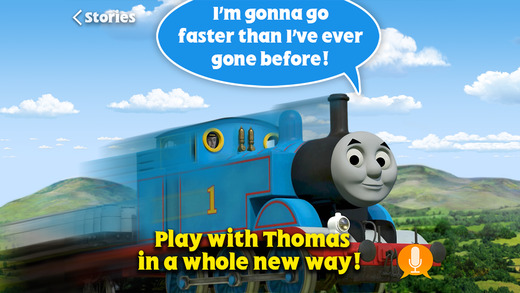
thomasThomas & Friends Talk to You is the latest app from ToyTalk Inc. Speech recognition technology allows kids (ages 3-6) to have a two-way conversation with Thomas and the Steam Team. The app literally works like a walkie-talkie. When the orange button appears on the screen, the child presses it to talk to Thomas. When the child lets go of the button, Thomas answers. The FREE portion of the app features a fun adventure on the island of Sodor. There are additional adventures available as in-app purchases. The app’s activities include: learning shapes, memory games, speaking & listening, singing, telling stories, solving a mystery, transmitting information, making silly noises, parts of speech, sharing & taking turns, and more. In order to enable speech recognition, ToyTalk Inc. needs to capture audio recordings of your child so parental permission is required. Parents can then access and control their child’s recordings from ToyTalk’s website: www.toytalk.com. If your child is a fan of Thomas and friends, make sure take advantage of this week’s  “launch special.” 🙂

Direct Link: https://itunes.apple.com/us/app/thomas-friends-talk-to-you/id1002232132?mt=8

0

Cat Doorman’s Little Red Wagon

little red wagonFREE for a limited time – Cat Doorman’s Little Red Wagon, a musical songbook/adventure game. Kids play in the forest as they sing along to the classic folk tune, Little Red Wagon. First kids choose which musical version of the song they’d like to hear: guitar, piano, or full band. Then they follow the highlighted lyrics and musical notes that run along the bottom of the screen. At the same time, they help a little girl with her little red wagon as she gathers supplies for a picnic. Kids will love discovering the hidden animations along the way! The app’s illustrations are beautifully done – hand-painted on textured paper. Little Red Wagon is from an album called Cat Doorman’s Songbook, the winner of the 2013 Parent’s Choice Silver Honor Award. It features members of the Decemberists and the Corin Tucker Band. Nicely done app for little ones!!

Direct Link: https://itunes.apple.com/us/app/cat-doormans-little-red-wagon/id589087235?mt=8

0

My Little Piano!

my little pianoKeep a piano in your pocket with My LIttle Piano! – FREE for a limited time. Kids can change the keyboard to experiment with eight different instruments or sounds – piano, guitar, xylophone, drums, animal sounds, traffic sounds, funny sounds, or synthesizers. There are also four background rhythms.  A little dinner music anyone? 🙂

Direct Link: https://itunes.apple.com/us/app/my-little-piano!/id845397032?mt=8

0

Photo Mapo

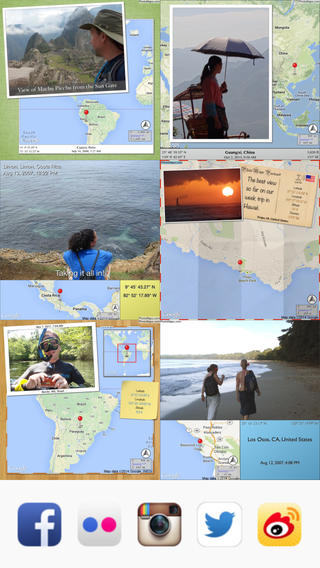
photo mapoFREE today – Photo Mapo, an easy-to-use photography app/fabulous tool for classroom projects. This app easily transforms any photo into a mapped masterpiece. The app features twenty-three styles. Projects can be customize by changing the background, map type, & zoom level. There is also an option to add a 180 character description. Finished projects can be shared by email or saved to the camera roll. How fabulous!! Kids can use this app to connect events (real or make-believe) to their settings. They can use it with: pictures of grandparents/great-grandparents to show their native countries, with scanned drawings of story scenes to show the setting, with pictures/drawing of animals to show their habitats, with historical photos to show locations, etc. Kids could also create virtual postcards with this app. Photo Mapo has loads of potential for classroom use!

Direct Link: https://itunes.apple.com/us/app/photo-mapo-add-map-to-your/id525258687?mt=8