0

Pocket Zoo HD with Live Animal Cams

pocket zoo

Put a zoo in your child’s pocket! Pocket Zoo HD is on sale (for $.99) for a limited time. The app opens to an illustrated virtual zoo with 50+ animals. When kids click on an animal’s picture and the app takes them to that animal’s page. The app features: 20+ Live Animal Cams – live video streaming from zoos all over the world, 150+ wildlife video clips, animals sounds, and pictures with fun facts, descriptions, & details about each animal. If you have an animal lover in your life, you may want to explore this app. This app normally sells for $2.99 – download it today! 🙂

Pocket Zoo HD ™ with Live Animal Cams - Tiny Hearts Limited

0

Fiete Match

fiete match2

FREE today – Fiete Match, a pair matching game with a twist. Kids challenge Fiete (a sailor) to play some matching games and he responds like a real player. He claps, gives the thumbs up, shows disappointment, etc. This educational app is suitable for multiple age groups. There are three levels of difficulty (8, 12 or 16 squares) and 6 games included: calculations (adding), counting, flags, marine animals, vehicles (looks for related cards), and world landmarks (matches symbols with images). The app is well-designed and visually appealing. Kids choose the game they would like to play from the lighthouse menu. Parental controls are underwater. Ocean sounds and sailor music complete the nautical setting. Fiete Match has been awarded the German developer prize  – Best Learning Game 2013.

Download link: https://itunes.apple.com/us/app/fiete-match/id695799170?mt=8&uo=4

0

Shadow Puppet

Shadow PuppetUse the power of this app to create a unique travel log with your child. “How I Spent My Summer Vacation” goes digital!

Recently updated and still FREE – Shadow Puppet, a photography app which has been featured by Apple as one of the “Best New Apps” for over 6 months!  Using this app, it’s easy to create “puppets” – recorded explanations of your photos. First you choose your photos and put them in the order. Then you talk about your pictures. Everything is recorded. Finished “puppets” can be shared via email, SMS, Facebook and/or Twitter. There are so many ways for everyone to use Shadow Puppet: to teach something new, to share adventures with friends, to record children talking about their experiences, to tell the story behind old family photos, etc.

The update has many new features. Now you can include video clips, add music, search the web for images, overlay text/stickers, and more! The FREE version of the app permits you to include up to 10 photos/video clips. For $1.99 you can get Puppet Essentials which allows you to add up to 100 items to each video and have access to more drawing & decorating tools. The update made this great app even better!

The classroom uses for this app are only limited by your imagination: Take pictures of a child’s work and have him/her explain it to parents. Send pictures and voice recordings of the class field trip. Have kids give a step-by-step explanation of what happened in a science experiment. Draw & sequence pictures to retell a story. Make a “talking timeline” by sequencing photos of historical events. Have kids use it to present mini reports on any subject. Have virtual “pet day” – kids bring in pictures/recordings of their pets. Because you can use anything saved to your photo library, you can explain photos from the web, artwork created in other apps, and so much more. The possibilities for using this educational app are endless. For more suggestions go to http://get-puppet.com/education. What a fabulous resource!!

Download link: https://itunes.apple.com/us/app/shadow-puppet/id700902833?mt=8&uo=4

0

Earthlapse

earthlapse

FREE for a limited time – Earthlapse, turns your iPad/iPhone into a window aboard the International Space Station. The app comes with 7 views of Earth (aurora borealis, a tropical storm, Canadian arm of the ISS, the cupola of the ISS, Earth & clouds, Canada & northern USA, and aurora australis) captured by NASA astronauts. It also has 8 relaxing space soundtracks. Love the music! When you touch the screen, you can control what you see with your finger. You can also enable a clock and/or worldwide weather – a nice feature if you want to use it as a screen saver. It would be great to Airplay this app on a big screen in your classroom when kids were doing creative writing about space, living on the ISS, etc. 🙂

Download link: https://itunes.apple.com/us/app/earthlapse/id522003167?mt=8&uo=4

0

Popboardz

Popboardz

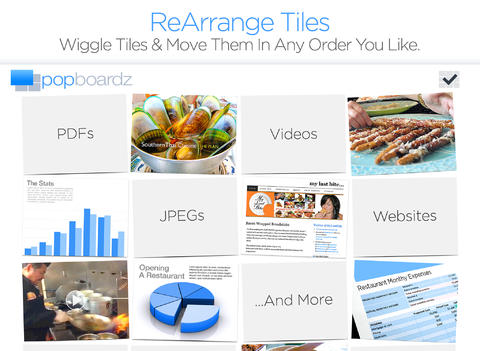
FREE again for a limited time – Popboardz, a productivity tool that normally sells for $4.99.  Popboardz makes it easy to organize, store, and present information. Each board is a grid with 16 spaces for content so that all of your PDFs, images, videos, websites, can be arranged on one screen. Unlike other presentation tools, Popboardz makes it easy to customize your presentation to meet the needs of your group. Just click on the grid space that contains the example, information, or link that you would like present next! It’s easy to skip around. This app would be fabulous to use in the classroom. A teacher could organize all his/her digital resources for a unit on one board. That board can be saved so it is always ready to present! It is also easy to edit and/or rearrange boards so that lessons can be tweaked as new resources become available. Students could also use Popboardz – to organize information, to present projects, to give reports, and more. What a great educational app!

Download link: https://itunes.apple.com/us/app/popboardz/id563989511?mt=8&uo=4

0

Oscar Goes to the Zoo

Oscar Goes to the Zoo

FREE for a limited time – Oscar Goes to the Zoo, a “You Tell Me” story. In this story, a cute little dachshund goes to the zoo and wonders what it might be like to be the different animals that he sees there. In the end he discovers that he likes being himself. Cute story!

“You Tell Me” stories are designed with some special features: 1. They incorporate WordWinks into the story. WordWinks are questions and comments written in red italics. To maximize children’s understanding of the story, teachers often add comments/questions as they read aloud. WordWinks are meant to model that teacher voice. 2. They have a “Retell, Record & Share” section. Kids are asked to order 4 scenes from the story then record their own version of the story to share with grandparents or friends. 3. If you register, you can receive a FREE Oscar Goes to the Zoo activity book by email.

If you have a preschooler or early reader, check out this e-book. I love that it emphasizes “thinking about reading.”

Download link: https://itunes.apple.com/us/app/oscar-goes-to-the-zoo/id587648796?mt=8&uo=4

0

Bug Games HD

bug games

Singing crickets! Bug Games HD is FREE for a limited time. This super cute educational app for preschoolers has 4 sections: Cricket Concert, Bee Word Builder, Ant Tunnel Builder, and Spider Dot-to-Dot. In the Cricket Concert section, kids can select a song to hear the crickets sing together or they can tap on each cricket to play the song on their own. In Bee Word Builder, kids hear the phonic pronunciation of individual letters as they use them to put words together. Ant Tunnel Builder requires kids to rotate puzzle pieces so that the ants can march through a completed tunnel. Spider Dot-to-Dot has kids connecting dots in numerical order. Kids collect sticker rewards along the way. This app has a nice combination of learning games for preschoolers – cute, fun, & engaging! Who knew playing with bugs could be so much fun! 🙂

Bug Games HD - by Busy Bee Studios - Busy Bee Studios

0

Halftone 2 Comic Book Creator

halftone 2

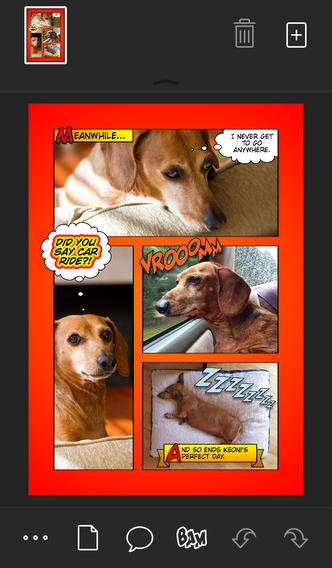
Halftone 2 – Comic Book Creator is FREE this weekend. This app was named by Apple as a Best of 2013 winner and an Editors’ Choice. Halftone 2 – Comic Book Creator is a categorized as a photography app but it has many educational uses. This app makes it easy to turn your photos into comic book pages that your friends and family will love! The app includes a large assortment of paper styles, captions, speech bubbles, graphic stamps, and fonts for your projects. And… it’s so simple to use. First choose a page layout, then apply photo filters. Next add text by using captions and/or speech & thought bubbles. Then finish your project with some fun graphics like WHAM, BAM, or POW. You can even add a few sound effects. Your creation can be shared as an image, a multi-page document, or high-definition video. Because it is so easy to use, this app would be great for creating visuals to go with classroom projects such as stories, book reports, newsletters, etc. And… it would be really fun to use this app to create comics of your family vacation. Get started today – there are SO many creative & educational uses for this app!

Download link: https://itunes.apple.com/us/app/halftone-2-comic-book-creator/id603139024?mt=8&uo=4

0

Teach Me Kindergarten

teach me kindergarten

FREE for a limited time – Teach Me Kindergarten, an educational app for young kids. It teaches addition and subtraction to 10, spelling (choose the missing letter), preK & K Dolch sight words, letter writing (upper & lower case), and number writing. The app includes parental controls which permit parents/teachers to choose which subjects they want and/or the level of difficulty. They can even choose specific questions. Up to 40 players can be entered and the topics for each player can be individualized – great for the classroom. Parents/teachers can review performance history for each subject to check how their children are doing.

Kids are rewarded for correct answers with stickers or coins. Sticker scenes include the beach, reef, pirate cove, city, farm, and playground. Parents/teachers can set the number of correct responses needed for getting a sticker from 1 – 9. Completed scenes can be exported to share. 🙂

Download link: https://itunes.apple.com/us/app/teachme-kindergarten/id336689375?mt=8&uo=4

0

Homework+

Homework+

FREE again, for a limited time – Homework+, a simple to use homework/test planner. This educational app is geared towards older students who are taking multiple classes. It could also be used with younger kids as an electronic assignment book. It’s never too early to teach kids how to be organized. 🙂

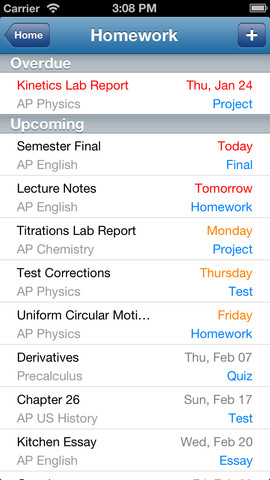
To set up the app, first edit the subject list & category lists to reflect what you are studying. After that, it is very easy to add assignments to the calendar – just give the assignment a title, choose the subject & category, put in the due date, choose a level of priority, and save. As you finish an assignment, mark it as complete and the app moves it to the finished list. App badges show you how many assignments you have and how many you have finished. Notifications can be set (1 or 2 days before) to remind you of an upcoming assignment. The app also keeps track of overdue assignments. Very slick and intuitive – great for teaching kids to be organized!!

Homework+ - Chijang Huang