0

Educreations

Educreations is great FREE app that turns your iPad into a recordable whiteboard. You can create tutorial videos for a variety of purposes: teach a lesson, create example math problems, explain a diagram, add commentary to your photos, etc. This educational app records & replays your voice, handwriting and/or drawings. Educreations is simple to use and permits you to build lessons with multiple pages. The editing tools allow you to: add text to any page, add photos, resize and move images, easily erase drawing mistakes, create “animated playback” by dragging objects as you record, and more.

But the best thing about this app is the ability to share your work. Free accounts are available at http://www.educreations.com where you can share your work as well as look at lessons created by others. Students can be given online access to the lessons that you have created there. Or, you can embed your lessons on your class blog/website. Students can watch a lesson before class or review a lesson after class. Absent students can watch from home. You can post information to help students with their homework. You can tutor someone online. Parents can log in to find out what is going on in class so they can help their children. What a powerful tool!! This app is being used at all levels of education including the college level. The features of Educreations make it a standout among the recordable whiteboard apps!

Highly recommended!

Educreations Interactive Whiteboard - Educreations, Inc

0

Learn the States with Flat Stanley FREE

flat stanley

If your kids LOVE Flat Stanley (and who doesn’t) you may want to check out the FREE version of this iPad app  – Learn the Sates with Flat Stanley FREE. This FREE version of the app features states in the west coast region. The full version is currently on sale for $.99 and it features all 50 states.

A mail truck has lost its cargo! Kids slingshot Stanley to the proper state so that he can help deliver letters to students. Kids must identify each state by its location and shape. The app uses colored stars to indicate how many states were identified correctly on the first try. If your class is involved in the Flat Stanley project, or reads the Flat Stanley books, you may want to take a closer look at this app. 🙂

Learn The States With Flat Stanley Free - Flatter World, Inc.

0

ICDL (International Children’s Digital Library) – Free Books for Children

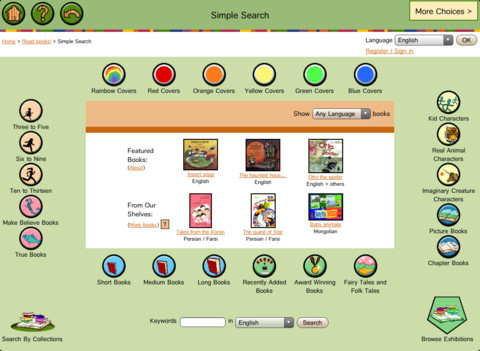
FREE – ICDL (International Children’s Digital Library) – Free Books for Children. This app brings thousands of free children’s books from 60 different countries to the iPad – it’s truly a worldwide collection of books at your fingertips. Books can be searched in a variety of ways – by age appropriateness, length (short, medium, long), genre, ratings, awards, picture vs chapter, and more. You may register if you wish, but it is not necessary. Some advantages to registering include – saving favorite books on a personal bookshelf, returning to the last page that you were reading, and selecting the language you prefer to use.

The feature that I really like is the “Browse Exhibitions” section. The exhibitions are theme based collections of books from around the world. Examples of some current themes are: Celebrating Differences, Everyone Needs Water & Water Needs Everyone, and Forever Friendship. Within each exhibition is an overview of the theme, links to the books included, descriptions of why the books are included, and related activities (in pdf format). As the world becomes more mobile, school systems are facing language barriers. For example, Chicago Public Schools has over 70 languages spoken by their students. What an awesome resource to promote worldwide citizenship and understanding!

The mission of the International Children’s Digital Library Foundation (ICDL Foundation) is to support the world’s children in becoming effective members of the global community – who exhibit tolerance and respect for diverse cultures, languages and ideas — by making the best in children’s literature available online free of charge. The Foundation pursues its vision by building a digital library of outstanding children’s books from around the world and supporting communities of children and adults in exploring and using this literature through innovative technology designed in close partnership with children for children. 

Read more @ http://en.childrenslibrary.org/

ICDL - Free Books for Children - International Children's Digital Library - ICDL Foundation

0

The Winston Show

winston

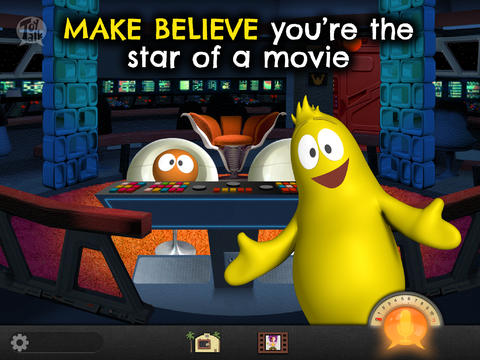
FREE – The Winston Show, an adorable app for kids 6+. Winston (a self-proclaimed, yellow fellow) and his sidekick Ellington have created the first talk show starring you! Special guests include Blackbeard the Pirate, Marie Antoinette, and the Blue Whale. Kids visit 6 different studios within the app. In Studio 1, they become a contestant on a quiz show called Win with Winston. Studio 2 features Fireside Chats on a variety of kid-friendly subjects such as magic and chores. In Studios, 3 kids can choose to become the star in two movies: Squabble Among the Stars or Winston Sly, Private Eye. They battle colorful characters (such as Lewis & Clark) in Studio 4’s You vs., another game show. Studio 5 is the Costume Department where kids can play dress-up in an assortment of costumes. And finally, Studio 6 features the Writing Room where kids choose the path of a story. This app is fabulous helping kids with conversational language because the characters listen and talk back! This app is quite ingenious and it’s really fun – for kids and adults. Adults will love seeing kids interact with Winston and friends. And, they will understand all of the jokes. 🙂 Delightful!!

HIghly recommended!

Download link: https://itunes.apple.com/us/app/winston-show/id669541931?mt=8&uo=4

0

Tellagami

Telegami

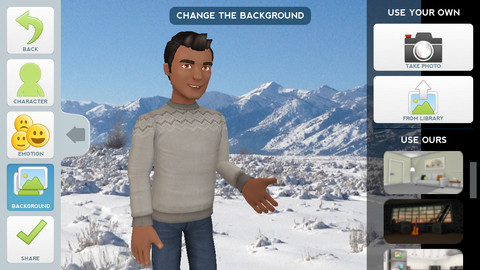
Currently FREE, Tellagami (rhymes with origami) is a unique storytelling app. Short stories called gamis are easy to create. First you select and customize a character by choosing his/her skin tone, eye color, hair color, and clothing. Then you choose an emotion – happy, sad, surprised, angry, scared, silly. Next you choose a background from the app, from your photo library, or create one by using your camera. You are now ready to create your gami. You can record your gami in you own voice or choose the text button to type in what your character will say  – the limit is 450 characters. Gamis can be shared via email, messaging, Facebook, or Twitter.

This educational app is fabulous!! Its uses are only limited by your imagination!! Kids can use gamis to introduce themselves at the beginning of the year. They can customize gamis to look like themselves and be reporters, scientists, teachers, etc. They can create the character (and setting) from a book they are reading. They can message or email a parent to explain what they are learning in class. Teachers could use gamis as interactive exit slips. The list is endless. Kids will LOVE creating gamis!

Tellagami ™ - Tellagami Inc.

0

WWF Together

wwf

Named Runner-Up App of the Year!

Apple Design Award 2013 Winner and named by Apple as 1 of 10 Apps That WOW – WWF Together. This beautifully designed, FREE educational app for the iPad was originally released last January by the World Wildlife Federation. The app features 8 endangered species – giant pandas, marine turtles, polar bears, elephants, tigers, bison, whales, and snow leopards. The unique and engaging features of this app includes: stories about these endangered animals with playful interactive elements, fabulous high-definition videos and image galleries – featuring photos by renowned environmental photographer Morten Koldby, cool facts about each animal, and a 3D interactive globe that tells how far you are from 60 different animals around the world. Everything about this app is wonderful – including the music. You will fall in love with the magnificent creatures presented in this app.  Additional stories about other species will be added regularly – AWESOME app !!

Highly recommended!

WWF Together - World Wildlife Fund

0

3 FREE Virtual Math Manipulatives

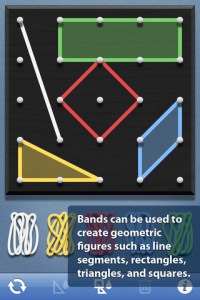
Geoboard by The Math Learning Center (a nonprofit organization dedicated to K – 12 education) is a FREE app that turns your iPhone/iPad into a virtual geoboard. Geoboards can be used as tools to teach mathematical concepts such as polygons, perimeter, area, line segments, angles, congruent shapes, symmetry, fractions, etc. Shapes are created by stretching bands on the geoboard’s pegs. There are 5 colors of bands in the iPhone version and 8 in the iPad version. There is also a tool to fill in shapes. On the iPad version, you can switch from the standard 25 peg board to a 150 peg board to create more complex shapes. This is a great app with the potential to be used in so many ways.

Highly recommended for your virtual math tool kit!

Geoboard, by The Math Learning Center - Clarity Innovations

FREE for the iPad, Virtual Manipulatives contains math manipulatives for teaching fractions, decimals, and percents. Included are tiles/circles divided into halves, thirds, fourth, fifths, sixths, eighths, tenths, and 12ths AND their corresponding decimals and percentages! The manipulatives are color coded across the settings so that 1/2 is blue as is .50 and 50%. Kids drag tile pieces onto the work area to compare fractions/decimals/percentages. In the settings you can change from tiles to circles, make the pieces transparent, and hide the numbers on the pieces. Completed work can be easily saved to photos. Finding equivalent fractions has never been so slick – WOW!!

Common Core Standards

  • 3.NF.3 – Explain equivalence of fractions in special cases, and compare fractions by reasoning about their size. Understand two fractions as equivalent (equal) if they are the same size, or the same point on a number line.
  • 4.NF.1 – Explain why a fraction a/b is equivalent to a fraction (n × a)/(n × b) by using visual fraction models, with attention to how the number and size of the parts differ even though the two fractions themselves are the same size. Use this principle to recognize and generate equivalent fractions.

Highly Recommended!
Virtual Manipulatives! - ABCya.com

equivalent fractions

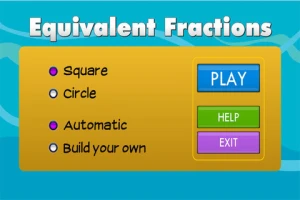
From the National Council of Teachers of Mathematics comes a FREE app called Equivalent Fractions. Kids create equivalent fractions by dividing and shading squares or circles. Circles can be divided into 24ths. Squares can be divided into 144ths. In the play mode, a fraction is shown and kids must create 2 additional fractions that are equivalent. All 3 fractions must have different denominators. The app also places the fractions on a number line – a great visual for comparing! There is also a “build your own” mode which would be fabulous to use for guided exploration & practice. Kids could also use this section as a virtual manipulative when working independently. This app is an excellent resource for the classroom !!

Common Core Standards met:

  • 3.NF.3 – Explain equivalence of fractions and compare fractions by reasoning about their size. Understand two fractions as equivalent (equal) if they are the same size, or the same point on a number line. Recognize and generate simple equivalent fractions, e.g., 1/2 = 2/4, 4/6 = 2/3). Explain why the fractions are equivalent, e.g., by using a visual fraction model.

Highly Recommended!

Equivalent Fractions - National Council of Teachers of Mathematics

0

Fizzy’s Lunch Lab Fresh Pick

Fizzy's Lunch Lab Fresh Pick

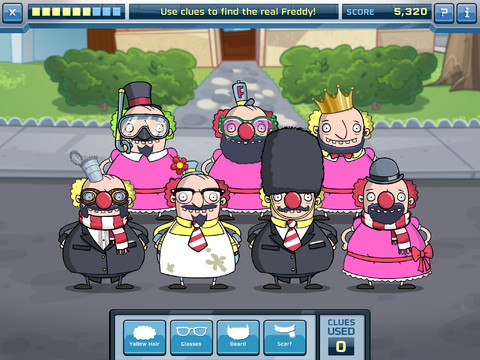
Fizzy’s Lunch Lab Fresh Pick (an educational app based on the PBS KIDS web series) is FREE ! It was developed by PBS with funding from a Ready to Learn Grant from the U.S. Department of Education. Professor Fizzy is holding a competition for 6 – 8 year olds to see who qualifies to be the next Lunch Labber. The app includes 8 challenges that use math and problem solving skills – deductive reasoning, mapping, sorting and classifying. Kids must navigate their way through a grocery store, buy groceries, count out the correct change in a check-out line, successfully serve the correct food to hungry customers, use reasoning to find Freddy, and more. This educational app supports multiple users with self-leveling games that make the challenge specific to each child. FUN!!

Fizzy's Lunch Lab Fresh Pick - PBS KIDS

0

Cloudy With a Chance of Meatballs Movie Storybook

Cloudy

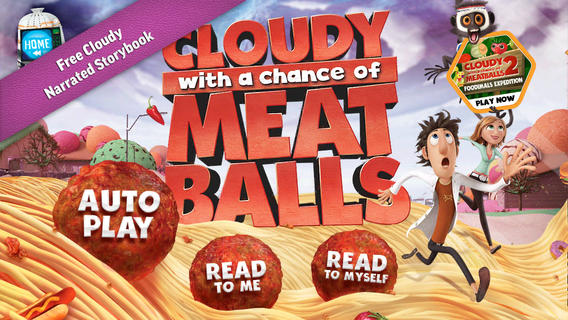
FREE again for a limited time – Cloudy With a Chance of Meatballs Movie Storybook, a narrated educational app based on the book/movie of the same name. Kids join Flint Lockwood & friends in this educational app. Flint invents a machine that turns water into food to help turn the town into a thriving “food tourism” destination. Eventually the food mutates until a tornado formed of spaghetti and meatballs threatens the town! The app also includes an activity book – available for only $.99 as an in-app purchase. Nicely done!!

Download link: https://itunes.apple.com/us/app/cloudy-chance-meatballs-movie/id703020863?mt=8&uo=4

0

ABCmouse.com – A-Z Music Videos

a to z

FREE – A to Z Music Videos. This educational app has 26 animated videos  – one for each letter of the alphabet. As kids watch the videos, they earn tickets to unlock other videos. There is also an option to purchase tickets to unlock videos more quickly. The videos are top-notch! They help children learn letter names and sounds AND develop vocabulary. Every video is produced in a different musical style, so kids are also introduced to a wide variety of musical genres. This app is a must-have for preschool, kindergarten, and first grade teachers – a perfect introduction to the letters of the alphabet!

Common Core Standards met:

  • K. RF.3 – Know and apply grade-level phonics and word analysis skills in decoding words. Demonstrate basic knowledge of one-to-one letter-sound correspondences by producing the primary sound or many of the most frequent sounds for each consonant. Associate the short sounds with common spellings (graphemes) for the five major vowels.

ABCmouse.com 26 A-Z Music Videos - Age of Learning, Inc.