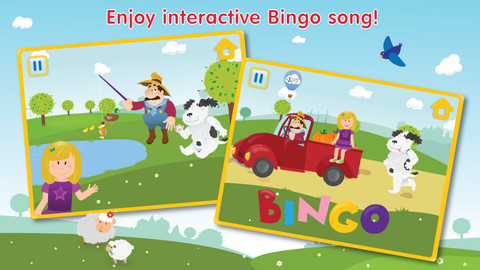
FREE – a cute interactive version of the popular children’s song – Bingo. This app would be fun for little ones to sing along with! The other features of this app (karaoke mode, farm animal cards, etc.) are available as in-app purchases. Try this FREE version to see if this app is something your child might enjoy.
Category Archives: FREE apps for kids
ZoLo
“ZoLo – knobby, blobby, skinny, squatty, square and round, plain or spotty!”
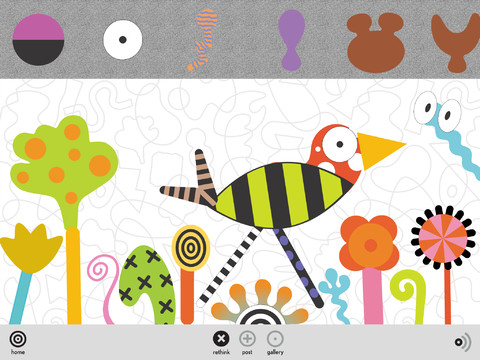
Chosen as New & Noteworthy in the App Store and FREE – ZoLO•ooLo™ ZoLo play sets were first introduced to the world by the Museum of Modern Art in NYC in 1986. Now 20+ years later, ZoLo has been recognized by the Toy Industry of America in their book – 100 Years of the Power of Play. The app is a virtual ZoLo play set with a palette of colorful shapes. Kids (and adults) can mix, rotate, resize, or shift them to make a unique creations. Creations can be saved in “my gallerio” – a personal gallery and in “globo” – a shared gallery. Once a creation is saved it can be shared via email, Twitter, and Facebook. Love this app but I wish there was an option in the settings to disable some of the sharing. ZoLo is a great app for open-ended, imaginative play!!
Space Cakes
Space Cakes was released on April 25 and it is FREE – thanks to the support of Eli’s Cheesecake in Chicago. Kids use number sense and early math skills to complete intergalactic baking missions. They find themselves in a bakery filled with alien ingredients. They must follow a recipe to add the correct amount of each ingredient. Then they choose a 3D shape for their levitating batter and bake it. Next a topper, frosting, and sprinkles are added to finish their creations. Time for delivery – they steer the cake delivery spaceship back to Earth. Finally they celebrate their safe arrival with starburst, fireworks, and colorful confetti! Kids can snap a photo of their creations to share them via email, save them in a gallery, or use them to inspire creative writing – descriptive paragraphs using math terms, a story about an intergalactic cake baking contest, etc. There is a section for parents/teachers which explains the educational value of the app and how it meets the CCSS. This app provides a fun way to work with math concepts AND a wonderful springboard for creative writing.
WWF Together
Just named by Apple as 1 of 10 Apps That WOW – WWF Together. This beautifully designed, FREE app for the iPad was originally released in January by the World Wildlife Federation. The app features 8 endangered species – giant pandas, marine turtles, polar bears, elephants, tigers, bison, whales, and snow leopards. The unique and engaging features of this app includes: stories about these endangered animals with playful interactive elements, fabulous high-definition videos and image galleries – featuring photos by renowned environmental photographer Morten Koldby, cool facts about each animal, and a 3D interactive globe that tells how far you are from 60 different animals around the world. Everything about this app is wonderful – including the music. You will fall in love with the magnificent creatures presented in this app. Additional stories about other species will be added regularly – AWESOME app !!
Highly recommended!
MyScript Calculator
Just named by Apple as 1 of 10 Apps That WOW and FREE – MyScript Calculator is an amazing app. It performs mathematical operations literally by hand! You write the problem … it solves the problem! The app is very simple to use. Just write the mathematical equation on the screen. MyScript technology converts the symbols and numbers to digital text and delivers the answers. It supports the following operations: basic operations (+, -, x, ÷, +/‒, 1/x), additional operations ( %, √, x!, |x|), powers/exponentials (ℯx, xy , x2), trigonometry, and more. Very cool!! MyScript Calculator also won the Mobile App Showdown at CES 2013!!
Little Learners Play and Learn
Little Learners Play and Learn is a FREE app for babies and toddlers. The app can be used in conjunction with Little Learners® books by Paragon Books Ltd. Two FREE content areas are included: 1. Let’s Eat: Kids touch the screen to find out what each animal likes to eat. This activity helps hand-eye coordination vocabulary development. 2. Let’s Play: Kids can rock a horse, bang a drum, wind a jack in the box, and more in this easy tap-to-play game. Two other areas of content are available as an in-app purchase – Let’s Go and Animal Sounds. VERY cute app for little ones!
Polk Street Press
If you are not familiar with this developer, do yourself a favor and get acquainted 🙂 Here are two GREAT story apps – sweet stories with beautiful illustrations. The interactivity is purposeful. It truly adds the story rather than just being there so the app can be interactive. And… they are currently FREE! Thank you, Polk Street Press!
FREE for the iPhone/iPad, Goodnight Safari is a sweet interactive story for bedtime. Kids (ages 2-4) help the animals of the savannah complete their evening activities in 7 different scenes – a giraffe eating dinner, a monkey climbing into bed, a hippo taking a bath, etc. Optional counting & color activities are available as an in-app purchase. Very sweet story for a peaceful end to your child’s day – highly recommended!

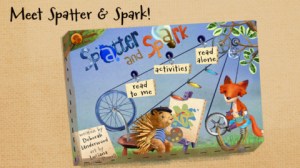
Spatter and Spark is another cute interactive book for iPhone 4 /iPad 2 and later models. Spatter (an artistic porcupine) and Spark (an inventive fox) team up to figure out how to get a look at Hubert, the baby crow, so that Spatter can paint Hubert’s picture. Kids are invited to help as Spatter & Spark problem solve their way through the story. There are 10 interactive scenes within the app. Each scene is beautifully illustrated by Luciana Navarro Powell, the illustrator of Goodnight Safari. The story (for 4 – 6 year olds) is very cute with purposeful interactivity that adds to the story. Spatter and Spark could also be used with elementary students to encourage them to think & write about their own inventions. I would have used it with my third graders when I was teaching 🙂 An activity pack (with 4 additional activities) is available as an in-app purchase. Nicely done and highly recommended!
ScreenChomp
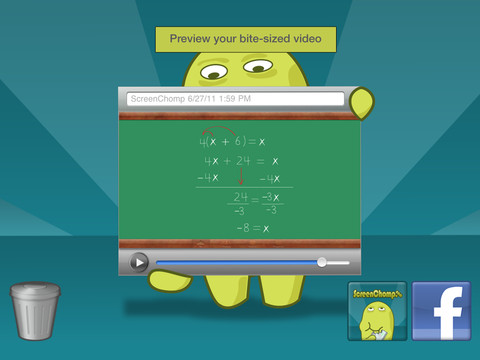
ScreenChomp is a powerful tool that can be used in so many ways and it’s FREE!! It is basically turns your iPad into a recordable whiteboard. You can use it to sketch out and record ideas for yourself or to share with others. Teachers can send tutorial videos home with kids. Kids can create videos to help each other. The possibilities for this app are only limited by one’s imagination.
Here is a link to a You Tube video that explains how it works: What is ScreenChomp? The iPad app to Record. Sketch. Share! – YouTube.
Highly recommended!
Smart White Board HD
FREE whiteboard app, Smart White Board HD, is super simple to use! One finger writes, 2 fingers erase, 3 fingers clears all. Press the save button or shake your device to save an image. You can write in black, blue, or red and in 3 thicknesses. The app also includes a simple voice recorder. Just press record, talk, stop & name your file, and it is saved to a list. You can then email your recording if you wish to share it. Teachers can get rid of their classroom whiteboards, markers, and erasers! Have kids show their work, explain their thoughts, etc. with this simple app!
Teacher Clicker – Socrative / Student Clicker – Socrative
Still FREE and now even better!! Socrative has just added two additional quiz features: # 1 – Teachers can now add images to their questions. #2 – The system can now grade short answer questions. Teachers just input the acceptable answers and the system does the rest. 🙂
This website and app are unbelievably cool – they turn any device with a web browser (iPhone, iPad, laptops) into a student response clicker. If a teacher has access to any kind of wireless lab, he/she can engage the entire class in a game or quiz and watch the results in real-time. Teachers begin by using their teacher app or logging into t.socrative.com with their email and password. Once logged in, teachers are assigned a room number to share with their students. Students log in using their student app or at m.socrative.com and enter the “virtual room number” provided by the teacher. Teachers initiate an activity and students respond on their devices. Multiple choice and short answer quizzes are easy to create – types of questions can be mixed. Teachers can also choose to run the quiz as a Space Race game. The students’ responses are visible to the teacher in real-time. Teachers can see what each child answered individually as well as what the group answered collectively. And the best part is… the app grades, graphs the results, and generates a report as an Excel spreadsheet or an email.
What a powerful tool for teachers – a short quiz at the end of a lesson can pinpoint what students understand and what needs to be retaught. Hours of grading and analyzing test results are done immediately. Every student is involved – wow!
Highly recommended!